Disclaimer: This article assumes familiarity with Linux, containers, and virtual machines. If you're just getting started with Linux, we recommend beginning with beginner-friendly distros like Ubuntu or Fedora. This post dives into the internals of how an immutable Linux distribution works specifically Bluefin and is best suited for engineers comfortable with concepts like initramfs, kernel modules, and container images.
The Five Stages of a Linux Engineer
Every Linux engineer I have met goes through roughly the same arc. The names change, the hardware changes, but the stages are uncannily consistent.
Stage 1: The Rookie. You copy scripts off the internet without reading them. You install Gentoo on a dare. You break your system every other week and feel proud about it.
Stage 2: The Enthusiast. You have learned enough UNIX to be dangerous. Every shiny new distro is the one that will finally change everything. NixOS one month, Arch the next.
Stage 3: The Employee. You have a job now. You settle on Ubuntu or Debian because it just works and you cannot afford to debug your OS on company time. You still complain about it in Slack.
Stage 4: The Midlife Techie. You use Vim. You have strong opinions about your terminal multiplexer. You care deeply about stability and have stopped chasing novelty for its own sake. You know what you need.
Stage 5: The Baptised. You pick a church. Debian, RHEL, Arch, take your pick. You stop distro-hopping because you have a life, a family, and foresight. You make that one distro work well enough and you stick with it.
I think I am somewhere between four and five. I know what I need. I care about stability more than I care about features. I have stopped chasing the shiny.
So when my new Dell XPS 13+ 9340 started misbehaving within a week of me setting it up with Ubuntu 24.04, I was not looking for an adventure. I was looking for a fix.
The Problem: A Kernel Patch That Broke Slack
The Dell XPS 13+ 9340 ships with an Intel IPU6 camera. On Ubuntu 24.04, the IPU6 driver situation is, to put it diplomatically, a mess. After an official kernel upgrade, the upstream kernel no longer carried a working IPU6 driver. After digging through the community forums and a few GitHub issues, I found a community-built kernel module that could fix it but it required recompiling the kernel module from source.
I went through the whole process. Pulled the source, configured the build, applied the patch, compiled. Got it to build. Hit a wall immediately: the patched driver only worked with Chromium. Firefox remained broken.
Annoying. But I could live with it.
Then the real problem showed up.
After applying the IPU6 patch, opening Slack would occasionally crash my entire system. Not a clean kernel panic with a readable stack trace. A full, hard freeze. Display locked, input dead, no response to keyboard or mouse. The only way out was a hard reboot.
To be fair, kernel rollbacks are technically possible on Linux, it's not like you're stuck. But it's far from straightforward. I ended up reinstalling Ubuntu and going back to the official kernel updates. The webcam issue persisted. The GNOME freezes "a well-documented Ubuntu problem with no clear RCA to this day" kept showing up in different forms. I'd written about why I eventually stopped using Ubuntu separately; this was just the latest chapter.
This is where the SRE part of my brain started firing. If I were just writing code, maybe I could tolerate occasional freezes. But I do SRE work. I am on incident calls. Slack is where response coordination happens. A machine that hard-freezes when you open your primary communication tool is not a minor inconvenience. It is a reliability failure.
The debugging situation was just as bad as the freezes themselves. I had a system that had accumulated months of state: a manually compiled kernel module, packages from a PPA, some dotfile changes, a handful of config edits I half-remembered making. When the Slack crashes started, I had no clean way to understand what was interacting with what. Rolling back the IPU6 patch risked breaking something else. There was no audit trail. There was no rollback path. I was debugging entropy.
My colleague Spandan, who works here at One2N, had a simple suggestion.
Switch to Bluefin. Run your usual programs as Flatpaks or inside a Distrobox container. Keep the base OS untouched. If a kernel update breaks something, roll back the OS image. Stop spending hours debugging the interaction between a half-applied driver patch and an Electron app on a system that has been accumulating state for months.
That suggestion turned into this post.
So, what actually is Bluefin?
Let me start with a one-liner, buzzword-heavy description, because it actually captures it well:
Bluefin is an immutable Linux distro built on Fedora Silverblue (part of the Fedora Atomic Desktops family). It takes Silverblue as its base and layers on curated developer tooling, sensible defaults, and deep integration with the container ecosystem.
And what does "immutable" actually mean?
Your base OS sits on a read-only filesystem, completely separate from your personal files, installed apps, and config. Modifications layer on top of it. The core system is never directly edited in place. If something goes wrong, you can roll back to the previous system snapshot with a single reboot, because the OS is updated atomically as an image.
If that pattern sounds familiar, it should. It's the same principle behind how we manage reliable production systems.
Why should I care about it?
Ever run into an upgrade on Ubuntu, Debian or RHEL that broke everything? Your options are usually:
Re-image from a disk snapshot? But the last snapshot was taken a year ago.
Reinstall everything on a newer version? Now you spend a day getting back to where you were.
"I maintain dotfiles and scripts to get me up and running"? Are you sure they'll work as intended on the newer OS version?
Quick History Lesson to Immutable Linux Distros
Immutable system updates have been around for a long time; they just lived in devices most engineers didn't think of as "computers."
On many modern Android devices, and more clearly in ChromeOS, the system updates the inactive slot, boots into it, and can fall back to the previous slot if something goes wrong, thanks to A/B partitions. Updates write to the inactive partition in the background. On reboot the system switches over. If anything goes wrong, it reverts. You've probably never noticed ChromeOS fail an update, because the design doesn't let it stay broken.
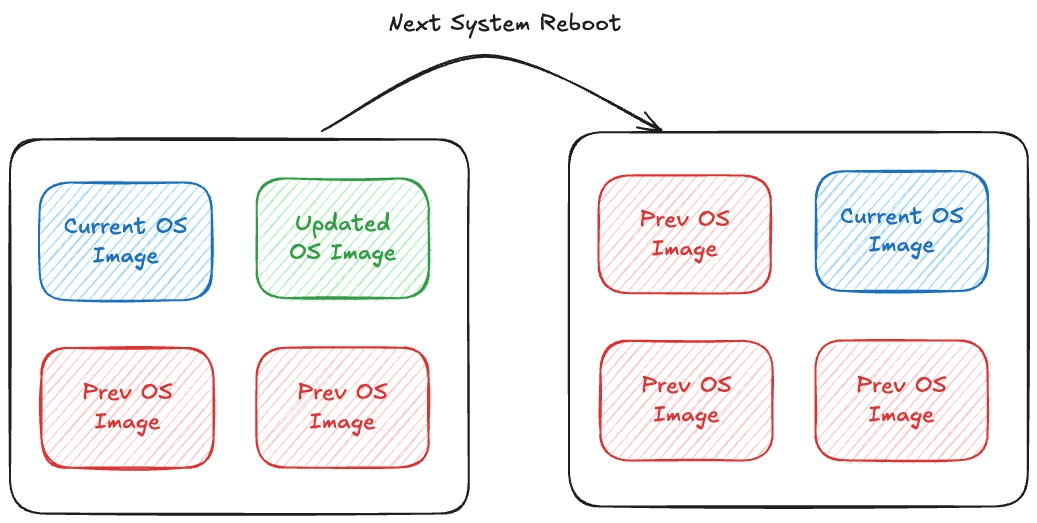
Fig 1: Core Concept behind immutable system upgrades
Fedora CoreOS and Fedora Silverblue took a different approach using OSTree and rpm‑ostree to manage the entire bootable filesystem as a versioned tree. More recently, bootc layered an OCI‑image workflow on top of that, so systems like Fedora Atomic and Bluefin can define their OS in a Containerfile but still reuse the OSTree machinery under the hood.
Bluefin builds on this by defining its base system in a Containerfile and shipping the result as an OCI image from a container registry, which bootc then installs onto your disk.
The desktop efforts eventually came under the Fedora Atomic Desktops umbrella, with Bluefin as a derivative of Fedora Silverblue. Ubuntu followed with Ubuntu Core for IoT and embedded devices, bringing image‑based updates to another huge ecosystem. And with RHEL 10’s image‑mode deployments, immutable operating systems became a first‑class option inside mainstream enterprise Linux, rather than a niche experiment.
The mechanism that makes all of this possible is the OCI image format, which is worth understanding on its own before we go further.
The curious case of OCI images
Bluefin defines its base system using a Containerfile and ships the resulting build as an OCI image, distributed from a container registry. This might raise alarms: does it boot off a container? Are all processes running inside containers? No. OCI images in this context are simply a versioned artifact format. They allow the OS to be packaged, versioned, and distributed atomically, similar to Docker images, but the OS runs natively on the kernel, not inside a container runtime.
The absurd (yet powerful) idea of Bootable Containers
For years, OCI containers have been the de facto standard for packaging and deploying applications. They let us run a complete Linux user space as an application.
But what if you could deploy an entire operating system with the same ease, on a VM or even bare metal?
That's the core idea of a Bootable Container. Not running an OS as a container, but packaging, distributing, and versioning an operating system like an OCI image: layered, reproducible, and stored in the same OCI registries (Quay.io, Docker Hub, GHCR). Built with familiar tools like Docker, Podman, or BuildKit.
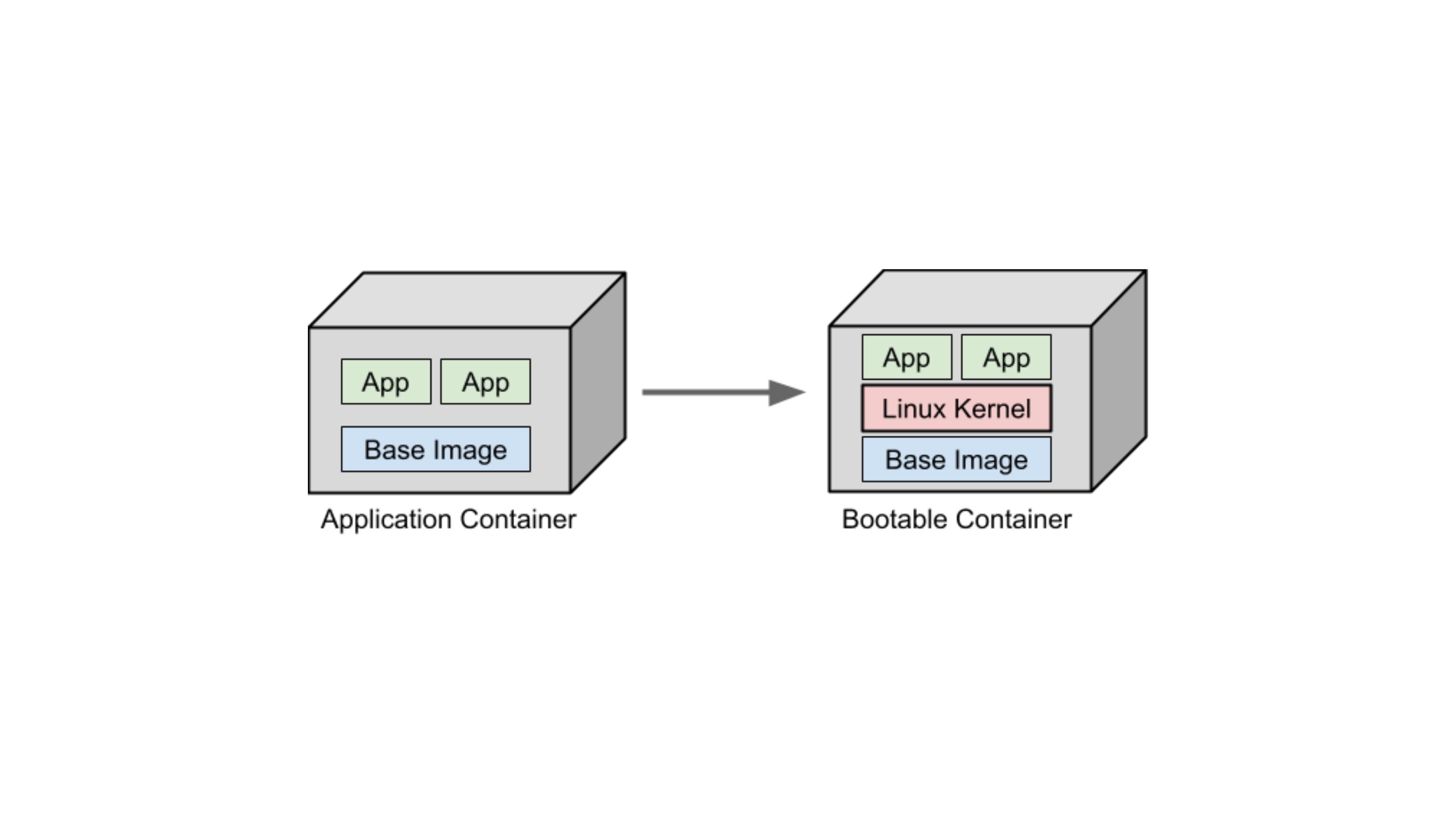
Fig2: Idea of Bootable Containers
Ok! But how does Bluefin solve it?
Think about how Android handles failed updates, or how smart devices like TVs and set-top boxes silently update without you noticing. Most run some version of Linux. If an update fails, everything reverts to normal. That's what immutable distros help you achieve.
They maintain a read-only Linux filesystem tree. Everything except user-installed utilities and local files remains intact. If anything breaks, you simply swap back to the previous read-only filesystem tree and reboot. Atomic rollback.
Bluefin solves this using bootc you've seen how that works above. It packages the entire OS as an OCI image and uses OSTree under the hood to manage atomic upgrades, rollbacks, and versioned snapshots on disk.
Challenge 1: Versioning
We need to extract OCI Images in a way that doesn't require storing every file in a snapshot, yet maintains OverlayFS-like features. We need something that converts OCI Images into versioned OS snapshots, rather than blindly unpacking everything to root. Think Git commits for OS snapshots, with these requirements:
Versioning binary blobs: Unlike Git, the system must efficiently version large binary files like shared libraries and vmlinuz.
Full filesystem scope: Handle thousands of files with features like hardlinks, deduplication, and efficient storage. Must be aware of OS-specific requirements.
Atomic checkouts and rollbacks: Snapshots must be deployable atomically so the system can switch between versions without leaving the filesystem in an inconsistent state.
Efficient delta updates: Only changed objects should be transmitted or applied on upgrade.
Metadata awareness: Must track permissions, symlinks, device nodes, SELinux labels, and other OS-specific metadata that Git ignores.
Immutable snapshots: Each snapshot should be immutable, ensuring consistent and reproducible OS states across hosts.
Challenge 2: Building + Deploying
Traditionally, building a Linux OS involved creating a chroot/buildroot environment: compiling the kernel, its modules, the ABI (glibc/musl), generating a new initramfs, and copying the kernel to /boot. Installing Linux from a LiveCD or performing a system upgrade follows a similar process.
With bootable containers, we want the reproducibility and isolation of containers, but also the ability to package all dependencies, the kernel, and userland upgrades in the same snapshot. However, standard containers cannot run a new kernel since they always use the host kernel. This means we cannot fully boot and test the kernel and init system inside Docker or Podman. We can test the filesystem structure, userland binaries, and configuration files, which catches most errors before deployment. For full kernel or boot-level testing, a VM or emulator like QEMU is needed.
This is where bootc comes in:
Handles conversion between OSTree snapshots and OCI images, enabling distribution and deployment.
Provides a wrapper over Podman/Docker and OSTree to build, test, and package bootable OS snapshots.
Manages host services for atomic updates, deployments, and rollbacks of bootable containers.
Offers a CLI similar to Docker, designed for sysadmins and power users.
rpm-ostree vs bootc: What's the Difference?
If you've been following the Fedora Atomic ecosystem, you'll encounter both rpm-ostree and bootc. These two tools are related but serve slightly different roles, and the ecosystem is actively transitioning from the former to the latter.
rpm-ostree is the original tool for managing Fedora Atomic systems. It combines OSTree (for filesystem snapshot versioning) with RPM (for package management), allowing you to layer RPM packages on top of the base image. Commands like rpm-ostree upgrade and rpm-ostree install pkg-name have been the standard way to manage Fedora Silverblue and Kinoite for years.
bootc is the newer, OCI-first evolution. Where rpm-ostree used OSTree's own transport layer to pull updates, bootc uses standard OCI container registries. This makes bootc composable with the entire container tooling ecosystem Docker, Podman, Skopeo, GHCR, Quay.io, CI/CD pipelines. bootc upgrade, bootc switch, and bootc status are the equivalent commands. Today, rpm‑ostree upgrade and bootc upgrade both operate on the same underlying state on Bluefin, so you can generally use either to move between OS versions. As long as you avoid local rpm‑ostree layering, they behave interchangeably; once you start layering RPMs, you should stick to rpm‑ostree for upgrades.
The direction of travel is clear: the Fedora ecosystem is moving towards bootc as the primary management interface, with rpm-ostree remaining supported for backward compatibility. Future versions of Bluefin and Fedora Atomic Desktops will lean more heavily on bootc and dnf5, phasing out rpm-ostree's role over time.
One trade-off worth knowing:
rpm-ostreeuses file-level deduplication (very space-efficient), whilebootcuses layer-level deduplication (more bandwidth but more OCI-compatible). For most users this doesn't matter but it's relevant if you're managing many machines with limited storage.
The Bigger Picture: Immutable Infrastructure as a Mindset
If you work in SRE, DevOps, or cloud infrastructure, this entire story probably sounds familiar. The principles behind Bluefin are the same ones that underpin how we manage production systems today.
We stopped SSHing into servers to patch them. Instead, we rebuild and redeploy from a known-good image. We version our infrastructure like code. We treat every deployment as an atomic operation with a clear rollback path.
Bluefin simply applies that same philosophy to your laptop. If it breaks, you don't debug it. You roll back. If you want to try something new, you test it in a container or a VM, then layer it in declaratively. Your base system stays predictable, reproducible, and battle-tested.
That's the shift-left mindset in action: reliability-first thinking that starts at your workstation, not as an afterthought for production servers.
How Do You Actually Install Software on an Immutable OS?
This is the question that trips up most people when they first hear about immutable Linux. If the base system is read-only, how do you install your dev tools? Your CLI utilities? Your custom software?
The answer is: you don't install them on the base system. You use layered approaches that keep the host clean and your tools isolated. On Bluefin, there are four primary strategies:
Flatpak (for GUI applications)
Flatpak is the primary way to install desktop applications on Bluefin. Every app from Flathub runs in a sandboxed environment, completely isolated from the host OS. Think of it as containerised app distribution for the desktop similar in spirit to what Docker does for server workloads, but for end-user applications. Flatpaks bundle their own dependencies, which means app updates never touch the base system. Uninstalling is clean. No dependency hell.
Bluefin uses Bazaar (the Universal Blue fork of GNOME Software) as its default app store, replacing the upstream Flathub frontend with a cleaner, Flathub-first store that doesn't show non-Flatpak packages at all.
Homebrew (for CLI developer tools)
Bluefin ships with Homebrew (the macOS package manager) integrated directly into the OS running entirely in the user's home directory, never touching system files. For developers who need CLI tools like ripgrep, fzf, gh, kubectl, or language runtimes, Homebrew is the primary path. A significant portion of Bluefin users enable Developer Mode (bluefin-dx), which layers additional tooling on top Podman Desktop, VS Code, and a pre-configured devcontainer setup.
Distrobox / Toolbx (for full Linux environments)
Distrobox and Toolbx are tools that launch fully featured Linux distribution containers (Ubuntu, Arch, Fedora, Debian your pick) that integrate seamlessly with your desktop. From inside a Distrobox container you can install packages with apt, pacman, or dnf as you normally would and the apps, CLIs, and even GUI applications appear on your host desktop as if they were native. Your home directory is mounted inside the container, so files are shared transparently. When you're done experimenting, you delete the container. Nothing touches the host. This is the immutable Linux answer to "I just want to apt install something" you get a full mutable Linux environment scoped to a throwaway container.
Custom image layering (for team / enterprise use)
For teams, the most powerful approach is forking the Bluefin Containerfile, adding your organisation's required tooling directly into the image, and publishing it to your own container registry. Every developer on the team pulls the same image. Onboarding a new machine is bootc switch ghcr.io/yourorg/your-image:latest and a reboot. No setup scripts. No configuration drift. This is the cloud-native developer workstation pattern and it's increasingly common in platform engineering and internal developer platform (IDP) setups.
The broader Universal Blue ecosystem (the short version)
Bluefin is part of Universal Blue, an open-source project building opinionated OCI images on top of Fedora Atomic Desktops. As of 2025‑2026, Universal Blue images see tens of thousands of active weekly system check‑ins, which is a healthy signal that this ecosystem is being used in anger and not just tried in a VM once. The key images beyond Bluefin:
Aurora: KDE Plasma counterpart to Bluefin, same philosophy, different desktop.
Bazzite : Gaming-focused. Think SteamOS for any PC. Ships Steam, Proton, Nvidia drivers, and a Game Mode out of the box.
uCore: Headless server image for homelabs and edge deployments. Minimal CoreOS base with Podman/Docker support.
All share the same underlying technology, CI/CD pipeline, and update mechanism.
Should You Actually Use Bluefin (or Any Immutable Distro)?
Immutable Linux is not for everyone, and that's fine. Here's an honest breakdown:
You'll love it if you:
Are comfortable with containers and want your OS to behave like your production infrastructure. For SREs especially, the mental model maps directly to how production systems already work: immutable images, atomic deploys, clean rollbacks.
Want a stable, low-maintenance desktop that updates in the background and never breaks on major upgrades.
Work with devcontainers or Docker/Podman daily and want those to be your development environment.
Are tired of distro-hopping and want to commit to something that will be reliable for years.
You might struggle if you:
Need lots of obscure system-level packages that aren't available as Flatpaks or in Homebrew.
Rely heavily on modifying system files or
/etcdirectly.Are new to Linux and don't yet have a mental model for how Linux filesystems and containers work.
Need proprietary or niche hardware drivers that aren't included in the Fedora kernel.
If you're coming from Ubuntu or Debian as your daily driver, the transition is less steep than it sounds. The desktop feels identical. The difference is entirely under the hood, and once you've lived with atomic rollbacks for a few weeks, going back to a mutable system feels like working without version control.
In 2026, immutable Linux is mature. Bluefin, Bazzite, and Aurora have active communities, regular releases, and real user bases in the tens of thousands. They're no longer experiments, they're daily drivers for a growing number of engineers. If you're a developer or SRE who values reliability and reproducibility, they're worth a serious look.
If you liked this, here are a few related posts from the One2N blog:
Our CTO tried a similar experiment with a different Linux setup: Daily driving Omarchy and Hyprland as a CTO
The reliability thinking that underpins all of this: SRE math every engineer should know
This post came out of One2N's internal engineering lab: Prayogshala - The Engineering Laboratory at One2N
At One2N, we help engineering teams build reliable, cloud-native infrastructure, from the workstation to production. If the ideas in this post resonate with how you want to run your systems, let's talk.
References
OSTree (libostree): https://ostreedev.github.io/ostree/
bootc documentation: https://bootc-dev.github.io/bootc/
bootc and OSTree deep dive: https://a-cup-of.coffee/blog/ostree-bootc/
Fedora Atomic Desktops: https://fedoraproject.org/atomic-desktops/
RHEL 10 Immutable Announcement: https://www.redhat.com/en/about/press-releases/red-hat-introduces-rhel-10
Bluefin Containerfile: https://github.com/ublue-os/bluefin/blob/main/Containerfile
Project Bluefin: https://projectbluefin.io/
Universal Blue Project: https://universal-blue.org
Bluefin Developer Mode (bluefin-dx): https://docs.projectbluefin.io/bluefin-dx/
Distrobox: https://github.com/89luca89/distrobox
Fedora bootc / rpm-ostree relationship: https://docs.fedoraproject.org/en-US/bootc/rpm-ostree/
Bazzite: https://bazzite.gg
Intel IPU6 camera drivers: https://github.com/intel/ipu6-drivers
Why I ditched Ubuntu - Harsh Mishra: https://randomtinkering.hashnode.dev/why-i-ditched-ubuntu
The State of Immutable Linux: Youtube
Disclaimer: This article assumes familiarity with Linux, containers, and virtual machines. If you're just getting started with Linux, we recommend beginning with beginner-friendly distros like Ubuntu or Fedora. This post dives into the internals of how an immutable Linux distribution works specifically Bluefin and is best suited for engineers comfortable with concepts like initramfs, kernel modules, and container images.
The Five Stages of a Linux Engineer
Every Linux engineer I have met goes through roughly the same arc. The names change, the hardware changes, but the stages are uncannily consistent.
Stage 1: The Rookie. You copy scripts off the internet without reading them. You install Gentoo on a dare. You break your system every other week and feel proud about it.
Stage 2: The Enthusiast. You have learned enough UNIX to be dangerous. Every shiny new distro is the one that will finally change everything. NixOS one month, Arch the next.
Stage 3: The Employee. You have a job now. You settle on Ubuntu or Debian because it just works and you cannot afford to debug your OS on company time. You still complain about it in Slack.
Stage 4: The Midlife Techie. You use Vim. You have strong opinions about your terminal multiplexer. You care deeply about stability and have stopped chasing novelty for its own sake. You know what you need.
Stage 5: The Baptised. You pick a church. Debian, RHEL, Arch, take your pick. You stop distro-hopping because you have a life, a family, and foresight. You make that one distro work well enough and you stick with it.
I think I am somewhere between four and five. I know what I need. I care about stability more than I care about features. I have stopped chasing the shiny.
So when my new Dell XPS 13+ 9340 started misbehaving within a week of me setting it up with Ubuntu 24.04, I was not looking for an adventure. I was looking for a fix.
The Problem: A Kernel Patch That Broke Slack
The Dell XPS 13+ 9340 ships with an Intel IPU6 camera. On Ubuntu 24.04, the IPU6 driver situation is, to put it diplomatically, a mess. After an official kernel upgrade, the upstream kernel no longer carried a working IPU6 driver. After digging through the community forums and a few GitHub issues, I found a community-built kernel module that could fix it but it required recompiling the kernel module from source.
I went through the whole process. Pulled the source, configured the build, applied the patch, compiled. Got it to build. Hit a wall immediately: the patched driver only worked with Chromium. Firefox remained broken.
Annoying. But I could live with it.
Then the real problem showed up.
After applying the IPU6 patch, opening Slack would occasionally crash my entire system. Not a clean kernel panic with a readable stack trace. A full, hard freeze. Display locked, input dead, no response to keyboard or mouse. The only way out was a hard reboot.
To be fair, kernel rollbacks are technically possible on Linux, it's not like you're stuck. But it's far from straightforward. I ended up reinstalling Ubuntu and going back to the official kernel updates. The webcam issue persisted. The GNOME freezes "a well-documented Ubuntu problem with no clear RCA to this day" kept showing up in different forms. I'd written about why I eventually stopped using Ubuntu separately; this was just the latest chapter.
This is where the SRE part of my brain started firing. If I were just writing code, maybe I could tolerate occasional freezes. But I do SRE work. I am on incident calls. Slack is where response coordination happens. A machine that hard-freezes when you open your primary communication tool is not a minor inconvenience. It is a reliability failure.
The debugging situation was just as bad as the freezes themselves. I had a system that had accumulated months of state: a manually compiled kernel module, packages from a PPA, some dotfile changes, a handful of config edits I half-remembered making. When the Slack crashes started, I had no clean way to understand what was interacting with what. Rolling back the IPU6 patch risked breaking something else. There was no audit trail. There was no rollback path. I was debugging entropy.
My colleague Spandan, who works here at One2N, had a simple suggestion.
Switch to Bluefin. Run your usual programs as Flatpaks or inside a Distrobox container. Keep the base OS untouched. If a kernel update breaks something, roll back the OS image. Stop spending hours debugging the interaction between a half-applied driver patch and an Electron app on a system that has been accumulating state for months.
That suggestion turned into this post.
So, what actually is Bluefin?
Let me start with a one-liner, buzzword-heavy description, because it actually captures it well:
Bluefin is an immutable Linux distro built on Fedora Silverblue (part of the Fedora Atomic Desktops family). It takes Silverblue as its base and layers on curated developer tooling, sensible defaults, and deep integration with the container ecosystem.
And what does "immutable" actually mean?
Your base OS sits on a read-only filesystem, completely separate from your personal files, installed apps, and config. Modifications layer on top of it. The core system is never directly edited in place. If something goes wrong, you can roll back to the previous system snapshot with a single reboot, because the OS is updated atomically as an image.
If that pattern sounds familiar, it should. It's the same principle behind how we manage reliable production systems.
Why should I care about it?
Ever run into an upgrade on Ubuntu, Debian or RHEL that broke everything? Your options are usually:
Re-image from a disk snapshot? But the last snapshot was taken a year ago.
Reinstall everything on a newer version? Now you spend a day getting back to where you were.
"I maintain dotfiles and scripts to get me up and running"? Are you sure they'll work as intended on the newer OS version?
Quick History Lesson to Immutable Linux Distros
Immutable system updates have been around for a long time; they just lived in devices most engineers didn't think of as "computers."
On many modern Android devices, and more clearly in ChromeOS, the system updates the inactive slot, boots into it, and can fall back to the previous slot if something goes wrong, thanks to A/B partitions. Updates write to the inactive partition in the background. On reboot the system switches over. If anything goes wrong, it reverts. You've probably never noticed ChromeOS fail an update, because the design doesn't let it stay broken.
Fig 1: Core Concept behind immutable system upgrades
Fedora CoreOS and Fedora Silverblue took a different approach using OSTree and rpm‑ostree to manage the entire bootable filesystem as a versioned tree. More recently, bootc layered an OCI‑image workflow on top of that, so systems like Fedora Atomic and Bluefin can define their OS in a Containerfile but still reuse the OSTree machinery under the hood.
Bluefin builds on this by defining its base system in a Containerfile and shipping the result as an OCI image from a container registry, which bootc then installs onto your disk.
The desktop efforts eventually came under the Fedora Atomic Desktops umbrella, with Bluefin as a derivative of Fedora Silverblue. Ubuntu followed with Ubuntu Core for IoT and embedded devices, bringing image‑based updates to another huge ecosystem. And with RHEL 10’s image‑mode deployments, immutable operating systems became a first‑class option inside mainstream enterprise Linux, rather than a niche experiment.
The mechanism that makes all of this possible is the OCI image format, which is worth understanding on its own before we go further.
The curious case of OCI images
Bluefin defines its base system using a Containerfile and ships the resulting build as an OCI image, distributed from a container registry. This might raise alarms: does it boot off a container? Are all processes running inside containers? No. OCI images in this context are simply a versioned artifact format. They allow the OS to be packaged, versioned, and distributed atomically, similar to Docker images, but the OS runs natively on the kernel, not inside a container runtime.
The absurd (yet powerful) idea of Bootable Containers
For years, OCI containers have been the de facto standard for packaging and deploying applications. They let us run a complete Linux user space as an application.
But what if you could deploy an entire operating system with the same ease, on a VM or even bare metal?
That's the core idea of a Bootable Container. Not running an OS as a container, but packaging, distributing, and versioning an operating system like an OCI image: layered, reproducible, and stored in the same OCI registries (Quay.io, Docker Hub, GHCR). Built with familiar tools like Docker, Podman, or BuildKit.
Fig2: Idea of Bootable Containers
Ok! But how does Bluefin solve it?
Think about how Android handles failed updates, or how smart devices like TVs and set-top boxes silently update without you noticing. Most run some version of Linux. If an update fails, everything reverts to normal. That's what immutable distros help you achieve.
They maintain a read-only Linux filesystem tree. Everything except user-installed utilities and local files remains intact. If anything breaks, you simply swap back to the previous read-only filesystem tree and reboot. Atomic rollback.
Bluefin solves this using bootc you've seen how that works above. It packages the entire OS as an OCI image and uses OSTree under the hood to manage atomic upgrades, rollbacks, and versioned snapshots on disk.
Challenge 1: Versioning
We need to extract OCI Images in a way that doesn't require storing every file in a snapshot, yet maintains OverlayFS-like features. We need something that converts OCI Images into versioned OS snapshots, rather than blindly unpacking everything to root. Think Git commits for OS snapshots, with these requirements:
Versioning binary blobs: Unlike Git, the system must efficiently version large binary files like shared libraries and vmlinuz.
Full filesystem scope: Handle thousands of files with features like hardlinks, deduplication, and efficient storage. Must be aware of OS-specific requirements.
Atomic checkouts and rollbacks: Snapshots must be deployable atomically so the system can switch between versions without leaving the filesystem in an inconsistent state.
Efficient delta updates: Only changed objects should be transmitted or applied on upgrade.
Metadata awareness: Must track permissions, symlinks, device nodes, SELinux labels, and other OS-specific metadata that Git ignores.
Immutable snapshots: Each snapshot should be immutable, ensuring consistent and reproducible OS states across hosts.
Challenge 2: Building + Deploying
Traditionally, building a Linux OS involved creating a chroot/buildroot environment: compiling the kernel, its modules, the ABI (glibc/musl), generating a new initramfs, and copying the kernel to /boot. Installing Linux from a LiveCD or performing a system upgrade follows a similar process.
With bootable containers, we want the reproducibility and isolation of containers, but also the ability to package all dependencies, the kernel, and userland upgrades in the same snapshot. However, standard containers cannot run a new kernel since they always use the host kernel. This means we cannot fully boot and test the kernel and init system inside Docker or Podman. We can test the filesystem structure, userland binaries, and configuration files, which catches most errors before deployment. For full kernel or boot-level testing, a VM or emulator like QEMU is needed.
This is where bootc comes in:
Handles conversion between OSTree snapshots and OCI images, enabling distribution and deployment.
Provides a wrapper over Podman/Docker and OSTree to build, test, and package bootable OS snapshots.
Manages host services for atomic updates, deployments, and rollbacks of bootable containers.
Offers a CLI similar to Docker, designed for sysadmins and power users.
rpm-ostree vs bootc: What's the Difference?
If you've been following the Fedora Atomic ecosystem, you'll encounter both rpm-ostree and bootc. These two tools are related but serve slightly different roles, and the ecosystem is actively transitioning from the former to the latter.
rpm-ostree is the original tool for managing Fedora Atomic systems. It combines OSTree (for filesystem snapshot versioning) with RPM (for package management), allowing you to layer RPM packages on top of the base image. Commands like rpm-ostree upgrade and rpm-ostree install pkg-name have been the standard way to manage Fedora Silverblue and Kinoite for years.
bootc is the newer, OCI-first evolution. Where rpm-ostree used OSTree's own transport layer to pull updates, bootc uses standard OCI container registries. This makes bootc composable with the entire container tooling ecosystem Docker, Podman, Skopeo, GHCR, Quay.io, CI/CD pipelines. bootc upgrade, bootc switch, and bootc status are the equivalent commands. Today, rpm‑ostree upgrade and bootc upgrade both operate on the same underlying state on Bluefin, so you can generally use either to move between OS versions. As long as you avoid local rpm‑ostree layering, they behave interchangeably; once you start layering RPMs, you should stick to rpm‑ostree for upgrades.
The direction of travel is clear: the Fedora ecosystem is moving towards bootc as the primary management interface, with rpm-ostree remaining supported for backward compatibility. Future versions of Bluefin and Fedora Atomic Desktops will lean more heavily on bootc and dnf5, phasing out rpm-ostree's role over time.
One trade-off worth knowing:
rpm-ostreeuses file-level deduplication (very space-efficient), whilebootcuses layer-level deduplication (more bandwidth but more OCI-compatible). For most users this doesn't matter but it's relevant if you're managing many machines with limited storage.
The Bigger Picture: Immutable Infrastructure as a Mindset
If you work in SRE, DevOps, or cloud infrastructure, this entire story probably sounds familiar. The principles behind Bluefin are the same ones that underpin how we manage production systems today.
We stopped SSHing into servers to patch them. Instead, we rebuild and redeploy from a known-good image. We version our infrastructure like code. We treat every deployment as an atomic operation with a clear rollback path.
Bluefin simply applies that same philosophy to your laptop. If it breaks, you don't debug it. You roll back. If you want to try something new, you test it in a container or a VM, then layer it in declaratively. Your base system stays predictable, reproducible, and battle-tested.
That's the shift-left mindset in action: reliability-first thinking that starts at your workstation, not as an afterthought for production servers.
How Do You Actually Install Software on an Immutable OS?
This is the question that trips up most people when they first hear about immutable Linux. If the base system is read-only, how do you install your dev tools? Your CLI utilities? Your custom software?
The answer is: you don't install them on the base system. You use layered approaches that keep the host clean and your tools isolated. On Bluefin, there are four primary strategies:
Flatpak (for GUI applications)
Flatpak is the primary way to install desktop applications on Bluefin. Every app from Flathub runs in a sandboxed environment, completely isolated from the host OS. Think of it as containerised app distribution for the desktop similar in spirit to what Docker does for server workloads, but for end-user applications. Flatpaks bundle their own dependencies, which means app updates never touch the base system. Uninstalling is clean. No dependency hell.
Bluefin uses Bazaar (the Universal Blue fork of GNOME Software) as its default app store, replacing the upstream Flathub frontend with a cleaner, Flathub-first store that doesn't show non-Flatpak packages at all.
Homebrew (for CLI developer tools)
Bluefin ships with Homebrew (the macOS package manager) integrated directly into the OS running entirely in the user's home directory, never touching system files. For developers who need CLI tools like ripgrep, fzf, gh, kubectl, or language runtimes, Homebrew is the primary path. A significant portion of Bluefin users enable Developer Mode (bluefin-dx), which layers additional tooling on top Podman Desktop, VS Code, and a pre-configured devcontainer setup.
Distrobox / Toolbx (for full Linux environments)
Distrobox and Toolbx are tools that launch fully featured Linux distribution containers (Ubuntu, Arch, Fedora, Debian your pick) that integrate seamlessly with your desktop. From inside a Distrobox container you can install packages with apt, pacman, or dnf as you normally would and the apps, CLIs, and even GUI applications appear on your host desktop as if they were native. Your home directory is mounted inside the container, so files are shared transparently. When you're done experimenting, you delete the container. Nothing touches the host. This is the immutable Linux answer to "I just want to apt install something" you get a full mutable Linux environment scoped to a throwaway container.
Custom image layering (for team / enterprise use)
For teams, the most powerful approach is forking the Bluefin Containerfile, adding your organisation's required tooling directly into the image, and publishing it to your own container registry. Every developer on the team pulls the same image. Onboarding a new machine is bootc switch ghcr.io/yourorg/your-image:latest and a reboot. No setup scripts. No configuration drift. This is the cloud-native developer workstation pattern and it's increasingly common in platform engineering and internal developer platform (IDP) setups.
The broader Universal Blue ecosystem (the short version)
Bluefin is part of Universal Blue, an open-source project building opinionated OCI images on top of Fedora Atomic Desktops. As of 2025‑2026, Universal Blue images see tens of thousands of active weekly system check‑ins, which is a healthy signal that this ecosystem is being used in anger and not just tried in a VM once. The key images beyond Bluefin:
Aurora: KDE Plasma counterpart to Bluefin, same philosophy, different desktop.
Bazzite : Gaming-focused. Think SteamOS for any PC. Ships Steam, Proton, Nvidia drivers, and a Game Mode out of the box.
uCore: Headless server image for homelabs and edge deployments. Minimal CoreOS base with Podman/Docker support.
All share the same underlying technology, CI/CD pipeline, and update mechanism.
Should You Actually Use Bluefin (or Any Immutable Distro)?
Immutable Linux is not for everyone, and that's fine. Here's an honest breakdown:
You'll love it if you:
Are comfortable with containers and want your OS to behave like your production infrastructure. For SREs especially, the mental model maps directly to how production systems already work: immutable images, atomic deploys, clean rollbacks.
Want a stable, low-maintenance desktop that updates in the background and never breaks on major upgrades.
Work with devcontainers or Docker/Podman daily and want those to be your development environment.
Are tired of distro-hopping and want to commit to something that will be reliable for years.
You might struggle if you:
Need lots of obscure system-level packages that aren't available as Flatpaks or in Homebrew.
Rely heavily on modifying system files or
/etcdirectly.Are new to Linux and don't yet have a mental model for how Linux filesystems and containers work.
Need proprietary or niche hardware drivers that aren't included in the Fedora kernel.
If you're coming from Ubuntu or Debian as your daily driver, the transition is less steep than it sounds. The desktop feels identical. The difference is entirely under the hood, and once you've lived with atomic rollbacks for a few weeks, going back to a mutable system feels like working without version control.
In 2026, immutable Linux is mature. Bluefin, Bazzite, and Aurora have active communities, regular releases, and real user bases in the tens of thousands. They're no longer experiments, they're daily drivers for a growing number of engineers. If you're a developer or SRE who values reliability and reproducibility, they're worth a serious look.
If you liked this, here are a few related posts from the One2N blog:
Our CTO tried a similar experiment with a different Linux setup: Daily driving Omarchy and Hyprland as a CTO
The reliability thinking that underpins all of this: SRE math every engineer should know
This post came out of One2N's internal engineering lab: Prayogshala - The Engineering Laboratory at One2N
At One2N, we help engineering teams build reliable, cloud-native infrastructure, from the workstation to production. If the ideas in this post resonate with how you want to run your systems, let's talk.
References
OSTree (libostree): https://ostreedev.github.io/ostree/
bootc documentation: https://bootc-dev.github.io/bootc/
bootc and OSTree deep dive: https://a-cup-of.coffee/blog/ostree-bootc/
Fedora Atomic Desktops: https://fedoraproject.org/atomic-desktops/
RHEL 10 Immutable Announcement: https://www.redhat.com/en/about/press-releases/red-hat-introduces-rhel-10
Bluefin Containerfile: https://github.com/ublue-os/bluefin/blob/main/Containerfile
Project Bluefin: https://projectbluefin.io/
Universal Blue Project: https://universal-blue.org
Bluefin Developer Mode (bluefin-dx): https://docs.projectbluefin.io/bluefin-dx/
Distrobox: https://github.com/89luca89/distrobox
Fedora bootc / rpm-ostree relationship: https://docs.fedoraproject.org/en-US/bootc/rpm-ostree/
Bazzite: https://bazzite.gg
Intel IPU6 camera drivers: https://github.com/intel/ipu6-drivers
Why I ditched Ubuntu - Harsh Mishra: https://randomtinkering.hashnode.dev/why-i-ditched-ubuntu
The State of Immutable Linux: Youtube
Share
Share
On this page
Section
On this page
In this post
section