
There's a particular kind of Monday morning that every engineer knows. You open Slack, skim through a message from compliance or ops, and realize what looked like a routine request is about to become an infrastructure project.
Ours sounded simple enough: give a bunch of external parties (customers, partner institutions, regulatory bodies) a secure way to pick up documents. Different recipients, different use cases, same ask: "Can you give them SFTP access?”
Here is how we built a secure, multi-tenant SFTP setup for a fintech client without losing our minds or our budget.
Why SFTP? In this Economy?
Every few years, engineers convince themselves that SFTP is on its way out. APIs are cleaner, object storage is more flexible, pre-signed URLs are simpler to operationalize. They're not wrong. But "better" doesn't always win.
In regulated industries, SFTP is the lingua franca. Compliance teams know it, partners have the tooling, and nobody wants to rewrite their workflows for your preferred file-sharing mechanism. The question was never "why SFTP?", it was "how do we make SFTP not a maintenance nightmare?"
Our client needed a setup where documents were:
Accessible only to the intended recipient
Automatically deleted after a defined retention window
Fully auditable
And because multiple external parties needed access, we also needed strong tenant isolation. Each tenant needed their own files, their own access, and no visibility into anyone else’s data.
Simple on paper. Painful in practice.
The Self Managed EC2 trap
The first instinct - and I say this as someone who has fallen into this exact trap before - is to spin up an EC2 instance, install OpenSSH, configure some users, and call it a day. What could go wrong?
Everything. Everything can go wrong.
User management becomes a part-time job. Each tenant needs their own chroot jail. Adding a tenant means SSH-ing into the server, running commands, setting permissions, and praying you didn't accidentally give tenant A a peek into tenant B's home directory. Offboarding is the same process in reverse, except now there are orphaned files to worry about.
SSH key rotation is genuinely terrible. Tenants lose keys. Tenants rotate keys. Tenants email you a new public key as a screenshot of a terminal. At two tenants this is annoying. At ten tenants this is a dedicated on-call rotation.
Auto-deletion is a cron job nightmare. Files need to be deleted after N days - compliance requirement. On EC2, that's a cron job you have to write, test, monitor, and debug at 11pm when it silently fails and the compliance team asks why files from March are still sitting there in July.
When we priced out the engineering time to build and maintain this - user provisioning, key rotation, incident response - the number was uncomfortable. We needed a better way.
Enter AWS Transfer Family
AWS Transfer Family is a managed SFTP service with no servers to babysit, native SSH key authentication, and out-of-the-box CloudWatch logging.
You create a Transfer Server (the SFTP endpoint the client connects to) and Transfer Users (the accounts tenants use to authenticate). AWS just handles the rest.
This is delightful for single tenants. But multi-tenant is where most people hit a wall.
The obvious move is one Transfer Server per tenant for clear separation. The catch is that AWS Transfer Family charges per endpoint, per hour. A dedicated server per tenant scales too expensively.
So, we asked a different question:
can we run all tenants through a single Transfer Server and still guarantee complete isolation?
Yes. And the solution is surprisingly elegant.
The key insight: isolate in S3, not in the server
It’s worth being precise about what "multi-tenant" meant here, because the term gets used loosely.
We weren't after path-based isolation inside a shared folder tree. We wanted one SFTP endpoint for simplicity, but with genuine separate storage and access for each tenant.
We used S3 as the backend for AWS Transfer Family. The crucial detail is that storage mapping is defined at the Transfer User level, not the server level. Different users on the same Transfer Server can land in entirely different S3 buckets.
In practice, that gave us a simple pattern:
One shared AWS Transfer Server.
Separate Transfer Users for each tenant.
A dedicated S3 bucket for each tenant.
Permissions scoped so each tenant can access only their own bucket.
Visually, the architecture looks like this
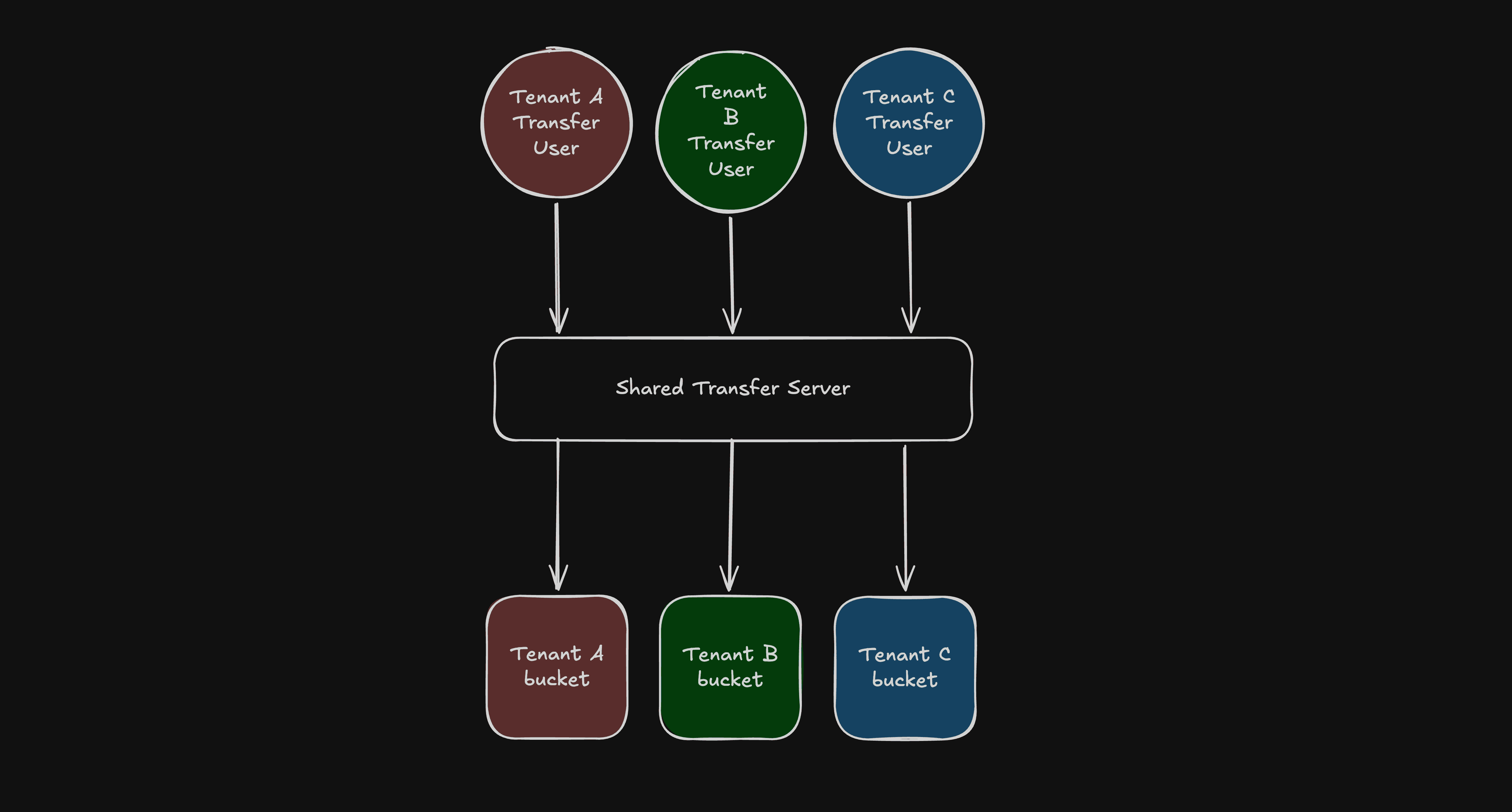
Fig: Rough Architecture Diagram
From the tenant’s perspective, they connect to one SFTP endpoint and only see their own files. Behind the scenes, they are isolated by separate storage and permissions.
You could use one bucket with tenant prefixes (tenant-a/, tenant-b/). It looks simpler, but correctness then depends on path-scoped permissions everywhere. The boundary becomes logical rather than physical, making it harder to verify.
Separate buckets gave us a much cleaner mental model. Each tenant has a distinct storage boundary and permissions scoped strictly to that boundary. Audits and incident analysis are simpler because the isolation model is obvious.
Why S3 Helped
S3 as a backend gave us three things beyond raw storage:
Retention: S3 lifecycle rules automatically delete files after a set number of days. No cron jobs required.
Access control: Each tenant's Transfer User maps to a dedicated IAM role scoped to their bucket.
Auditability: AWS Transfer Family integrates with CloudTrail and S3 server access logging natively.
What we actually built: Terraform-managed multi-tenant SFTP on AWS
We wrapped the entire setup in a Terraform module so onboarding a new tenant became a routine infrastructure change.
Isolation isn't just a naming convention. Each tenant bucket gets a dedicated IAM role that the Transfer service assumes upon authentication. The role is scoped exclusively to that tenant's bucket:
inline_policy_permissions = {
  FullAccessBucket = {
    effect = "Allow"
    actions = [
      "s3:ListBucket",
      "s3:GetBucketLocation",
      "s3:GetObject",
      "s3:PutObject",
      "s3:DeleteObject"
    ]
    resources = [
      "arn:aws:s3:::${var.bucket_name}",
      "arn:aws:s3:::${var.bucket_name}/*"
    ]
  }
}
IAM inline policy scoped to grant the Transfer Family role access only to the specific tenant's bucket.
But an IAM role alone isn't enough, as other principals in the same AWS account could still have broad S3 permissions. So each bucket carries a policy with three statements working in tandem.
First, an explicit Allow for the tenant's Transfer Role. Second, explicit Deny statements that reject every identity whose aws:userId doesn't match the tenant's Transfer Role:
{
  Sid       = "DenyObjectManipulationForEveryoneExceptTransfer"
  Effect    = "Deny"
  Principal = "*"
  Action = [
    "s3:GetObject",
    "s3:PutObject",
    "s3:DeleteObject"
  ]
  Resource = [
    "arn:aws:s3:::${var.bucket_name}",
    "arn:aws:s3:::${var.bucket_name}/*"
  ]
  Condition = {
    StringNotLike = {
      "aws:userId" = ["${module.transfer_service_role.unique_id}:*"]
    }
  }
},
{
  Sid       = "DenyListForEveryoneExceptTransferAndCaller"
  Effect    = "Deny"
  Principal = "*"
  Action    = ["s3:ListBucket"]
  Resource = [
    "arn:aws:s3:::${var.bucket_name}",
    "arn:aws:s3:::${var.bucket_name}/*"
  ]
  Condition = {
    StringNotLike = {
      "aws:userId" = [
        "${module.transfer_service_role.unique_id}:*",
        "${data.aws_caller_identity.current.user_id}"
The S3 bucket policy enforcing strict isolation by denying access to any identity that does not match the tenant's specific Transfer Role.
Using aws:userId conditions rather than NotPrincipal is robust against edge cases where NotPrincipal interacts unexpectedly with service roles. These explicit Denys cannot be overridden by any Allow policy elsewhere in the account.
(Note: The caller identity - the role running Terraform - is exempted from the ListBucket Deny so infrastructure tooling can track the bucket's state between deployments without reading the files).
Onboarding is Now Boring
Adding a new tenant is two steps. In tfvars, declare the tenant's bucket name, their users with SSH public keys, and an optional retention window:
buckets = {
  tenant-a-documents = {
    auto_delete       = true
    auto_delete_after = 90
    users = {
      alice = {
        ssh_public_key = "ssh-rsa AAAA..."
      }
      bob = {
        ssh_public_key = "ssh-rsa AAAA..."
      }
    }
  }
}
A sample tfvars configuration used to onboard a new tenant, define their lifecycle rules, and map their SSH public keys.
Then run terraform apply. The module creates the S3 bucket, scoped IAM role, bucket policy, lifecycle rule, and Transfer Users in one shot. No server access, no manual provisioning.
SSH key rotation is an update to the ssh_public_key value in tfvars followed by another apply. Offboarding is removing the tenant's config entirely. Every change is version-controlled, peer-reviewed, and auditable by default - because it's just infrastructure code.
The better Monday morning
There is another kind of Monday morning in fintech SRE work. The one where compliance says a new regulatory body needs onboarding, and instead of dread, you feel something close to calm. You update a config file, run an apply, and send the tenant their endpoint and username before your second coffee.
We kept the compatibility the business needed, avoided the cost of one endpoint per tenant, and preserved tenant isolation by separating storage and access behind a shared front door.
AWS Transfer Family turned a category of ongoing, error-prone, manual toil into a repeatable, auditable, boring operational process.
And in infrastructure work, boring is the highest compliment I know how to give.
At One2N, we help engineering teams design and run reliable, cloud-native infrastructure - from secure data pipelines to production grade platform engineering. If the ideas in this post resonate with how you want to build, let's talk.
External references
Related reads
There's a particular kind of Monday morning that every engineer knows. You open Slack, skim through a message from compliance or ops, and realize what looked like a routine request is about to become an infrastructure project.
Ours sounded simple enough: give a bunch of external parties (customers, partner institutions, regulatory bodies) a secure way to pick up documents. Different recipients, different use cases, same ask: "Can you give them SFTP access?”
Here is how we built a secure, multi-tenant SFTP setup for a fintech client without losing our minds or our budget.
Why SFTP? In this Economy?
Every few years, engineers convince themselves that SFTP is on its way out. APIs are cleaner, object storage is more flexible, pre-signed URLs are simpler to operationalize. They're not wrong. But "better" doesn't always win.
In regulated industries, SFTP is the lingua franca. Compliance teams know it, partners have the tooling, and nobody wants to rewrite their workflows for your preferred file-sharing mechanism. The question was never "why SFTP?", it was "how do we make SFTP not a maintenance nightmare?"
Our client needed a setup where documents were:
Accessible only to the intended recipient
Automatically deleted after a defined retention window
Fully auditable
And because multiple external parties needed access, we also needed strong tenant isolation. Each tenant needed their own files, their own access, and no visibility into anyone else’s data.
Simple on paper. Painful in practice.
The Self Managed EC2 trap
The first instinct - and I say this as someone who has fallen into this exact trap before - is to spin up an EC2 instance, install OpenSSH, configure some users, and call it a day. What could go wrong?
Everything. Everything can go wrong.
User management becomes a part-time job. Each tenant needs their own chroot jail. Adding a tenant means SSH-ing into the server, running commands, setting permissions, and praying you didn't accidentally give tenant A a peek into tenant B's home directory. Offboarding is the same process in reverse, except now there are orphaned files to worry about.
SSH key rotation is genuinely terrible. Tenants lose keys. Tenants rotate keys. Tenants email you a new public key as a screenshot of a terminal. At two tenants this is annoying. At ten tenants this is a dedicated on-call rotation.
Auto-deletion is a cron job nightmare. Files need to be deleted after N days - compliance requirement. On EC2, that's a cron job you have to write, test, monitor, and debug at 11pm when it silently fails and the compliance team asks why files from March are still sitting there in July.
When we priced out the engineering time to build and maintain this - user provisioning, key rotation, incident response - the number was uncomfortable. We needed a better way.
Enter AWS Transfer Family
AWS Transfer Family is a managed SFTP service with no servers to babysit, native SSH key authentication, and out-of-the-box CloudWatch logging.
You create a Transfer Server (the SFTP endpoint the client connects to) and Transfer Users (the accounts tenants use to authenticate). AWS just handles the rest.
This is delightful for single tenants. But multi-tenant is where most people hit a wall.
The obvious move is one Transfer Server per tenant for clear separation. The catch is that AWS Transfer Family charges per endpoint, per hour. A dedicated server per tenant scales too expensively.
So, we asked a different question:
can we run all tenants through a single Transfer Server and still guarantee complete isolation?
Yes. And the solution is surprisingly elegant.
The key insight: isolate in S3, not in the server
It’s worth being precise about what "multi-tenant" meant here, because the term gets used loosely.
We weren't after path-based isolation inside a shared folder tree. We wanted one SFTP endpoint for simplicity, but with genuine separate storage and access for each tenant.
We used S3 as the backend for AWS Transfer Family. The crucial detail is that storage mapping is defined at the Transfer User level, not the server level. Different users on the same Transfer Server can land in entirely different S3 buckets.
In practice, that gave us a simple pattern:
One shared AWS Transfer Server.
Separate Transfer Users for each tenant.
A dedicated S3 bucket for each tenant.
Permissions scoped so each tenant can access only their own bucket.
Visually, the architecture looks like this
Fig: Rough Architecture Diagram
From the tenant’s perspective, they connect to one SFTP endpoint and only see their own files. Behind the scenes, they are isolated by separate storage and permissions.
You could use one bucket with tenant prefixes (tenant-a/, tenant-b/). It looks simpler, but correctness then depends on path-scoped permissions everywhere. The boundary becomes logical rather than physical, making it harder to verify.
Separate buckets gave us a much cleaner mental model. Each tenant has a distinct storage boundary and permissions scoped strictly to that boundary. Audits and incident analysis are simpler because the isolation model is obvious.
Why S3 Helped
S3 as a backend gave us three things beyond raw storage:
Retention: S3 lifecycle rules automatically delete files after a set number of days. No cron jobs required.
Access control: Each tenant's Transfer User maps to a dedicated IAM role scoped to their bucket.
Auditability: AWS Transfer Family integrates with CloudTrail and S3 server access logging natively.
What we actually built: Terraform-managed multi-tenant SFTP on AWS
We wrapped the entire setup in a Terraform module so onboarding a new tenant became a routine infrastructure change.
Isolation isn't just a naming convention. Each tenant bucket gets a dedicated IAM role that the Transfer service assumes upon authentication. The role is scoped exclusively to that tenant's bucket:
inline_policy_permissions = {
  FullAccessBucket = {
    effect = "Allow"
    actions = [
      "s3:ListBucket",
      "s3:GetBucketLocation",
      "s3:GetObject",
      "s3:PutObject",
      "s3:DeleteObject"
    ]
    resources = [
      "arn:aws:s3:::${var.bucket_name}",
      "arn:aws:s3:::${var.bucket_name}/*"
    ]
  }
}
IAM inline policy scoped to grant the Transfer Family role access only to the specific tenant's bucket.
But an IAM role alone isn't enough, as other principals in the same AWS account could still have broad S3 permissions. So each bucket carries a policy with three statements working in tandem.
First, an explicit Allow for the tenant's Transfer Role. Second, explicit Deny statements that reject every identity whose aws:userId doesn't match the tenant's Transfer Role:
{
  Sid       = "DenyObjectManipulationForEveryoneExceptTransfer"
  Effect    = "Deny"
  Principal = "*"
  Action = [
    "s3:GetObject",
    "s3:PutObject",
    "s3:DeleteObject"
  ]
  Resource = [
    "arn:aws:s3:::${var.bucket_name}",
    "arn:aws:s3:::${var.bucket_name}/*"
  ]
  Condition = {
    StringNotLike = {
      "aws:userId" = ["${module.transfer_service_role.unique_id}:*"]
    }
  }
},
{
  Sid       = "DenyListForEveryoneExceptTransferAndCaller"
  Effect    = "Deny"
  Principal = "*"
  Action    = ["s3:ListBucket"]
  Resource = [
    "arn:aws:s3:::${var.bucket_name}",
    "arn:aws:s3:::${var.bucket_name}/*"
  ]
  Condition = {
    StringNotLike = {
      "aws:userId" = [
        "${module.transfer_service_role.unique_id}:*",
        "${data.aws_caller_identity.current.user_id}"
The S3 bucket policy enforcing strict isolation by denying access to any identity that does not match the tenant's specific Transfer Role.
Using aws:userId conditions rather than NotPrincipal is robust against edge cases where NotPrincipal interacts unexpectedly with service roles. These explicit Denys cannot be overridden by any Allow policy elsewhere in the account.
(Note: The caller identity - the role running Terraform - is exempted from the ListBucket Deny so infrastructure tooling can track the bucket's state between deployments without reading the files).
Onboarding is Now Boring
Adding a new tenant is two steps. In tfvars, declare the tenant's bucket name, their users with SSH public keys, and an optional retention window:
buckets = {
  tenant-a-documents = {
    auto_delete       = true
    auto_delete_after = 90
    users = {
      alice = {
        ssh_public_key = "ssh-rsa AAAA..."
      }
      bob = {
        ssh_public_key = "ssh-rsa AAAA..."
      }
    }
  }
}
A sample tfvars configuration used to onboard a new tenant, define their lifecycle rules, and map their SSH public keys.
Then run terraform apply. The module creates the S3 bucket, scoped IAM role, bucket policy, lifecycle rule, and Transfer Users in one shot. No server access, no manual provisioning.
SSH key rotation is an update to the ssh_public_key value in tfvars followed by another apply. Offboarding is removing the tenant's config entirely. Every change is version-controlled, peer-reviewed, and auditable by default - because it's just infrastructure code.
The better Monday morning
There is another kind of Monday morning in fintech SRE work. The one where compliance says a new regulatory body needs onboarding, and instead of dread, you feel something close to calm. You update a config file, run an apply, and send the tenant their endpoint and username before your second coffee.
We kept the compatibility the business needed, avoided the cost of one endpoint per tenant, and preserved tenant isolation by separating storage and access behind a shared front door.
AWS Transfer Family turned a category of ongoing, error-prone, manual toil into a repeatable, auditable, boring operational process.
And in infrastructure work, boring is the highest compliment I know how to give.
At One2N, we help engineering teams design and run reliable, cloud-native infrastructure - from secure data pipelines to production grade platform engineering. If the ideas in this post resonate with how you want to build, let's talk.
External references
Related reads
There's a particular kind of Monday morning that every engineer knows. You open Slack, skim through a message from compliance or ops, and realize what looked like a routine request is about to become an infrastructure project.
Ours sounded simple enough: give a bunch of external parties (customers, partner institutions, regulatory bodies) a secure way to pick up documents. Different recipients, different use cases, same ask: "Can you give them SFTP access?”
Here is how we built a secure, multi-tenant SFTP setup for a fintech client without losing our minds or our budget.
Why SFTP? In this Economy?
Every few years, engineers convince themselves that SFTP is on its way out. APIs are cleaner, object storage is more flexible, pre-signed URLs are simpler to operationalize. They're not wrong. But "better" doesn't always win.
In regulated industries, SFTP is the lingua franca. Compliance teams know it, partners have the tooling, and nobody wants to rewrite their workflows for your preferred file-sharing mechanism. The question was never "why SFTP?", it was "how do we make SFTP not a maintenance nightmare?"
Our client needed a setup where documents were:
Accessible only to the intended recipient
Automatically deleted after a defined retention window
Fully auditable
And because multiple external parties needed access, we also needed strong tenant isolation. Each tenant needed their own files, their own access, and no visibility into anyone else’s data.
Simple on paper. Painful in practice.
The Self Managed EC2 trap
The first instinct - and I say this as someone who has fallen into this exact trap before - is to spin up an EC2 instance, install OpenSSH, configure some users, and call it a day. What could go wrong?
Everything. Everything can go wrong.
User management becomes a part-time job. Each tenant needs their own chroot jail. Adding a tenant means SSH-ing into the server, running commands, setting permissions, and praying you didn't accidentally give tenant A a peek into tenant B's home directory. Offboarding is the same process in reverse, except now there are orphaned files to worry about.
SSH key rotation is genuinely terrible. Tenants lose keys. Tenants rotate keys. Tenants email you a new public key as a screenshot of a terminal. At two tenants this is annoying. At ten tenants this is a dedicated on-call rotation.
Auto-deletion is a cron job nightmare. Files need to be deleted after N days - compliance requirement. On EC2, that's a cron job you have to write, test, monitor, and debug at 11pm when it silently fails and the compliance team asks why files from March are still sitting there in July.
When we priced out the engineering time to build and maintain this - user provisioning, key rotation, incident response - the number was uncomfortable. We needed a better way.
Enter AWS Transfer Family
AWS Transfer Family is a managed SFTP service with no servers to babysit, native SSH key authentication, and out-of-the-box CloudWatch logging.
You create a Transfer Server (the SFTP endpoint the client connects to) and Transfer Users (the accounts tenants use to authenticate). AWS just handles the rest.
This is delightful for single tenants. But multi-tenant is where most people hit a wall.
The obvious move is one Transfer Server per tenant for clear separation. The catch is that AWS Transfer Family charges per endpoint, per hour. A dedicated server per tenant scales too expensively.
So, we asked a different question:
can we run all tenants through a single Transfer Server and still guarantee complete isolation?
Yes. And the solution is surprisingly elegant.
The key insight: isolate in S3, not in the server
It’s worth being precise about what "multi-tenant" meant here, because the term gets used loosely.
We weren't after path-based isolation inside a shared folder tree. We wanted one SFTP endpoint for simplicity, but with genuine separate storage and access for each tenant.
We used S3 as the backend for AWS Transfer Family. The crucial detail is that storage mapping is defined at the Transfer User level, not the server level. Different users on the same Transfer Server can land in entirely different S3 buckets.
In practice, that gave us a simple pattern:
One shared AWS Transfer Server.
Separate Transfer Users for each tenant.
A dedicated S3 bucket for each tenant.
Permissions scoped so each tenant can access only their own bucket.
Visually, the architecture looks like this
Fig: Rough Architecture Diagram
From the tenant’s perspective, they connect to one SFTP endpoint and only see their own files. Behind the scenes, they are isolated by separate storage and permissions.
You could use one bucket with tenant prefixes (tenant-a/, tenant-b/). It looks simpler, but correctness then depends on path-scoped permissions everywhere. The boundary becomes logical rather than physical, making it harder to verify.
Separate buckets gave us a much cleaner mental model. Each tenant has a distinct storage boundary and permissions scoped strictly to that boundary. Audits and incident analysis are simpler because the isolation model is obvious.
Why S3 Helped
S3 as a backend gave us three things beyond raw storage:
Retention: S3 lifecycle rules automatically delete files after a set number of days. No cron jobs required.
Access control: Each tenant's Transfer User maps to a dedicated IAM role scoped to their bucket.
Auditability: AWS Transfer Family integrates with CloudTrail and S3 server access logging natively.
What we actually built: Terraform-managed multi-tenant SFTP on AWS
We wrapped the entire setup in a Terraform module so onboarding a new tenant became a routine infrastructure change.
Isolation isn't just a naming convention. Each tenant bucket gets a dedicated IAM role that the Transfer service assumes upon authentication. The role is scoped exclusively to that tenant's bucket:
inline_policy_permissions = {
  FullAccessBucket = {
    effect = "Allow"
    actions = [
      "s3:ListBucket",
      "s3:GetBucketLocation",
      "s3:GetObject",
      "s3:PutObject",
      "s3:DeleteObject"
    ]
    resources = [
      "arn:aws:s3:::${var.bucket_name}",
      "arn:aws:s3:::${var.bucket_name}/*"
    ]
  }
}
IAM inline policy scoped to grant the Transfer Family role access only to the specific tenant's bucket.
But an IAM role alone isn't enough, as other principals in the same AWS account could still have broad S3 permissions. So each bucket carries a policy with three statements working in tandem.
First, an explicit Allow for the tenant's Transfer Role. Second, explicit Deny statements that reject every identity whose aws:userId doesn't match the tenant's Transfer Role:
{
  Sid       = "DenyObjectManipulationForEveryoneExceptTransfer"
  Effect    = "Deny"
  Principal = "*"
  Action = [
    "s3:GetObject",
    "s3:PutObject",
    "s3:DeleteObject"
  ]
  Resource = [
    "arn:aws:s3:::${var.bucket_name}",
    "arn:aws:s3:::${var.bucket_name}/*"
  ]
  Condition = {
    StringNotLike = {
      "aws:userId" = ["${module.transfer_service_role.unique_id}:*"]
    }
  }
},
{
  Sid       = "DenyListForEveryoneExceptTransferAndCaller"
  Effect    = "Deny"
  Principal = "*"
  Action    = ["s3:ListBucket"]
  Resource = [
    "arn:aws:s3:::${var.bucket_name}",
    "arn:aws:s3:::${var.bucket_name}/*"
  ]
  Condition = {
    StringNotLike = {
      "aws:userId" = [
        "${module.transfer_service_role.unique_id}:*",
        "${data.aws_caller_identity.current.user_id}"
The S3 bucket policy enforcing strict isolation by denying access to any identity that does not match the tenant's specific Transfer Role.
Using aws:userId conditions rather than NotPrincipal is robust against edge cases where NotPrincipal interacts unexpectedly with service roles. These explicit Denys cannot be overridden by any Allow policy elsewhere in the account.
(Note: The caller identity - the role running Terraform - is exempted from the ListBucket Deny so infrastructure tooling can track the bucket's state between deployments without reading the files).
Onboarding is Now Boring
Adding a new tenant is two steps. In tfvars, declare the tenant's bucket name, their users with SSH public keys, and an optional retention window:
buckets = {
  tenant-a-documents = {
    auto_delete       = true
    auto_delete_after = 90
    users = {
      alice = {
        ssh_public_key = "ssh-rsa AAAA..."
      }
      bob = {
        ssh_public_key = "ssh-rsa AAAA..."
      }
    }
  }
}
A sample tfvars configuration used to onboard a new tenant, define their lifecycle rules, and map their SSH public keys.
Then run terraform apply. The module creates the S3 bucket, scoped IAM role, bucket policy, lifecycle rule, and Transfer Users in one shot. No server access, no manual provisioning.
SSH key rotation is an update to the ssh_public_key value in tfvars followed by another apply. Offboarding is removing the tenant's config entirely. Every change is version-controlled, peer-reviewed, and auditable by default - because it's just infrastructure code.
The better Monday morning
There is another kind of Monday morning in fintech SRE work. The one where compliance says a new regulatory body needs onboarding, and instead of dread, you feel something close to calm. You update a config file, run an apply, and send the tenant their endpoint and username before your second coffee.
We kept the compatibility the business needed, avoided the cost of one endpoint per tenant, and preserved tenant isolation by separating storage and access behind a shared front door.
AWS Transfer Family turned a category of ongoing, error-prone, manual toil into a repeatable, auditable, boring operational process.
And in infrastructure work, boring is the highest compliment I know how to give.
At One2N, we help engineering teams design and run reliable, cloud-native infrastructure - from secure data pipelines to production grade platform engineering. If the ideas in this post resonate with how you want to build, let's talk.
External references
Related reads
There's a particular kind of Monday morning that every engineer knows. You open Slack, skim through a message from compliance or ops, and realize what looked like a routine request is about to become an infrastructure project.
Ours sounded simple enough: give a bunch of external parties (customers, partner institutions, regulatory bodies) a secure way to pick up documents. Different recipients, different use cases, same ask: "Can you give them SFTP access?”
Here is how we built a secure, multi-tenant SFTP setup for a fintech client without losing our minds or our budget.
Why SFTP? In this Economy?
Every few years, engineers convince themselves that SFTP is on its way out. APIs are cleaner, object storage is more flexible, pre-signed URLs are simpler to operationalize. They're not wrong. But "better" doesn't always win.
In regulated industries, SFTP is the lingua franca. Compliance teams know it, partners have the tooling, and nobody wants to rewrite their workflows for your preferred file-sharing mechanism. The question was never "why SFTP?", it was "how do we make SFTP not a maintenance nightmare?"
Our client needed a setup where documents were:
Accessible only to the intended recipient
Automatically deleted after a defined retention window
Fully auditable
And because multiple external parties needed access, we also needed strong tenant isolation. Each tenant needed their own files, their own access, and no visibility into anyone else’s data.
Simple on paper. Painful in practice.
The Self Managed EC2 trap
The first instinct - and I say this as someone who has fallen into this exact trap before - is to spin up an EC2 instance, install OpenSSH, configure some users, and call it a day. What could go wrong?
Everything. Everything can go wrong.
User management becomes a part-time job. Each tenant needs their own chroot jail. Adding a tenant means SSH-ing into the server, running commands, setting permissions, and praying you didn't accidentally give tenant A a peek into tenant B's home directory. Offboarding is the same process in reverse, except now there are orphaned files to worry about.
SSH key rotation is genuinely terrible. Tenants lose keys. Tenants rotate keys. Tenants email you a new public key as a screenshot of a terminal. At two tenants this is annoying. At ten tenants this is a dedicated on-call rotation.
Auto-deletion is a cron job nightmare. Files need to be deleted after N days - compliance requirement. On EC2, that's a cron job you have to write, test, monitor, and debug at 11pm when it silently fails and the compliance team asks why files from March are still sitting there in July.
When we priced out the engineering time to build and maintain this - user provisioning, key rotation, incident response - the number was uncomfortable. We needed a better way.
Enter AWS Transfer Family
AWS Transfer Family is a managed SFTP service with no servers to babysit, native SSH key authentication, and out-of-the-box CloudWatch logging.
You create a Transfer Server (the SFTP endpoint the client connects to) and Transfer Users (the accounts tenants use to authenticate). AWS just handles the rest.
This is delightful for single tenants. But multi-tenant is where most people hit a wall.
The obvious move is one Transfer Server per tenant for clear separation. The catch is that AWS Transfer Family charges per endpoint, per hour. A dedicated server per tenant scales too expensively.
So, we asked a different question:
can we run all tenants through a single Transfer Server and still guarantee complete isolation?
Yes. And the solution is surprisingly elegant.
The key insight: isolate in S3, not in the server
It’s worth being precise about what "multi-tenant" meant here, because the term gets used loosely.
We weren't after path-based isolation inside a shared folder tree. We wanted one SFTP endpoint for simplicity, but with genuine separate storage and access for each tenant.
We used S3 as the backend for AWS Transfer Family. The crucial detail is that storage mapping is defined at the Transfer User level, not the server level. Different users on the same Transfer Server can land in entirely different S3 buckets.
In practice, that gave us a simple pattern:
One shared AWS Transfer Server.
Separate Transfer Users for each tenant.
A dedicated S3 bucket for each tenant.
Permissions scoped so each tenant can access only their own bucket.
Visually, the architecture looks like this
Fig: Rough Architecture Diagram
From the tenant’s perspective, they connect to one SFTP endpoint and only see their own files. Behind the scenes, they are isolated by separate storage and permissions.
You could use one bucket with tenant prefixes (tenant-a/, tenant-b/). It looks simpler, but correctness then depends on path-scoped permissions everywhere. The boundary becomes logical rather than physical, making it harder to verify.
Separate buckets gave us a much cleaner mental model. Each tenant has a distinct storage boundary and permissions scoped strictly to that boundary. Audits and incident analysis are simpler because the isolation model is obvious.
Why S3 Helped
S3 as a backend gave us three things beyond raw storage:
Retention: S3 lifecycle rules automatically delete files after a set number of days. No cron jobs required.
Access control: Each tenant's Transfer User maps to a dedicated IAM role scoped to their bucket.
Auditability: AWS Transfer Family integrates with CloudTrail and S3 server access logging natively.
What we actually built: Terraform-managed multi-tenant SFTP on AWS
We wrapped the entire setup in a Terraform module so onboarding a new tenant became a routine infrastructure change.
Isolation isn't just a naming convention. Each tenant bucket gets a dedicated IAM role that the Transfer service assumes upon authentication. The role is scoped exclusively to that tenant's bucket:
inline_policy_permissions = {
  FullAccessBucket = {
    effect = "Allow"
    actions = [
      "s3:ListBucket",
      "s3:GetBucketLocation",
      "s3:GetObject",
      "s3:PutObject",
      "s3:DeleteObject"
    ]
    resources = [
      "arn:aws:s3:::${var.bucket_name}",
      "arn:aws:s3:::${var.bucket_name}/*"
    ]
  }
}
IAM inline policy scoped to grant the Transfer Family role access only to the specific tenant's bucket.
But an IAM role alone isn't enough, as other principals in the same AWS account could still have broad S3 permissions. So each bucket carries a policy with three statements working in tandem.
First, an explicit Allow for the tenant's Transfer Role. Second, explicit Deny statements that reject every identity whose aws:userId doesn't match the tenant's Transfer Role:
{
  Sid       = "DenyObjectManipulationForEveryoneExceptTransfer"
  Effect    = "Deny"
  Principal = "*"
  Action = [
    "s3:GetObject",
    "s3:PutObject",
    "s3:DeleteObject"
  ]
  Resource = [
    "arn:aws:s3:::${var.bucket_name}",
    "arn:aws:s3:::${var.bucket_name}/*"
  ]
  Condition = {
    StringNotLike = {
      "aws:userId" = ["${module.transfer_service_role.unique_id}:*"]
    }
  }
},
{
  Sid       = "DenyListForEveryoneExceptTransferAndCaller"
  Effect    = "Deny"
  Principal = "*"
  Action    = ["s3:ListBucket"]
  Resource = [
    "arn:aws:s3:::${var.bucket_name}",
    "arn:aws:s3:::${var.bucket_name}/*"
  ]
  Condition = {
    StringNotLike = {
      "aws:userId" = [
        "${module.transfer_service_role.unique_id}:*",
        "${data.aws_caller_identity.current.user_id}"
The S3 bucket policy enforcing strict isolation by denying access to any identity that does not match the tenant's specific Transfer Role.
Using aws:userId conditions rather than NotPrincipal is robust against edge cases where NotPrincipal interacts unexpectedly with service roles. These explicit Denys cannot be overridden by any Allow policy elsewhere in the account.
(Note: The caller identity - the role running Terraform - is exempted from the ListBucket Deny so infrastructure tooling can track the bucket's state between deployments without reading the files).
Onboarding is Now Boring
Adding a new tenant is two steps. In tfvars, declare the tenant's bucket name, their users with SSH public keys, and an optional retention window:
buckets = {
  tenant-a-documents = {
    auto_delete       = true
    auto_delete_after = 90
    users = {
      alice = {
        ssh_public_key = "ssh-rsa AAAA..."
      }
      bob = {
        ssh_public_key = "ssh-rsa AAAA..."
      }
    }
  }
}
A sample tfvars configuration used to onboard a new tenant, define their lifecycle rules, and map their SSH public keys.
Then run terraform apply. The module creates the S3 bucket, scoped IAM role, bucket policy, lifecycle rule, and Transfer Users in one shot. No server access, no manual provisioning.
SSH key rotation is an update to the ssh_public_key value in tfvars followed by another apply. Offboarding is removing the tenant's config entirely. Every change is version-controlled, peer-reviewed, and auditable by default - because it's just infrastructure code.
The better Monday morning
There is another kind of Monday morning in fintech SRE work. The one where compliance says a new regulatory body needs onboarding, and instead of dread, you feel something close to calm. You update a config file, run an apply, and send the tenant their endpoint and username before your second coffee.
We kept the compatibility the business needed, avoided the cost of one endpoint per tenant, and preserved tenant isolation by separating storage and access behind a shared front door.
AWS Transfer Family turned a category of ongoing, error-prone, manual toil into a repeatable, auditable, boring operational process.
And in infrastructure work, boring is the highest compliment I know how to give.
At One2N, we help engineering teams design and run reliable, cloud-native infrastructure - from secure data pipelines to production grade platform engineering. If the ideas in this post resonate with how you want to build, let's talk.
External references
Related reads
There's a particular kind of Monday morning that every engineer knows. You open Slack, skim through a message from compliance or ops, and realize what looked like a routine request is about to become an infrastructure project.
Ours sounded simple enough: give a bunch of external parties (customers, partner institutions, regulatory bodies) a secure way to pick up documents. Different recipients, different use cases, same ask: "Can you give them SFTP access?”
Here is how we built a secure, multi-tenant SFTP setup for a fintech client without losing our minds or our budget.
Why SFTP? In this Economy?
Every few years, engineers convince themselves that SFTP is on its way out. APIs are cleaner, object storage is more flexible, pre-signed URLs are simpler to operationalize. They're not wrong. But "better" doesn't always win.
In regulated industries, SFTP is the lingua franca. Compliance teams know it, partners have the tooling, and nobody wants to rewrite their workflows for your preferred file-sharing mechanism. The question was never "why SFTP?", it was "how do we make SFTP not a maintenance nightmare?"
Our client needed a setup where documents were:
Accessible only to the intended recipient
Automatically deleted after a defined retention window
Fully auditable
And because multiple external parties needed access, we also needed strong tenant isolation. Each tenant needed their own files, their own access, and no visibility into anyone else’s data.
Simple on paper. Painful in practice.
The Self Managed EC2 trap
The first instinct - and I say this as someone who has fallen into this exact trap before - is to spin up an EC2 instance, install OpenSSH, configure some users, and call it a day. What could go wrong?
Everything. Everything can go wrong.
User management becomes a part-time job. Each tenant needs their own chroot jail. Adding a tenant means SSH-ing into the server, running commands, setting permissions, and praying you didn't accidentally give tenant A a peek into tenant B's home directory. Offboarding is the same process in reverse, except now there are orphaned files to worry about.
SSH key rotation is genuinely terrible. Tenants lose keys. Tenants rotate keys. Tenants email you a new public key as a screenshot of a terminal. At two tenants this is annoying. At ten tenants this is a dedicated on-call rotation.
Auto-deletion is a cron job nightmare. Files need to be deleted after N days - compliance requirement. On EC2, that's a cron job you have to write, test, monitor, and debug at 11pm when it silently fails and the compliance team asks why files from March are still sitting there in July.
When we priced out the engineering time to build and maintain this - user provisioning, key rotation, incident response - the number was uncomfortable. We needed a better way.
Enter AWS Transfer Family
AWS Transfer Family is a managed SFTP service with no servers to babysit, native SSH key authentication, and out-of-the-box CloudWatch logging.
You create a Transfer Server (the SFTP endpoint the client connects to) and Transfer Users (the accounts tenants use to authenticate). AWS just handles the rest.
This is delightful for single tenants. But multi-tenant is where most people hit a wall.
The obvious move is one Transfer Server per tenant for clear separation. The catch is that AWS Transfer Family charges per endpoint, per hour. A dedicated server per tenant scales too expensively.
So, we asked a different question:
can we run all tenants through a single Transfer Server and still guarantee complete isolation?
Yes. And the solution is surprisingly elegant.
The key insight: isolate in S3, not in the server
It’s worth being precise about what "multi-tenant" meant here, because the term gets used loosely.
We weren't after path-based isolation inside a shared folder tree. We wanted one SFTP endpoint for simplicity, but with genuine separate storage and access for each tenant.
We used S3 as the backend for AWS Transfer Family. The crucial detail is that storage mapping is defined at the Transfer User level, not the server level. Different users on the same Transfer Server can land in entirely different S3 buckets.
In practice, that gave us a simple pattern:
One shared AWS Transfer Server.
Separate Transfer Users for each tenant.
A dedicated S3 bucket for each tenant.
Permissions scoped so each tenant can access only their own bucket.
Visually, the architecture looks like this
Fig: Rough Architecture Diagram
From the tenant’s perspective, they connect to one SFTP endpoint and only see their own files. Behind the scenes, they are isolated by separate storage and permissions.
You could use one bucket with tenant prefixes (tenant-a/, tenant-b/). It looks simpler, but correctness then depends on path-scoped permissions everywhere. The boundary becomes logical rather than physical, making it harder to verify.
Separate buckets gave us a much cleaner mental model. Each tenant has a distinct storage boundary and permissions scoped strictly to that boundary. Audits and incident analysis are simpler because the isolation model is obvious.
Why S3 Helped
S3 as a backend gave us three things beyond raw storage:
Retention: S3 lifecycle rules automatically delete files after a set number of days. No cron jobs required.
Access control: Each tenant's Transfer User maps to a dedicated IAM role scoped to their bucket.
Auditability: AWS Transfer Family integrates with CloudTrail and S3 server access logging natively.
What we actually built: Terraform-managed multi-tenant SFTP on AWS
We wrapped the entire setup in a Terraform module so onboarding a new tenant became a routine infrastructure change.
Isolation isn't just a naming convention. Each tenant bucket gets a dedicated IAM role that the Transfer service assumes upon authentication. The role is scoped exclusively to that tenant's bucket:
inline_policy_permissions = {
  FullAccessBucket = {
    effect = "Allow"
    actions = [
      "s3:ListBucket",
      "s3:GetBucketLocation",
      "s3:GetObject",
      "s3:PutObject",
      "s3:DeleteObject"
    ]
    resources = [
      "arn:aws:s3:::${var.bucket_name}",
      "arn:aws:s3:::${var.bucket_name}/*"
    ]
  }
}
IAM inline policy scoped to grant the Transfer Family role access only to the specific tenant's bucket.
But an IAM role alone isn't enough, as other principals in the same AWS account could still have broad S3 permissions. So each bucket carries a policy with three statements working in tandem.
First, an explicit Allow for the tenant's Transfer Role. Second, explicit Deny statements that reject every identity whose aws:userId doesn't match the tenant's Transfer Role:
{
  Sid       = "DenyObjectManipulationForEveryoneExceptTransfer"
  Effect    = "Deny"
  Principal = "*"
  Action = [
    "s3:GetObject",
    "s3:PutObject",
    "s3:DeleteObject"
  ]
  Resource = [
    "arn:aws:s3:::${var.bucket_name}",
    "arn:aws:s3:::${var.bucket_name}/*"
  ]
  Condition = {
    StringNotLike = {
      "aws:userId" = ["${module.transfer_service_role.unique_id}:*"]
    }
  }
},
{
  Sid       = "DenyListForEveryoneExceptTransferAndCaller"
  Effect    = "Deny"
  Principal = "*"
  Action    = ["s3:ListBucket"]
  Resource = [
    "arn:aws:s3:::${var.bucket_name}",
    "arn:aws:s3:::${var.bucket_name}/*"
  ]
  Condition = {
    StringNotLike = {
      "aws:userId" = [
        "${module.transfer_service_role.unique_id}:*",
        "${data.aws_caller_identity.current.user_id}"
The S3 bucket policy enforcing strict isolation by denying access to any identity that does not match the tenant's specific Transfer Role.
Using aws:userId conditions rather than NotPrincipal is robust against edge cases where NotPrincipal interacts unexpectedly with service roles. These explicit Denys cannot be overridden by any Allow policy elsewhere in the account.
(Note: The caller identity - the role running Terraform - is exempted from the ListBucket Deny so infrastructure tooling can track the bucket's state between deployments without reading the files).
Onboarding is Now Boring
Adding a new tenant is two steps. In tfvars, declare the tenant's bucket name, their users with SSH public keys, and an optional retention window:
buckets = {
  tenant-a-documents = {
    auto_delete       = true
    auto_delete_after = 90
    users = {
      alice = {
        ssh_public_key = "ssh-rsa AAAA..."
      }
      bob = {
        ssh_public_key = "ssh-rsa AAAA..."
      }
    }
  }
}
A sample tfvars configuration used to onboard a new tenant, define their lifecycle rules, and map their SSH public keys.
Then run terraform apply. The module creates the S3 bucket, scoped IAM role, bucket policy, lifecycle rule, and Transfer Users in one shot. No server access, no manual provisioning.
SSH key rotation is an update to the ssh_public_key value in tfvars followed by another apply. Offboarding is removing the tenant's config entirely. Every change is version-controlled, peer-reviewed, and auditable by default - because it's just infrastructure code.
The better Monday morning
There is another kind of Monday morning in fintech SRE work. The one where compliance says a new regulatory body needs onboarding, and instead of dread, you feel something close to calm. You update a config file, run an apply, and send the tenant their endpoint and username before your second coffee.
We kept the compatibility the business needed, avoided the cost of one endpoint per tenant, and preserved tenant isolation by separating storage and access behind a shared front door.
AWS Transfer Family turned a category of ongoing, error-prone, manual toil into a repeatable, auditable, boring operational process.
And in infrastructure work, boring is the highest compliment I know how to give.
At One2N, we help engineering teams design and run reliable, cloud-native infrastructure - from secure data pipelines to production grade platform engineering. If the ideas in this post resonate with how you want to build, let's talk.
External references
Related reads
Share
Share
On this page
Section
On this page
In this post
section
Share
Related Content

Kong API Gateway for Gaming and Sports Betting Integrations

Modernising Observability for a Billion Dollar Revenue Gaming Platform

Migrating from AWS Glue to Self-Hosted ClickHouse: 70% Cost Reduction for a Fintech Client.

How we reduced Kafka message latency by 90% and increased throughput 4x for a $300M SaaS platform.