The client’s Azure setup had grown organically over time, shaped by changing needs and quick decisions. By the time we stepped in, maintaining stability had become a balancing act between legacy configurations and urgent fixes. On the surface, the business applications appeared to function adequately users could log in, and the day-to-day traffic didn’t show obvious signs of failure. But underneath that thin layer of stability, the infrastructure was straining. It had been built quickly, the setup grew in response to immediate demands, with no one taking a step back to consider how all the pieces fit together, and over time it became convoluted in ways that made even small changes risky. Scaling of backend servers was inconsistent, stability was shaky, and managing the platform had turned into a daily struggle rather than a routine task.
The deeper we looked, the more gaps we uncovered. The environment strategy was minimal only staging and production existed, and both lacked stability, creating risk for every deployment and change. We noticed several extremely visible anti-patterns in the existing setup. Let’s review a few that would make anyone pause and ask, Hold on what’s going on here? frontend and backend services were deployed on the same machines, which amplified complexity and increased risk with every change. Deployments were fully manual, lacking proper CI/CD pipelines and versioning, and in some cases, the code running in production was so poorly tracked that even the team wasn’t sure which version was live. Essential operational tools auto-scaling, monitoring, alerting, and dashboards were absent, leaving the systems effectively blind to performance issues and failures. Production servers were still exposed with public IPs despite being behind load balancers, while the Jenkins server, intended for deployments, was also running unrelated analytics scripts, overloading it and making deployments unreliable. Collaboration was further hindered by source code scattered across personal GitHub accounts, resulting in poor visibility and governance.
This wasn’t the result of laziness or incompetence. It was the natural outcome of a system built under pressure. Early on, the client had been driven by the urgency to get things working, and Azure’s free credits provided a quick way to spin up resources. But over time, those “temporary fixes” piled up. What began as a scrappy, functional setup evolved into an environment that was fragile, confusing, and ultimately too expensive to maintain.
Why we chose AWS for cloud migration
At this point, a migration was inevitable. The existing Azure environment was unsustainable, and patching it piece by piece would have been more work than starting fresh. AWS emerged as the obvious choice, not just because it was different, but because it was the right fit for the client’s future.
One of the most decisive factors was the client’s engineering team’s familiarity with AWS. The engineers already had knowledge about AWS terminologies, services, and workflows. Azure, in contrast, always felt cumbersome. Its console was scattered with overlapping resource groups, servers were spread across them with no clear purpose, and even simple tasks often required navigating through layers of interrelated services. It was difficult to know which resources were essential and which were relics of old experiments. The team also struggled with Azure’s IAM and resource aggregation model, which felt unintuitive compared to AWS’s cleaner approach.
AWS, by contrast, felt familiar and approachable. Its structure matched the way the engineers already thought about infrastructure. Navigating the console was simpler, setting up IAM roles felt more natural, and the ecosystem aligned with the team’s existing knowledge. On top of this, the client had already made a strategic decision to move to AWS long-term. So looking at all the pain points and the strategic direction of the leadership, it made sense to pivot our foundations to AWS and build there.
Challenges of migrating from Azure to AWS without downtime
Knowing where to go didn’t make the journey easy. The migration came with two strict, non-negotiable requirements. The first was that production services had to remain uninterrupted. Any downtime would directly impact users, which was unacceptable. The second was that the problems from Azure couldn’t simply be carried over. A lift-and-shift approach might have been faster on paper, but it would have recreated the same brittle system in a different cloud.
The only way forward was to rebuild everything from scratch in AWS, designing the new infrastructure the right way while keeping Azure online until AWS had proven itself stable. This meant the project wasn’t just about migration it was about transformation.
AWS infrastructure best practices: VPC, Subnets, IAM
The first step was to create order where there had been chaos. AWS offered a chance to rebuild with clarity, and that started with isolating environments. Instead of everything bleeding together, three dedicated environments were created: development, staging, and production. Each lived in its own Virtual Private Cloud (VPC), with carefully planned public and private subnets. Security groups were scoped narrowly to ensure only the right communication paths were allowed.
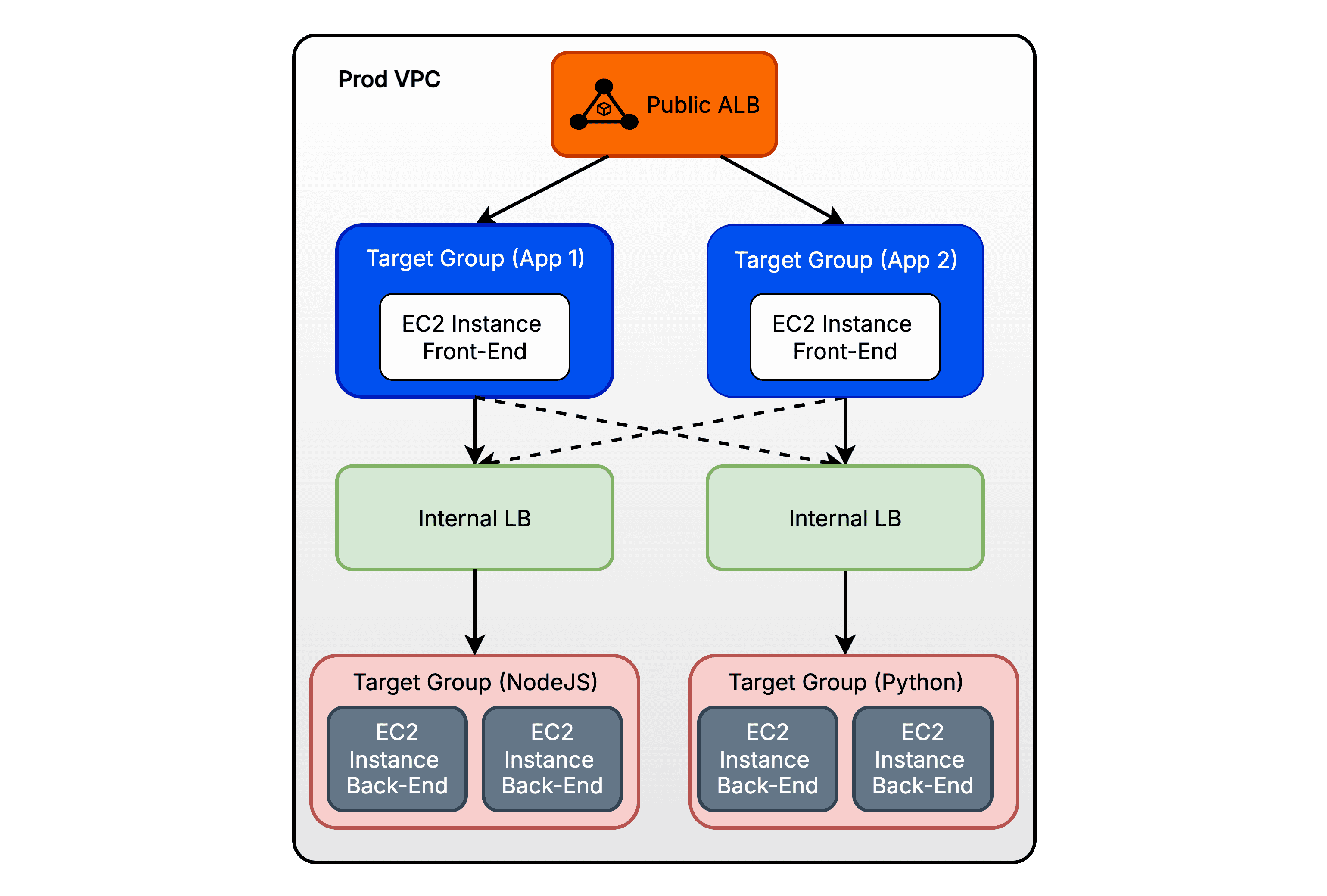
In production, the practice of attaching public IPs directly to servers was abandoned. All external access flowed through Application Load Balancers, ensuring a controlled entry point. IAM roles defined permissions with precision, and AWS Systems Manager (SSM) provided secure, auditable access to the machines. To guarantee consistency, golden Amazon Machine Images (AMIs) were used to launch new instances, ensuring every server came online with a predictable, battle-tested configuration.
Elasticity was another major win. With Auto Scaling Groups tied to Application Load Balancers, workloads could finally scale up or down automatically in response to demand. No more guessing capacity or scrambling to add servers when traffic spiked. Domain management also transitioned from Cloudflare to Amazon Route 53, consolidating DNS into a single, integrated, and highly reliable platform.
The redesigned setup brought order and clarity. The diagram below illustrates how the frontend, backend, load balancers, and supporting services now fit together in AWS.
CI/CD migration with GitHub Actions on AWS
Infrastructure formed the backbone of the system, and deployments were essential to its day-to-day operations and in the old environment, this process was inconsistent and prone to failure. Jenkins pipelines failed frequently, manual deployments were risky, and there was no reliable way to roll back a bad release.
In AWS, this entire pipeline setup was re-implemented with GitHub Actions. Clean, environment-specific pipelines were introduced for development, staging, and production. Self-hosted runners executed the workflows, while GitHub’s built-in secret management ensured that sensitive credentials like API keys were kept safe. To bring consistency, all repositories were moved into a central GitHub organization, giving the team better collaboration and visibility.
Perhaps the most impactful improvement came from how builds were managed. Every artifact was stored in Amazon S3, with versioning in place. This meant that if something went wrong in production, the team could roll back instantly to the previous version with a single trigger from GitHub. A dedicated rollback pipeline was created to make this even smoother. And to keep storage from ballooning, S3 lifecycle policies automatically cleared out builds older than 30 days.
Deployments, which had previously been stressful and error-prone, were now consistent, transparent, and straightforward to execute. The team could rely on the process rather than constantly reacting to problems.
Decoupling frontend and backend in AWS architecture
Architecture wasn’t just about infrastructure, it was about design choices. One of the biggest shifts was the decision to decouple frontend and backend services. Instead of running together on the same servers, each became its own independent component.
This change made scaling far more efficient. New servers could be provisioned automatically, pulling the right build directly from S3. There was no manual configuration, no guessing, and no risk of one service disrupting another. Every instance came online in a consistent state, and scaling became invisible to end users.
Implementing CloudWatch Observability in AWS migration
Application monitoring was minimal. Sentry was used, but not for all applications, and logs from NGINX, PM2 (process manager for Node.js), and Uvicorn (web server for Python) had to be accessed directly on the servers. There was no centralized logging or USE metrics setup, leaving the team with very little insight into system performance. In AWS, it became a cornerstone of the platform. Centralized logging pulled together data from NGINX, PM2, Uvicorn, and the operating system into a single place. CloudWatch dashboards provided real-time metrics for CPU, memory, disk I/O, request rates, errors, latency etc. Network traffic could be monitored, bottlenecks identified, and performance tuned proactively. Alerts were configured through Amazon SNS, flowing directly into email and Slack so that the right people were notified immediately when something went wrong.
For the first time, the team had complete visibility. Issues that would have taken hours or days to detect in the old system could now be spotted and addressed in real time. For teams building observability pipelines, here are a few practices we think you should maintain as a blanket rule:
Implement RED metrics (Rate, Errors, Duration) for all applications as a baseline standard.
Ensure mandatory infrastructure monitoring for compute, memory, storage, and network resources, using USE metrics (Utilization, Saturation, Errors) as a baseline.
Following these practices ensures that when something breaks in production, your team has enough information to quickly detect and diagnose the issue, improving overall readiness and reliability.
Zero-Downtime Azure to AWS migration strategy
The cutover was handled carefully, the team approached each step with caution, knowing that even small missteps could affect users. Decisions were made deliberately, prioritizing reliability and giving confidence that the system would continue to run smoothly. The production environment in AWS underwent regression testing, load testing, and repeated validation of auto scaling and load balancing. QA teams stressed the system under different scenarios until confidence was high.
When the time came, DNS traffic was transitioned gradually to Amazon Route 53. For a short period, Azure and AWS ran in parallel. This overlap meant higher costs temporarily, but it gave the team a vital safety net. Users never saw a blip of downtime, and once AWS proved fully stable, Azure was quietly decommissioned.
Key lessons from Azure to AWS cloud migration
Looking back, the migration taught a number of important lessons. Development, staging, and production need to be separate from day one. CI/CD pipelines, observability, and autoscaling aren’t nice-to-have extras they’re fundamental. Running dual infrastructure may feel expensive, but it’s the safest way to achieve zero downtime. And perhaps most importantly, security and access control must be woven into the architecture from the very beginning, not bolted on later.
Flawed systems shouldn’t be copied, they should be redesigned with best practices.
Future roadmap after AWS migration
The move to AWS has given the client a foundation that is stable, secure, and ready for growth. Deployments are smoother, scaling happens automatically, and observability provides confidence in daily operations. The roadmap ahead includes expanding automated testing, refining costs with reserved instances, and eventually building multi-region resiliency to handle even larger-scale demand. If you’re planning to scale your applications or expand your product offerings, check out our case studies to see how One2N has helped companies navigate similar challenges. Our expertise in building resilient, scalable, and observable cloud environments could provide the guidance your team needs.
Azure to AWS migration: conclusion and next steps
This migration wasn’t just a change in cloud providers, it was a transformation in how infrastructure was built, managed, and scaled. Quick fixes had run their course. The only way forward was intentional rebuilding and by making that choice, the client now operates on a system that is predictable, efficient, and designed for the future.If your organization is grappling with similar challenges, let’s connect.
Sometimes the best path forward isn’t patching the cracks but laying down a new foundation strong enough to support long-term success.
The client’s Azure setup had grown organically over time, shaped by changing needs and quick decisions. By the time we stepped in, maintaining stability had become a balancing act between legacy configurations and urgent fixes. On the surface, the business applications appeared to function adequately users could log in, and the day-to-day traffic didn’t show obvious signs of failure. But underneath that thin layer of stability, the infrastructure was straining. It had been built quickly, the setup grew in response to immediate demands, with no one taking a step back to consider how all the pieces fit together, and over time it became convoluted in ways that made even small changes risky. Scaling of backend servers was inconsistent, stability was shaky, and managing the platform had turned into a daily struggle rather than a routine task.
The deeper we looked, the more gaps we uncovered. The environment strategy was minimal only staging and production existed, and both lacked stability, creating risk for every deployment and change. We noticed several extremely visible anti-patterns in the existing setup. Let’s review a few that would make anyone pause and ask, Hold on what’s going on here? frontend and backend services were deployed on the same machines, which amplified complexity and increased risk with every change. Deployments were fully manual, lacking proper CI/CD pipelines and versioning, and in some cases, the code running in production was so poorly tracked that even the team wasn’t sure which version was live. Essential operational tools auto-scaling, monitoring, alerting, and dashboards were absent, leaving the systems effectively blind to performance issues and failures. Production servers were still exposed with public IPs despite being behind load balancers, while the Jenkins server, intended for deployments, was also running unrelated analytics scripts, overloading it and making deployments unreliable. Collaboration was further hindered by source code scattered across personal GitHub accounts, resulting in poor visibility and governance.
This wasn’t the result of laziness or incompetence. It was the natural outcome of a system built under pressure. Early on, the client had been driven by the urgency to get things working, and Azure’s free credits provided a quick way to spin up resources. But over time, those “temporary fixes” piled up. What began as a scrappy, functional setup evolved into an environment that was fragile, confusing, and ultimately too expensive to maintain.
Why we chose AWS for cloud migration
At this point, a migration was inevitable. The existing Azure environment was unsustainable, and patching it piece by piece would have been more work than starting fresh. AWS emerged as the obvious choice, not just because it was different, but because it was the right fit for the client’s future.
One of the most decisive factors was the client’s engineering team’s familiarity with AWS. The engineers already had knowledge about AWS terminologies, services, and workflows. Azure, in contrast, always felt cumbersome. Its console was scattered with overlapping resource groups, servers were spread across them with no clear purpose, and even simple tasks often required navigating through layers of interrelated services. It was difficult to know which resources were essential and which were relics of old experiments. The team also struggled with Azure’s IAM and resource aggregation model, which felt unintuitive compared to AWS’s cleaner approach.
AWS, by contrast, felt familiar and approachable. Its structure matched the way the engineers already thought about infrastructure. Navigating the console was simpler, setting up IAM roles felt more natural, and the ecosystem aligned with the team’s existing knowledge. On top of this, the client had already made a strategic decision to move to AWS long-term. So looking at all the pain points and the strategic direction of the leadership, it made sense to pivot our foundations to AWS and build there.
Challenges of migrating from Azure to AWS without downtime
Knowing where to go didn’t make the journey easy. The migration came with two strict, non-negotiable requirements. The first was that production services had to remain uninterrupted. Any downtime would directly impact users, which was unacceptable. The second was that the problems from Azure couldn’t simply be carried over. A lift-and-shift approach might have been faster on paper, but it would have recreated the same brittle system in a different cloud.
The only way forward was to rebuild everything from scratch in AWS, designing the new infrastructure the right way while keeping Azure online until AWS had proven itself stable. This meant the project wasn’t just about migration it was about transformation.
AWS infrastructure best practices: VPC, Subnets, IAM
The first step was to create order where there had been chaos. AWS offered a chance to rebuild with clarity, and that started with isolating environments. Instead of everything bleeding together, three dedicated environments were created: development, staging, and production. Each lived in its own Virtual Private Cloud (VPC), with carefully planned public and private subnets. Security groups were scoped narrowly to ensure only the right communication paths were allowed.
In production, the practice of attaching public IPs directly to servers was abandoned. All external access flowed through Application Load Balancers, ensuring a controlled entry point. IAM roles defined permissions with precision, and AWS Systems Manager (SSM) provided secure, auditable access to the machines. To guarantee consistency, golden Amazon Machine Images (AMIs) were used to launch new instances, ensuring every server came online with a predictable, battle-tested configuration.
Elasticity was another major win. With Auto Scaling Groups tied to Application Load Balancers, workloads could finally scale up or down automatically in response to demand. No more guessing capacity or scrambling to add servers when traffic spiked. Domain management also transitioned from Cloudflare to Amazon Route 53, consolidating DNS into a single, integrated, and highly reliable platform.
The redesigned setup brought order and clarity. The diagram below illustrates how the frontend, backend, load balancers, and supporting services now fit together in AWS.

CI/CD migration with GitHub Actions on AWS
Infrastructure formed the backbone of the system, and deployments were essential to its day-to-day operations and in the old environment, this process was inconsistent and prone to failure. Jenkins pipelines failed frequently, manual deployments were risky, and there was no reliable way to roll back a bad release.
In AWS, this entire pipeline setup was re-implemented with GitHub Actions. Clean, environment-specific pipelines were introduced for development, staging, and production. Self-hosted runners executed the workflows, while GitHub’s built-in secret management ensured that sensitive credentials like API keys were kept safe. To bring consistency, all repositories were moved into a central GitHub organization, giving the team better collaboration and visibility.
Perhaps the most impactful improvement came from how builds were managed. Every artifact was stored in Amazon S3, with versioning in place. This meant that if something went wrong in production, the team could roll back instantly to the previous version with a single trigger from GitHub. A dedicated rollback pipeline was created to make this even smoother. And to keep storage from ballooning, S3 lifecycle policies automatically cleared out builds older than 30 days.
Deployments, which had previously been stressful and error-prone, were now consistent, transparent, and straightforward to execute. The team could rely on the process rather than constantly reacting to problems.
Decoupling frontend and backend in AWS architecture
Architecture wasn’t just about infrastructure, it was about design choices. One of the biggest shifts was the decision to decouple frontend and backend services. Instead of running together on the same servers, each became its own independent component.
This change made scaling far more efficient. New servers could be provisioned automatically, pulling the right build directly from S3. There was no manual configuration, no guessing, and no risk of one service disrupting another. Every instance came online in a consistent state, and scaling became invisible to end users.
Implementing CloudWatch Observability in AWS migration
Application monitoring was minimal. Sentry was used, but not for all applications, and logs from NGINX, PM2 (process manager for Node.js), and Uvicorn (web server for Python) had to be accessed directly on the servers. There was no centralized logging or USE metrics setup, leaving the team with very little insight into system performance. In AWS, it became a cornerstone of the platform. Centralized logging pulled together data from NGINX, PM2, Uvicorn, and the operating system into a single place. CloudWatch dashboards provided real-time metrics for CPU, memory, disk I/O, request rates, errors, latency etc. Network traffic could be monitored, bottlenecks identified, and performance tuned proactively. Alerts were configured through Amazon SNS, flowing directly into email and Slack so that the right people were notified immediately when something went wrong.
For the first time, the team had complete visibility. Issues that would have taken hours or days to detect in the old system could now be spotted and addressed in real time. For teams building observability pipelines, here are a few practices we think you should maintain as a blanket rule:
Implement RED metrics (Rate, Errors, Duration) for all applications as a baseline standard.
Ensure mandatory infrastructure monitoring for compute, memory, storage, and network resources, using USE metrics (Utilization, Saturation, Errors) as a baseline.
Following these practices ensures that when something breaks in production, your team has enough information to quickly detect and diagnose the issue, improving overall readiness and reliability.
Zero-Downtime Azure to AWS migration strategy
The cutover was handled carefully, the team approached each step with caution, knowing that even small missteps could affect users. Decisions were made deliberately, prioritizing reliability and giving confidence that the system would continue to run smoothly. The production environment in AWS underwent regression testing, load testing, and repeated validation of auto scaling and load balancing. QA teams stressed the system under different scenarios until confidence was high.
When the time came, DNS traffic was transitioned gradually to Amazon Route 53. For a short period, Azure and AWS ran in parallel. This overlap meant higher costs temporarily, but it gave the team a vital safety net. Users never saw a blip of downtime, and once AWS proved fully stable, Azure was quietly decommissioned.
Key lessons from Azure to AWS cloud migration
Looking back, the migration taught a number of important lessons. Development, staging, and production need to be separate from day one. CI/CD pipelines, observability, and autoscaling aren’t nice-to-have extras they’re fundamental. Running dual infrastructure may feel expensive, but it’s the safest way to achieve zero downtime. And perhaps most importantly, security and access control must be woven into the architecture from the very beginning, not bolted on later.
Flawed systems shouldn’t be copied, they should be redesigned with best practices.
Future roadmap after AWS migration
The move to AWS has given the client a foundation that is stable, secure, and ready for growth. Deployments are smoother, scaling happens automatically, and observability provides confidence in daily operations. The roadmap ahead includes expanding automated testing, refining costs with reserved instances, and eventually building multi-region resiliency to handle even larger-scale demand. If you’re planning to scale your applications or expand your product offerings, check out our case studies to see how One2N has helped companies navigate similar challenges. Our expertise in building resilient, scalable, and observable cloud environments could provide the guidance your team needs.
Azure to AWS migration: conclusion and next steps
This migration wasn’t just a change in cloud providers, it was a transformation in how infrastructure was built, managed, and scaled. Quick fixes had run their course. The only way forward was intentional rebuilding and by making that choice, the client now operates on a system that is predictable, efficient, and designed for the future.If your organization is grappling with similar challenges, let’s connect.
Sometimes the best path forward isn’t patching the cracks but laying down a new foundation strong enough to support long-term success.
The client’s Azure setup had grown organically over time, shaped by changing needs and quick decisions. By the time we stepped in, maintaining stability had become a balancing act between legacy configurations and urgent fixes. On the surface, the business applications appeared to function adequately users could log in, and the day-to-day traffic didn’t show obvious signs of failure. But underneath that thin layer of stability, the infrastructure was straining. It had been built quickly, the setup grew in response to immediate demands, with no one taking a step back to consider how all the pieces fit together, and over time it became convoluted in ways that made even small changes risky. Scaling of backend servers was inconsistent, stability was shaky, and managing the platform had turned into a daily struggle rather than a routine task.
The deeper we looked, the more gaps we uncovered. The environment strategy was minimal only staging and production existed, and both lacked stability, creating risk for every deployment and change. We noticed several extremely visible anti-patterns in the existing setup. Let’s review a few that would make anyone pause and ask, Hold on what’s going on here? frontend and backend services were deployed on the same machines, which amplified complexity and increased risk with every change. Deployments were fully manual, lacking proper CI/CD pipelines and versioning, and in some cases, the code running in production was so poorly tracked that even the team wasn’t sure which version was live. Essential operational tools auto-scaling, monitoring, alerting, and dashboards were absent, leaving the systems effectively blind to performance issues and failures. Production servers were still exposed with public IPs despite being behind load balancers, while the Jenkins server, intended for deployments, was also running unrelated analytics scripts, overloading it and making deployments unreliable. Collaboration was further hindered by source code scattered across personal GitHub accounts, resulting in poor visibility and governance.
This wasn’t the result of laziness or incompetence. It was the natural outcome of a system built under pressure. Early on, the client had been driven by the urgency to get things working, and Azure’s free credits provided a quick way to spin up resources. But over time, those “temporary fixes” piled up. What began as a scrappy, functional setup evolved into an environment that was fragile, confusing, and ultimately too expensive to maintain.
Why we chose AWS for cloud migration
At this point, a migration was inevitable. The existing Azure environment was unsustainable, and patching it piece by piece would have been more work than starting fresh. AWS emerged as the obvious choice, not just because it was different, but because it was the right fit for the client’s future.
One of the most decisive factors was the client’s engineering team’s familiarity with AWS. The engineers already had knowledge about AWS terminologies, services, and workflows. Azure, in contrast, always felt cumbersome. Its console was scattered with overlapping resource groups, servers were spread across them with no clear purpose, and even simple tasks often required navigating through layers of interrelated services. It was difficult to know which resources were essential and which were relics of old experiments. The team also struggled with Azure’s IAM and resource aggregation model, which felt unintuitive compared to AWS’s cleaner approach.
AWS, by contrast, felt familiar and approachable. Its structure matched the way the engineers already thought about infrastructure. Navigating the console was simpler, setting up IAM roles felt more natural, and the ecosystem aligned with the team’s existing knowledge. On top of this, the client had already made a strategic decision to move to AWS long-term. So looking at all the pain points and the strategic direction of the leadership, it made sense to pivot our foundations to AWS and build there.
Challenges of migrating from Azure to AWS without downtime
Knowing where to go didn’t make the journey easy. The migration came with two strict, non-negotiable requirements. The first was that production services had to remain uninterrupted. Any downtime would directly impact users, which was unacceptable. The second was that the problems from Azure couldn’t simply be carried over. A lift-and-shift approach might have been faster on paper, but it would have recreated the same brittle system in a different cloud.
The only way forward was to rebuild everything from scratch in AWS, designing the new infrastructure the right way while keeping Azure online until AWS had proven itself stable. This meant the project wasn’t just about migration it was about transformation.
AWS infrastructure best practices: VPC, Subnets, IAM
The first step was to create order where there had been chaos. AWS offered a chance to rebuild with clarity, and that started with isolating environments. Instead of everything bleeding together, three dedicated environments were created: development, staging, and production. Each lived in its own Virtual Private Cloud (VPC), with carefully planned public and private subnets. Security groups were scoped narrowly to ensure only the right communication paths were allowed.
In production, the practice of attaching public IPs directly to servers was abandoned. All external access flowed through Application Load Balancers, ensuring a controlled entry point. IAM roles defined permissions with precision, and AWS Systems Manager (SSM) provided secure, auditable access to the machines. To guarantee consistency, golden Amazon Machine Images (AMIs) were used to launch new instances, ensuring every server came online with a predictable, battle-tested configuration.
Elasticity was another major win. With Auto Scaling Groups tied to Application Load Balancers, workloads could finally scale up or down automatically in response to demand. No more guessing capacity or scrambling to add servers when traffic spiked. Domain management also transitioned from Cloudflare to Amazon Route 53, consolidating DNS into a single, integrated, and highly reliable platform.
The redesigned setup brought order and clarity. The diagram below illustrates how the frontend, backend, load balancers, and supporting services now fit together in AWS.

CI/CD migration with GitHub Actions on AWS
Infrastructure formed the backbone of the system, and deployments were essential to its day-to-day operations and in the old environment, this process was inconsistent and prone to failure. Jenkins pipelines failed frequently, manual deployments were risky, and there was no reliable way to roll back a bad release.
In AWS, this entire pipeline setup was re-implemented with GitHub Actions. Clean, environment-specific pipelines were introduced for development, staging, and production. Self-hosted runners executed the workflows, while GitHub’s built-in secret management ensured that sensitive credentials like API keys were kept safe. To bring consistency, all repositories were moved into a central GitHub organization, giving the team better collaboration and visibility.
Perhaps the most impactful improvement came from how builds were managed. Every artifact was stored in Amazon S3, with versioning in place. This meant that if something went wrong in production, the team could roll back instantly to the previous version with a single trigger from GitHub. A dedicated rollback pipeline was created to make this even smoother. And to keep storage from ballooning, S3 lifecycle policies automatically cleared out builds older than 30 days.
Deployments, which had previously been stressful and error-prone, were now consistent, transparent, and straightforward to execute. The team could rely on the process rather than constantly reacting to problems.
Decoupling frontend and backend in AWS architecture
Architecture wasn’t just about infrastructure, it was about design choices. One of the biggest shifts was the decision to decouple frontend and backend services. Instead of running together on the same servers, each became its own independent component.
This change made scaling far more efficient. New servers could be provisioned automatically, pulling the right build directly from S3. There was no manual configuration, no guessing, and no risk of one service disrupting another. Every instance came online in a consistent state, and scaling became invisible to end users.
Implementing CloudWatch Observability in AWS migration
Application monitoring was minimal. Sentry was used, but not for all applications, and logs from NGINX, PM2 (process manager for Node.js), and Uvicorn (web server for Python) had to be accessed directly on the servers. There was no centralized logging or USE metrics setup, leaving the team with very little insight into system performance. In AWS, it became a cornerstone of the platform. Centralized logging pulled together data from NGINX, PM2, Uvicorn, and the operating system into a single place. CloudWatch dashboards provided real-time metrics for CPU, memory, disk I/O, request rates, errors, latency etc. Network traffic could be monitored, bottlenecks identified, and performance tuned proactively. Alerts were configured through Amazon SNS, flowing directly into email and Slack so that the right people were notified immediately when something went wrong.
For the first time, the team had complete visibility. Issues that would have taken hours or days to detect in the old system could now be spotted and addressed in real time. For teams building observability pipelines, here are a few practices we think you should maintain as a blanket rule:
Implement RED metrics (Rate, Errors, Duration) for all applications as a baseline standard.
Ensure mandatory infrastructure monitoring for compute, memory, storage, and network resources, using USE metrics (Utilization, Saturation, Errors) as a baseline.
Following these practices ensures that when something breaks in production, your team has enough information to quickly detect and diagnose the issue, improving overall readiness and reliability.
Zero-Downtime Azure to AWS migration strategy
The cutover was handled carefully, the team approached each step with caution, knowing that even small missteps could affect users. Decisions were made deliberately, prioritizing reliability and giving confidence that the system would continue to run smoothly. The production environment in AWS underwent regression testing, load testing, and repeated validation of auto scaling and load balancing. QA teams stressed the system under different scenarios until confidence was high.
When the time came, DNS traffic was transitioned gradually to Amazon Route 53. For a short period, Azure and AWS ran in parallel. This overlap meant higher costs temporarily, but it gave the team a vital safety net. Users never saw a blip of downtime, and once AWS proved fully stable, Azure was quietly decommissioned.
Key lessons from Azure to AWS cloud migration
Looking back, the migration taught a number of important lessons. Development, staging, and production need to be separate from day one. CI/CD pipelines, observability, and autoscaling aren’t nice-to-have extras they’re fundamental. Running dual infrastructure may feel expensive, but it’s the safest way to achieve zero downtime. And perhaps most importantly, security and access control must be woven into the architecture from the very beginning, not bolted on later.
Flawed systems shouldn’t be copied, they should be redesigned with best practices.
Future roadmap after AWS migration
The move to AWS has given the client a foundation that is stable, secure, and ready for growth. Deployments are smoother, scaling happens automatically, and observability provides confidence in daily operations. The roadmap ahead includes expanding automated testing, refining costs with reserved instances, and eventually building multi-region resiliency to handle even larger-scale demand. If you’re planning to scale your applications or expand your product offerings, check out our case studies to see how One2N has helped companies navigate similar challenges. Our expertise in building resilient, scalable, and observable cloud environments could provide the guidance your team needs.
Azure to AWS migration: conclusion and next steps
This migration wasn’t just a change in cloud providers, it was a transformation in how infrastructure was built, managed, and scaled. Quick fixes had run their course. The only way forward was intentional rebuilding and by making that choice, the client now operates on a system that is predictable, efficient, and designed for the future.If your organization is grappling with similar challenges, let’s connect.
Sometimes the best path forward isn’t patching the cracks but laying down a new foundation strong enough to support long-term success.
The client’s Azure setup had grown organically over time, shaped by changing needs and quick decisions. By the time we stepped in, maintaining stability had become a balancing act between legacy configurations and urgent fixes. On the surface, the business applications appeared to function adequately users could log in, and the day-to-day traffic didn’t show obvious signs of failure. But underneath that thin layer of stability, the infrastructure was straining. It had been built quickly, the setup grew in response to immediate demands, with no one taking a step back to consider how all the pieces fit together, and over time it became convoluted in ways that made even small changes risky. Scaling of backend servers was inconsistent, stability was shaky, and managing the platform had turned into a daily struggle rather than a routine task.
The deeper we looked, the more gaps we uncovered. The environment strategy was minimal only staging and production existed, and both lacked stability, creating risk for every deployment and change. We noticed several extremely visible anti-patterns in the existing setup. Let’s review a few that would make anyone pause and ask, Hold on what’s going on here? frontend and backend services were deployed on the same machines, which amplified complexity and increased risk with every change. Deployments were fully manual, lacking proper CI/CD pipelines and versioning, and in some cases, the code running in production was so poorly tracked that even the team wasn’t sure which version was live. Essential operational tools auto-scaling, monitoring, alerting, and dashboards were absent, leaving the systems effectively blind to performance issues and failures. Production servers were still exposed with public IPs despite being behind load balancers, while the Jenkins server, intended for deployments, was also running unrelated analytics scripts, overloading it and making deployments unreliable. Collaboration was further hindered by source code scattered across personal GitHub accounts, resulting in poor visibility and governance.
This wasn’t the result of laziness or incompetence. It was the natural outcome of a system built under pressure. Early on, the client had been driven by the urgency to get things working, and Azure’s free credits provided a quick way to spin up resources. But over time, those “temporary fixes” piled up. What began as a scrappy, functional setup evolved into an environment that was fragile, confusing, and ultimately too expensive to maintain.
Why we chose AWS for cloud migration
At this point, a migration was inevitable. The existing Azure environment was unsustainable, and patching it piece by piece would have been more work than starting fresh. AWS emerged as the obvious choice, not just because it was different, but because it was the right fit for the client’s future.
One of the most decisive factors was the client’s engineering team’s familiarity with AWS. The engineers already had knowledge about AWS terminologies, services, and workflows. Azure, in contrast, always felt cumbersome. Its console was scattered with overlapping resource groups, servers were spread across them with no clear purpose, and even simple tasks often required navigating through layers of interrelated services. It was difficult to know which resources were essential and which were relics of old experiments. The team also struggled with Azure’s IAM and resource aggregation model, which felt unintuitive compared to AWS’s cleaner approach.
AWS, by contrast, felt familiar and approachable. Its structure matched the way the engineers already thought about infrastructure. Navigating the console was simpler, setting up IAM roles felt more natural, and the ecosystem aligned with the team’s existing knowledge. On top of this, the client had already made a strategic decision to move to AWS long-term. So looking at all the pain points and the strategic direction of the leadership, it made sense to pivot our foundations to AWS and build there.
Challenges of migrating from Azure to AWS without downtime
Knowing where to go didn’t make the journey easy. The migration came with two strict, non-negotiable requirements. The first was that production services had to remain uninterrupted. Any downtime would directly impact users, which was unacceptable. The second was that the problems from Azure couldn’t simply be carried over. A lift-and-shift approach might have been faster on paper, but it would have recreated the same brittle system in a different cloud.
The only way forward was to rebuild everything from scratch in AWS, designing the new infrastructure the right way while keeping Azure online until AWS had proven itself stable. This meant the project wasn’t just about migration it was about transformation.
AWS infrastructure best practices: VPC, Subnets, IAM
The first step was to create order where there had been chaos. AWS offered a chance to rebuild with clarity, and that started with isolating environments. Instead of everything bleeding together, three dedicated environments were created: development, staging, and production. Each lived in its own Virtual Private Cloud (VPC), with carefully planned public and private subnets. Security groups were scoped narrowly to ensure only the right communication paths were allowed.
In production, the practice of attaching public IPs directly to servers was abandoned. All external access flowed through Application Load Balancers, ensuring a controlled entry point. IAM roles defined permissions with precision, and AWS Systems Manager (SSM) provided secure, auditable access to the machines. To guarantee consistency, golden Amazon Machine Images (AMIs) were used to launch new instances, ensuring every server came online with a predictable, battle-tested configuration.
Elasticity was another major win. With Auto Scaling Groups tied to Application Load Balancers, workloads could finally scale up or down automatically in response to demand. No more guessing capacity or scrambling to add servers when traffic spiked. Domain management also transitioned from Cloudflare to Amazon Route 53, consolidating DNS into a single, integrated, and highly reliable platform.
The redesigned setup brought order and clarity. The diagram below illustrates how the frontend, backend, load balancers, and supporting services now fit together in AWS.

CI/CD migration with GitHub Actions on AWS
Infrastructure formed the backbone of the system, and deployments were essential to its day-to-day operations and in the old environment, this process was inconsistent and prone to failure. Jenkins pipelines failed frequently, manual deployments were risky, and there was no reliable way to roll back a bad release.
In AWS, this entire pipeline setup was re-implemented with GitHub Actions. Clean, environment-specific pipelines were introduced for development, staging, and production. Self-hosted runners executed the workflows, while GitHub’s built-in secret management ensured that sensitive credentials like API keys were kept safe. To bring consistency, all repositories were moved into a central GitHub organization, giving the team better collaboration and visibility.
Perhaps the most impactful improvement came from how builds were managed. Every artifact was stored in Amazon S3, with versioning in place. This meant that if something went wrong in production, the team could roll back instantly to the previous version with a single trigger from GitHub. A dedicated rollback pipeline was created to make this even smoother. And to keep storage from ballooning, S3 lifecycle policies automatically cleared out builds older than 30 days.
Deployments, which had previously been stressful and error-prone, were now consistent, transparent, and straightforward to execute. The team could rely on the process rather than constantly reacting to problems.
Decoupling frontend and backend in AWS architecture
Architecture wasn’t just about infrastructure, it was about design choices. One of the biggest shifts was the decision to decouple frontend and backend services. Instead of running together on the same servers, each became its own independent component.
This change made scaling far more efficient. New servers could be provisioned automatically, pulling the right build directly from S3. There was no manual configuration, no guessing, and no risk of one service disrupting another. Every instance came online in a consistent state, and scaling became invisible to end users.
Implementing CloudWatch Observability in AWS migration
Application monitoring was minimal. Sentry was used, but not for all applications, and logs from NGINX, PM2 (process manager for Node.js), and Uvicorn (web server for Python) had to be accessed directly on the servers. There was no centralized logging or USE metrics setup, leaving the team with very little insight into system performance. In AWS, it became a cornerstone of the platform. Centralized logging pulled together data from NGINX, PM2, Uvicorn, and the operating system into a single place. CloudWatch dashboards provided real-time metrics for CPU, memory, disk I/O, request rates, errors, latency etc. Network traffic could be monitored, bottlenecks identified, and performance tuned proactively. Alerts were configured through Amazon SNS, flowing directly into email and Slack so that the right people were notified immediately when something went wrong.
For the first time, the team had complete visibility. Issues that would have taken hours or days to detect in the old system could now be spotted and addressed in real time. For teams building observability pipelines, here are a few practices we think you should maintain as a blanket rule:
Implement RED metrics (Rate, Errors, Duration) for all applications as a baseline standard.
Ensure mandatory infrastructure monitoring for compute, memory, storage, and network resources, using USE metrics (Utilization, Saturation, Errors) as a baseline.
Following these practices ensures that when something breaks in production, your team has enough information to quickly detect and diagnose the issue, improving overall readiness and reliability.
Zero-Downtime Azure to AWS migration strategy
The cutover was handled carefully, the team approached each step with caution, knowing that even small missteps could affect users. Decisions were made deliberately, prioritizing reliability and giving confidence that the system would continue to run smoothly. The production environment in AWS underwent regression testing, load testing, and repeated validation of auto scaling and load balancing. QA teams stressed the system under different scenarios until confidence was high.
When the time came, DNS traffic was transitioned gradually to Amazon Route 53. For a short period, Azure and AWS ran in parallel. This overlap meant higher costs temporarily, but it gave the team a vital safety net. Users never saw a blip of downtime, and once AWS proved fully stable, Azure was quietly decommissioned.
Key lessons from Azure to AWS cloud migration
Looking back, the migration taught a number of important lessons. Development, staging, and production need to be separate from day one. CI/CD pipelines, observability, and autoscaling aren’t nice-to-have extras they’re fundamental. Running dual infrastructure may feel expensive, but it’s the safest way to achieve zero downtime. And perhaps most importantly, security and access control must be woven into the architecture from the very beginning, not bolted on later.
Flawed systems shouldn’t be copied, they should be redesigned with best practices.
Future roadmap after AWS migration
The move to AWS has given the client a foundation that is stable, secure, and ready for growth. Deployments are smoother, scaling happens automatically, and observability provides confidence in daily operations. The roadmap ahead includes expanding automated testing, refining costs with reserved instances, and eventually building multi-region resiliency to handle even larger-scale demand. If you’re planning to scale your applications or expand your product offerings, check out our case studies to see how One2N has helped companies navigate similar challenges. Our expertise in building resilient, scalable, and observable cloud environments could provide the guidance your team needs.
Azure to AWS migration: conclusion and next steps
This migration wasn’t just a change in cloud providers, it was a transformation in how infrastructure was built, managed, and scaled. Quick fixes had run their course. The only way forward was intentional rebuilding and by making that choice, the client now operates on a system that is predictable, efficient, and designed for the future.If your organization is grappling with similar challenges, let’s connect.
Sometimes the best path forward isn’t patching the cracks but laying down a new foundation strong enough to support long-term success.
The client’s Azure setup had grown organically over time, shaped by changing needs and quick decisions. By the time we stepped in, maintaining stability had become a balancing act between legacy configurations and urgent fixes. On the surface, the business applications appeared to function adequately users could log in, and the day-to-day traffic didn’t show obvious signs of failure. But underneath that thin layer of stability, the infrastructure was straining. It had been built quickly, the setup grew in response to immediate demands, with no one taking a step back to consider how all the pieces fit together, and over time it became convoluted in ways that made even small changes risky. Scaling of backend servers was inconsistent, stability was shaky, and managing the platform had turned into a daily struggle rather than a routine task.
The deeper we looked, the more gaps we uncovered. The environment strategy was minimal only staging and production existed, and both lacked stability, creating risk for every deployment and change. We noticed several extremely visible anti-patterns in the existing setup. Let’s review a few that would make anyone pause and ask, Hold on what’s going on here? frontend and backend services were deployed on the same machines, which amplified complexity and increased risk with every change. Deployments were fully manual, lacking proper CI/CD pipelines and versioning, and in some cases, the code running in production was so poorly tracked that even the team wasn’t sure which version was live. Essential operational tools auto-scaling, monitoring, alerting, and dashboards were absent, leaving the systems effectively blind to performance issues and failures. Production servers were still exposed with public IPs despite being behind load balancers, while the Jenkins server, intended for deployments, was also running unrelated analytics scripts, overloading it and making deployments unreliable. Collaboration was further hindered by source code scattered across personal GitHub accounts, resulting in poor visibility and governance.
This wasn’t the result of laziness or incompetence. It was the natural outcome of a system built under pressure. Early on, the client had been driven by the urgency to get things working, and Azure’s free credits provided a quick way to spin up resources. But over time, those “temporary fixes” piled up. What began as a scrappy, functional setup evolved into an environment that was fragile, confusing, and ultimately too expensive to maintain.
Why we chose AWS for cloud migration
At this point, a migration was inevitable. The existing Azure environment was unsustainable, and patching it piece by piece would have been more work than starting fresh. AWS emerged as the obvious choice, not just because it was different, but because it was the right fit for the client’s future.
One of the most decisive factors was the client’s engineering team’s familiarity with AWS. The engineers already had knowledge about AWS terminologies, services, and workflows. Azure, in contrast, always felt cumbersome. Its console was scattered with overlapping resource groups, servers were spread across them with no clear purpose, and even simple tasks often required navigating through layers of interrelated services. It was difficult to know which resources were essential and which were relics of old experiments. The team also struggled with Azure’s IAM and resource aggregation model, which felt unintuitive compared to AWS’s cleaner approach.
AWS, by contrast, felt familiar and approachable. Its structure matched the way the engineers already thought about infrastructure. Navigating the console was simpler, setting up IAM roles felt more natural, and the ecosystem aligned with the team’s existing knowledge. On top of this, the client had already made a strategic decision to move to AWS long-term. So looking at all the pain points and the strategic direction of the leadership, it made sense to pivot our foundations to AWS and build there.
Challenges of migrating from Azure to AWS without downtime
Knowing where to go didn’t make the journey easy. The migration came with two strict, non-negotiable requirements. The first was that production services had to remain uninterrupted. Any downtime would directly impact users, which was unacceptable. The second was that the problems from Azure couldn’t simply be carried over. A lift-and-shift approach might have been faster on paper, but it would have recreated the same brittle system in a different cloud.
The only way forward was to rebuild everything from scratch in AWS, designing the new infrastructure the right way while keeping Azure online until AWS had proven itself stable. This meant the project wasn’t just about migration it was about transformation.
AWS infrastructure best practices: VPC, Subnets, IAM
The first step was to create order where there had been chaos. AWS offered a chance to rebuild with clarity, and that started with isolating environments. Instead of everything bleeding together, three dedicated environments were created: development, staging, and production. Each lived in its own Virtual Private Cloud (VPC), with carefully planned public and private subnets. Security groups were scoped narrowly to ensure only the right communication paths were allowed.
In production, the practice of attaching public IPs directly to servers was abandoned. All external access flowed through Application Load Balancers, ensuring a controlled entry point. IAM roles defined permissions with precision, and AWS Systems Manager (SSM) provided secure, auditable access to the machines. To guarantee consistency, golden Amazon Machine Images (AMIs) were used to launch new instances, ensuring every server came online with a predictable, battle-tested configuration.
Elasticity was another major win. With Auto Scaling Groups tied to Application Load Balancers, workloads could finally scale up or down automatically in response to demand. No more guessing capacity or scrambling to add servers when traffic spiked. Domain management also transitioned from Cloudflare to Amazon Route 53, consolidating DNS into a single, integrated, and highly reliable platform.
The redesigned setup brought order and clarity. The diagram below illustrates how the frontend, backend, load balancers, and supporting services now fit together in AWS.

CI/CD migration with GitHub Actions on AWS
Infrastructure formed the backbone of the system, and deployments were essential to its day-to-day operations and in the old environment, this process was inconsistent and prone to failure. Jenkins pipelines failed frequently, manual deployments were risky, and there was no reliable way to roll back a bad release.
In AWS, this entire pipeline setup was re-implemented with GitHub Actions. Clean, environment-specific pipelines were introduced for development, staging, and production. Self-hosted runners executed the workflows, while GitHub’s built-in secret management ensured that sensitive credentials like API keys were kept safe. To bring consistency, all repositories were moved into a central GitHub organization, giving the team better collaboration and visibility.
Perhaps the most impactful improvement came from how builds were managed. Every artifact was stored in Amazon S3, with versioning in place. This meant that if something went wrong in production, the team could roll back instantly to the previous version with a single trigger from GitHub. A dedicated rollback pipeline was created to make this even smoother. And to keep storage from ballooning, S3 lifecycle policies automatically cleared out builds older than 30 days.
Deployments, which had previously been stressful and error-prone, were now consistent, transparent, and straightforward to execute. The team could rely on the process rather than constantly reacting to problems.
Decoupling frontend and backend in AWS architecture
Architecture wasn’t just about infrastructure, it was about design choices. One of the biggest shifts was the decision to decouple frontend and backend services. Instead of running together on the same servers, each became its own independent component.
This change made scaling far more efficient. New servers could be provisioned automatically, pulling the right build directly from S3. There was no manual configuration, no guessing, and no risk of one service disrupting another. Every instance came online in a consistent state, and scaling became invisible to end users.
Implementing CloudWatch Observability in AWS migration
Application monitoring was minimal. Sentry was used, but not for all applications, and logs from NGINX, PM2 (process manager for Node.js), and Uvicorn (web server for Python) had to be accessed directly on the servers. There was no centralized logging or USE metrics setup, leaving the team with very little insight into system performance. In AWS, it became a cornerstone of the platform. Centralized logging pulled together data from NGINX, PM2, Uvicorn, and the operating system into a single place. CloudWatch dashboards provided real-time metrics for CPU, memory, disk I/O, request rates, errors, latency etc. Network traffic could be monitored, bottlenecks identified, and performance tuned proactively. Alerts were configured through Amazon SNS, flowing directly into email and Slack so that the right people were notified immediately when something went wrong.
For the first time, the team had complete visibility. Issues that would have taken hours or days to detect in the old system could now be spotted and addressed in real time. For teams building observability pipelines, here are a few practices we think you should maintain as a blanket rule:
Implement RED metrics (Rate, Errors, Duration) for all applications as a baseline standard.
Ensure mandatory infrastructure monitoring for compute, memory, storage, and network resources, using USE metrics (Utilization, Saturation, Errors) as a baseline.
Following these practices ensures that when something breaks in production, your team has enough information to quickly detect and diagnose the issue, improving overall readiness and reliability.
Zero-Downtime Azure to AWS migration strategy
The cutover was handled carefully, the team approached each step with caution, knowing that even small missteps could affect users. Decisions were made deliberately, prioritizing reliability and giving confidence that the system would continue to run smoothly. The production environment in AWS underwent regression testing, load testing, and repeated validation of auto scaling and load balancing. QA teams stressed the system under different scenarios until confidence was high.
When the time came, DNS traffic was transitioned gradually to Amazon Route 53. For a short period, Azure and AWS ran in parallel. This overlap meant higher costs temporarily, but it gave the team a vital safety net. Users never saw a blip of downtime, and once AWS proved fully stable, Azure was quietly decommissioned.
Key lessons from Azure to AWS cloud migration
Looking back, the migration taught a number of important lessons. Development, staging, and production need to be separate from day one. CI/CD pipelines, observability, and autoscaling aren’t nice-to-have extras they’re fundamental. Running dual infrastructure may feel expensive, but it’s the safest way to achieve zero downtime. And perhaps most importantly, security and access control must be woven into the architecture from the very beginning, not bolted on later.
Flawed systems shouldn’t be copied, they should be redesigned with best practices.
Future roadmap after AWS migration
The move to AWS has given the client a foundation that is stable, secure, and ready for growth. Deployments are smoother, scaling happens automatically, and observability provides confidence in daily operations. The roadmap ahead includes expanding automated testing, refining costs with reserved instances, and eventually building multi-region resiliency to handle even larger-scale demand. If you’re planning to scale your applications or expand your product offerings, check out our case studies to see how One2N has helped companies navigate similar challenges. Our expertise in building resilient, scalable, and observable cloud environments could provide the guidance your team needs.
Azure to AWS migration: conclusion and next steps
This migration wasn’t just a change in cloud providers, it was a transformation in how infrastructure was built, managed, and scaled. Quick fixes had run their course. The only way forward was intentional rebuilding and by making that choice, the client now operates on a system that is predictable, efficient, and designed for the future.If your organization is grappling with similar challenges, let’s connect.
Sometimes the best path forward isn’t patching the cracks but laying down a new foundation strong enough to support long-term success.