

If you've moved a workload off AWS and onto on-prem infrastructure, you've likely run into this: the network isolation you got for free on the cloud does not exist on bare metal.
On AWS, Security Groups and VPC boundaries enforce service boundaries quietly in the background. Most teams never have to think about it. On-prem, the network is flat by default. Your payment service, your internal admin panel, your logging agent, and your customer-facing API all sit in the same cluster with nothing between them at the network layer.
You can get that isolation back through firewall rules and network segmentation, but on most on-prem setups that means working through infra teams with their own change management cycles. When you are mid-migration and trying to move fast, that is a meaningful constraint.
So on an EKS Hybrid deployment that we were running, we decided to solve this at the mesh layer instead. We already had Istio in the stack, and it gave us a way to enforce workload-level isolation without waiting on network-level changes. The security team reviewed the model and signed off, because the controls we built mapped directly to what they would have required from the firewall anyway. This talk covers the broader EKS Hybrid setup if you want that context.
This post is about how we built that isolation layer, layer by layer, and what we learned doing it.
Why Istio (even for small clusters)
You don't need a massive microservices architecture to benefit from Istio. Even in a small cluster, the mesh gives you three things that are hard to get any other way:
Zero-Trust Identity: Instead of trusting a service because it has a certain IP address, you trust it because it holds a cryptographically verified certificate tied to its identity. An attacker who gets onto the network cannot fake that.
Transparent Encryption: All traffic between services is encrypted automatically using mTLS (mutual TLS, meaning both sides verify each other), with no changes needed to your application code.
Deep Observability: You get a live map of which services are talking to which, with no instrumentation required.
Sidecar vs. Ambient: why we chose Ambient mode
There are two ways to run Istio. The traditional model injects a small proxy (called a sidecar) into every pod. Every service gets its own proxy, which handles encryption and policy enforcement for that service.
We chose the newer approach: Istio Ambient Mode. Instead of a proxy per pod, Ambient runs a single shared component called ztunnel on each node. It handles the same job (encrypting traffic, enforcing identity) but does it at the node level rather than inside every individual pod.
Feature | Sidecar Mode | Ambient Mode |
|---|---|---|
Deployment | One proxy inside every pod | One shared component per node |
Operational Overhead | High (restarts, extra memory per pod) | Low (transparent to pods) |
Encryption (mTLS) | Handled by each pod's own proxy | Handled by the node-level ztunnel |
Advanced HTTP features (L7) | Always available | Needs an extra component (Waypoint Proxy) |
Performance | Medium | Lower overhead for basic security |
What you give up with Ambient mode
Ambient mode is not a drop-in replacement for sidecars yet. The gaps worth knowing before you commit:
Advanced HTTP features (L7) need an extra component: Things like header-based routing, retries, and per-request metrics are not handled by ztunnel. You need to deploy a Waypoint Proxy for these.
Custom filters do not work on ztunnel: If you are using custom WebAssembly plugins or the
EnvoyFilterAPI today, those require a Waypoint Proxy too.Virtual Machines are not supported: Ambient only works for Kubernetes workloads. If you need to include VMs in the mesh, you still need the sidecar model.
Multi-cluster setups need extra care: Cross-cluster support between sidecar-mode and Ambient-mode clusters is in beta and has specific configuration requirements.
A mental model before you read further
With the tooling decided, here is how to think about what we are actually building before getting into the steps.
Think of your cluster like an office building where all the doors are unlocked by default. Anyone who gets inside can walk into any room. What we are doing here is:
Lock all the doors - by default, no service can receive traffic unless we explicitly say it can.
Replace keycards with staff badges - instead of "this IP address is allowed in", it becomes "this specific service, verified by a certificate, is allowed in." An attacker cannot fake a certificate just by spoofing an IP.
Control what leaves the building - nothing in the cluster can talk to the outside internet unless it goes through a single monitored exit point.
Add a physical deadbolt on top - a second layer of network rules at the operating system level, so that even if something bypassed Istio entirely, it still could not leave.
Each section below covers one of these four steps, in order.
The hardening journey
We did not roll this out in one go. Each layer addressed a gap the previous one left open. The principle throughout was the same: start with everything blocked, then open only what you can justify.
Layer 1: the global deny
The first step was to block all incoming traffic to every service in the mesh by default. We did this with a single Istio policy applied at the top level:
# Eg 1: The global ingress deny policy
apiVersion: security.istio.io/v1beta1
kind: AuthorizationPolicy
metadata:
  name: deny-all-ingress
  namespace: istio-system
spec
An empty spec with no rules means nothing is allowed. From here, we add explicit rules for every connection that should be permitted.
Note: The traditional sidecar setup has a useful "dry run" mode called Audit Mode. It logs traffic that would have been blocked, without actually blocking it, so you can check your rules are correct before enforcing them. Ambient mode in Istio 1.24 does not support this. We had to be more careful as a result, manually checking every allow rule and watching access logs closely before switching to strict enforcement.
Layer 2: SPIFFE identity as the perimeter
Once everything is blocked by default, we need a way to open specific connections. Rather than using IP addresses (which can change when pods restart), we use service identity.
Every service in the mesh gets a SPIFFE ID, a standard way of naming workload identities. SPIFFE stands for Secure Production Identity Framework for Everyone. It looks like this:
spiffe://cluster.local/ns/production/sa/frontend-sa
This identity is baked into the TLS certificate the service uses. Because Istio controls those certificates, a service cannot claim a different identity just by changing a label or configuration file.
Security is tied to the service's account, not to its IP address or location in the network.
Allowing the frontend service to call the backend then looks like this:
# Eg 2: Allowing Frontend to call Backend based on SPIFFE identity
apiVersion: security.istio.io/v1beta1
kind: AuthorizationPolicy
metadata:
  name: allow-frontend-to-backend
  namespace: production
spec:
  selector:
    matchLabels:
      app: backend-api
  action: ALLOW
  rules:
    - from:
        - source:
            principals: ["cluster.local/ns/production/sa/frontend-sa"
Layer 3: egress blocking and DNS interception
Locking down incoming traffic is only half the problem. On a flat network, a compromised service could still reach out to the internet freely. That is how data gets exfiltrated, how attackers establish a connection back to their infrastructure, and how services end up calling things they have no business calling.
We solved this by routing all outbound traffic through a dedicated exit point (an Egress Gateway) per namespace, and blocking everything else at the network level.
How the DNS side of this works
When a service tries to connect to an external address like api.external.com, here is what happens:
The ztunnel intercepts the DNS lookup before it goes out.
If we have declared
api.external.comas an allowed external service (via aServiceEntry), ztunnel returns a placeholder IP address. The service connects to that, and ztunnel routes the real connection through the Egress Gateway for inspection.If we have not declared that address, ztunnel lets the DNS request through but the actual connection gets dropped by the kernel-level network rules (covered in the next layer).
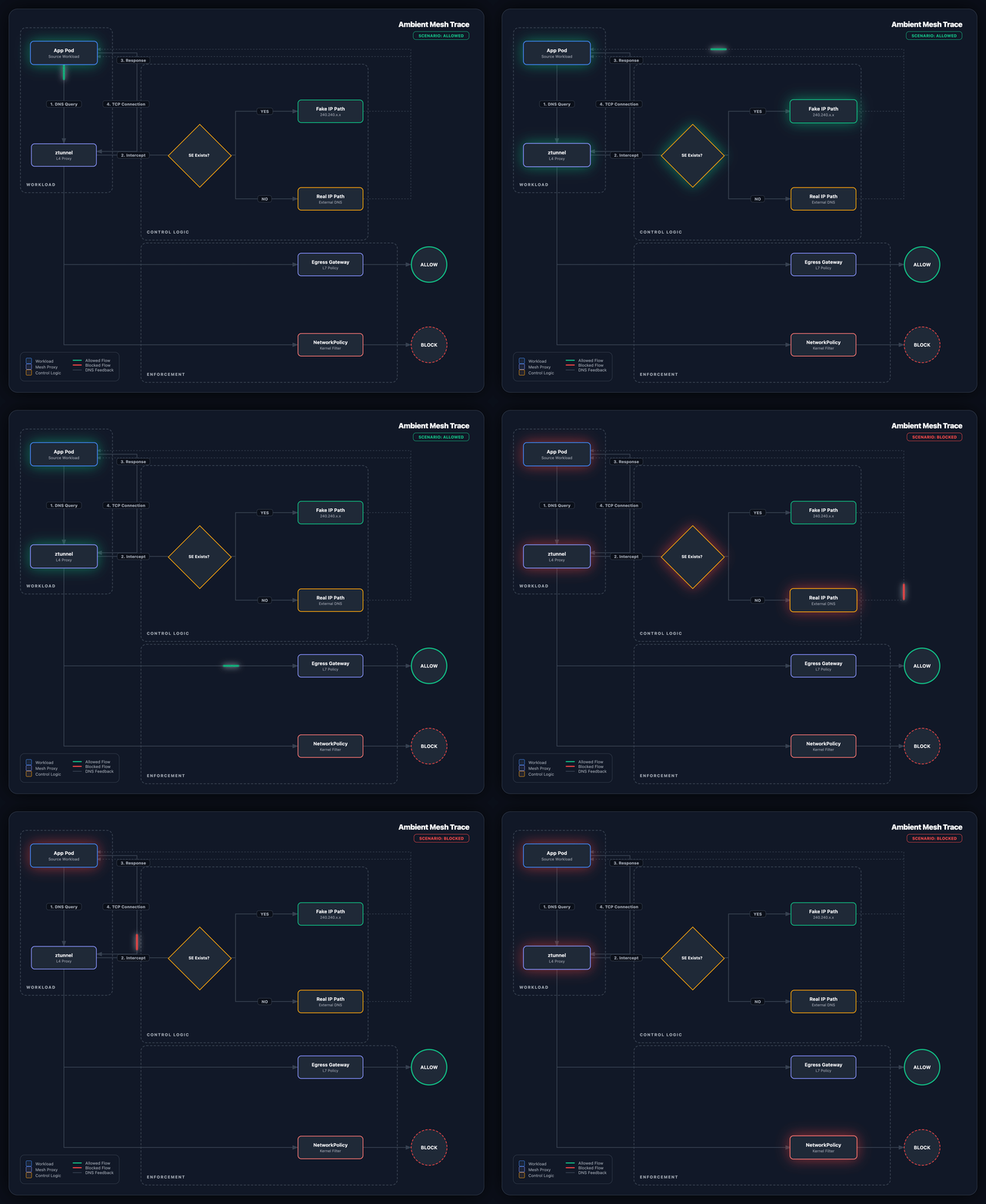
Fig 1: The Egress Flow with DNS Interception
To register an allowed external service and route it through the gateway:
# Eg 3: Registering an external service and linking to the Egress Gateway
apiVersion: networking.istio.io/v1
kind: ServiceEntry
metadata:
  name: external-api
  namespace: production
  labels:
    istio.io/use-waypoint: production-egress-gateway # Explicitly binds SE to our gateway
spec:
hosts:
- api.external.com
ports:
  - number: 443
    name: https
    protocol: HTTPS
location: MESH_EXTERNAL
resolution
The istio.io/use-waypoint label is what tells ztunnel to send this traffic through the gateway instead of passing it through directly.
Layer 4: the kernel-level backstop
Istio is powerful, but we wanted a safety net underneath it. If something bypassed the mesh entirely, we needed the network itself to catch it.
Kubernetes has its own network rules (NetworkPolicies) that work at a lower level than Istio, enforced by the Linux kernel on each node. We set two rules for every namespace:
Block all outbound traffic except DNS lookups and the internal Istio communication port (15008). Regular services cannot reach the internet.
Allow the Egress Gateway to reach the internet. This is the only component that can.
# Eg 4: Restricting pod egress to the Mesh and DNS only
kind: NetworkPolicy
apiVersion: networking.k8s.io/v1
metadata:
  name: deny-all-egress-except-mesh
  namespace: production
spec:
  podSelector: {} # Applies to all pods in the namespace
  policyTypes: ["Egress"]
egress:
  - to: # Allow DNS
      - namespaceSelector: {} # any namespace
    ports:
      - protocol: UDP
        port: 53
  - to: # Allow traffic to istio-system (for control plane/discovery)
      - namespaceSelector:
          matchLabels:
            kubernetes.io/metadata.name: istio-system
    ports: # Allow HBONE tunnel to Egress Gateway/Waypoint
      - protocol: TCP
        port: 15008
---
# Eg 5: Allowing the Egress Gateway to reach the internet
kind: NetworkPolicy
apiVersion: networking.k8s.io/v1
metadata:
  name: allow-egress-gateway-to-internet
  namespace: production
spec:
  podSelector:
    matchLabels:
      gateway.networking.k8s.io/gateway-name: production-egress-gateway
  policyTypes: ["Egress"]
egress:
  - {} # Unrestricted egress for the gateway itself
What we learned
Start with the why: We adopted Istio here not because it is interesting technology, but because the infrastructure could not give us the isolation we needed without months of back-and-forth. That framing matters when you are explaining the decision to a security team.
Ambient mode is worth it, but go in with open eyes: It removes a lot of operational overhead, but you will need the Waypoint Proxy for anything beyond basic traffic encryption, and VMs are not supported yet.
Istio and Kubernetes network rules are not the same thing: Istio works at the application layer. Kubernetes NetworkPolicies work at the network layer. You need both. Each catches things the other cannot.
Hardening a network on flat infrastructure is rarely a clean process. It starts with the messy reality of services talking freely to each other and involves a lot of careful testing with default-deny rules before you can trust what you have built. But by moving from "trust this IP" to "trust this verified identity", we turned a high-risk on-premises environment into something we could actually defend, without filing a single infrastructure ticket to get there.
In the end, the mesh isn’t just about traffic management. It’s about taking control of your security posture in environments where the underlying hardware doesn’t have your back.
Most teams treat the mesh as a traffic tool and the firewall as the security tool. On a flat network, that split will burn you. If your workloads are talking freely to each other right now, see how we approach this or let's fix that.
If you've moved a workload off AWS and onto on-prem infrastructure, you've likely run into this: the network isolation you got for free on the cloud does not exist on bare metal.
On AWS, Security Groups and VPC boundaries enforce service boundaries quietly in the background. Most teams never have to think about it. On-prem, the network is flat by default. Your payment service, your internal admin panel, your logging agent, and your customer-facing API all sit in the same cluster with nothing between them at the network layer.
You can get that isolation back through firewall rules and network segmentation, but on most on-prem setups that means working through infra teams with their own change management cycles. When you are mid-migration and trying to move fast, that is a meaningful constraint.
So on an EKS Hybrid deployment that we were running, we decided to solve this at the mesh layer instead. We already had Istio in the stack, and it gave us a way to enforce workload-level isolation without waiting on network-level changes. The security team reviewed the model and signed off, because the controls we built mapped directly to what they would have required from the firewall anyway. This talk covers the broader EKS Hybrid setup if you want that context.
This post is about how we built that isolation layer, layer by layer, and what we learned doing it.
Why Istio (even for small clusters)
You don't need a massive microservices architecture to benefit from Istio. Even in a small cluster, the mesh gives you three things that are hard to get any other way:
Zero-Trust Identity: Instead of trusting a service because it has a certain IP address, you trust it because it holds a cryptographically verified certificate tied to its identity. An attacker who gets onto the network cannot fake that.
Transparent Encryption: All traffic between services is encrypted automatically using mTLS (mutual TLS, meaning both sides verify each other), with no changes needed to your application code.
Deep Observability: You get a live map of which services are talking to which, with no instrumentation required.
Sidecar vs. Ambient: why we chose Ambient mode
There are two ways to run Istio. The traditional model injects a small proxy (called a sidecar) into every pod. Every service gets its own proxy, which handles encryption and policy enforcement for that service.
We chose the newer approach: Istio Ambient Mode. Instead of a proxy per pod, Ambient runs a single shared component called ztunnel on each node. It handles the same job (encrypting traffic, enforcing identity) but does it at the node level rather than inside every individual pod.
Feature | Sidecar Mode | Ambient Mode |
|---|---|---|
Deployment | One proxy inside every pod | One shared component per node |
Operational Overhead | High (restarts, extra memory per pod) | Low (transparent to pods) |
Encryption (mTLS) | Handled by each pod's own proxy | Handled by the node-level ztunnel |
Advanced HTTP features (L7) | Always available | Needs an extra component (Waypoint Proxy) |
Performance | Medium | Lower overhead for basic security |
What you give up with Ambient mode
Ambient mode is not a drop-in replacement for sidecars yet. The gaps worth knowing before you commit:
Advanced HTTP features (L7) need an extra component: Things like header-based routing, retries, and per-request metrics are not handled by ztunnel. You need to deploy a Waypoint Proxy for these.
Custom filters do not work on ztunnel: If you are using custom WebAssembly plugins or the
EnvoyFilterAPI today, those require a Waypoint Proxy too.Virtual Machines are not supported: Ambient only works for Kubernetes workloads. If you need to include VMs in the mesh, you still need the sidecar model.
Multi-cluster setups need extra care: Cross-cluster support between sidecar-mode and Ambient-mode clusters is in beta and has specific configuration requirements.
A mental model before you read further
With the tooling decided, here is how to think about what we are actually building before getting into the steps.
Think of your cluster like an office building where all the doors are unlocked by default. Anyone who gets inside can walk into any room. What we are doing here is:
Lock all the doors - by default, no service can receive traffic unless we explicitly say it can.
Replace keycards with staff badges - instead of "this IP address is allowed in", it becomes "this specific service, verified by a certificate, is allowed in." An attacker cannot fake a certificate just by spoofing an IP.
Control what leaves the building - nothing in the cluster can talk to the outside internet unless it goes through a single monitored exit point.
Add a physical deadbolt on top - a second layer of network rules at the operating system level, so that even if something bypassed Istio entirely, it still could not leave.
Each section below covers one of these four steps, in order.
The hardening journey
We did not roll this out in one go. Each layer addressed a gap the previous one left open. The principle throughout was the same: start with everything blocked, then open only what you can justify.
Layer 1: the global deny
The first step was to block all incoming traffic to every service in the mesh by default. We did this with a single Istio policy applied at the top level:
# Eg 1: The global ingress deny policy
apiVersion: security.istio.io/v1beta1
kind: AuthorizationPolicy
metadata:
  name: deny-all-ingress
  namespace: istio-system
spec
An empty spec with no rules means nothing is allowed. From here, we add explicit rules for every connection that should be permitted.
Note: The traditional sidecar setup has a useful "dry run" mode called Audit Mode. It logs traffic that would have been blocked, without actually blocking it, so you can check your rules are correct before enforcing them. Ambient mode in Istio 1.24 does not support this. We had to be more careful as a result, manually checking every allow rule and watching access logs closely before switching to strict enforcement.
Layer 2: SPIFFE identity as the perimeter
Once everything is blocked by default, we need a way to open specific connections. Rather than using IP addresses (which can change when pods restart), we use service identity.
Every service in the mesh gets a SPIFFE ID, a standard way of naming workload identities. SPIFFE stands for Secure Production Identity Framework for Everyone. It looks like this:
spiffe://cluster.local/ns/production/sa/frontend-sa
This identity is baked into the TLS certificate the service uses. Because Istio controls those certificates, a service cannot claim a different identity just by changing a label or configuration file.
Security is tied to the service's account, not to its IP address or location in the network.
Allowing the frontend service to call the backend then looks like this:
# Eg 2: Allowing Frontend to call Backend based on SPIFFE identity
apiVersion: security.istio.io/v1beta1
kind: AuthorizationPolicy
metadata:
  name: allow-frontend-to-backend
  namespace: production
spec:
  selector:
    matchLabels:
      app: backend-api
  action: ALLOW
  rules:
    - from:
        - source:
            principals: ["cluster.local/ns/production/sa/frontend-sa"
Layer 3: egress blocking and DNS interception
Locking down incoming traffic is only half the problem. On a flat network, a compromised service could still reach out to the internet freely. That is how data gets exfiltrated, how attackers establish a connection back to their infrastructure, and how services end up calling things they have no business calling.
We solved this by routing all outbound traffic through a dedicated exit point (an Egress Gateway) per namespace, and blocking everything else at the network level.
How the DNS side of this works
When a service tries to connect to an external address like api.external.com, here is what happens:
The ztunnel intercepts the DNS lookup before it goes out.
If we have declared
api.external.comas an allowed external service (via aServiceEntry), ztunnel returns a placeholder IP address. The service connects to that, and ztunnel routes the real connection through the Egress Gateway for inspection.If we have not declared that address, ztunnel lets the DNS request through but the actual connection gets dropped by the kernel-level network rules (covered in the next layer).
Fig 1: The Egress Flow with DNS Interception
To register an allowed external service and route it through the gateway:
# Eg 3: Registering an external service and linking to the Egress Gateway
apiVersion: networking.istio.io/v1
kind: ServiceEntry
metadata:
  name: external-api
  namespace: production
  labels:
    istio.io/use-waypoint: production-egress-gateway # Explicitly binds SE to our gateway
spec:
hosts:
- api.external.com
ports:
  - number: 443
    name: https
    protocol: HTTPS
location: MESH_EXTERNAL
resolution
The istio.io/use-waypoint label is what tells ztunnel to send this traffic through the gateway instead of passing it through directly.
Layer 4: the kernel-level backstop
Istio is powerful, but we wanted a safety net underneath it. If something bypassed the mesh entirely, we needed the network itself to catch it.
Kubernetes has its own network rules (NetworkPolicies) that work at a lower level than Istio, enforced by the Linux kernel on each node. We set two rules for every namespace:
Block all outbound traffic except DNS lookups and the internal Istio communication port (15008). Regular services cannot reach the internet.
Allow the Egress Gateway to reach the internet. This is the only component that can.
# Eg 4: Restricting pod egress to the Mesh and DNS only
kind: NetworkPolicy
apiVersion: networking.k8s.io/v1
metadata:
  name: deny-all-egress-except-mesh
  namespace: production
spec:
  podSelector: {} # Applies to all pods in the namespace
  policyTypes: ["Egress"]
egress:
  - to: # Allow DNS
      - namespaceSelector: {} # any namespace
    ports:
      - protocol: UDP
        port: 53
  - to: # Allow traffic to istio-system (for control plane/discovery)
      - namespaceSelector:
          matchLabels:
            kubernetes.io/metadata.name: istio-system
    ports: # Allow HBONE tunnel to Egress Gateway/Waypoint
      - protocol: TCP
        port: 15008
---
# Eg 5: Allowing the Egress Gateway to reach the internet
kind: NetworkPolicy
apiVersion: networking.k8s.io/v1
metadata:
  name: allow-egress-gateway-to-internet
  namespace: production
spec:
  podSelector:
    matchLabels:
      gateway.networking.k8s.io/gateway-name: production-egress-gateway
  policyTypes: ["Egress"]
egress:
  - {} # Unrestricted egress for the gateway itself
What we learned
Start with the why: We adopted Istio here not because it is interesting technology, but because the infrastructure could not give us the isolation we needed without months of back-and-forth. That framing matters when you are explaining the decision to a security team.
Ambient mode is worth it, but go in with open eyes: It removes a lot of operational overhead, but you will need the Waypoint Proxy for anything beyond basic traffic encryption, and VMs are not supported yet.
Istio and Kubernetes network rules are not the same thing: Istio works at the application layer. Kubernetes NetworkPolicies work at the network layer. You need both. Each catches things the other cannot.
Hardening a network on flat infrastructure is rarely a clean process. It starts with the messy reality of services talking freely to each other and involves a lot of careful testing with default-deny rules before you can trust what you have built. But by moving from "trust this IP" to "trust this verified identity", we turned a high-risk on-premises environment into something we could actually defend, without filing a single infrastructure ticket to get there.
In the end, the mesh isn’t just about traffic management. It’s about taking control of your security posture in environments where the underlying hardware doesn’t have your back.
Most teams treat the mesh as a traffic tool and the firewall as the security tool. On a flat network, that split will burn you. If your workloads are talking freely to each other right now, see how we approach this or let's fix that.
If you've moved a workload off AWS and onto on-prem infrastructure, you've likely run into this: the network isolation you got for free on the cloud does not exist on bare metal.
On AWS, Security Groups and VPC boundaries enforce service boundaries quietly in the background. Most teams never have to think about it. On-prem, the network is flat by default. Your payment service, your internal admin panel, your logging agent, and your customer-facing API all sit in the same cluster with nothing between them at the network layer.
You can get that isolation back through firewall rules and network segmentation, but on most on-prem setups that means working through infra teams with their own change management cycles. When you are mid-migration and trying to move fast, that is a meaningful constraint.
So on an EKS Hybrid deployment that we were running, we decided to solve this at the mesh layer instead. We already had Istio in the stack, and it gave us a way to enforce workload-level isolation without waiting on network-level changes. The security team reviewed the model and signed off, because the controls we built mapped directly to what they would have required from the firewall anyway. This talk covers the broader EKS Hybrid setup if you want that context.
This post is about how we built that isolation layer, layer by layer, and what we learned doing it.
Why Istio (even for small clusters)
You don't need a massive microservices architecture to benefit from Istio. Even in a small cluster, the mesh gives you three things that are hard to get any other way:
Zero-Trust Identity: Instead of trusting a service because it has a certain IP address, you trust it because it holds a cryptographically verified certificate tied to its identity. An attacker who gets onto the network cannot fake that.
Transparent Encryption: All traffic between services is encrypted automatically using mTLS (mutual TLS, meaning both sides verify each other), with no changes needed to your application code.
Deep Observability: You get a live map of which services are talking to which, with no instrumentation required.
Sidecar vs. Ambient: why we chose Ambient mode
There are two ways to run Istio. The traditional model injects a small proxy (called a sidecar) into every pod. Every service gets its own proxy, which handles encryption and policy enforcement for that service.
We chose the newer approach: Istio Ambient Mode. Instead of a proxy per pod, Ambient runs a single shared component called ztunnel on each node. It handles the same job (encrypting traffic, enforcing identity) but does it at the node level rather than inside every individual pod.
Feature | Sidecar Mode | Ambient Mode |
|---|---|---|
Deployment | One proxy inside every pod | One shared component per node |
Operational Overhead | High (restarts, extra memory per pod) | Low (transparent to pods) |
Encryption (mTLS) | Handled by each pod's own proxy | Handled by the node-level ztunnel |
Advanced HTTP features (L7) | Always available | Needs an extra component (Waypoint Proxy) |
Performance | Medium | Lower overhead for basic security |
What you give up with Ambient mode
Ambient mode is not a drop-in replacement for sidecars yet. The gaps worth knowing before you commit:
Advanced HTTP features (L7) need an extra component: Things like header-based routing, retries, and per-request metrics are not handled by ztunnel. You need to deploy a Waypoint Proxy for these.
Custom filters do not work on ztunnel: If you are using custom WebAssembly plugins or the
EnvoyFilterAPI today, those require a Waypoint Proxy too.Virtual Machines are not supported: Ambient only works for Kubernetes workloads. If you need to include VMs in the mesh, you still need the sidecar model.
Multi-cluster setups need extra care: Cross-cluster support between sidecar-mode and Ambient-mode clusters is in beta and has specific configuration requirements.
A mental model before you read further
With the tooling decided, here is how to think about what we are actually building before getting into the steps.
Think of your cluster like an office building where all the doors are unlocked by default. Anyone who gets inside can walk into any room. What we are doing here is:
Lock all the doors - by default, no service can receive traffic unless we explicitly say it can.
Replace keycards with staff badges - instead of "this IP address is allowed in", it becomes "this specific service, verified by a certificate, is allowed in." An attacker cannot fake a certificate just by spoofing an IP.
Control what leaves the building - nothing in the cluster can talk to the outside internet unless it goes through a single monitored exit point.
Add a physical deadbolt on top - a second layer of network rules at the operating system level, so that even if something bypassed Istio entirely, it still could not leave.
Each section below covers one of these four steps, in order.
The hardening journey
We did not roll this out in one go. Each layer addressed a gap the previous one left open. The principle throughout was the same: start with everything blocked, then open only what you can justify.
Layer 1: the global deny
The first step was to block all incoming traffic to every service in the mesh by default. We did this with a single Istio policy applied at the top level:
# Eg 1: The global ingress deny policy
apiVersion: security.istio.io/v1beta1
kind: AuthorizationPolicy
metadata:
  name: deny-all-ingress
  namespace: istio-system
spec
An empty spec with no rules means nothing is allowed. From here, we add explicit rules for every connection that should be permitted.
Note: The traditional sidecar setup has a useful "dry run" mode called Audit Mode. It logs traffic that would have been blocked, without actually blocking it, so you can check your rules are correct before enforcing them. Ambient mode in Istio 1.24 does not support this. We had to be more careful as a result, manually checking every allow rule and watching access logs closely before switching to strict enforcement.
Layer 2: SPIFFE identity as the perimeter
Once everything is blocked by default, we need a way to open specific connections. Rather than using IP addresses (which can change when pods restart), we use service identity.
Every service in the mesh gets a SPIFFE ID, a standard way of naming workload identities. SPIFFE stands for Secure Production Identity Framework for Everyone. It looks like this:
spiffe://cluster.local/ns/production/sa/frontend-sa
This identity is baked into the TLS certificate the service uses. Because Istio controls those certificates, a service cannot claim a different identity just by changing a label or configuration file.
Security is tied to the service's account, not to its IP address or location in the network.
Allowing the frontend service to call the backend then looks like this:
# Eg 2: Allowing Frontend to call Backend based on SPIFFE identity
apiVersion: security.istio.io/v1beta1
kind: AuthorizationPolicy
metadata:
  name: allow-frontend-to-backend
  namespace: production
spec:
  selector:
    matchLabels:
      app: backend-api
  action: ALLOW
  rules:
    - from:
        - source:
            principals: ["cluster.local/ns/production/sa/frontend-sa"
Layer 3: egress blocking and DNS interception
Locking down incoming traffic is only half the problem. On a flat network, a compromised service could still reach out to the internet freely. That is how data gets exfiltrated, how attackers establish a connection back to their infrastructure, and how services end up calling things they have no business calling.
We solved this by routing all outbound traffic through a dedicated exit point (an Egress Gateway) per namespace, and blocking everything else at the network level.
How the DNS side of this works
When a service tries to connect to an external address like api.external.com, here is what happens:
The ztunnel intercepts the DNS lookup before it goes out.
If we have declared
api.external.comas an allowed external service (via aServiceEntry), ztunnel returns a placeholder IP address. The service connects to that, and ztunnel routes the real connection through the Egress Gateway for inspection.If we have not declared that address, ztunnel lets the DNS request through but the actual connection gets dropped by the kernel-level network rules (covered in the next layer).
Fig 1: The Egress Flow with DNS Interception
To register an allowed external service and route it through the gateway:
# Eg 3: Registering an external service and linking to the Egress Gateway
apiVersion: networking.istio.io/v1
kind: ServiceEntry
metadata:
  name: external-api
  namespace: production
  labels:
    istio.io/use-waypoint: production-egress-gateway # Explicitly binds SE to our gateway
spec:
hosts:
- api.external.com
ports:
  - number: 443
    name: https
    protocol: HTTPS
location: MESH_EXTERNAL
resolution
The istio.io/use-waypoint label is what tells ztunnel to send this traffic through the gateway instead of passing it through directly.
Layer 4: the kernel-level backstop
Istio is powerful, but we wanted a safety net underneath it. If something bypassed the mesh entirely, we needed the network itself to catch it.
Kubernetes has its own network rules (NetworkPolicies) that work at a lower level than Istio, enforced by the Linux kernel on each node. We set two rules for every namespace:
Block all outbound traffic except DNS lookups and the internal Istio communication port (15008). Regular services cannot reach the internet.
Allow the Egress Gateway to reach the internet. This is the only component that can.
# Eg 4: Restricting pod egress to the Mesh and DNS only
kind: NetworkPolicy
apiVersion: networking.k8s.io/v1
metadata:
  name: deny-all-egress-except-mesh
  namespace: production
spec:
  podSelector: {} # Applies to all pods in the namespace
  policyTypes: ["Egress"]
egress:
  - to: # Allow DNS
      - namespaceSelector: {} # any namespace
    ports:
      - protocol: UDP
        port: 53
  - to: # Allow traffic to istio-system (for control plane/discovery)
      - namespaceSelector:
          matchLabels:
            kubernetes.io/metadata.name: istio-system
    ports: # Allow HBONE tunnel to Egress Gateway/Waypoint
      - protocol: TCP
        port: 15008
---
# Eg 5: Allowing the Egress Gateway to reach the internet
kind: NetworkPolicy
apiVersion: networking.k8s.io/v1
metadata:
  name: allow-egress-gateway-to-internet
  namespace: production
spec:
  podSelector:
    matchLabels:
      gateway.networking.k8s.io/gateway-name: production-egress-gateway
  policyTypes: ["Egress"]
egress:
  - {} # Unrestricted egress for the gateway itself
What we learned
Start with the why: We adopted Istio here not because it is interesting technology, but because the infrastructure could not give us the isolation we needed without months of back-and-forth. That framing matters when you are explaining the decision to a security team.
Ambient mode is worth it, but go in with open eyes: It removes a lot of operational overhead, but you will need the Waypoint Proxy for anything beyond basic traffic encryption, and VMs are not supported yet.
Istio and Kubernetes network rules are not the same thing: Istio works at the application layer. Kubernetes NetworkPolicies work at the network layer. You need both. Each catches things the other cannot.
Hardening a network on flat infrastructure is rarely a clean process. It starts with the messy reality of services talking freely to each other and involves a lot of careful testing with default-deny rules before you can trust what you have built. But by moving from "trust this IP" to "trust this verified identity", we turned a high-risk on-premises environment into something we could actually defend, without filing a single infrastructure ticket to get there.
In the end, the mesh isn’t just about traffic management. It’s about taking control of your security posture in environments where the underlying hardware doesn’t have your back.
Most teams treat the mesh as a traffic tool and the firewall as the security tool. On a flat network, that split will burn you. If your workloads are talking freely to each other right now, see how we approach this or let's fix that.
If you've moved a workload off AWS and onto on-prem infrastructure, you've likely run into this: the network isolation you got for free on the cloud does not exist on bare metal.
On AWS, Security Groups and VPC boundaries enforce service boundaries quietly in the background. Most teams never have to think about it. On-prem, the network is flat by default. Your payment service, your internal admin panel, your logging agent, and your customer-facing API all sit in the same cluster with nothing between them at the network layer.
You can get that isolation back through firewall rules and network segmentation, but on most on-prem setups that means working through infra teams with their own change management cycles. When you are mid-migration and trying to move fast, that is a meaningful constraint.
So on an EKS Hybrid deployment that we were running, we decided to solve this at the mesh layer instead. We already had Istio in the stack, and it gave us a way to enforce workload-level isolation without waiting on network-level changes. The security team reviewed the model and signed off, because the controls we built mapped directly to what they would have required from the firewall anyway. This talk covers the broader EKS Hybrid setup if you want that context.
This post is about how we built that isolation layer, layer by layer, and what we learned doing it.
Why Istio (even for small clusters)
You don't need a massive microservices architecture to benefit from Istio. Even in a small cluster, the mesh gives you three things that are hard to get any other way:
Zero-Trust Identity: Instead of trusting a service because it has a certain IP address, you trust it because it holds a cryptographically verified certificate tied to its identity. An attacker who gets onto the network cannot fake that.
Transparent Encryption: All traffic between services is encrypted automatically using mTLS (mutual TLS, meaning both sides verify each other), with no changes needed to your application code.
Deep Observability: You get a live map of which services are talking to which, with no instrumentation required.
Sidecar vs. Ambient: why we chose Ambient mode
There are two ways to run Istio. The traditional model injects a small proxy (called a sidecar) into every pod. Every service gets its own proxy, which handles encryption and policy enforcement for that service.
We chose the newer approach: Istio Ambient Mode. Instead of a proxy per pod, Ambient runs a single shared component called ztunnel on each node. It handles the same job (encrypting traffic, enforcing identity) but does it at the node level rather than inside every individual pod.
Feature | Sidecar Mode | Ambient Mode |
|---|---|---|
Deployment | One proxy inside every pod | One shared component per node |
Operational Overhead | High (restarts, extra memory per pod) | Low (transparent to pods) |
Encryption (mTLS) | Handled by each pod's own proxy | Handled by the node-level ztunnel |
Advanced HTTP features (L7) | Always available | Needs an extra component (Waypoint Proxy) |
Performance | Medium | Lower overhead for basic security |
What you give up with Ambient mode
Ambient mode is not a drop-in replacement for sidecars yet. The gaps worth knowing before you commit:
Advanced HTTP features (L7) need an extra component: Things like header-based routing, retries, and per-request metrics are not handled by ztunnel. You need to deploy a Waypoint Proxy for these.
Custom filters do not work on ztunnel: If you are using custom WebAssembly plugins or the
EnvoyFilterAPI today, those require a Waypoint Proxy too.Virtual Machines are not supported: Ambient only works for Kubernetes workloads. If you need to include VMs in the mesh, you still need the sidecar model.
Multi-cluster setups need extra care: Cross-cluster support between sidecar-mode and Ambient-mode clusters is in beta and has specific configuration requirements.
A mental model before you read further
With the tooling decided, here is how to think about what we are actually building before getting into the steps.
Think of your cluster like an office building where all the doors are unlocked by default. Anyone who gets inside can walk into any room. What we are doing here is:
Lock all the doors - by default, no service can receive traffic unless we explicitly say it can.
Replace keycards with staff badges - instead of "this IP address is allowed in", it becomes "this specific service, verified by a certificate, is allowed in." An attacker cannot fake a certificate just by spoofing an IP.
Control what leaves the building - nothing in the cluster can talk to the outside internet unless it goes through a single monitored exit point.
Add a physical deadbolt on top - a second layer of network rules at the operating system level, so that even if something bypassed Istio entirely, it still could not leave.
Each section below covers one of these four steps, in order.
The hardening journey
We did not roll this out in one go. Each layer addressed a gap the previous one left open. The principle throughout was the same: start with everything blocked, then open only what you can justify.
Layer 1: the global deny
The first step was to block all incoming traffic to every service in the mesh by default. We did this with a single Istio policy applied at the top level:
# Eg 1: The global ingress deny policy
apiVersion: security.istio.io/v1beta1
kind: AuthorizationPolicy
metadata:
  name: deny-all-ingress
  namespace: istio-system
spec
An empty spec with no rules means nothing is allowed. From here, we add explicit rules for every connection that should be permitted.
Note: The traditional sidecar setup has a useful "dry run" mode called Audit Mode. It logs traffic that would have been blocked, without actually blocking it, so you can check your rules are correct before enforcing them. Ambient mode in Istio 1.24 does not support this. We had to be more careful as a result, manually checking every allow rule and watching access logs closely before switching to strict enforcement.
Layer 2: SPIFFE identity as the perimeter
Once everything is blocked by default, we need a way to open specific connections. Rather than using IP addresses (which can change when pods restart), we use service identity.
Every service in the mesh gets a SPIFFE ID, a standard way of naming workload identities. SPIFFE stands for Secure Production Identity Framework for Everyone. It looks like this:
spiffe://cluster.local/ns/production/sa/frontend-sa
This identity is baked into the TLS certificate the service uses. Because Istio controls those certificates, a service cannot claim a different identity just by changing a label or configuration file.
Security is tied to the service's account, not to its IP address or location in the network.
Allowing the frontend service to call the backend then looks like this:
# Eg 2: Allowing Frontend to call Backend based on SPIFFE identity
apiVersion: security.istio.io/v1beta1
kind: AuthorizationPolicy
metadata:
  name: allow-frontend-to-backend
  namespace: production
spec:
  selector:
    matchLabels:
      app: backend-api
  action: ALLOW
  rules:
    - from:
        - source:
            principals: ["cluster.local/ns/production/sa/frontend-sa"
Layer 3: egress blocking and DNS interception
Locking down incoming traffic is only half the problem. On a flat network, a compromised service could still reach out to the internet freely. That is how data gets exfiltrated, how attackers establish a connection back to their infrastructure, and how services end up calling things they have no business calling.
We solved this by routing all outbound traffic through a dedicated exit point (an Egress Gateway) per namespace, and blocking everything else at the network level.
How the DNS side of this works
When a service tries to connect to an external address like api.external.com, here is what happens:
The ztunnel intercepts the DNS lookup before it goes out.
If we have declared
api.external.comas an allowed external service (via aServiceEntry), ztunnel returns a placeholder IP address. The service connects to that, and ztunnel routes the real connection through the Egress Gateway for inspection.If we have not declared that address, ztunnel lets the DNS request through but the actual connection gets dropped by the kernel-level network rules (covered in the next layer).
Fig 1: The Egress Flow with DNS Interception
To register an allowed external service and route it through the gateway:
# Eg 3: Registering an external service and linking to the Egress Gateway
apiVersion: networking.istio.io/v1
kind: ServiceEntry
metadata:
  name: external-api
  namespace: production
  labels:
    istio.io/use-waypoint: production-egress-gateway # Explicitly binds SE to our gateway
spec:
hosts:
- api.external.com
ports:
  - number: 443
    name: https
    protocol: HTTPS
location: MESH_EXTERNAL
resolution
The istio.io/use-waypoint label is what tells ztunnel to send this traffic through the gateway instead of passing it through directly.
Layer 4: the kernel-level backstop
Istio is powerful, but we wanted a safety net underneath it. If something bypassed the mesh entirely, we needed the network itself to catch it.
Kubernetes has its own network rules (NetworkPolicies) that work at a lower level than Istio, enforced by the Linux kernel on each node. We set two rules for every namespace:
Block all outbound traffic except DNS lookups and the internal Istio communication port (15008). Regular services cannot reach the internet.
Allow the Egress Gateway to reach the internet. This is the only component that can.
# Eg 4: Restricting pod egress to the Mesh and DNS only
kind: NetworkPolicy
apiVersion: networking.k8s.io/v1
metadata:
  name: deny-all-egress-except-mesh
  namespace: production
spec:
  podSelector: {} # Applies to all pods in the namespace
  policyTypes: ["Egress"]
egress:
  - to: # Allow DNS
      - namespaceSelector: {} # any namespace
    ports:
      - protocol: UDP
        port: 53
  - to: # Allow traffic to istio-system (for control plane/discovery)
      - namespaceSelector:
          matchLabels:
            kubernetes.io/metadata.name: istio-system
    ports: # Allow HBONE tunnel to Egress Gateway/Waypoint
      - protocol: TCP
        port: 15008
---
# Eg 5: Allowing the Egress Gateway to reach the internet
kind: NetworkPolicy
apiVersion: networking.k8s.io/v1
metadata:
  name: allow-egress-gateway-to-internet
  namespace: production
spec:
  podSelector:
    matchLabels:
      gateway.networking.k8s.io/gateway-name: production-egress-gateway
  policyTypes: ["Egress"]
egress:
  - {} # Unrestricted egress for the gateway itself
What we learned
Start with the why: We adopted Istio here not because it is interesting technology, but because the infrastructure could not give us the isolation we needed without months of back-and-forth. That framing matters when you are explaining the decision to a security team.
Ambient mode is worth it, but go in with open eyes: It removes a lot of operational overhead, but you will need the Waypoint Proxy for anything beyond basic traffic encryption, and VMs are not supported yet.
Istio and Kubernetes network rules are not the same thing: Istio works at the application layer. Kubernetes NetworkPolicies work at the network layer. You need both. Each catches things the other cannot.
Hardening a network on flat infrastructure is rarely a clean process. It starts with the messy reality of services talking freely to each other and involves a lot of careful testing with default-deny rules before you can trust what you have built. But by moving from "trust this IP" to "trust this verified identity", we turned a high-risk on-premises environment into something we could actually defend, without filing a single infrastructure ticket to get there.
In the end, the mesh isn’t just about traffic management. It’s about taking control of your security posture in environments where the underlying hardware doesn’t have your back.
Most teams treat the mesh as a traffic tool and the firewall as the security tool. On a flat network, that split will burn you. If your workloads are talking freely to each other right now, see how we approach this or let's fix that.
If you've moved a workload off AWS and onto on-prem infrastructure, you've likely run into this: the network isolation you got for free on the cloud does not exist on bare metal.
On AWS, Security Groups and VPC boundaries enforce service boundaries quietly in the background. Most teams never have to think about it. On-prem, the network is flat by default. Your payment service, your internal admin panel, your logging agent, and your customer-facing API all sit in the same cluster with nothing between them at the network layer.
You can get that isolation back through firewall rules and network segmentation, but on most on-prem setups that means working through infra teams with their own change management cycles. When you are mid-migration and trying to move fast, that is a meaningful constraint.
So on an EKS Hybrid deployment that we were running, we decided to solve this at the mesh layer instead. We already had Istio in the stack, and it gave us a way to enforce workload-level isolation without waiting on network-level changes. The security team reviewed the model and signed off, because the controls we built mapped directly to what they would have required from the firewall anyway. This talk covers the broader EKS Hybrid setup if you want that context.
This post is about how we built that isolation layer, layer by layer, and what we learned doing it.
Why Istio (even for small clusters)
You don't need a massive microservices architecture to benefit from Istio. Even in a small cluster, the mesh gives you three things that are hard to get any other way:
Zero-Trust Identity: Instead of trusting a service because it has a certain IP address, you trust it because it holds a cryptographically verified certificate tied to its identity. An attacker who gets onto the network cannot fake that.
Transparent Encryption: All traffic between services is encrypted automatically using mTLS (mutual TLS, meaning both sides verify each other), with no changes needed to your application code.
Deep Observability: You get a live map of which services are talking to which, with no instrumentation required.
Sidecar vs. Ambient: why we chose Ambient mode
There are two ways to run Istio. The traditional model injects a small proxy (called a sidecar) into every pod. Every service gets its own proxy, which handles encryption and policy enforcement for that service.
We chose the newer approach: Istio Ambient Mode. Instead of a proxy per pod, Ambient runs a single shared component called ztunnel on each node. It handles the same job (encrypting traffic, enforcing identity) but does it at the node level rather than inside every individual pod.
Feature | Sidecar Mode | Ambient Mode |
|---|---|---|
Deployment | One proxy inside every pod | One shared component per node |
Operational Overhead | High (restarts, extra memory per pod) | Low (transparent to pods) |
Encryption (mTLS) | Handled by each pod's own proxy | Handled by the node-level ztunnel |
Advanced HTTP features (L7) | Always available | Needs an extra component (Waypoint Proxy) |
Performance | Medium | Lower overhead for basic security |
What you give up with Ambient mode
Ambient mode is not a drop-in replacement for sidecars yet. The gaps worth knowing before you commit:
Advanced HTTP features (L7) need an extra component: Things like header-based routing, retries, and per-request metrics are not handled by ztunnel. You need to deploy a Waypoint Proxy for these.
Custom filters do not work on ztunnel: If you are using custom WebAssembly plugins or the
EnvoyFilterAPI today, those require a Waypoint Proxy too.Virtual Machines are not supported: Ambient only works for Kubernetes workloads. If you need to include VMs in the mesh, you still need the sidecar model.
Multi-cluster setups need extra care: Cross-cluster support between sidecar-mode and Ambient-mode clusters is in beta and has specific configuration requirements.
A mental model before you read further
With the tooling decided, here is how to think about what we are actually building before getting into the steps.
Think of your cluster like an office building where all the doors are unlocked by default. Anyone who gets inside can walk into any room. What we are doing here is:
Lock all the doors - by default, no service can receive traffic unless we explicitly say it can.
Replace keycards with staff badges - instead of "this IP address is allowed in", it becomes "this specific service, verified by a certificate, is allowed in." An attacker cannot fake a certificate just by spoofing an IP.
Control what leaves the building - nothing in the cluster can talk to the outside internet unless it goes through a single monitored exit point.
Add a physical deadbolt on top - a second layer of network rules at the operating system level, so that even if something bypassed Istio entirely, it still could not leave.
Each section below covers one of these four steps, in order.
The hardening journey
We did not roll this out in one go. Each layer addressed a gap the previous one left open. The principle throughout was the same: start with everything blocked, then open only what you can justify.
Layer 1: the global deny
The first step was to block all incoming traffic to every service in the mesh by default. We did this with a single Istio policy applied at the top level:
# Eg 1: The global ingress deny policy
apiVersion: security.istio.io/v1beta1
kind: AuthorizationPolicy
metadata:
  name: deny-all-ingress
  namespace: istio-system
spec
An empty spec with no rules means nothing is allowed. From here, we add explicit rules for every connection that should be permitted.
Note: The traditional sidecar setup has a useful "dry run" mode called Audit Mode. It logs traffic that would have been blocked, without actually blocking it, so you can check your rules are correct before enforcing them. Ambient mode in Istio 1.24 does not support this. We had to be more careful as a result, manually checking every allow rule and watching access logs closely before switching to strict enforcement.
Layer 2: SPIFFE identity as the perimeter
Once everything is blocked by default, we need a way to open specific connections. Rather than using IP addresses (which can change when pods restart), we use service identity.
Every service in the mesh gets a SPIFFE ID, a standard way of naming workload identities. SPIFFE stands for Secure Production Identity Framework for Everyone. It looks like this:
spiffe://cluster.local/ns/production/sa/frontend-sa
This identity is baked into the TLS certificate the service uses. Because Istio controls those certificates, a service cannot claim a different identity just by changing a label or configuration file.
Security is tied to the service's account, not to its IP address or location in the network.
Allowing the frontend service to call the backend then looks like this:
# Eg 2: Allowing Frontend to call Backend based on SPIFFE identity
apiVersion: security.istio.io/v1beta1
kind: AuthorizationPolicy
metadata:
  name: allow-frontend-to-backend
  namespace: production
spec:
  selector:
    matchLabels:
      app: backend-api
  action: ALLOW
  rules:
    - from:
        - source:
            principals: ["cluster.local/ns/production/sa/frontend-sa"
Layer 3: egress blocking and DNS interception
Locking down incoming traffic is only half the problem. On a flat network, a compromised service could still reach out to the internet freely. That is how data gets exfiltrated, how attackers establish a connection back to their infrastructure, and how services end up calling things they have no business calling.
We solved this by routing all outbound traffic through a dedicated exit point (an Egress Gateway) per namespace, and blocking everything else at the network level.
How the DNS side of this works
When a service tries to connect to an external address like api.external.com, here is what happens:
The ztunnel intercepts the DNS lookup before it goes out.
If we have declared
api.external.comas an allowed external service (via aServiceEntry), ztunnel returns a placeholder IP address. The service connects to that, and ztunnel routes the real connection through the Egress Gateway for inspection.If we have not declared that address, ztunnel lets the DNS request through but the actual connection gets dropped by the kernel-level network rules (covered in the next layer).
Fig 1: The Egress Flow with DNS Interception
To register an allowed external service and route it through the gateway:
# Eg 3: Registering an external service and linking to the Egress Gateway
apiVersion: networking.istio.io/v1
kind: ServiceEntry
metadata:
  name: external-api
  namespace: production
  labels:
    istio.io/use-waypoint: production-egress-gateway # Explicitly binds SE to our gateway
spec:
hosts:
- api.external.com
ports:
  - number: 443
    name: https
    protocol: HTTPS
location: MESH_EXTERNAL
resolution
The istio.io/use-waypoint label is what tells ztunnel to send this traffic through the gateway instead of passing it through directly.
Layer 4: the kernel-level backstop
Istio is powerful, but we wanted a safety net underneath it. If something bypassed the mesh entirely, we needed the network itself to catch it.
Kubernetes has its own network rules (NetworkPolicies) that work at a lower level than Istio, enforced by the Linux kernel on each node. We set two rules for every namespace:
Block all outbound traffic except DNS lookups and the internal Istio communication port (15008). Regular services cannot reach the internet.
Allow the Egress Gateway to reach the internet. This is the only component that can.
# Eg 4: Restricting pod egress to the Mesh and DNS only
kind: NetworkPolicy
apiVersion: networking.k8s.io/v1
metadata:
  name: deny-all-egress-except-mesh
  namespace: production
spec:
  podSelector: {} # Applies to all pods in the namespace
  policyTypes: ["Egress"]
egress:
  - to: # Allow DNS
      - namespaceSelector: {} # any namespace
    ports:
      - protocol: UDP
        port: 53
  - to: # Allow traffic to istio-system (for control plane/discovery)
      - namespaceSelector:
          matchLabels:
            kubernetes.io/metadata.name: istio-system
    ports: # Allow HBONE tunnel to Egress Gateway/Waypoint
      - protocol: TCP
        port: 15008
---
# Eg 5: Allowing the Egress Gateway to reach the internet
kind: NetworkPolicy
apiVersion: networking.k8s.io/v1
metadata:
  name: allow-egress-gateway-to-internet
  namespace: production
spec:
  podSelector:
    matchLabels:
      gateway.networking.k8s.io/gateway-name: production-egress-gateway
  policyTypes: ["Egress"]
egress:
  - {} # Unrestricted egress for the gateway itself
What we learned
Start with the why: We adopted Istio here not because it is interesting technology, but because the infrastructure could not give us the isolation we needed without months of back-and-forth. That framing matters when you are explaining the decision to a security team.
Ambient mode is worth it, but go in with open eyes: It removes a lot of operational overhead, but you will need the Waypoint Proxy for anything beyond basic traffic encryption, and VMs are not supported yet.
Istio and Kubernetes network rules are not the same thing: Istio works at the application layer. Kubernetes NetworkPolicies work at the network layer. You need both. Each catches things the other cannot.
Hardening a network on flat infrastructure is rarely a clean process. It starts with the messy reality of services talking freely to each other and involves a lot of careful testing with default-deny rules before you can trust what you have built. But by moving from "trust this IP" to "trust this verified identity", we turned a high-risk on-premises environment into something we could actually defend, without filing a single infrastructure ticket to get there.
In the end, the mesh isn’t just about traffic management. It’s about taking control of your security posture in environments where the underlying hardware doesn’t have your back.
Most teams treat the mesh as a traffic tool and the firewall as the security tool. On a flat network, that split will burn you. If your workloads are talking freely to each other right now, see how we approach this or let's fix that.
Share
Share
On this page
Section
On this page
In this post
section