
This post shows how an approach to test TCP reachability on a box with no curl, wget or nc taught me how bash built-ins and shell parsers work, and why the same command behaves differently in bash and zsh.
Checking connectivity on a locked-down VM without curl
I was on a locked-down VM. We wanted to update the metrics collector running on it to ship data to a new endpoint, and before changing anything I needed to answer two things from the VM itself:
Can this VM reach the new endpoint on
:443at all?Once it does, is the collector actually shipping data? Its local metrics endpoint on
:8888would tell me.
Both are ordinary “hit an HTTP endpoint” and “is this port open” checks. The problem was the toolbox. curl was permission-denied, python3 was permission-denied, and there was no wget or nc I could rely on.
So I asked an LLM how to check connectivity with nothing but the shell. It gave me this:
exec 3I ran it, it worked, and later I stopped to understand why. This post walks the same path: use it first, take it apart at the end.
How the bash /dev/tcp syntax works
exec 3Read this as: dial this TCP connection, keep it open as FD 3, so I can send on it and then receive on it.
execapplies the redirect to the current shell so the connection stays open for later commands.3is the file descriptor number. 0, 1, and 2 are stdin, stdout, stderr, so pick 3 or higher.<>opens the descriptor for both reading and writing. A socket needs both: you write the request, then read the response./dev/tcp/localhost/8888is the host and port.
After that line, FD 3 is the connection. Write to it with >&3, read from it with <&3.

Fig 1: After exec 3<>/dev/tcp/host/port, FD 3 in the current shell is a live TCP socket. printf >&3 writes the request on it and cat <&3 reads the response.
Checking if a TCP port is open with bash
The smallest useful test is “can I open a connection to this host and port”. Wrap the open in a subshell so it closes immediately, and branch on the exit code:
(exec 3<>/dev/tcp/HOST/443) && echo OPEN || echo
A closed or unreachable port gives you the failure branch with a specific reason on stderr: Connection refused, Connection timed out, or Cannot assign requested address. The reason matters when you debug, so read it rather than only trusting OPEN/FAIL.
This works on :443, but only as a reachability test. /dev/tcp speaks plaintext TCP. It does not do TLS, so you cannot fetch HTTPS content with it. You can confirm the socket opens and infer that egress is allowed.
For the VM, the reachability check to the new endpoint on :443 timed out. That located the problem before I touched any config: the box had no egress to the endpoint at all.
Sending an HTTP request over /dev/tcp
The collector’s own metrics on :8888 are plain HTTP, so I could read the actual body. Four steps: open, send the request, read the response, close.
exec 3<>/dev/tcp/localhost/8888
printf 'GET /metrics HTTP/1.0
Host: localhost

' >&3
cat <&3
exec 3
Four details make this work:
Use
printf, notecho. HTTP request lines end in carriage-return + line-feed (\r\n), and the request ends with a blank line, so you need a trailing\r\n\r\n.printfemits those escapes reliably.Use
HTTP/1.0. The server closes the connection when the response is done, socat <&3reaches end-of-file and returns. WithHTTP/1.1the connection stays alive by default andcathangs, unless you sendConnection: close.Include the
Host:header. It is required by HTTP/1.1 and harmless in 1.0, and shared web servers need it to pick the right site.exec 3>&-closes FD 3 when you are done.

Fig 2: The collector’s local :8888 endpoint answered and its sent counter kept climbing, while the :443 check to the new endpoint timed out.
Why you need exec 3<> instead of a plain read
A first instinct is to read the socket like a file:
cat< opens the socket read-only. The connection opens, but an HTTP server says nothing until it receives a request. With a read-only descriptor there is no way to send that request, so the read blocks or returns nothing. A file has bytes sitting on disk to read. A socket does not. You have to send first, then receive, which needs a read-write descriptor.
That is what <> gives you. And exec 3<> holds that one connection open on FD 3 across several commands, so the printf that sends the request and the cat that reads the reply run over the same socket. Without exec, the socket would close when the first command finished and the read would hit a dead connection.
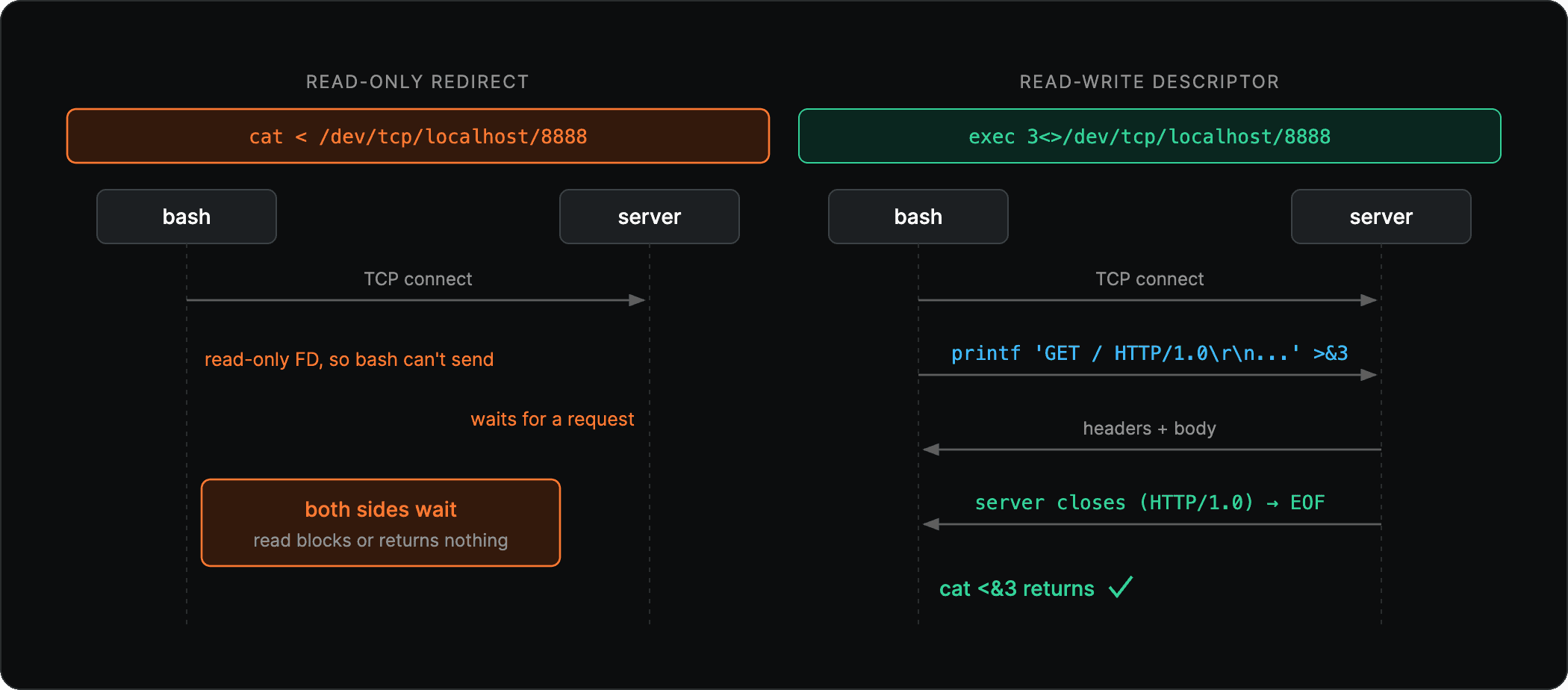
Fig 3: With a read-only descriptor, bash cannot send the request the server is waiting for. With exec 3<>, the request goes out on FD 3, the response comes back, and HTTP/1.0 closes the connection so cat returns.
Reproducing it on macOS: bash vs zsh
The VM work was done, but I wanted to reproduce the trick on my Mac to be sure I understood it.
Start a plaintext server in one terminal:
python3 -m http.server 8000
In another terminal, the first attempt failed:
$ exec 3<>/dev/tcp/localhost/8000
zsh
macOS defaults to zsh. So I switched to bash and ran the same line:
/bin/bash
echo $0                       # bash
exec 3<>/dev/tcp/localhost/8000
printf 'GET / HTTP/1.0
Host: localhost

' >&3
cat <&3
exec 3
That returned the directory listing served by python -m http.server, headers and all.
Now the part that puzzled me. Both shells are being handed the same path and, on the face of it, both are just trying to read from it. bash succeeded. So I checked whether the path was actually there:
$ ls /dev/tcp
ls
There is no such file. bash opened a connection to a path that does not exist, and zsh failed on the same path saying it could not find the file. Why could bash “find” a path that ls cannot, when zsh could not?
Why ls /dev/tcp finds nothing: bash makes it up
/dev/tcp is not a file or a device. It is a special case in bash’s parser, documented in the Redirections section of the bash manual.
When bash processes a redirect and the target starts with /dev/tcp/ (or /dev/udp/), it does not call open() on a file at all. It parses the host and port out of the path, resolves them, opens a real network socket, and hands you that socket on the descriptor you named. The string /dev/tcp/localhost/8000 is a convention bash invents, not a filesystem entry, which is exactly why ls finds nothing.
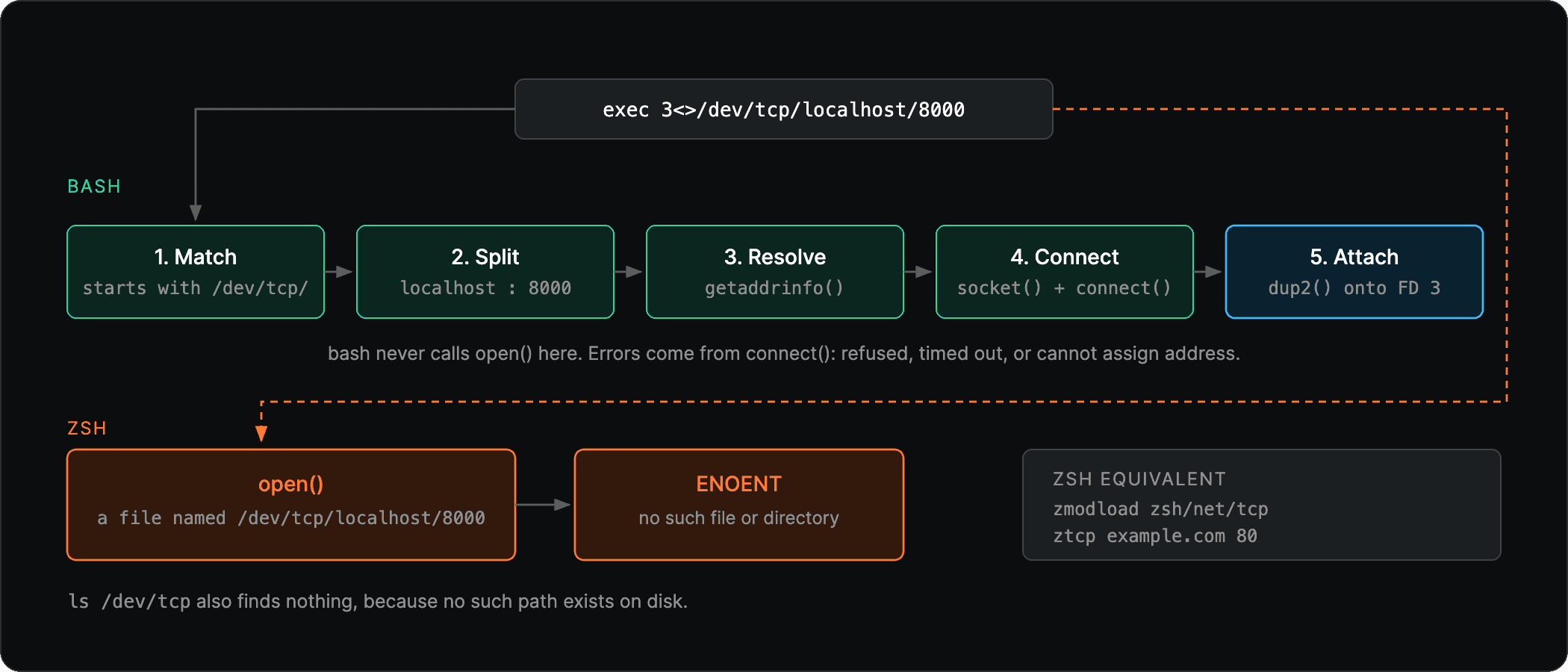
Fig 4: bash matches /dev/tcp/ during redirection, resolves the host, connects a socket and attaches it to FD 3. zsh calls open() on the literal path and gets ENOENT.
zsh never implemented this convention. It takes the path literally, tries to open() a file by that name, and fails. Same string, different parser, different meaning:
bash opens a socket.
zsh looks for a file named
/dev/tcp/localhost/8000and fails.
zsh does have TCP sockets, through a separate module with different syntax (see this walkthrough of zsh TCP for the details):
zmodload zsh/net/tcp
ztcp example.com 80
What bash does under the hood
During redirection, before any
open(), bash checks whether the target string starts with/dev/tcp/(or/dev/udp/).If it matches, it splits the remainder into host and port. Everything up to the last
/is the host, the final segment is the port. Service names work here, so/dev/tcp/example.com/httpresolveshttpto 80 via/etc/services.It calls
getaddrinfo(host, port), which handles DNS names, numeric IPs, and both IPv4 and IPv6.It creates the socket with
socket()(SOCK_STREAMfor tcp,SOCK_DGRAMfor udp) and connects withconnect(). This is the step that blocks and produces the refused, timed-out, or address errors.It
dup2()s the connected socket onto the descriptor you asked for, soexec 3<>...leaves FD 3 as a live socket.
From that point the socket is an ordinary descriptor. printf ... >&3 is a write() on it and cat <&3 is a read() on it. There is no file involved at any stage.
There is one side effect to know about. getaddrinfo() can return an IPv6 address first, and bash tries that one. If the host resolves to IPv6 but the box you are checking from has no IPv6 route, the connect fails with Cannot assign requested address even though the host is fine over IPv4. The host is not down and nothing is blocked, the local box just has no v6 path. To rule this out, resolve the IPv4 (A) address yourself and put the numeric IP in the path:
# get the IPv4 address (any one of these works)
getent ahostsv4 example.com | awk '{print $1; exit}'   # -> e.g. 93.184.216.34
# or: dig +short A example.com | head -1
# or: python3 -c 'import socket; print(socket.gethostbyname("example.com"))'

# retry the check against the numeric IPv4, skipping DNS
(exec 3<>/dev/tcp/93.184.216.34/443) && echo OPEN || echo
POSIX mode is the other gotcha: bash only invents /dev/tcp when running as bash. Invoked as sh or with set -o posix, it treats the path as a real filename and the trick is off. If a line works in your shell but fails in a script, check the shebang.
Limitations of bash /dev/tcp
Bash only. Run
echo $0to confirm your shell before trusting the syntax. Usebash -c '...'when a script’s shebang might besh.Plaintext only. No TLS, so no HTTPS content. You can test that
:443opens, but not read from it.No built-in timeout. Pair it with
timeoutwhen a hang is possible:
timeout 8 bash -c 'exec 3<>/dev/tcp/host/443' && echo OPEN || echo
Key learnings
When the box is locked down, reach for shell built-ins before assuming you are stuck.
/dev/tcpcovers a lot of “is this port open” and “what does this plaintext endpoint return” work with no binaries at all.A local metric that says “sent” is not proof of delivery. The
sentcounter went up while nothing reached the far end, because it counts what the collector handed to its exporter. The:443reachability check is what showed the data was going nowhere.The same command can mean different things in different shells.
/dev/tcpis bash parser behavior, not an OS device, which is whyls /dev/tcpfinds nothing and zsh errors on the identical line. Knowing where a feature lives tells you where it will and will not work.Constraints are a good teacher. Having no curl forced me to slow down and learn how a socket actually gets opened, instead of pasting a one-liner and moving on. The LLM handed me the working command in seconds, and it would have been easy to stop there. The understanding came from questioning the answer within the constraint.
Debugging production from a box with no tools is everyday work for our SREs. If your team is chasing egress problems, collectors that report success while dropping data, or locked-down environments, talk to One2N’s SRE team or get in touch.
If you liked this post, you might find these interesting too
This post shows how an approach to test TCP reachability on a box with no curl, wget or nc taught me how bash built-ins and shell parsers work, and why the same command behaves differently in bash and zsh.
Checking connectivity on a locked-down VM without curl
I was on a locked-down VM. We wanted to update the metrics collector running on it to ship data to a new endpoint, and before changing anything I needed to answer two things from the VM itself:
Can this VM reach the new endpoint on
:443at all?Once it does, is the collector actually shipping data? Its local metrics endpoint on
:8888would tell me.
Both are ordinary “hit an HTTP endpoint” and “is this port open” checks. The problem was the toolbox. curl was permission-denied, python3 was permission-denied, and there was no wget or nc I could rely on.
So I asked an LLM how to check connectivity with nothing but the shell. It gave me this:
exec 3I ran it, it worked, and later I stopped to understand why. This post walks the same path: use it first, take it apart at the end.
How the bash /dev/tcp syntax works
exec 3Read this as: dial this TCP connection, keep it open as FD 3, so I can send on it and then receive on it.
execapplies the redirect to the current shell so the connection stays open for later commands.3is the file descriptor number. 0, 1, and 2 are stdin, stdout, stderr, so pick 3 or higher.<>opens the descriptor for both reading and writing. A socket needs both: you write the request, then read the response./dev/tcp/localhost/8888is the host and port.
After that line, FD 3 is the connection. Write to it with >&3, read from it with <&3.
Fig 1: After exec 3<>/dev/tcp/host/port, FD 3 in the current shell is a live TCP socket. printf >&3 writes the request on it and cat <&3 reads the response.
Checking if a TCP port is open with bash
The smallest useful test is “can I open a connection to this host and port”. Wrap the open in a subshell so it closes immediately, and branch on the exit code:
(exec 3<>/dev/tcp/HOST/443) && echo OPEN || echo
A closed or unreachable port gives you the failure branch with a specific reason on stderr: Connection refused, Connection timed out, or Cannot assign requested address. The reason matters when you debug, so read it rather than only trusting OPEN/FAIL.
This works on :443, but only as a reachability test. /dev/tcp speaks plaintext TCP. It does not do TLS, so you cannot fetch HTTPS content with it. You can confirm the socket opens and infer that egress is allowed.
For the VM, the reachability check to the new endpoint on :443 timed out. That located the problem before I touched any config: the box had no egress to the endpoint at all.
Sending an HTTP request over /dev/tcp
The collector’s own metrics on :8888 are plain HTTP, so I could read the actual body. Four steps: open, send the request, read the response, close.
exec 3<>/dev/tcp/localhost/8888
printf 'GET /metrics HTTP/1.0
Host: localhost

' >&3
cat <&3
exec 3
Four details make this work:
Use
printf, notecho. HTTP request lines end in carriage-return + line-feed (\r\n), and the request ends with a blank line, so you need a trailing\r\n\r\n.printfemits those escapes reliably.Use
HTTP/1.0. The server closes the connection when the response is done, socat <&3reaches end-of-file and returns. WithHTTP/1.1the connection stays alive by default andcathangs, unless you sendConnection: close.Include the
Host:header. It is required by HTTP/1.1 and harmless in 1.0, and shared web servers need it to pick the right site.exec 3>&-closes FD 3 when you are done.
Fig 2: The collector’s local :8888 endpoint answered and its sent counter kept climbing, while the :443 check to the new endpoint timed out.
Why you need exec 3<> instead of a plain read
A first instinct is to read the socket like a file:
cat< opens the socket read-only. The connection opens, but an HTTP server says nothing until it receives a request. With a read-only descriptor there is no way to send that request, so the read blocks or returns nothing. A file has bytes sitting on disk to read. A socket does not. You have to send first, then receive, which needs a read-write descriptor.
That is what <> gives you. And exec 3<> holds that one connection open on FD 3 across several commands, so the printf that sends the request and the cat that reads the reply run over the same socket. Without exec, the socket would close when the first command finished and the read would hit a dead connection.
Fig 3: With a read-only descriptor, bash cannot send the request the server is waiting for. With exec 3<>, the request goes out on FD 3, the response comes back, and HTTP/1.0 closes the connection so cat returns.
Reproducing it on macOS: bash vs zsh
The VM work was done, but I wanted to reproduce the trick on my Mac to be sure I understood it.
Start a plaintext server in one terminal:
python3 -m http.server 8000
In another terminal, the first attempt failed:
$ exec 3<>/dev/tcp/localhost/8000
zsh
macOS defaults to zsh. So I switched to bash and ran the same line:
/bin/bash
echo $0                       # bash
exec 3<>/dev/tcp/localhost/8000
printf 'GET / HTTP/1.0
Host: localhost

' >&3
cat <&3
exec 3
That returned the directory listing served by python -m http.server, headers and all.
Now the part that puzzled me. Both shells are being handed the same path and, on the face of it, both are just trying to read from it. bash succeeded. So I checked whether the path was actually there:
$ ls /dev/tcp
ls
There is no such file. bash opened a connection to a path that does not exist, and zsh failed on the same path saying it could not find the file. Why could bash “find” a path that ls cannot, when zsh could not?
Why ls /dev/tcp finds nothing: bash makes it up
/dev/tcp is not a file or a device. It is a special case in bash’s parser, documented in the Redirections section of the bash manual.
When bash processes a redirect and the target starts with /dev/tcp/ (or /dev/udp/), it does not call open() on a file at all. It parses the host and port out of the path, resolves them, opens a real network socket, and hands you that socket on the descriptor you named. The string /dev/tcp/localhost/8000 is a convention bash invents, not a filesystem entry, which is exactly why ls finds nothing.
Fig 4: bash matches /dev/tcp/ during redirection, resolves the host, connects a socket and attaches it to FD 3. zsh calls open() on the literal path and gets ENOENT.
zsh never implemented this convention. It takes the path literally, tries to open() a file by that name, and fails. Same string, different parser, different meaning:
bash opens a socket.
zsh looks for a file named
/dev/tcp/localhost/8000and fails.
zsh does have TCP sockets, through a separate module with different syntax (see this walkthrough of zsh TCP for the details):
zmodload zsh/net/tcp
ztcp example.com 80
What bash does under the hood
During redirection, before any
open(), bash checks whether the target string starts with/dev/tcp/(or/dev/udp/).If it matches, it splits the remainder into host and port. Everything up to the last
/is the host, the final segment is the port. Service names work here, so/dev/tcp/example.com/httpresolveshttpto 80 via/etc/services.It calls
getaddrinfo(host, port), which handles DNS names, numeric IPs, and both IPv4 and IPv6.It creates the socket with
socket()(SOCK_STREAMfor tcp,SOCK_DGRAMfor udp) and connects withconnect(). This is the step that blocks and produces the refused, timed-out, or address errors.It
dup2()s the connected socket onto the descriptor you asked for, soexec 3<>...leaves FD 3 as a live socket.
From that point the socket is an ordinary descriptor. printf ... >&3 is a write() on it and cat <&3 is a read() on it. There is no file involved at any stage.
There is one side effect to know about. getaddrinfo() can return an IPv6 address first, and bash tries that one. If the host resolves to IPv6 but the box you are checking from has no IPv6 route, the connect fails with Cannot assign requested address even though the host is fine over IPv4. The host is not down and nothing is blocked, the local box just has no v6 path. To rule this out, resolve the IPv4 (A) address yourself and put the numeric IP in the path:
# get the IPv4 address (any one of these works)
getent ahostsv4 example.com | awk '{print $1; exit}'   # -> e.g. 93.184.216.34
# or: dig +short A example.com | head -1
# or: python3 -c 'import socket; print(socket.gethostbyname("example.com"))'

# retry the check against the numeric IPv4, skipping DNS
(exec 3<>/dev/tcp/93.184.216.34/443) && echo OPEN || echo
POSIX mode is the other gotcha: bash only invents /dev/tcp when running as bash. Invoked as sh or with set -o posix, it treats the path as a real filename and the trick is off. If a line works in your shell but fails in a script, check the shebang.
Limitations of bash /dev/tcp
Bash only. Run
echo $0to confirm your shell before trusting the syntax. Usebash -c '...'when a script’s shebang might besh.Plaintext only. No TLS, so no HTTPS content. You can test that
:443opens, but not read from it.No built-in timeout. Pair it with
timeoutwhen a hang is possible:
timeout 8 bash -c 'exec 3<>/dev/tcp/host/443' && echo OPEN || echo
Key learnings
When the box is locked down, reach for shell built-ins before assuming you are stuck.
/dev/tcpcovers a lot of “is this port open” and “what does this plaintext endpoint return” work with no binaries at all.A local metric that says “sent” is not proof of delivery. The
sentcounter went up while nothing reached the far end, because it counts what the collector handed to its exporter. The:443reachability check is what showed the data was going nowhere.The same command can mean different things in different shells.
/dev/tcpis bash parser behavior, not an OS device, which is whyls /dev/tcpfinds nothing and zsh errors on the identical line. Knowing where a feature lives tells you where it will and will not work.Constraints are a good teacher. Having no curl forced me to slow down and learn how a socket actually gets opened, instead of pasting a one-liner and moving on. The LLM handed me the working command in seconds, and it would have been easy to stop there. The understanding came from questioning the answer within the constraint.
Debugging production from a box with no tools is everyday work for our SREs. If your team is chasing egress problems, collectors that report success while dropping data, or locked-down environments, talk to One2N’s SRE team or get in touch.
If you liked this post, you might find these interesting too
This post shows how an approach to test TCP reachability on a box with no curl, wget or nc taught me how bash built-ins and shell parsers work, and why the same command behaves differently in bash and zsh.
Checking connectivity on a locked-down VM without curl
I was on a locked-down VM. We wanted to update the metrics collector running on it to ship data to a new endpoint, and before changing anything I needed to answer two things from the VM itself:
Can this VM reach the new endpoint on
:443at all?Once it does, is the collector actually shipping data? Its local metrics endpoint on
:8888would tell me.
Both are ordinary “hit an HTTP endpoint” and “is this port open” checks. The problem was the toolbox. curl was permission-denied, python3 was permission-denied, and there was no wget or nc I could rely on.
So I asked an LLM how to check connectivity with nothing but the shell. It gave me this:
exec 3I ran it, it worked, and later I stopped to understand why. This post walks the same path: use it first, take it apart at the end.
How the bash /dev/tcp syntax works
exec 3Read this as: dial this TCP connection, keep it open as FD 3, so I can send on it and then receive on it.
execapplies the redirect to the current shell so the connection stays open for later commands.3is the file descriptor number. 0, 1, and 2 are stdin, stdout, stderr, so pick 3 or higher.<>opens the descriptor for both reading and writing. A socket needs both: you write the request, then read the response./dev/tcp/localhost/8888is the host and port.
After that line, FD 3 is the connection. Write to it with >&3, read from it with <&3.
Fig 1: After exec 3<>/dev/tcp/host/port, FD 3 in the current shell is a live TCP socket. printf >&3 writes the request on it and cat <&3 reads the response.
Checking if a TCP port is open with bash
The smallest useful test is “can I open a connection to this host and port”. Wrap the open in a subshell so it closes immediately, and branch on the exit code:
(exec 3<>/dev/tcp/HOST/443) && echo OPEN || echo
A closed or unreachable port gives you the failure branch with a specific reason on stderr: Connection refused, Connection timed out, or Cannot assign requested address. The reason matters when you debug, so read it rather than only trusting OPEN/FAIL.
This works on :443, but only as a reachability test. /dev/tcp speaks plaintext TCP. It does not do TLS, so you cannot fetch HTTPS content with it. You can confirm the socket opens and infer that egress is allowed.
For the VM, the reachability check to the new endpoint on :443 timed out. That located the problem before I touched any config: the box had no egress to the endpoint at all.
Sending an HTTP request over /dev/tcp
The collector’s own metrics on :8888 are plain HTTP, so I could read the actual body. Four steps: open, send the request, read the response, close.
exec 3<>/dev/tcp/localhost/8888
printf 'GET /metrics HTTP/1.0
Host: localhost

' >&3
cat <&3
exec 3
Four details make this work:
Use
printf, notecho. HTTP request lines end in carriage-return + line-feed (\r\n), and the request ends with a blank line, so you need a trailing\r\n\r\n.printfemits those escapes reliably.Use
HTTP/1.0. The server closes the connection when the response is done, socat <&3reaches end-of-file and returns. WithHTTP/1.1the connection stays alive by default andcathangs, unless you sendConnection: close.Include the
Host:header. It is required by HTTP/1.1 and harmless in 1.0, and shared web servers need it to pick the right site.exec 3>&-closes FD 3 when you are done.
Fig 2: The collector’s local :8888 endpoint answered and its sent counter kept climbing, while the :443 check to the new endpoint timed out.
Why you need exec 3<> instead of a plain read
A first instinct is to read the socket like a file:
cat< opens the socket read-only. The connection opens, but an HTTP server says nothing until it receives a request. With a read-only descriptor there is no way to send that request, so the read blocks or returns nothing. A file has bytes sitting on disk to read. A socket does not. You have to send first, then receive, which needs a read-write descriptor.
That is what <> gives you. And exec 3<> holds that one connection open on FD 3 across several commands, so the printf that sends the request and the cat that reads the reply run over the same socket. Without exec, the socket would close when the first command finished and the read would hit a dead connection.
Fig 3: With a read-only descriptor, bash cannot send the request the server is waiting for. With exec 3<>, the request goes out on FD 3, the response comes back, and HTTP/1.0 closes the connection so cat returns.
Reproducing it on macOS: bash vs zsh
The VM work was done, but I wanted to reproduce the trick on my Mac to be sure I understood it.
Start a plaintext server in one terminal:
python3 -m http.server 8000
In another terminal, the first attempt failed:
$ exec 3<>/dev/tcp/localhost/8000
zsh
macOS defaults to zsh. So I switched to bash and ran the same line:
/bin/bash
echo $0                       # bash
exec 3<>/dev/tcp/localhost/8000
printf 'GET / HTTP/1.0
Host: localhost

' >&3
cat <&3
exec 3
That returned the directory listing served by python -m http.server, headers and all.
Now the part that puzzled me. Both shells are being handed the same path and, on the face of it, both are just trying to read from it. bash succeeded. So I checked whether the path was actually there:
$ ls /dev/tcp
ls
There is no such file. bash opened a connection to a path that does not exist, and zsh failed on the same path saying it could not find the file. Why could bash “find” a path that ls cannot, when zsh could not?
Why ls /dev/tcp finds nothing: bash makes it up
/dev/tcp is not a file or a device. It is a special case in bash’s parser, documented in the Redirections section of the bash manual.
When bash processes a redirect and the target starts with /dev/tcp/ (or /dev/udp/), it does not call open() on a file at all. It parses the host and port out of the path, resolves them, opens a real network socket, and hands you that socket on the descriptor you named. The string /dev/tcp/localhost/8000 is a convention bash invents, not a filesystem entry, which is exactly why ls finds nothing.
Fig 4: bash matches /dev/tcp/ during redirection, resolves the host, connects a socket and attaches it to FD 3. zsh calls open() on the literal path and gets ENOENT.
zsh never implemented this convention. It takes the path literally, tries to open() a file by that name, and fails. Same string, different parser, different meaning:
bash opens a socket.
zsh looks for a file named
/dev/tcp/localhost/8000and fails.
zsh does have TCP sockets, through a separate module with different syntax (see this walkthrough of zsh TCP for the details):
zmodload zsh/net/tcp
ztcp example.com 80
What bash does under the hood
During redirection, before any
open(), bash checks whether the target string starts with/dev/tcp/(or/dev/udp/).If it matches, it splits the remainder into host and port. Everything up to the last
/is the host, the final segment is the port. Service names work here, so/dev/tcp/example.com/httpresolveshttpto 80 via/etc/services.It calls
getaddrinfo(host, port), which handles DNS names, numeric IPs, and both IPv4 and IPv6.It creates the socket with
socket()(SOCK_STREAMfor tcp,SOCK_DGRAMfor udp) and connects withconnect(). This is the step that blocks and produces the refused, timed-out, or address errors.It
dup2()s the connected socket onto the descriptor you asked for, soexec 3<>...leaves FD 3 as a live socket.
From that point the socket is an ordinary descriptor. printf ... >&3 is a write() on it and cat <&3 is a read() on it. There is no file involved at any stage.
There is one side effect to know about. getaddrinfo() can return an IPv6 address first, and bash tries that one. If the host resolves to IPv6 but the box you are checking from has no IPv6 route, the connect fails with Cannot assign requested address even though the host is fine over IPv4. The host is not down and nothing is blocked, the local box just has no v6 path. To rule this out, resolve the IPv4 (A) address yourself and put the numeric IP in the path:
# get the IPv4 address (any one of these works)
getent ahostsv4 example.com | awk '{print $1; exit}'   # -> e.g. 93.184.216.34
# or: dig +short A example.com | head -1
# or: python3 -c 'import socket; print(socket.gethostbyname("example.com"))'

# retry the check against the numeric IPv4, skipping DNS
(exec 3<>/dev/tcp/93.184.216.34/443) && echo OPEN || echo
POSIX mode is the other gotcha: bash only invents /dev/tcp when running as bash. Invoked as sh or with set -o posix, it treats the path as a real filename and the trick is off. If a line works in your shell but fails in a script, check the shebang.
Limitations of bash /dev/tcp
Bash only. Run
echo $0to confirm your shell before trusting the syntax. Usebash -c '...'when a script’s shebang might besh.Plaintext only. No TLS, so no HTTPS content. You can test that
:443opens, but not read from it.No built-in timeout. Pair it with
timeoutwhen a hang is possible:
timeout 8 bash -c 'exec 3<>/dev/tcp/host/443' && echo OPEN || echo
Key learnings
When the box is locked down, reach for shell built-ins before assuming you are stuck.
/dev/tcpcovers a lot of “is this port open” and “what does this plaintext endpoint return” work with no binaries at all.A local metric that says “sent” is not proof of delivery. The
sentcounter went up while nothing reached the far end, because it counts what the collector handed to its exporter. The:443reachability check is what showed the data was going nowhere.The same command can mean different things in different shells.
/dev/tcpis bash parser behavior, not an OS device, which is whyls /dev/tcpfinds nothing and zsh errors on the identical line. Knowing where a feature lives tells you where it will and will not work.Constraints are a good teacher. Having no curl forced me to slow down and learn how a socket actually gets opened, instead of pasting a one-liner and moving on. The LLM handed me the working command in seconds, and it would have been easy to stop there. The understanding came from questioning the answer within the constraint.
Debugging production from a box with no tools is everyday work for our SREs. If your team is chasing egress problems, collectors that report success while dropping data, or locked-down environments, talk to One2N’s SRE team or get in touch.
If you liked this post, you might find these interesting too
This post shows how an approach to test TCP reachability on a box with no curl, wget or nc taught me how bash built-ins and shell parsers work, and why the same command behaves differently in bash and zsh.
Checking connectivity on a locked-down VM without curl
I was on a locked-down VM. We wanted to update the metrics collector running on it to ship data to a new endpoint, and before changing anything I needed to answer two things from the VM itself:
Can this VM reach the new endpoint on
:443at all?Once it does, is the collector actually shipping data? Its local metrics endpoint on
:8888would tell me.
Both are ordinary “hit an HTTP endpoint” and “is this port open” checks. The problem was the toolbox. curl was permission-denied, python3 was permission-denied, and there was no wget or nc I could rely on.
So I asked an LLM how to check connectivity with nothing but the shell. It gave me this:
exec 3I ran it, it worked, and later I stopped to understand why. This post walks the same path: use it first, take it apart at the end.
How the bash /dev/tcp syntax works
exec 3Read this as: dial this TCP connection, keep it open as FD 3, so I can send on it and then receive on it.
execapplies the redirect to the current shell so the connection stays open for later commands.3is the file descriptor number. 0, 1, and 2 are stdin, stdout, stderr, so pick 3 or higher.<>opens the descriptor for both reading and writing. A socket needs both: you write the request, then read the response./dev/tcp/localhost/8888is the host and port.
After that line, FD 3 is the connection. Write to it with >&3, read from it with <&3.
Fig 1: After exec 3<>/dev/tcp/host/port, FD 3 in the current shell is a live TCP socket. printf >&3 writes the request on it and cat <&3 reads the response.
Checking if a TCP port is open with bash
The smallest useful test is “can I open a connection to this host and port”. Wrap the open in a subshell so it closes immediately, and branch on the exit code:
(exec 3<>/dev/tcp/HOST/443) && echo OPEN || echo
A closed or unreachable port gives you the failure branch with a specific reason on stderr: Connection refused, Connection timed out, or Cannot assign requested address. The reason matters when you debug, so read it rather than only trusting OPEN/FAIL.
This works on :443, but only as a reachability test. /dev/tcp speaks plaintext TCP. It does not do TLS, so you cannot fetch HTTPS content with it. You can confirm the socket opens and infer that egress is allowed.
For the VM, the reachability check to the new endpoint on :443 timed out. That located the problem before I touched any config: the box had no egress to the endpoint at all.
Sending an HTTP request over /dev/tcp
The collector’s own metrics on :8888 are plain HTTP, so I could read the actual body. Four steps: open, send the request, read the response, close.
exec 3<>/dev/tcp/localhost/8888
printf 'GET /metrics HTTP/1.0
Host: localhost

' >&3
cat <&3
exec 3
Four details make this work:
Use
printf, notecho. HTTP request lines end in carriage-return + line-feed (\r\n), and the request ends with a blank line, so you need a trailing\r\n\r\n.printfemits those escapes reliably.Use
HTTP/1.0. The server closes the connection when the response is done, socat <&3reaches end-of-file and returns. WithHTTP/1.1the connection stays alive by default andcathangs, unless you sendConnection: close.Include the
Host:header. It is required by HTTP/1.1 and harmless in 1.0, and shared web servers need it to pick the right site.exec 3>&-closes FD 3 when you are done.
Fig 2: The collector’s local :8888 endpoint answered and its sent counter kept climbing, while the :443 check to the new endpoint timed out.
Why you need exec 3<> instead of a plain read
A first instinct is to read the socket like a file:
cat< opens the socket read-only. The connection opens, but an HTTP server says nothing until it receives a request. With a read-only descriptor there is no way to send that request, so the read blocks or returns nothing. A file has bytes sitting on disk to read. A socket does not. You have to send first, then receive, which needs a read-write descriptor.
That is what <> gives you. And exec 3<> holds that one connection open on FD 3 across several commands, so the printf that sends the request and the cat that reads the reply run over the same socket. Without exec, the socket would close when the first command finished and the read would hit a dead connection.
Fig 3: With a read-only descriptor, bash cannot send the request the server is waiting for. With exec 3<>, the request goes out on FD 3, the response comes back, and HTTP/1.0 closes the connection so cat returns.
Reproducing it on macOS: bash vs zsh
The VM work was done, but I wanted to reproduce the trick on my Mac to be sure I understood it.
Start a plaintext server in one terminal:
python3 -m http.server 8000
In another terminal, the first attempt failed:
$ exec 3<>/dev/tcp/localhost/8000
zsh
macOS defaults to zsh. So I switched to bash and ran the same line:
/bin/bash
echo $0                       # bash
exec 3<>/dev/tcp/localhost/8000
printf 'GET / HTTP/1.0
Host: localhost

' >&3
cat <&3
exec 3
That returned the directory listing served by python -m http.server, headers and all.
Now the part that puzzled me. Both shells are being handed the same path and, on the face of it, both are just trying to read from it. bash succeeded. So I checked whether the path was actually there:
$ ls /dev/tcp
ls
There is no such file. bash opened a connection to a path that does not exist, and zsh failed on the same path saying it could not find the file. Why could bash “find” a path that ls cannot, when zsh could not?
Why ls /dev/tcp finds nothing: bash makes it up
/dev/tcp is not a file or a device. It is a special case in bash’s parser, documented in the Redirections section of the bash manual.
When bash processes a redirect and the target starts with /dev/tcp/ (or /dev/udp/), it does not call open() on a file at all. It parses the host and port out of the path, resolves them, opens a real network socket, and hands you that socket on the descriptor you named. The string /dev/tcp/localhost/8000 is a convention bash invents, not a filesystem entry, which is exactly why ls finds nothing.
Fig 4: bash matches /dev/tcp/ during redirection, resolves the host, connects a socket and attaches it to FD 3. zsh calls open() on the literal path and gets ENOENT.
zsh never implemented this convention. It takes the path literally, tries to open() a file by that name, and fails. Same string, different parser, different meaning:
bash opens a socket.
zsh looks for a file named
/dev/tcp/localhost/8000and fails.
zsh does have TCP sockets, through a separate module with different syntax (see this walkthrough of zsh TCP for the details):
zmodload zsh/net/tcp
ztcp example.com 80
What bash does under the hood
During redirection, before any
open(), bash checks whether the target string starts with/dev/tcp/(or/dev/udp/).If it matches, it splits the remainder into host and port. Everything up to the last
/is the host, the final segment is the port. Service names work here, so/dev/tcp/example.com/httpresolveshttpto 80 via/etc/services.It calls
getaddrinfo(host, port), which handles DNS names, numeric IPs, and both IPv4 and IPv6.It creates the socket with
socket()(SOCK_STREAMfor tcp,SOCK_DGRAMfor udp) and connects withconnect(). This is the step that blocks and produces the refused, timed-out, or address errors.It
dup2()s the connected socket onto the descriptor you asked for, soexec 3<>...leaves FD 3 as a live socket.
From that point the socket is an ordinary descriptor. printf ... >&3 is a write() on it and cat <&3 is a read() on it. There is no file involved at any stage.
There is one side effect to know about. getaddrinfo() can return an IPv6 address first, and bash tries that one. If the host resolves to IPv6 but the box you are checking from has no IPv6 route, the connect fails with Cannot assign requested address even though the host is fine over IPv4. The host is not down and nothing is blocked, the local box just has no v6 path. To rule this out, resolve the IPv4 (A) address yourself and put the numeric IP in the path:
# get the IPv4 address (any one of these works)
getent ahostsv4 example.com | awk '{print $1; exit}'   # -> e.g. 93.184.216.34
# or: dig +short A example.com | head -1
# or: python3 -c 'import socket; print(socket.gethostbyname("example.com"))'

# retry the check against the numeric IPv4, skipping DNS
(exec 3<>/dev/tcp/93.184.216.34/443) && echo OPEN || echo
POSIX mode is the other gotcha: bash only invents /dev/tcp when running as bash. Invoked as sh or with set -o posix, it treats the path as a real filename and the trick is off. If a line works in your shell but fails in a script, check the shebang.
Limitations of bash /dev/tcp
Bash only. Run
echo $0to confirm your shell before trusting the syntax. Usebash -c '...'when a script’s shebang might besh.Plaintext only. No TLS, so no HTTPS content. You can test that
:443opens, but not read from it.No built-in timeout. Pair it with
timeoutwhen a hang is possible:
timeout 8 bash -c 'exec 3<>/dev/tcp/host/443' && echo OPEN || echo
Key learnings
When the box is locked down, reach for shell built-ins before assuming you are stuck.
/dev/tcpcovers a lot of “is this port open” and “what does this plaintext endpoint return” work with no binaries at all.A local metric that says “sent” is not proof of delivery. The
sentcounter went up while nothing reached the far end, because it counts what the collector handed to its exporter. The:443reachability check is what showed the data was going nowhere.The same command can mean different things in different shells.
/dev/tcpis bash parser behavior, not an OS device, which is whyls /dev/tcpfinds nothing and zsh errors on the identical line. Knowing where a feature lives tells you where it will and will not work.Constraints are a good teacher. Having no curl forced me to slow down and learn how a socket actually gets opened, instead of pasting a one-liner and moving on. The LLM handed me the working command in seconds, and it would have been easy to stop there. The understanding came from questioning the answer within the constraint.
Debugging production from a box with no tools is everyday work for our SREs. If your team is chasing egress problems, collectors that report success while dropping data, or locked-down environments, talk to One2N’s SRE team or get in touch.
If you liked this post, you might find these interesting too
This post shows how an approach to test TCP reachability on a box with no curl, wget or nc taught me how bash built-ins and shell parsers work, and why the same command behaves differently in bash and zsh.
Checking connectivity on a locked-down VM without curl
I was on a locked-down VM. We wanted to update the metrics collector running on it to ship data to a new endpoint, and before changing anything I needed to answer two things from the VM itself:
Can this VM reach the new endpoint on
:443at all?Once it does, is the collector actually shipping data? Its local metrics endpoint on
:8888would tell me.
Both are ordinary “hit an HTTP endpoint” and “is this port open” checks. The problem was the toolbox. curl was permission-denied, python3 was permission-denied, and there was no wget or nc I could rely on.
So I asked an LLM how to check connectivity with nothing but the shell. It gave me this:
exec 3I ran it, it worked, and later I stopped to understand why. This post walks the same path: use it first, take it apart at the end.
How the bash /dev/tcp syntax works
exec 3Read this as: dial this TCP connection, keep it open as FD 3, so I can send on it and then receive on it.
execapplies the redirect to the current shell so the connection stays open for later commands.3is the file descriptor number. 0, 1, and 2 are stdin, stdout, stderr, so pick 3 or higher.<>opens the descriptor for both reading and writing. A socket needs both: you write the request, then read the response./dev/tcp/localhost/8888is the host and port.
After that line, FD 3 is the connection. Write to it with >&3, read from it with <&3.
Fig 1: After exec 3<>/dev/tcp/host/port, FD 3 in the current shell is a live TCP socket. printf >&3 writes the request on it and cat <&3 reads the response.
Checking if a TCP port is open with bash
The smallest useful test is “can I open a connection to this host and port”. Wrap the open in a subshell so it closes immediately, and branch on the exit code:
(exec 3<>/dev/tcp/HOST/443) && echo OPEN || echo
A closed or unreachable port gives you the failure branch with a specific reason on stderr: Connection refused, Connection timed out, or Cannot assign requested address. The reason matters when you debug, so read it rather than only trusting OPEN/FAIL.
This works on :443, but only as a reachability test. /dev/tcp speaks plaintext TCP. It does not do TLS, so you cannot fetch HTTPS content with it. You can confirm the socket opens and infer that egress is allowed.
For the VM, the reachability check to the new endpoint on :443 timed out. That located the problem before I touched any config: the box had no egress to the endpoint at all.
Sending an HTTP request over /dev/tcp
The collector’s own metrics on :8888 are plain HTTP, so I could read the actual body. Four steps: open, send the request, read the response, close.
exec 3<>/dev/tcp/localhost/8888
printf 'GET /metrics HTTP/1.0
Host: localhost

' >&3
cat <&3
exec 3
Four details make this work:
Use
printf, notecho. HTTP request lines end in carriage-return + line-feed (\r\n), and the request ends with a blank line, so you need a trailing\r\n\r\n.printfemits those escapes reliably.Use
HTTP/1.0. The server closes the connection when the response is done, socat <&3reaches end-of-file and returns. WithHTTP/1.1the connection stays alive by default andcathangs, unless you sendConnection: close.Include the
Host:header. It is required by HTTP/1.1 and harmless in 1.0, and shared web servers need it to pick the right site.exec 3>&-closes FD 3 when you are done.
Fig 2: The collector’s local :8888 endpoint answered and its sent counter kept climbing, while the :443 check to the new endpoint timed out.
Why you need exec 3<> instead of a plain read
A first instinct is to read the socket like a file:
cat< opens the socket read-only. The connection opens, but an HTTP server says nothing until it receives a request. With a read-only descriptor there is no way to send that request, so the read blocks or returns nothing. A file has bytes sitting on disk to read. A socket does not. You have to send first, then receive, which needs a read-write descriptor.
That is what <> gives you. And exec 3<> holds that one connection open on FD 3 across several commands, so the printf that sends the request and the cat that reads the reply run over the same socket. Without exec, the socket would close when the first command finished and the read would hit a dead connection.
Fig 3: With a read-only descriptor, bash cannot send the request the server is waiting for. With exec 3<>, the request goes out on FD 3, the response comes back, and HTTP/1.0 closes the connection so cat returns.
Reproducing it on macOS: bash vs zsh
The VM work was done, but I wanted to reproduce the trick on my Mac to be sure I understood it.
Start a plaintext server in one terminal:
python3 -m http.server 8000
In another terminal, the first attempt failed:
$ exec 3<>/dev/tcp/localhost/8000
zsh
macOS defaults to zsh. So I switched to bash and ran the same line:
/bin/bash
echo $0                       # bash
exec 3<>/dev/tcp/localhost/8000
printf 'GET / HTTP/1.0
Host: localhost

' >&3
cat <&3
exec 3
That returned the directory listing served by python -m http.server, headers and all.
Now the part that puzzled me. Both shells are being handed the same path and, on the face of it, both are just trying to read from it. bash succeeded. So I checked whether the path was actually there:
$ ls /dev/tcp
ls
There is no such file. bash opened a connection to a path that does not exist, and zsh failed on the same path saying it could not find the file. Why could bash “find” a path that ls cannot, when zsh could not?
Why ls /dev/tcp finds nothing: bash makes it up
/dev/tcp is not a file or a device. It is a special case in bash’s parser, documented in the Redirections section of the bash manual.
When bash processes a redirect and the target starts with /dev/tcp/ (or /dev/udp/), it does not call open() on a file at all. It parses the host and port out of the path, resolves them, opens a real network socket, and hands you that socket on the descriptor you named. The string /dev/tcp/localhost/8000 is a convention bash invents, not a filesystem entry, which is exactly why ls finds nothing.
Fig 4: bash matches /dev/tcp/ during redirection, resolves the host, connects a socket and attaches it to FD 3. zsh calls open() on the literal path and gets ENOENT.
zsh never implemented this convention. It takes the path literally, tries to open() a file by that name, and fails. Same string, different parser, different meaning:
bash opens a socket.
zsh looks for a file named
/dev/tcp/localhost/8000and fails.
zsh does have TCP sockets, through a separate module with different syntax (see this walkthrough of zsh TCP for the details):
zmodload zsh/net/tcp
ztcp example.com 80
What bash does under the hood
During redirection, before any
open(), bash checks whether the target string starts with/dev/tcp/(or/dev/udp/).If it matches, it splits the remainder into host and port. Everything up to the last
/is the host, the final segment is the port. Service names work here, so/dev/tcp/example.com/httpresolveshttpto 80 via/etc/services.It calls
getaddrinfo(host, port), which handles DNS names, numeric IPs, and both IPv4 and IPv6.It creates the socket with
socket()(SOCK_STREAMfor tcp,SOCK_DGRAMfor udp) and connects withconnect(). This is the step that blocks and produces the refused, timed-out, or address errors.It
dup2()s the connected socket onto the descriptor you asked for, soexec 3<>...leaves FD 3 as a live socket.
From that point the socket is an ordinary descriptor. printf ... >&3 is a write() on it and cat <&3 is a read() on it. There is no file involved at any stage.
There is one side effect to know about. getaddrinfo() can return an IPv6 address first, and bash tries that one. If the host resolves to IPv6 but the box you are checking from has no IPv6 route, the connect fails with Cannot assign requested address even though the host is fine over IPv4. The host is not down and nothing is blocked, the local box just has no v6 path. To rule this out, resolve the IPv4 (A) address yourself and put the numeric IP in the path:
# get the IPv4 address (any one of these works)
getent ahostsv4 example.com | awk '{print $1; exit}'   # -> e.g. 93.184.216.34
# or: dig +short A example.com | head -1
# or: python3 -c 'import socket; print(socket.gethostbyname("example.com"))'

# retry the check against the numeric IPv4, skipping DNS
(exec 3<>/dev/tcp/93.184.216.34/443) && echo OPEN || echo
POSIX mode is the other gotcha: bash only invents /dev/tcp when running as bash. Invoked as sh or with set -o posix, it treats the path as a real filename and the trick is off. If a line works in your shell but fails in a script, check the shebang.
Limitations of bash /dev/tcp
Bash only. Run
echo $0to confirm your shell before trusting the syntax. Usebash -c '...'when a script’s shebang might besh.Plaintext only. No TLS, so no HTTPS content. You can test that
:443opens, but not read from it.No built-in timeout. Pair it with
timeoutwhen a hang is possible:
timeout 8 bash -c 'exec 3<>/dev/tcp/host/443' && echo OPEN || echo
Key learnings
When the box is locked down, reach for shell built-ins before assuming you are stuck.
/dev/tcpcovers a lot of “is this port open” and “what does this plaintext endpoint return” work with no binaries at all.A local metric that says “sent” is not proof of delivery. The
sentcounter went up while nothing reached the far end, because it counts what the collector handed to its exporter. The:443reachability check is what showed the data was going nowhere.The same command can mean different things in different shells.
/dev/tcpis bash parser behavior, not an OS device, which is whyls /dev/tcpfinds nothing and zsh errors on the identical line. Knowing where a feature lives tells you where it will and will not work.Constraints are a good teacher. Having no curl forced me to slow down and learn how a socket actually gets opened, instead of pasting a one-liner and moving on. The LLM handed me the working command in seconds, and it would have been easy to stop there. The understanding came from questioning the answer within the constraint.
Debugging production from a box with no tools is everyday work for our SREs. If your team is chasing egress problems, collectors that report success while dropping data, or locked-down environments, talk to One2N’s SRE team or get in touch.
If you liked this post, you might find these interesting too
Share
Share
On this page
Section
On this page
In this post
section