
OpenSearch can carry very different expectations on the same cluster. A customer-facing search API may need predictable response times, while an analytical report may scan several indexes to sort a large result. For example, an internal sales report may aggregate the complete orders index for one analyst. The same query exposed through a customer dashboard can run concurrently for multiple users, increasing shard work and consuming CPU and memory needed by the product-search API on the same cluster. Wider time ranges, broad index patterns, large aggregations, sorting and high shard fan-out all increase the CPU and memory required to execute those searches.
OpenSearch Workload Management, or WLM, lets the reporting queries in that example run under one workload group and the product-search queries under another. Each group can have its own CPU and memory thresholds, query timeout, shard concurrency and aggregation limits. Its scope is search traffic. Ingestion throughput, indexing performance, shard design and cluster capacity remain separate concerns. This article explains how WLM assigns search requests to workload groups, which controls can be applied and where its limits sit. By the end, you should be able to decide whether WLM fits the search problem you are investigating and whether your users, roles or index patterns provide usable workload boundaries.
What Causes Heavy Search Queries in OpenSearch?
Search cost depends on the query shape, the number of shards involved, the size of the result set, the aggregations being calculated and the number of searches running concurrently.
The source of the request also affects what an acceptable limit looks like:
Search traffic | Typical query behaviour | WLM controls that may fit |
|---|---|---|
Customer-facing product search | Concurrent application requests with short response-time targets | Short query timeouts and CPU or memory thresholds separate from reporting traffic |
Analytics and reporting | Wider index scans, large aggregations, sorting and longer execution times | Longer timeouts combined with CPU, memory and aggregation-bucket limits |
Internal and support tools | Query cost changes with user-supplied filters, sort fields, result size and aggregations | CPU and memory thresholds, along with a maximum request duration |
Scheduled searches | Reports or aggregations run at fixed intervals and may overlap | Shard-concurrency limits and complete-search cancellation intervals |
Observability search | Time-range queries across time-based log, trace or metric indexes, including dashboard panels and monitors | Shard-concurrency, timeout and aggregation limits when the requests can be identified separately |
These labels are examples of search traffic, and OpenSearch assigns separate treatment only when a request carries a workload group ID or matches a rule using supported attributes.
OpenSearch already applies caching, shard concurrency controls and other search optimisations. Request caching can avoid repeating identical shard-level work, while _msearch bundles multiple search bodies into a single API call. OpenSearch executes each search independently and in parallel, so it reduces network round trips while the cluster still performs the work of every included search. A dashboard with several panels can therefore send one _msearch request and still create substantial query work across the cluster. Those mechanisms do not provide separate CPU, memory or query limits for identifiable groups of traffic. Moving time windows, actively written indexes, broad index patterns, sorted historical searches and large aggregations can still require substantial work.
What Is OpenSearch Workload Management (WLM)?
Workload Management groups search traffic into logical workloads and controls how much CPU and memory each workload is allowed to consume. OpenSearch describes WLM as tenant-level admission control and reactive query management. When an assigned workload crosses its configured limits, OpenSearch can reject new searches or cancel running tasks from that group.
A workload group is assigned at the search-request level. The client can pass a workloadGroupId header, or OpenSearch can assign one by matching the request’s username, role or target index pattern. These attributes act as matching inputs, and the resulting workload group is attached to the request. The coordinator and shard-level tasks created by that search are then tracked against the group’s limits. Each group can have its own CPU and memory limits, and OpenSearch tracks resource consumption for the group at the node level.
WLM was introduced in OpenSearch 2.18. The cluster-level wlm.workload_group.mode setting controls whether workload management monitors or enforces the configured limits:
Mode | Behaviour |
|---|---|
| Disables WLM monitoring and enforcement |
| Tracks workload activity without rejecting or cancelling searches |
| Applies each workload group’s resiliency mode and allows configured limits to be enforced |
Each workload group also defines a resiliency_mode. It takes effect only when the cluster-level wlm.workload_group.mode is enabled and controls how strictly that group’s thresholds are applied:
monitor: Tracks queries without rejecting or cancelling them.soft: Allows queries to exceed the group’s thresholds while node resources remain available.enforced: Rejects queries when the group’s resource thresholds are exceeded.
In the WLM documentation, “tenant” refers to an identifiable set of search requests managed under one workload group. Depending on the cluster, that group may represent an application, a set of users, a role or searches against an index family. It does not automatically mean one end user, one index or an OpenSearch Dashboards tenant.
Tenant-level admission control and reactive query management - When resource usage exceeds configured limits, it automatically identifies and cancels demanding queries, ensuring fair resource distribution.
Tenant-level isolation - within the cluster for search workloads, operating at the node level.
OpenSearch 3.7 added group-specific search settings. A workload group can now define CPU and memory limits along with query timeouts, shard concurrency, aggregation limits and setting precedence.
How OpenSearch Assigns Search Queries to Workload Groups
WLM has two related responsibilities. It determines which workload group a search belongs to, then applies that group’s resource limits and search settings.
OpenSearch supports two methods for assigning requests:
Assignment method | How it works | Constraint |
|---|---|---|
Request header | The client includes the workload group ID in the | Participating clients must send the correct group ID |
Workload group rule | OpenSearch matches the request using username, role or index pattern | Classification is limited to attributes supported by the rule engine |
The request header is useful when the calling application already knows how its traffic should be classified. A product API could send one workload group ID for interactive customer searches, while a reporting service sends another.
Workload group rules provide automatic assignment. A rule can match:
principal.usernameprincipal.roleindex_pattern
Username and role matching require the OpenSearch Security plugin. Index rules can match a complete index name or a prefix pattern ending in *.
Once a request matches a rule, OpenSearch tags it with the corresponding workload group ID. If no rule matches, the request runs without a workload group.
A request can also match more than one rule. OpenSearch resolves competing matches by evaluating username before role and role before index pattern, followed by match specificity. If the matching rules remain tied, OpenSearch leaves the request without a workload group.
Use the boundary already present in the request. If the product-search API authenticates with its own service account, use WLM to match its username. If analysts have a separate role, do the same role matching. If datasets use stable index prefixes, match the index pattern. When those attributes cannot separate two search paths, have the client send the workloadGroupId header explicitly.
Based on this, we can also monitor WLM enforcement in real time as a cluster is running,
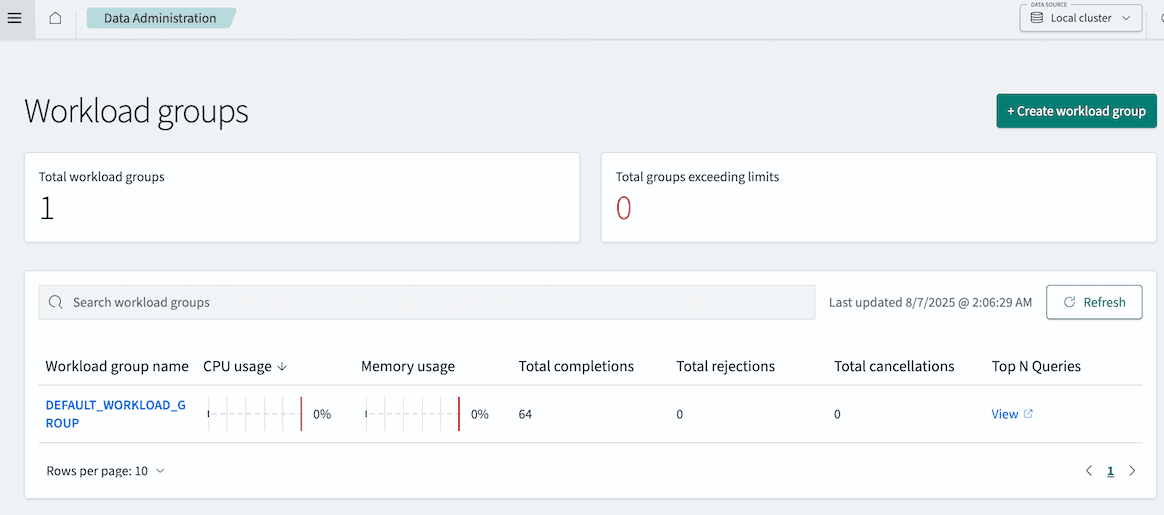
The Total workload groups panel shows the number of defined workload groups. The Total groups exceeding limits panel shows the number of workload groups exceeding thresholds
How OpenSearch WLM Controls CPU, Memory and Query Execution
Once a request is assigned to a workload group, OpenSearch applies the CPU, memory and search settings configured for that group.
Control | What it changes |
|---|---|
CPU resource limit | Defines the CPU threshold used to evaluate group consumption on each node |
Memory resource limit | Defines the memory threshold used to evaluate group consumption on each node |
| Limits shard-level query execution time and may return partial results |
| Cancels the complete search after a maximum duration |
| Limits concurrent shard requests from one search on each node |
| Controls how many shard results the coordinating node reduces in one batch |
| Limits the number of aggregation buckets allowed in a response |
| Determines whether workload-group settings take precedence over request-level values |
CPU and memory limits determine when WLM enforcement can reject or cancel tasks from a workload group. They do not reserve that amount of capacity for the group. The limits act as consumption thresholds on each node.
Shard concurrency controls how aggressively an individual search fans out. Reducing search.max_concurrent_shard_requests lowers the number of shard-level requests that one search can execute concurrently on a node. This does not reduce the total work required to complete the search or the number of shards it touches. Individual searches may take longer, while the node receives a smaller concurrency burst.
The timeout settings operate at different points in search execution. search.default_search_timeout limits the time spent executing a query on a shard. When that timeout is reached, the shard stops collecting hits and may return partial results to the coordinating node. search.cancel_after_time_interval limits the duration of the complete search request. When it is reached, OpenSearch cancels the request and its associated tasks, and the client receives an error.
search.batched_reduce_size affects the coordinating node. A search that spans several shards returns partial results that must be combined. Reducing the batch size can lower the amount of memory required during each reduction step, although the coordinating node may need to perform more reductions.
search.max_buckets limits the number of buckets produced by an aggregation. This is useful for analytical searches whose aggregation size can otherwise grow beyond what the caller needs.
By default, a value supplied directly in the search request takes precedence over the workload-group setting. Setting override_request_values to true reverses that order, allowing the group configuration to override values provided by the client.
This allows an interactive product search to have a shorter execution ceiling while an analytical workload runs for longer with limits on memory, shard concurrency and aggregation size. Supporting the analytical workload does not require increasing the cluster-wide limits applied to every search.
How to Design OpenSearch Workload Group Rules
The workload model needs to follow boundaries that OpenSearch can identify.
WLM does not inspect the calling application or infer the purpose of a query. If a customer-facing search endpoint and a reporting job use the same username, role and index pattern, rule-based assignment cannot distinguish them. The same limitation applies when Discover, dashboards and scheduled monitors use the same identity and query the same indexes.
A separate username or service identity works when applications authenticate independently. Roles can separate classes of users, such as customer-facing services, analysts and support engineers. Index-pattern rules work when workloads query different tenants, products or data families.
The workloadGroupId header provides an explicit option when two search paths share the same identity and indexes. The client takes responsibility for assigning the request to the correct group, so access to those group IDs and the ability to set the header must be controlled.
These choices affect how reliably limits can be enforced:
Available boundary | Suitable use |
|---|---|
Dedicated username or service identity | Separate applications or automated jobs |
Role | Groups of users or services with similar search requirements |
Index pattern | Tenants, products or datasets stored under distinct index families |
| Search paths that share identities and indexes but require different limits |
A broad rule can classify traffic that was intended for another group. A narrow rule can leave requests unassigned. Workload statistics should therefore be checked after rules are introduced, before enforcement is enabled.
OpenSearch WLM Limitations: What It Cannot Fix
WLM controls search workloads inside OpenSearch. It does not make an inefficient query efficient, fix poor shard design, increase indexing throughput or compensate for a cluster that is too small for its workload.
WLM can change how an assigned search is allowed to execute. The following problems remain outside its scope:
Rewriting an inefficient query.
Reducing the number of shards selected by the query.
Changing shard count, shard size or index layout.
Changing mappings or the underlying data model.
Adding CPU, memory or search capacity to the cluster.
Controlling or improving ingestion and indexing throughput.
A query that touches thousands of small shards will continue to touch those shards after WLM is applied. WLM can limit its concurrency or execution time, while reducing the query cost requires changes to shard layout, routing or index selection. A high-cardinality aggregation may be rejected by a bucket limit, but reducing the work it performs requires changes to the aggregation or data model.
If incoming data exceeds what the OpenSearch domain can sustainably index, the response belongs in indexing configuration, storage performance, shard design, upstream flow control or additional capacity. WLM may reduce search pressure on nodes that also handle writes, but it does not classify, throttle or optimise ingestion traffic.
OpenSearch also supports separating indexing and search workloads through search replicas and dedicated search nodes. This allows search and indexing capacity to scale independently, but requires a remote-store-enabled cluster, segment replication and a different node layout.
We would recommend a team exploring WLM to start with monitor_only and inspect CPU use, memory use, completions, rejections, cancellations and query latency for each group. Query Insights can help identify the search patterns behind that resource consumption. Enforcement can then be configured around the actual behaviour of the workload and the response-time requirements of its callers.
When to Use OpenSearch Workload Management
Product search, analytics, reporting, internal tools and observability queries can require different CPU, memory and execution limits on the same OpenSearch cluster. WLM provides those controls when requests can be assigned reliably through a workload group, role and its expected pressure on search.
In the next article, we will test this with a local OpenSearch 3.7 setup. We will generate different search workloads, inspect them using Query Insights and WLM statistics, apply workload groups and limits, and compare the behaviour as WLM moves from monitoring to enforcement.
At One2N, we help teams solve OpenSearch performance problems across search design, workload controls and cluster architecture. We can help determine where the pressure is coming from and whether the appropriate response is WLM, query optimisation, index changes or additional capacity.
OpenSearch can carry very different expectations on the same cluster. A customer-facing search API may need predictable response times, while an analytical report may scan several indexes to sort a large result. For example, an internal sales report may aggregate the complete orders index for one analyst. The same query exposed through a customer dashboard can run concurrently for multiple users, increasing shard work and consuming CPU and memory needed by the product-search API on the same cluster. Wider time ranges, broad index patterns, large aggregations, sorting and high shard fan-out all increase the CPU and memory required to execute those searches.
OpenSearch Workload Management, or WLM, lets the reporting queries in that example run under one workload group and the product-search queries under another. Each group can have its own CPU and memory thresholds, query timeout, shard concurrency and aggregation limits. Its scope is search traffic. Ingestion throughput, indexing performance, shard design and cluster capacity remain separate concerns. This article explains how WLM assigns search requests to workload groups, which controls can be applied and where its limits sit. By the end, you should be able to decide whether WLM fits the search problem you are investigating and whether your users, roles or index patterns provide usable workload boundaries.
What Causes Heavy Search Queries in OpenSearch?
Search cost depends on the query shape, the number of shards involved, the size of the result set, the aggregations being calculated and the number of searches running concurrently.
The source of the request also affects what an acceptable limit looks like:
Search traffic | Typical query behaviour | WLM controls that may fit |
|---|---|---|
Customer-facing product search | Concurrent application requests with short response-time targets | Short query timeouts and CPU or memory thresholds separate from reporting traffic |
Analytics and reporting | Wider index scans, large aggregations, sorting and longer execution times | Longer timeouts combined with CPU, memory and aggregation-bucket limits |
Internal and support tools | Query cost changes with user-supplied filters, sort fields, result size and aggregations | CPU and memory thresholds, along with a maximum request duration |
Scheduled searches | Reports or aggregations run at fixed intervals and may overlap | Shard-concurrency limits and complete-search cancellation intervals |
Observability search | Time-range queries across time-based log, trace or metric indexes, including dashboard panels and monitors | Shard-concurrency, timeout and aggregation limits when the requests can be identified separately |
These labels are examples of search traffic, and OpenSearch assigns separate treatment only when a request carries a workload group ID or matches a rule using supported attributes.
OpenSearch already applies caching, shard concurrency controls and other search optimisations. Request caching can avoid repeating identical shard-level work, while _msearch bundles multiple search bodies into a single API call. OpenSearch executes each search independently and in parallel, so it reduces network round trips while the cluster still performs the work of every included search. A dashboard with several panels can therefore send one _msearch request and still create substantial query work across the cluster. Those mechanisms do not provide separate CPU, memory or query limits for identifiable groups of traffic. Moving time windows, actively written indexes, broad index patterns, sorted historical searches and large aggregations can still require substantial work.
What Is OpenSearch Workload Management (WLM)?
Workload Management groups search traffic into logical workloads and controls how much CPU and memory each workload is allowed to consume. OpenSearch describes WLM as tenant-level admission control and reactive query management. When an assigned workload crosses its configured limits, OpenSearch can reject new searches or cancel running tasks from that group.
A workload group is assigned at the search-request level. The client can pass a workloadGroupId header, or OpenSearch can assign one by matching the request’s username, role or target index pattern. These attributes act as matching inputs, and the resulting workload group is attached to the request. The coordinator and shard-level tasks created by that search are then tracked against the group’s limits. Each group can have its own CPU and memory limits, and OpenSearch tracks resource consumption for the group at the node level.
WLM was introduced in OpenSearch 2.18. The cluster-level wlm.workload_group.mode setting controls whether workload management monitors or enforces the configured limits:
Mode | Behaviour |
|---|---|
| Disables WLM monitoring and enforcement |
| Tracks workload activity without rejecting or cancelling searches |
| Applies each workload group’s resiliency mode and allows configured limits to be enforced |
Each workload group also defines a resiliency_mode. It takes effect only when the cluster-level wlm.workload_group.mode is enabled and controls how strictly that group’s thresholds are applied:
monitor: Tracks queries without rejecting or cancelling them.soft: Allows queries to exceed the group’s thresholds while node resources remain available.enforced: Rejects queries when the group’s resource thresholds are exceeded.
In the WLM documentation, “tenant” refers to an identifiable set of search requests managed under one workload group. Depending on the cluster, that group may represent an application, a set of users, a role or searches against an index family. It does not automatically mean one end user, one index or an OpenSearch Dashboards tenant.
Tenant-level admission control and reactive query management - When resource usage exceeds configured limits, it automatically identifies and cancels demanding queries, ensuring fair resource distribution.
Tenant-level isolation - within the cluster for search workloads, operating at the node level.
OpenSearch 3.7 added group-specific search settings. A workload group can now define CPU and memory limits along with query timeouts, shard concurrency, aggregation limits and setting precedence.
How OpenSearch Assigns Search Queries to Workload Groups
WLM has two related responsibilities. It determines which workload group a search belongs to, then applies that group’s resource limits and search settings.
OpenSearch supports two methods for assigning requests:
Assignment method | How it works | Constraint |
|---|---|---|
Request header | The client includes the workload group ID in the | Participating clients must send the correct group ID |
Workload group rule | OpenSearch matches the request using username, role or index pattern | Classification is limited to attributes supported by the rule engine |
The request header is useful when the calling application already knows how its traffic should be classified. A product API could send one workload group ID for interactive customer searches, while a reporting service sends another.
Workload group rules provide automatic assignment. A rule can match:
principal.usernameprincipal.roleindex_pattern
Username and role matching require the OpenSearch Security plugin. Index rules can match a complete index name or a prefix pattern ending in *.
Once a request matches a rule, OpenSearch tags it with the corresponding workload group ID. If no rule matches, the request runs without a workload group.
A request can also match more than one rule. OpenSearch resolves competing matches by evaluating username before role and role before index pattern, followed by match specificity. If the matching rules remain tied, OpenSearch leaves the request without a workload group.
Use the boundary already present in the request. If the product-search API authenticates with its own service account, use WLM to match its username. If analysts have a separate role, do the same role matching. If datasets use stable index prefixes, match the index pattern. When those attributes cannot separate two search paths, have the client send the workloadGroupId header explicitly.
Based on this, we can also monitor WLM enforcement in real time as a cluster is running,
The Total workload groups panel shows the number of defined workload groups. The Total groups exceeding limits panel shows the number of workload groups exceeding thresholds
How OpenSearch WLM Controls CPU, Memory and Query Execution
Once a request is assigned to a workload group, OpenSearch applies the CPU, memory and search settings configured for that group.
Control | What it changes |
|---|---|
CPU resource limit | Defines the CPU threshold used to evaluate group consumption on each node |
Memory resource limit | Defines the memory threshold used to evaluate group consumption on each node |
| Limits shard-level query execution time and may return partial results |
| Cancels the complete search after a maximum duration |
| Limits concurrent shard requests from one search on each node |
| Controls how many shard results the coordinating node reduces in one batch |
| Limits the number of aggregation buckets allowed in a response |
| Determines whether workload-group settings take precedence over request-level values |
CPU and memory limits determine when WLM enforcement can reject or cancel tasks from a workload group. They do not reserve that amount of capacity for the group. The limits act as consumption thresholds on each node.
Shard concurrency controls how aggressively an individual search fans out. Reducing search.max_concurrent_shard_requests lowers the number of shard-level requests that one search can execute concurrently on a node. This does not reduce the total work required to complete the search or the number of shards it touches. Individual searches may take longer, while the node receives a smaller concurrency burst.
The timeout settings operate at different points in search execution. search.default_search_timeout limits the time spent executing a query on a shard. When that timeout is reached, the shard stops collecting hits and may return partial results to the coordinating node. search.cancel_after_time_interval limits the duration of the complete search request. When it is reached, OpenSearch cancels the request and its associated tasks, and the client receives an error.
search.batched_reduce_size affects the coordinating node. A search that spans several shards returns partial results that must be combined. Reducing the batch size can lower the amount of memory required during each reduction step, although the coordinating node may need to perform more reductions.
search.max_buckets limits the number of buckets produced by an aggregation. This is useful for analytical searches whose aggregation size can otherwise grow beyond what the caller needs.
By default, a value supplied directly in the search request takes precedence over the workload-group setting. Setting override_request_values to true reverses that order, allowing the group configuration to override values provided by the client.
This allows an interactive product search to have a shorter execution ceiling while an analytical workload runs for longer with limits on memory, shard concurrency and aggregation size. Supporting the analytical workload does not require increasing the cluster-wide limits applied to every search.
How to Design OpenSearch Workload Group Rules
The workload model needs to follow boundaries that OpenSearch can identify.
WLM does not inspect the calling application or infer the purpose of a query. If a customer-facing search endpoint and a reporting job use the same username, role and index pattern, rule-based assignment cannot distinguish them. The same limitation applies when Discover, dashboards and scheduled monitors use the same identity and query the same indexes.
A separate username or service identity works when applications authenticate independently. Roles can separate classes of users, such as customer-facing services, analysts and support engineers. Index-pattern rules work when workloads query different tenants, products or data families.
The workloadGroupId header provides an explicit option when two search paths share the same identity and indexes. The client takes responsibility for assigning the request to the correct group, so access to those group IDs and the ability to set the header must be controlled.
These choices affect how reliably limits can be enforced:
Available boundary | Suitable use |
|---|---|
Dedicated username or service identity | Separate applications or automated jobs |
Role | Groups of users or services with similar search requirements |
Index pattern | Tenants, products or datasets stored under distinct index families |
| Search paths that share identities and indexes but require different limits |
A broad rule can classify traffic that was intended for another group. A narrow rule can leave requests unassigned. Workload statistics should therefore be checked after rules are introduced, before enforcement is enabled.
OpenSearch WLM Limitations: What It Cannot Fix
WLM controls search workloads inside OpenSearch. It does not make an inefficient query efficient, fix poor shard design, increase indexing throughput or compensate for a cluster that is too small for its workload.
WLM can change how an assigned search is allowed to execute. The following problems remain outside its scope:
Rewriting an inefficient query.
Reducing the number of shards selected by the query.
Changing shard count, shard size or index layout.
Changing mappings or the underlying data model.
Adding CPU, memory or search capacity to the cluster.
Controlling or improving ingestion and indexing throughput.
A query that touches thousands of small shards will continue to touch those shards after WLM is applied. WLM can limit its concurrency or execution time, while reducing the query cost requires changes to shard layout, routing or index selection. A high-cardinality aggregation may be rejected by a bucket limit, but reducing the work it performs requires changes to the aggregation or data model.
If incoming data exceeds what the OpenSearch domain can sustainably index, the response belongs in indexing configuration, storage performance, shard design, upstream flow control or additional capacity. WLM may reduce search pressure on nodes that also handle writes, but it does not classify, throttle or optimise ingestion traffic.
OpenSearch also supports separating indexing and search workloads through search replicas and dedicated search nodes. This allows search and indexing capacity to scale independently, but requires a remote-store-enabled cluster, segment replication and a different node layout.
We would recommend a team exploring WLM to start with monitor_only and inspect CPU use, memory use, completions, rejections, cancellations and query latency for each group. Query Insights can help identify the search patterns behind that resource consumption. Enforcement can then be configured around the actual behaviour of the workload and the response-time requirements of its callers.
When to Use OpenSearch Workload Management
Product search, analytics, reporting, internal tools and observability queries can require different CPU, memory and execution limits on the same OpenSearch cluster. WLM provides those controls when requests can be assigned reliably through a workload group, role and its expected pressure on search.
In the next article, we will test this with a local OpenSearch 3.7 setup. We will generate different search workloads, inspect them using Query Insights and WLM statistics, apply workload groups and limits, and compare the behaviour as WLM moves from monitoring to enforcement.
At One2N, we help teams solve OpenSearch performance problems across search design, workload controls and cluster architecture. We can help determine where the pressure is coming from and whether the appropriate response is WLM, query optimisation, index changes or additional capacity.
Share
Share
On this page
Section
On this page
In this post
section