Kubernetes scaling conversations almost always start and end with compute: more traffic, more pods, more nodes, the autoscaler quietly doing its job. Address space gets a lot less attention, even though a cluster runs out of IPs the same way it runs out of anything else: quietly, until the day it doesn’t.
At One2N, I was adding pod address space to a client’s EKS Auto Mode setup across three environments because IP exhaustion was already becoming a problem. The plan was to associate a secondary CIDR with each VPC, create dedicated subnets for pods, and leave the nodes in their existing subnets.
The configuration initially appeared to work. Argo CD synced the change, and pods were using addresses from the new range. A few minutes later, restart alerts started arriving in Slack. When I checked the cluster again, pods were using the primary range and not the secondary range I had added.
The more useful clue was in Argo CD: the NodeClass kept returning to OutOfSync. The pod-networking fields I had added were disappearing from the live object.
I had applied those changes to a NodeClass named default, which EKS Auto Mode already managed. Understanding that ownership boundary explained why a configuration could apply successfully and still fail to persist.
How to Add a Secondary CIDR for Pod IPs in EKS Auto Mode
A VPC’s primary CIDR block can’t grow once it’s created. Every pod and node keeps drawing from that same fixed pool, and the day it runs out, there’s no fixing it in place. Address space has to come from somewhere else. We’ve hit IP conflicts on the addressing side before too, though that time it was a site-to-site VPN, not a VPC running out of room.
This is where the Secondary CIDR comes in: an independent range attached to the same VPC, carved into new subnets without touching anything already running. Free addresses elsewhere in the VPC don’t help a workload whose networking configuration only selects subnets that are running short, so which subnets you point at matters as much as how much space you add. (AWS VPC CIDR documentation)
I picked a range that didn’t overlap the primary block and attached it:
aws ec2 associate-vpc-cidr-block --vpc-id <vpc-id> --cidr-block 100
Then created one subnet per availability zone out of it:
aws ec2 create-subnet --vpc-id <vpc-id> --availability-zone <az> --cidr-block 100
The examples below use two Availability Zones for illustration. Adapt the address ranges, subnet IDs, and resource names to your own environment, and size subnets for the workload and expected growth rather than copying the /24s here directly.
That gave me Secondary address space. Getting Karpenter to actually route pods onto it took one more step.
How to Configure Pod Subnets in EKS Auto Mode with Karpenter
On EKS Auto Mode, node provisioning is split across two core API objects, both read by the Karpenter-based controller that AWS runs for us under the hood:
Object | Owns |
|---|---|
Cloud infrastructure configuration: subnets, security groups, IAM node role | |
Workload scheduling policy: permitted instance types, sizes, architectures, capacity |
Within the NodeClass, four selector fields do the actual work of separating node networking from pod networking:
Field | Purpose |
|---|---|
| Selects subnets for the node’s primary network interface |
| Selects security groups for that interface |
| Selects subnets for the secondary interfaces used by pods |
| Selects security groups for those pod interfaces |
I already had one NodeClass and one NodePool, wired together. The change was adding the new subnet IDs under podSubnetSelectorTerms, the field that controls which subnet a pod pulls its IP from, independent of the subnet its node boots into. The selected pod subnet has to sit in the same AZ as the node:
Availability Zone | Existing node subnet | New pod subnet |
|---|---|---|
|
|
|
|
|
|
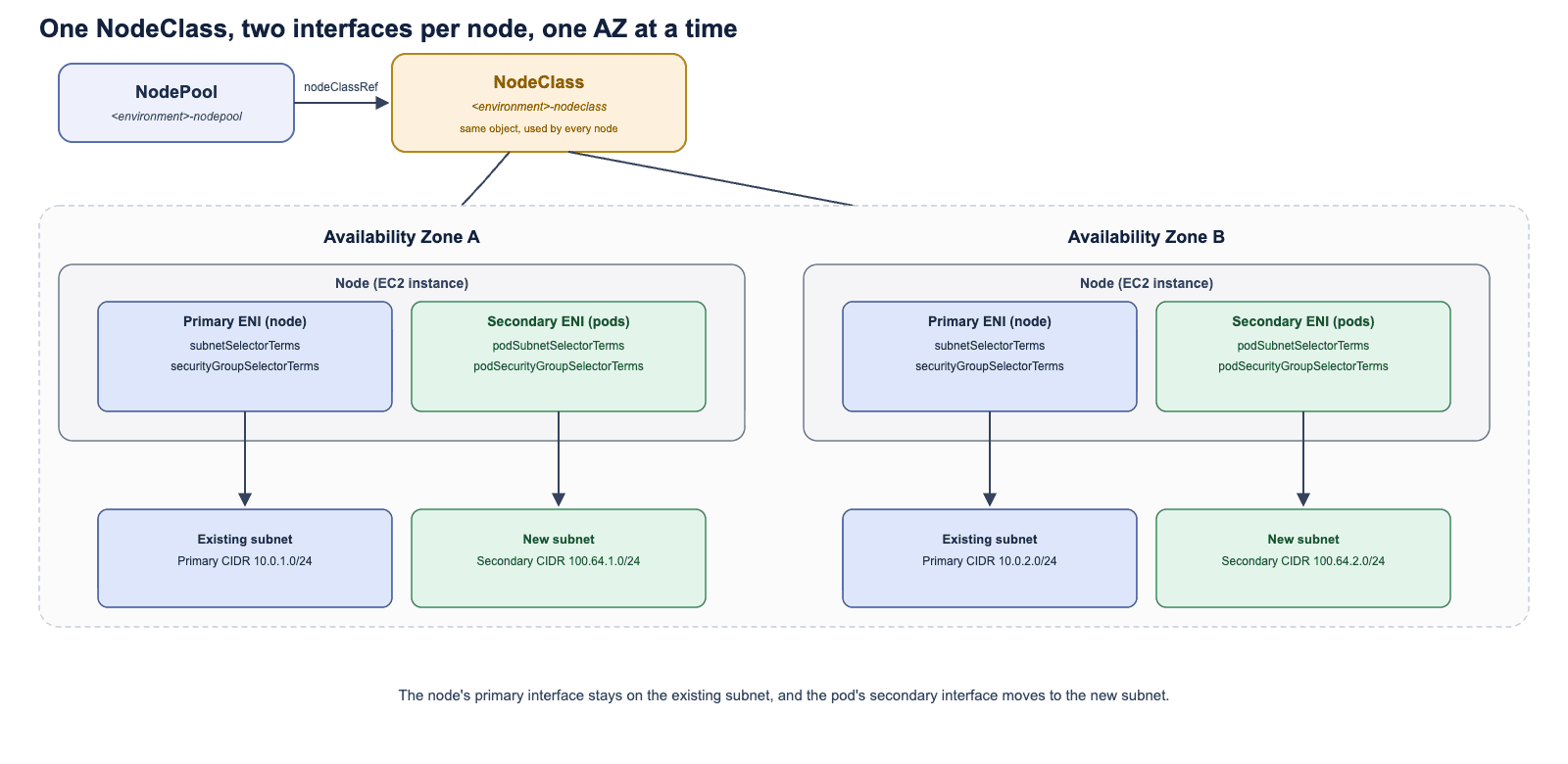
Fig 1a: One NodePool references one NodeClass, and that same NodeClass applies to every node it provisions. Within each AZ, a node’s primary interface stays on the existing subnet (subnetSelectorTerms, securityGroupSelectorTerms); its pods get a secondary interface on the new subnet (podSubnetSelectorTerms, podSecurityGroupSelectorTerms).
Adding only podSubnetSelectorTerms got the NodeClass rejected outright. EKS Auto Mode doesn’t let a pod’s network interface inherit the node’s own security group by default, even when that’s the exact group we want. podSecurityGroupSelectorTerms has to be set explicitly, pointing at the same group already on the node, or validation fails. (AWS: separate pod networking)
With all four fields in place, the manifest looked like this:
apiVersion: eks.amazonaws.com/v1
kind: NodeClass
metadata:
  name: default
spec:
  role: <environment>-eks-auto-node-role
  securityGroupSelectorTerms:
  - id: <security-group-id>
  podSecurityGroupSelectorTerms:
  - id: <security-group-id>
  subnetSelectorTerms:
  - id: <subnet-id-1>
  - id: <subnet-id-2>
  podSubnetSelectorTerms:
  - id: <pod-subnet-id-1>
  - id
I applied it, watched Argo CD sync, and moved on.
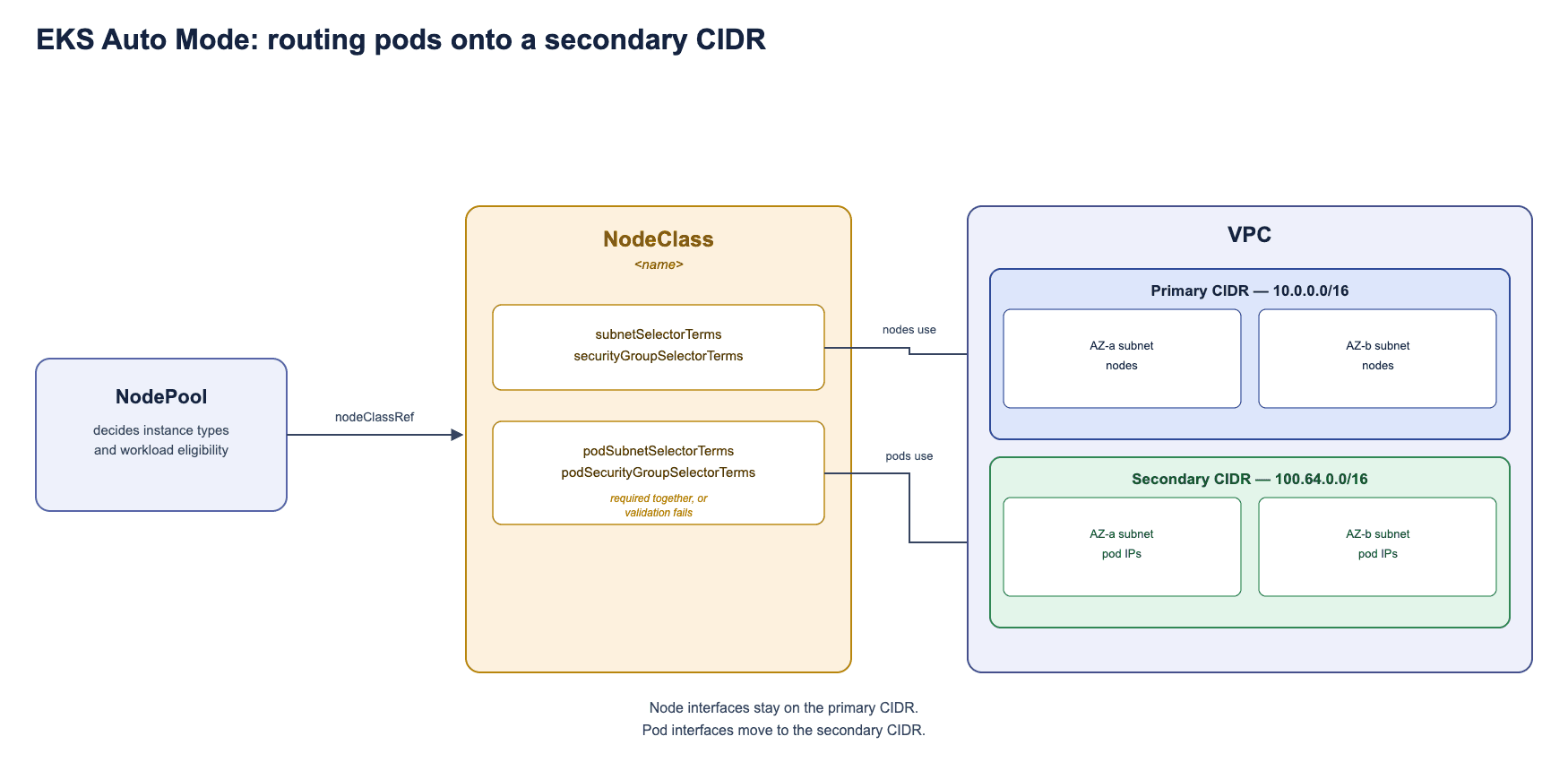
Fig 1b: How a NodePool, NodeClass, and Secondary CIDR fit together on EKS Auto Mode. Nodes boot into the primary CIDR through subnetSelectorTerms; pods draw IPs from the Secondary CIDR through podSubnetSelectorTerms. Both fields live on the same NodeClass but resolve independently.
EKS Pods Reverting to the Primary CIDR? Here’s What Happened
I confirmed the change with kubectl get pods -n <namespace> -o wide, watching the IP column. Pods were landing on the new range, exactly as designed:
NAME                   READY   STATUS    RESTARTS   AGE   IP            NODE
app-7d9f8b6c9-abcde    1/1     Running   0          3m    100.64.1.23   ip-10-0-12-45...
app-7d9f8b6c9-fghij    1/1     Running   0          3m    100
About five minutes later, the Slack alerts channel started to fire up - the same two deployments, no deploy or code change anywhere near the timestamps. I ran the same command again:
NAME                   READY   STATUS    RESTARTS   AGE   IP            NODE
app-7d9f8b6c9-abcde    1/1     Running   1          8m    10.0.12.201   ip-10-0-12-45...
app-7d9f8b6c9-fghij    1/1     Running   1          8m    10
The pods were back on the primary range. This kept happening: stable on the Secondary CIDR for about five minutes, then a drop back onto the primary range, hold there for a few minutes, drop again. Something was resetting my change on a fixed schedule, and every time, it won.
Pod IPs and restart counts were enough to spot the pattern, but they don’t by themselves prove what happened at the node level: a container restart, a replacement pod, and a replacement node are three different events, and separating them cleanly needs pod UIDs and events alongside the IP snapshots. (Kubernetes Pod lifecycle) For this case, the Argo CD side of the story turned out to be the more direct clue.
EKS Auto Mode NodeClass OutOfSync: Debugging Argo CD Reconciliation
I checked Argo CD next and found the NodeClass stuck in a permanent OutOfSync state. Every sync pushed my config through cleanly, and within minutes the live object had drifted back toward Auto Mode’s own built-in default spec. The pod-networking fields I’d just added were simply gone, though the rest of the object still looked enough like mine that it wasn’t obvious at a glance what had changed.
I matched the Slack alert timestamps against the times I’d run the two kubectl snapshots above, and every alert lined up exactly with a flip between the two CIDR ranges. It was two controllers, reconciling the same object toward two different targets, on a loop.
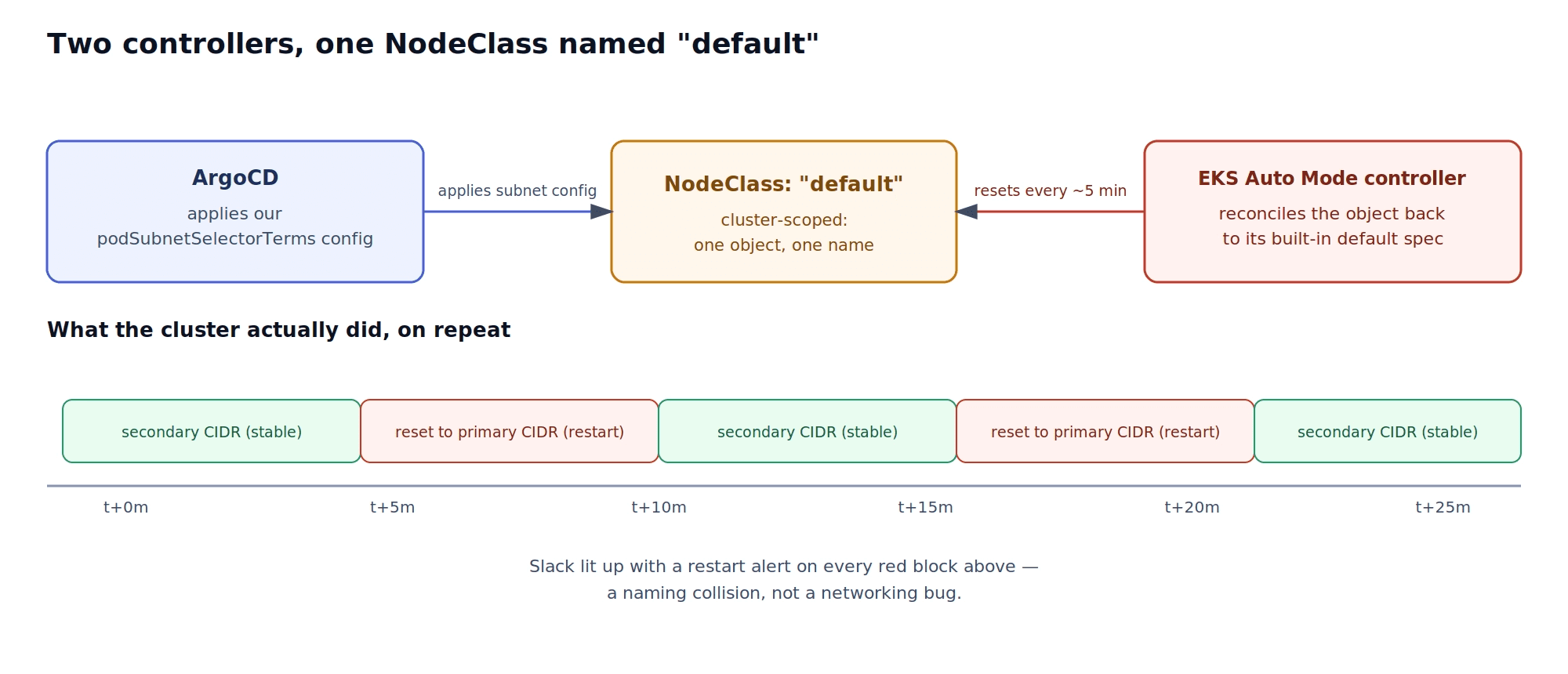
Fig 2a: Two controllers reconciling the same NodeClass object toward two different specs. Argo CD kept pushing my subnet config; EKS Auto Mode kept resetting the same object to its own. Pods flipped between the Secondary and primary CIDR on a roughly five-minute cycle, and Grafana’s restart alert landed in Slack on every flip.
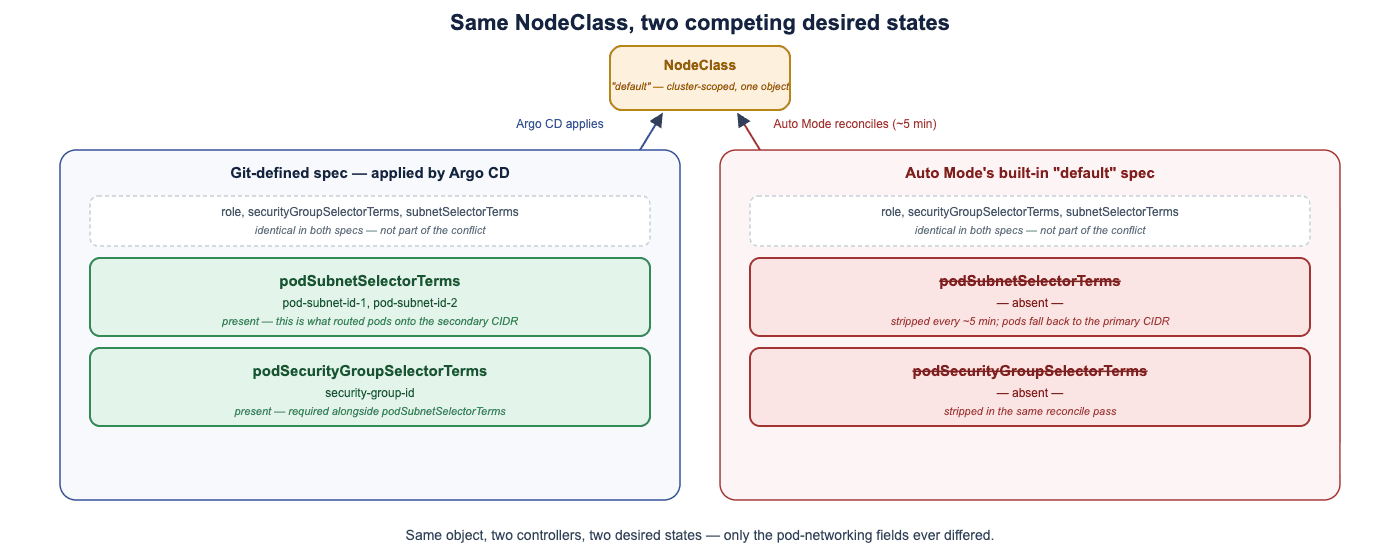
Fig 2b: The two desired states, field by field. role, securityGroupSelectorTerms, and subnetSelectorTerms matched on both sides. The entire conflict came down to podSubnetSelectorTerms and podSecurityGroupSelectorTerms, which Argo CD kept adding and Auto Mode kept stripping back out.
Why the EKS Auto Mode default NodeClass Keeps Reverting
I had named the NodeClass default. AWS’s documentation states plainly why that matters: EKS Auto Mode provisions its own NodeClass named default automatically the moment you enable a built-in NodePool. (AWS NodeClass considerations)
A NodeClass is cluster-scoped, so the name is the entire identity. There’s no such thing as “my default” NodeClass. I hadn’t created a second NodeClass. I’d been editing the one Auto Mode already owned, and it reset that object to its own spec every few minutes, right on schedule. Argo CD applied the pod-subnet settings from Git; EKS Auto Mode restored its built-in configuration underneath it. Another successful sync could put the fields back, but it never resolved the underlying ownership conflict.
There’s a related pattern in our AWS site-to-site VPN article: an ingress controller there removed manually configured load balancer rules the same way. In both cases, a change could appear to work temporarily, right up until a controller with a different desired state came back around to restore it.
A NodeClass stuck in OutOfSync right after a clean apply on EKS Auto Mode usually means a name collision with the built-in default NodeClass, not a sync bug.
Fixing EKS Auto Mode NodeClass Reconciliation Conflicts
I renamed the NodeClass to something Auto Mode has no claim on, and repointed the NodePool’s nodeClassRef to match:
apiVersion: eks.amazonaws.com/v1
kind: NodeClass
metadata:
  name: <environment>-nodeclass
spec:
  role: <environment>-eks-auto-node-role
  # Keep node primary interfaces in the existing subnets.
  securityGroupSelectorTerms:
  - id: <security-group-id>
  podSecurityGroupSelectorTerms:
  - id: <security-group-id>
  subnetSelectorTerms:
  - id: <subnet-id-1>
  - id: <subnet-id-2>
  # Allocate pod addresses through interfaces in the new subnets.
  podSubnetSelectorTerms:
  - id: <pod-subnet-id-1>
  - id
apiVersion: karpenter.sh/v1
kind: NodePool
metadata:
  name: <environment>-nodepool
spec:
  template:
    metadata:
      labels:
        <label-name>: <label-value>
    spec:
      nodeClassRef:
        group: eks.amazonaws.com
        kind: NodeClass
        name: <environment>-nodeclass
      requirements:
        - key: "eks.amazonaws.com/instance-category"
          operator: In
          values: ["c", "m", "r"]
        - key: "eks.amazonaws.com/instance-cpu"
          operator: In
          values: ["4", "8", "16", "32"]
        - key: "topology.kubernetes.io/zone"
          operator: In
          values: ["us-west-2a", "us-west-2b"]
        - key: "kubernetes.io/arch"
          operator: In
          values: ["arm64", "amd64"
I applied both and checked back later. The NodeClass no longer showed an OutOfSync status and kubectl get pods -o wide held steady on the Secondary CIDR for good. There was nothing left to reconcile. Auto Mode had its default NodeClass, and I had mine.
How to Verify Pod IPs and NodeClass Configuration in EKS Auto Mode
A clean sync right after applying isn’t proof the conflict is gone: the whole failure mode here is a change that looks correct for a few minutes before it’s reverted. The checks worth running:
# Confirm the custom NodeClass retains the intended networking fields.
kubectl get nodeclass <environment>-nodeclass -o yaml

# Confirm the NodePool references the custom NodeClass.
kubectl get nodepool <environment>-nodepool -o yaml

# Identify which NodePool actually provisioned each node.
kubectl get nodes -L karpenter.sh/nodepool

# Check pod addresses and the nodes hosting the workloads.
kubectl get pods -n <namespace> -o
Repeat these after subsequent syncs and after any new workload rollout, and test application connectivity too. An address in the expected range doesn’t by itself establish that the traffic paths you need actually work. If built-in pools remain enabled alongside your custom one, also confirm that the workloads requiring separate pod networking are actually scheduled onto the custom NodePool; creating the pool doesn’t by itself move anything onto it.
For an existing cluster, this manifest change also forces a node replacement: nodes need to pick up the new NodeClass configuration, and the affected workloads need to land on those replacement nodes. Account for pod disruption budgets and scheduling constraints when you plan the rollout, the same way you would for any other node-level config change.
EKS Auto Mode Secondary CIDR: Production Checks and Common Pitfalls
A few things are easy to miss if you’re moving fast:
Don’t bother repointing the built-in
general-purposeorsystemNodePool to a custom NodeClass either. AWS states plainly that you can’t modify the built-in NodePools at all, only enable or disable them.Run
kubectl get nodeclassbefore creating a new one at all. If a NodeClass showsOutOfSyncright after a clean apply, the object’s name is the first thing to check, not the last.Verify the node role’s EKS access entry and
AmazonEKSAutoNodePolicy, and the new pod subnets’ routes, security rules, and network ACLs, before relying on this in production.Separate pod subnets also reserve the node’s primary interface exclusively for the node, which can reduce pod density per node. That’s a real trade-off to weigh, independent of the reconciliation bug this article is about.
On EKS Auto Mode, your NodeClass and NodePool configuration is yours only until it collides with a name Auto Mode has already claimed for itself.
We see this exact pattern often: a config change applies cleanly, holds for a few minutes, then reverts on its own, with nothing in the deploy logs to explain why. It’s rarely the pipeline. Check what else has a claim on that object first. If you’re chasing something similar on EKS Auto Mode, Karpenter, or Argo CD, see how we approach production reliability, or get in touch if you’re chasing something similar.
Kubernetes scaling conversations almost always start and end with compute: more traffic, more pods, more nodes, the autoscaler quietly doing its job. Address space gets a lot less attention, even though a cluster runs out of IPs the same way it runs out of anything else: quietly, until the day it doesn’t.
At One2N, I was adding pod address space to a client’s EKS Auto Mode setup across three environments because IP exhaustion was already becoming a problem. The plan was to associate a secondary CIDR with each VPC, create dedicated subnets for pods, and leave the nodes in their existing subnets.
The configuration initially appeared to work. Argo CD synced the change, and pods were using addresses from the new range. A few minutes later, restart alerts started arriving in Slack. When I checked the cluster again, pods were using the primary range and not the secondary range I had added.
The more useful clue was in Argo CD: the NodeClass kept returning to OutOfSync. The pod-networking fields I had added were disappearing from the live object.
I had applied those changes to a NodeClass named default, which EKS Auto Mode already managed. Understanding that ownership boundary explained why a configuration could apply successfully and still fail to persist.
How to Add a Secondary CIDR for Pod IPs in EKS Auto Mode
A VPC’s primary CIDR block can’t grow once it’s created. Every pod and node keeps drawing from that same fixed pool, and the day it runs out, there’s no fixing it in place. Address space has to come from somewhere else. We’ve hit IP conflicts on the addressing side before too, though that time it was a site-to-site VPN, not a VPC running out of room.
This is where the Secondary CIDR comes in: an independent range attached to the same VPC, carved into new subnets without touching anything already running. Free addresses elsewhere in the VPC don’t help a workload whose networking configuration only selects subnets that are running short, so which subnets you point at matters as much as how much space you add. (AWS VPC CIDR documentation)
I picked a range that didn’t overlap the primary block and attached it:
aws ec2 associate-vpc-cidr-block --vpc-id <vpc-id> --cidr-block 100
Then created one subnet per availability zone out of it:
aws ec2 create-subnet --vpc-id <vpc-id> --availability-zone <az> --cidr-block 100
The examples below use two Availability Zones for illustration. Adapt the address ranges, subnet IDs, and resource names to your own environment, and size subnets for the workload and expected growth rather than copying the /24s here directly.
That gave me Secondary address space. Getting Karpenter to actually route pods onto it took one more step.
How to Configure Pod Subnets in EKS Auto Mode with Karpenter
On EKS Auto Mode, node provisioning is split across two core API objects, both read by the Karpenter-based controller that AWS runs for us under the hood:
Object | Owns |
|---|---|
Cloud infrastructure configuration: subnets, security groups, IAM node role | |
Workload scheduling policy: permitted instance types, sizes, architectures, capacity |
Within the NodeClass, four selector fields do the actual work of separating node networking from pod networking:
Field | Purpose |
|---|---|
| Selects subnets for the node’s primary network interface |
| Selects security groups for that interface |
| Selects subnets for the secondary interfaces used by pods |
| Selects security groups for those pod interfaces |
I already had one NodeClass and one NodePool, wired together. The change was adding the new subnet IDs under podSubnetSelectorTerms, the field that controls which subnet a pod pulls its IP from, independent of the subnet its node boots into. The selected pod subnet has to sit in the same AZ as the node:
Availability Zone | Existing node subnet | New pod subnet |
|---|---|---|
|
|
|
|
|
|
Fig 1a: One NodePool references one NodeClass, and that same NodeClass applies to every node it provisions. Within each AZ, a node’s primary interface stays on the existing subnet (subnetSelectorTerms, securityGroupSelectorTerms); its pods get a secondary interface on the new subnet (podSubnetSelectorTerms, podSecurityGroupSelectorTerms).
Adding only podSubnetSelectorTerms got the NodeClass rejected outright. EKS Auto Mode doesn’t let a pod’s network interface inherit the node’s own security group by default, even when that’s the exact group we want. podSecurityGroupSelectorTerms has to be set explicitly, pointing at the same group already on the node, or validation fails. (AWS: separate pod networking)
With all four fields in place, the manifest looked like this:
apiVersion: eks.amazonaws.com/v1
kind: NodeClass
metadata:
  name: default
spec:
  role: <environment>-eks-auto-node-role
  securityGroupSelectorTerms:
  - id: <security-group-id>
  podSecurityGroupSelectorTerms:
  - id: <security-group-id>
  subnetSelectorTerms:
  - id: <subnet-id-1>
  - id: <subnet-id-2>
  podSubnetSelectorTerms:
  - id: <pod-subnet-id-1>
  - id
I applied it, watched Argo CD sync, and moved on.
Fig 1b: How a NodePool, NodeClass, and Secondary CIDR fit together on EKS Auto Mode. Nodes boot into the primary CIDR through subnetSelectorTerms; pods draw IPs from the Secondary CIDR through podSubnetSelectorTerms. Both fields live on the same NodeClass but resolve independently.
EKS Pods Reverting to the Primary CIDR? Here’s What Happened
I confirmed the change with kubectl get pods -n <namespace> -o wide, watching the IP column. Pods were landing on the new range, exactly as designed:
NAME                   READY   STATUS    RESTARTS   AGE   IP            NODE
app-7d9f8b6c9-abcde    1/1     Running   0          3m    100.64.1.23   ip-10-0-12-45...
app-7d9f8b6c9-fghij    1/1     Running   0          3m    100
About five minutes later, the Slack alerts channel started to fire up - the same two deployments, no deploy or code change anywhere near the timestamps. I ran the same command again:
NAME                   READY   STATUS    RESTARTS   AGE   IP            NODE
app-7d9f8b6c9-abcde    1/1     Running   1          8m    10.0.12.201   ip-10-0-12-45...
app-7d9f8b6c9-fghij    1/1     Running   1          8m    10
The pods were back on the primary range. This kept happening: stable on the Secondary CIDR for about five minutes, then a drop back onto the primary range, hold there for a few minutes, drop again. Something was resetting my change on a fixed schedule, and every time, it won.
Pod IPs and restart counts were enough to spot the pattern, but they don’t by themselves prove what happened at the node level: a container restart, a replacement pod, and a replacement node are three different events, and separating them cleanly needs pod UIDs and events alongside the IP snapshots. (Kubernetes Pod lifecycle) For this case, the Argo CD side of the story turned out to be the more direct clue.
EKS Auto Mode NodeClass OutOfSync: Debugging Argo CD Reconciliation
I checked Argo CD next and found the NodeClass stuck in a permanent OutOfSync state. Every sync pushed my config through cleanly, and within minutes the live object had drifted back toward Auto Mode’s own built-in default spec. The pod-networking fields I’d just added were simply gone, though the rest of the object still looked enough like mine that it wasn’t obvious at a glance what had changed.
I matched the Slack alert timestamps against the times I’d run the two kubectl snapshots above, and every alert lined up exactly with a flip between the two CIDR ranges. It was two controllers, reconciling the same object toward two different targets, on a loop.
Fig 2a: Two controllers reconciling the same NodeClass object toward two different specs. Argo CD kept pushing my subnet config; EKS Auto Mode kept resetting the same object to its own. Pods flipped between the Secondary and primary CIDR on a roughly five-minute cycle, and Grafana’s restart alert landed in Slack on every flip.
Fig 2b: The two desired states, field by field. role, securityGroupSelectorTerms, and subnetSelectorTerms matched on both sides. The entire conflict came down to podSubnetSelectorTerms and podSecurityGroupSelectorTerms, which Argo CD kept adding and Auto Mode kept stripping back out.
Why the EKS Auto Mode default NodeClass Keeps Reverting
I had named the NodeClass default. AWS’s documentation states plainly why that matters: EKS Auto Mode provisions its own NodeClass named default automatically the moment you enable a built-in NodePool. (AWS NodeClass considerations)
A NodeClass is cluster-scoped, so the name is the entire identity. There’s no such thing as “my default” NodeClass. I hadn’t created a second NodeClass. I’d been editing the one Auto Mode already owned, and it reset that object to its own spec every few minutes, right on schedule. Argo CD applied the pod-subnet settings from Git; EKS Auto Mode restored its built-in configuration underneath it. Another successful sync could put the fields back, but it never resolved the underlying ownership conflict.
There’s a related pattern in our AWS site-to-site VPN article: an ingress controller there removed manually configured load balancer rules the same way. In both cases, a change could appear to work temporarily, right up until a controller with a different desired state came back around to restore it.
A NodeClass stuck in OutOfSync right after a clean apply on EKS Auto Mode usually means a name collision with the built-in default NodeClass, not a sync bug.
Fixing EKS Auto Mode NodeClass Reconciliation Conflicts
I renamed the NodeClass to something Auto Mode has no claim on, and repointed the NodePool’s nodeClassRef to match:
apiVersion: eks.amazonaws.com/v1
kind: NodeClass
metadata:
  name: <environment>-nodeclass
spec:
  role: <environment>-eks-auto-node-role
  # Keep node primary interfaces in the existing subnets.
  securityGroupSelectorTerms:
  - id: <security-group-id>
  podSecurityGroupSelectorTerms:
  - id: <security-group-id>
  subnetSelectorTerms:
  - id: <subnet-id-1>
  - id: <subnet-id-2>
  # Allocate pod addresses through interfaces in the new subnets.
  podSubnetSelectorTerms:
  - id: <pod-subnet-id-1>
  - id
apiVersion: karpenter.sh/v1
kind: NodePool
metadata:
  name: <environment>-nodepool
spec:
  template:
    metadata:
      labels:
        <label-name>: <label-value>
    spec:
      nodeClassRef:
        group: eks.amazonaws.com
        kind: NodeClass
        name: <environment>-nodeclass
      requirements:
        - key: "eks.amazonaws.com/instance-category"
          operator: In
          values: ["c", "m", "r"]
        - key: "eks.amazonaws.com/instance-cpu"
          operator: In
          values: ["4", "8", "16", "32"]
        - key: "topology.kubernetes.io/zone"
          operator: In
          values: ["us-west-2a", "us-west-2b"]
        - key: "kubernetes.io/arch"
          operator: In
          values: ["arm64", "amd64"
I applied both and checked back later. The NodeClass no longer showed an OutOfSync status and kubectl get pods -o wide held steady on the Secondary CIDR for good. There was nothing left to reconcile. Auto Mode had its default NodeClass, and I had mine.
How to Verify Pod IPs and NodeClass Configuration in EKS Auto Mode
A clean sync right after applying isn’t proof the conflict is gone: the whole failure mode here is a change that looks correct for a few minutes before it’s reverted. The checks worth running:
# Confirm the custom NodeClass retains the intended networking fields.
kubectl get nodeclass <environment>-nodeclass -o yaml

# Confirm the NodePool references the custom NodeClass.
kubectl get nodepool <environment>-nodepool -o yaml

# Identify which NodePool actually provisioned each node.
kubectl get nodes -L karpenter.sh/nodepool

# Check pod addresses and the nodes hosting the workloads.
kubectl get pods -n <namespace> -o
Repeat these after subsequent syncs and after any new workload rollout, and test application connectivity too. An address in the expected range doesn’t by itself establish that the traffic paths you need actually work. If built-in pools remain enabled alongside your custom one, also confirm that the workloads requiring separate pod networking are actually scheduled onto the custom NodePool; creating the pool doesn’t by itself move anything onto it.
For an existing cluster, this manifest change also forces a node replacement: nodes need to pick up the new NodeClass configuration, and the affected workloads need to land on those replacement nodes. Account for pod disruption budgets and scheduling constraints when you plan the rollout, the same way you would for any other node-level config change.
EKS Auto Mode Secondary CIDR: Production Checks and Common Pitfalls
A few things are easy to miss if you’re moving fast:
Don’t bother repointing the built-in
general-purposeorsystemNodePool to a custom NodeClass either. AWS states plainly that you can’t modify the built-in NodePools at all, only enable or disable them.Run
kubectl get nodeclassbefore creating a new one at all. If a NodeClass showsOutOfSyncright after a clean apply, the object’s name is the first thing to check, not the last.Verify the node role’s EKS access entry and
AmazonEKSAutoNodePolicy, and the new pod subnets’ routes, security rules, and network ACLs, before relying on this in production.Separate pod subnets also reserve the node’s primary interface exclusively for the node, which can reduce pod density per node. That’s a real trade-off to weigh, independent of the reconciliation bug this article is about.
On EKS Auto Mode, your NodeClass and NodePool configuration is yours only until it collides with a name Auto Mode has already claimed for itself.
We see this exact pattern often: a config change applies cleanly, holds for a few minutes, then reverts on its own, with nothing in the deploy logs to explain why. It’s rarely the pipeline. Check what else has a claim on that object first. If you’re chasing something similar on EKS Auto Mode, Karpenter, or Argo CD, see how we approach production reliability, or get in touch if you’re chasing something similar.
Kubernetes scaling conversations almost always start and end with compute: more traffic, more pods, more nodes, the autoscaler quietly doing its job. Address space gets a lot less attention, even though a cluster runs out of IPs the same way it runs out of anything else: quietly, until the day it doesn’t.
At One2N, I was adding pod address space to a client’s EKS Auto Mode setup across three environments because IP exhaustion was already becoming a problem. The plan was to associate a secondary CIDR with each VPC, create dedicated subnets for pods, and leave the nodes in their existing subnets.
The configuration initially appeared to work. Argo CD synced the change, and pods were using addresses from the new range. A few minutes later, restart alerts started arriving in Slack. When I checked the cluster again, pods were using the primary range and not the secondary range I had added.
The more useful clue was in Argo CD: the NodeClass kept returning to OutOfSync. The pod-networking fields I had added were disappearing from the live object.
I had applied those changes to a NodeClass named default, which EKS Auto Mode already managed. Understanding that ownership boundary explained why a configuration could apply successfully and still fail to persist.
How to Add a Secondary CIDR for Pod IPs in EKS Auto Mode
A VPC’s primary CIDR block can’t grow once it’s created. Every pod and node keeps drawing from that same fixed pool, and the day it runs out, there’s no fixing it in place. Address space has to come from somewhere else. We’ve hit IP conflicts on the addressing side before too, though that time it was a site-to-site VPN, not a VPC running out of room.
This is where the Secondary CIDR comes in: an independent range attached to the same VPC, carved into new subnets without touching anything already running. Free addresses elsewhere in the VPC don’t help a workload whose networking configuration only selects subnets that are running short, so which subnets you point at matters as much as how much space you add. (AWS VPC CIDR documentation)
I picked a range that didn’t overlap the primary block and attached it:
aws ec2 associate-vpc-cidr-block --vpc-id <vpc-id> --cidr-block 100
Then created one subnet per availability zone out of it:
aws ec2 create-subnet --vpc-id <vpc-id> --availability-zone <az> --cidr-block 100
The examples below use two Availability Zones for illustration. Adapt the address ranges, subnet IDs, and resource names to your own environment, and size subnets for the workload and expected growth rather than copying the /24s here directly.
That gave me Secondary address space. Getting Karpenter to actually route pods onto it took one more step.
How to Configure Pod Subnets in EKS Auto Mode with Karpenter
On EKS Auto Mode, node provisioning is split across two core API objects, both read by the Karpenter-based controller that AWS runs for us under the hood:
Object | Owns |
|---|---|
Cloud infrastructure configuration: subnets, security groups, IAM node role | |
Workload scheduling policy: permitted instance types, sizes, architectures, capacity |
Within the NodeClass, four selector fields do the actual work of separating node networking from pod networking:
Field | Purpose |
|---|---|
| Selects subnets for the node’s primary network interface |
| Selects security groups for that interface |
| Selects subnets for the secondary interfaces used by pods |
| Selects security groups for those pod interfaces |
I already had one NodeClass and one NodePool, wired together. The change was adding the new subnet IDs under podSubnetSelectorTerms, the field that controls which subnet a pod pulls its IP from, independent of the subnet its node boots into. The selected pod subnet has to sit in the same AZ as the node:
Availability Zone | Existing node subnet | New pod subnet |
|---|---|---|
|
|
|
|
|
|
Fig 1a: One NodePool references one NodeClass, and that same NodeClass applies to every node it provisions. Within each AZ, a node’s primary interface stays on the existing subnet (subnetSelectorTerms, securityGroupSelectorTerms); its pods get a secondary interface on the new subnet (podSubnetSelectorTerms, podSecurityGroupSelectorTerms).
Adding only podSubnetSelectorTerms got the NodeClass rejected outright. EKS Auto Mode doesn’t let a pod’s network interface inherit the node’s own security group by default, even when that’s the exact group we want. podSecurityGroupSelectorTerms has to be set explicitly, pointing at the same group already on the node, or validation fails. (AWS: separate pod networking)
With all four fields in place, the manifest looked like this:
apiVersion: eks.amazonaws.com/v1
kind: NodeClass
metadata:
  name: default
spec:
  role: <environment>-eks-auto-node-role
  securityGroupSelectorTerms:
  - id: <security-group-id>
  podSecurityGroupSelectorTerms:
  - id: <security-group-id>
  subnetSelectorTerms:
  - id: <subnet-id-1>
  - id: <subnet-id-2>
  podSubnetSelectorTerms:
  - id: <pod-subnet-id-1>
  - id
I applied it, watched Argo CD sync, and moved on.
Fig 1b: How a NodePool, NodeClass, and Secondary CIDR fit together on EKS Auto Mode. Nodes boot into the primary CIDR through subnetSelectorTerms; pods draw IPs from the Secondary CIDR through podSubnetSelectorTerms. Both fields live on the same NodeClass but resolve independently.
EKS Pods Reverting to the Primary CIDR? Here’s What Happened
I confirmed the change with kubectl get pods -n <namespace> -o wide, watching the IP column. Pods were landing on the new range, exactly as designed:
NAME                   READY   STATUS    RESTARTS   AGE   IP            NODE
app-7d9f8b6c9-abcde    1/1     Running   0          3m    100.64.1.23   ip-10-0-12-45...
app-7d9f8b6c9-fghij    1/1     Running   0          3m    100
About five minutes later, the Slack alerts channel started to fire up - the same two deployments, no deploy or code change anywhere near the timestamps. I ran the same command again:
NAME                   READY   STATUS    RESTARTS   AGE   IP            NODE
app-7d9f8b6c9-abcde    1/1     Running   1          8m    10.0.12.201   ip-10-0-12-45...
app-7d9f8b6c9-fghij    1/1     Running   1          8m    10
The pods were back on the primary range. This kept happening: stable on the Secondary CIDR for about five minutes, then a drop back onto the primary range, hold there for a few minutes, drop again. Something was resetting my change on a fixed schedule, and every time, it won.
Pod IPs and restart counts were enough to spot the pattern, but they don’t by themselves prove what happened at the node level: a container restart, a replacement pod, and a replacement node are three different events, and separating them cleanly needs pod UIDs and events alongside the IP snapshots. (Kubernetes Pod lifecycle) For this case, the Argo CD side of the story turned out to be the more direct clue.
EKS Auto Mode NodeClass OutOfSync: Debugging Argo CD Reconciliation
I checked Argo CD next and found the NodeClass stuck in a permanent OutOfSync state. Every sync pushed my config through cleanly, and within minutes the live object had drifted back toward Auto Mode’s own built-in default spec. The pod-networking fields I’d just added were simply gone, though the rest of the object still looked enough like mine that it wasn’t obvious at a glance what had changed.
I matched the Slack alert timestamps against the times I’d run the two kubectl snapshots above, and every alert lined up exactly with a flip between the two CIDR ranges. It was two controllers, reconciling the same object toward two different targets, on a loop.
Fig 2a: Two controllers reconciling the same NodeClass object toward two different specs. Argo CD kept pushing my subnet config; EKS Auto Mode kept resetting the same object to its own. Pods flipped between the Secondary and primary CIDR on a roughly five-minute cycle, and Grafana’s restart alert landed in Slack on every flip.
Fig 2b: The two desired states, field by field. role, securityGroupSelectorTerms, and subnetSelectorTerms matched on both sides. The entire conflict came down to podSubnetSelectorTerms and podSecurityGroupSelectorTerms, which Argo CD kept adding and Auto Mode kept stripping back out.
Why the EKS Auto Mode default NodeClass Keeps Reverting
I had named the NodeClass default. AWS’s documentation states plainly why that matters: EKS Auto Mode provisions its own NodeClass named default automatically the moment you enable a built-in NodePool. (AWS NodeClass considerations)
A NodeClass is cluster-scoped, so the name is the entire identity. There’s no such thing as “my default” NodeClass. I hadn’t created a second NodeClass. I’d been editing the one Auto Mode already owned, and it reset that object to its own spec every few minutes, right on schedule. Argo CD applied the pod-subnet settings from Git; EKS Auto Mode restored its built-in configuration underneath it. Another successful sync could put the fields back, but it never resolved the underlying ownership conflict.
There’s a related pattern in our AWS site-to-site VPN article: an ingress controller there removed manually configured load balancer rules the same way. In both cases, a change could appear to work temporarily, right up until a controller with a different desired state came back around to restore it.
A NodeClass stuck in OutOfSync right after a clean apply on EKS Auto Mode usually means a name collision with the built-in default NodeClass, not a sync bug.
Fixing EKS Auto Mode NodeClass Reconciliation Conflicts
I renamed the NodeClass to something Auto Mode has no claim on, and repointed the NodePool’s nodeClassRef to match:
apiVersion: eks.amazonaws.com/v1
kind: NodeClass
metadata:
  name: <environment>-nodeclass
spec:
  role: <environment>-eks-auto-node-role
  # Keep node primary interfaces in the existing subnets.
  securityGroupSelectorTerms:
  - id: <security-group-id>
  podSecurityGroupSelectorTerms:
  - id: <security-group-id>
  subnetSelectorTerms:
  - id: <subnet-id-1>
  - id: <subnet-id-2>
  # Allocate pod addresses through interfaces in the new subnets.
  podSubnetSelectorTerms:
  - id: <pod-subnet-id-1>
  - id
apiVersion: karpenter.sh/v1
kind: NodePool
metadata:
  name: <environment>-nodepool
spec:
  template:
    metadata:
      labels:
        <label-name>: <label-value>
    spec:
      nodeClassRef:
        group: eks.amazonaws.com
        kind: NodeClass
        name: <environment>-nodeclass
      requirements:
        - key: "eks.amazonaws.com/instance-category"
          operator: In
          values: ["c", "m", "r"]
        - key: "eks.amazonaws.com/instance-cpu"
          operator: In
          values: ["4", "8", "16", "32"]
        - key: "topology.kubernetes.io/zone"
          operator: In
          values: ["us-west-2a", "us-west-2b"]
        - key: "kubernetes.io/arch"
          operator: In
          values: ["arm64", "amd64"
I applied both and checked back later. The NodeClass no longer showed an OutOfSync status and kubectl get pods -o wide held steady on the Secondary CIDR for good. There was nothing left to reconcile. Auto Mode had its default NodeClass, and I had mine.
How to Verify Pod IPs and NodeClass Configuration in EKS Auto Mode
A clean sync right after applying isn’t proof the conflict is gone: the whole failure mode here is a change that looks correct for a few minutes before it’s reverted. The checks worth running:
# Confirm the custom NodeClass retains the intended networking fields.
kubectl get nodeclass <environment>-nodeclass -o yaml

# Confirm the NodePool references the custom NodeClass.
kubectl get nodepool <environment>-nodepool -o yaml

# Identify which NodePool actually provisioned each node.
kubectl get nodes -L karpenter.sh/nodepool

# Check pod addresses and the nodes hosting the workloads.
kubectl get pods -n <namespace> -o
Repeat these after subsequent syncs and after any new workload rollout, and test application connectivity too. An address in the expected range doesn’t by itself establish that the traffic paths you need actually work. If built-in pools remain enabled alongside your custom one, also confirm that the workloads requiring separate pod networking are actually scheduled onto the custom NodePool; creating the pool doesn’t by itself move anything onto it.
For an existing cluster, this manifest change also forces a node replacement: nodes need to pick up the new NodeClass configuration, and the affected workloads need to land on those replacement nodes. Account for pod disruption budgets and scheduling constraints when you plan the rollout, the same way you would for any other node-level config change.
EKS Auto Mode Secondary CIDR: Production Checks and Common Pitfalls
A few things are easy to miss if you’re moving fast:
Don’t bother repointing the built-in
general-purposeorsystemNodePool to a custom NodeClass either. AWS states plainly that you can’t modify the built-in NodePools at all, only enable or disable them.Run
kubectl get nodeclassbefore creating a new one at all. If a NodeClass showsOutOfSyncright after a clean apply, the object’s name is the first thing to check, not the last.Verify the node role’s EKS access entry and
AmazonEKSAutoNodePolicy, and the new pod subnets’ routes, security rules, and network ACLs, before relying on this in production.Separate pod subnets also reserve the node’s primary interface exclusively for the node, which can reduce pod density per node. That’s a real trade-off to weigh, independent of the reconciliation bug this article is about.
On EKS Auto Mode, your NodeClass and NodePool configuration is yours only until it collides with a name Auto Mode has already claimed for itself.
We see this exact pattern often: a config change applies cleanly, holds for a few minutes, then reverts on its own, with nothing in the deploy logs to explain why. It’s rarely the pipeline. Check what else has a claim on that object first. If you’re chasing something similar on EKS Auto Mode, Karpenter, or Argo CD, see how we approach production reliability, or get in touch if you’re chasing something similar.
Kubernetes scaling conversations almost always start and end with compute: more traffic, more pods, more nodes, the autoscaler quietly doing its job. Address space gets a lot less attention, even though a cluster runs out of IPs the same way it runs out of anything else: quietly, until the day it doesn’t.
At One2N, I was adding pod address space to a client’s EKS Auto Mode setup across three environments because IP exhaustion was already becoming a problem. The plan was to associate a secondary CIDR with each VPC, create dedicated subnets for pods, and leave the nodes in their existing subnets.
The configuration initially appeared to work. Argo CD synced the change, and pods were using addresses from the new range. A few minutes later, restart alerts started arriving in Slack. When I checked the cluster again, pods were using the primary range and not the secondary range I had added.
The more useful clue was in Argo CD: the NodeClass kept returning to OutOfSync. The pod-networking fields I had added were disappearing from the live object.
I had applied those changes to a NodeClass named default, which EKS Auto Mode already managed. Understanding that ownership boundary explained why a configuration could apply successfully and still fail to persist.
How to Add a Secondary CIDR for Pod IPs in EKS Auto Mode
A VPC’s primary CIDR block can’t grow once it’s created. Every pod and node keeps drawing from that same fixed pool, and the day it runs out, there’s no fixing it in place. Address space has to come from somewhere else. We’ve hit IP conflicts on the addressing side before too, though that time it was a site-to-site VPN, not a VPC running out of room.
This is where the Secondary CIDR comes in: an independent range attached to the same VPC, carved into new subnets without touching anything already running. Free addresses elsewhere in the VPC don’t help a workload whose networking configuration only selects subnets that are running short, so which subnets you point at matters as much as how much space you add. (AWS VPC CIDR documentation)
I picked a range that didn’t overlap the primary block and attached it:
aws ec2 associate-vpc-cidr-block --vpc-id <vpc-id> --cidr-block 100
Then created one subnet per availability zone out of it:
aws ec2 create-subnet --vpc-id <vpc-id> --availability-zone <az> --cidr-block 100
The examples below use two Availability Zones for illustration. Adapt the address ranges, subnet IDs, and resource names to your own environment, and size subnets for the workload and expected growth rather than copying the /24s here directly.
That gave me Secondary address space. Getting Karpenter to actually route pods onto it took one more step.
How to Configure Pod Subnets in EKS Auto Mode with Karpenter
On EKS Auto Mode, node provisioning is split across two core API objects, both read by the Karpenter-based controller that AWS runs for us under the hood:
Object | Owns |
|---|---|
Cloud infrastructure configuration: subnets, security groups, IAM node role | |
Workload scheduling policy: permitted instance types, sizes, architectures, capacity |
Within the NodeClass, four selector fields do the actual work of separating node networking from pod networking:
Field | Purpose |
|---|---|
| Selects subnets for the node’s primary network interface |
| Selects security groups for that interface |
| Selects subnets for the secondary interfaces used by pods |
| Selects security groups for those pod interfaces |
I already had one NodeClass and one NodePool, wired together. The change was adding the new subnet IDs under podSubnetSelectorTerms, the field that controls which subnet a pod pulls its IP from, independent of the subnet its node boots into. The selected pod subnet has to sit in the same AZ as the node:
Availability Zone | Existing node subnet | New pod subnet |
|---|---|---|
|
|
|
|
|
|
Fig 1a: One NodePool references one NodeClass, and that same NodeClass applies to every node it provisions. Within each AZ, a node’s primary interface stays on the existing subnet (subnetSelectorTerms, securityGroupSelectorTerms); its pods get a secondary interface on the new subnet (podSubnetSelectorTerms, podSecurityGroupSelectorTerms).
Adding only podSubnetSelectorTerms got the NodeClass rejected outright. EKS Auto Mode doesn’t let a pod’s network interface inherit the node’s own security group by default, even when that’s the exact group we want. podSecurityGroupSelectorTerms has to be set explicitly, pointing at the same group already on the node, or validation fails. (AWS: separate pod networking)
With all four fields in place, the manifest looked like this:
apiVersion: eks.amazonaws.com/v1
kind: NodeClass
metadata:
  name: default
spec:
  role: <environment>-eks-auto-node-role
  securityGroupSelectorTerms:
  - id: <security-group-id>
  podSecurityGroupSelectorTerms:
  - id: <security-group-id>
  subnetSelectorTerms:
  - id: <subnet-id-1>
  - id: <subnet-id-2>
  podSubnetSelectorTerms:
  - id: <pod-subnet-id-1>
  - id
I applied it, watched Argo CD sync, and moved on.
Fig 1b: How a NodePool, NodeClass, and Secondary CIDR fit together on EKS Auto Mode. Nodes boot into the primary CIDR through subnetSelectorTerms; pods draw IPs from the Secondary CIDR through podSubnetSelectorTerms. Both fields live on the same NodeClass but resolve independently.
EKS Pods Reverting to the Primary CIDR? Here’s What Happened
I confirmed the change with kubectl get pods -n <namespace> -o wide, watching the IP column. Pods were landing on the new range, exactly as designed:
NAME                   READY   STATUS    RESTARTS   AGE   IP            NODE
app-7d9f8b6c9-abcde    1/1     Running   0          3m    100.64.1.23   ip-10-0-12-45...
app-7d9f8b6c9-fghij    1/1     Running   0          3m    100
About five minutes later, the Slack alerts channel started to fire up - the same two deployments, no deploy or code change anywhere near the timestamps. I ran the same command again:
NAME                   READY   STATUS    RESTARTS   AGE   IP            NODE
app-7d9f8b6c9-abcde    1/1     Running   1          8m    10.0.12.201   ip-10-0-12-45...
app-7d9f8b6c9-fghij    1/1     Running   1          8m    10
The pods were back on the primary range. This kept happening: stable on the Secondary CIDR for about five minutes, then a drop back onto the primary range, hold there for a few minutes, drop again. Something was resetting my change on a fixed schedule, and every time, it won.
Pod IPs and restart counts were enough to spot the pattern, but they don’t by themselves prove what happened at the node level: a container restart, a replacement pod, and a replacement node are three different events, and separating them cleanly needs pod UIDs and events alongside the IP snapshots. (Kubernetes Pod lifecycle) For this case, the Argo CD side of the story turned out to be the more direct clue.
EKS Auto Mode NodeClass OutOfSync: Debugging Argo CD Reconciliation
I checked Argo CD next and found the NodeClass stuck in a permanent OutOfSync state. Every sync pushed my config through cleanly, and within minutes the live object had drifted back toward Auto Mode’s own built-in default spec. The pod-networking fields I’d just added were simply gone, though the rest of the object still looked enough like mine that it wasn’t obvious at a glance what had changed.
I matched the Slack alert timestamps against the times I’d run the two kubectl snapshots above, and every alert lined up exactly with a flip between the two CIDR ranges. It was two controllers, reconciling the same object toward two different targets, on a loop.
Fig 2a: Two controllers reconciling the same NodeClass object toward two different specs. Argo CD kept pushing my subnet config; EKS Auto Mode kept resetting the same object to its own. Pods flipped between the Secondary and primary CIDR on a roughly five-minute cycle, and Grafana’s restart alert landed in Slack on every flip.
Fig 2b: The two desired states, field by field. role, securityGroupSelectorTerms, and subnetSelectorTerms matched on both sides. The entire conflict came down to podSubnetSelectorTerms and podSecurityGroupSelectorTerms, which Argo CD kept adding and Auto Mode kept stripping back out.
Why the EKS Auto Mode default NodeClass Keeps Reverting
I had named the NodeClass default. AWS’s documentation states plainly why that matters: EKS Auto Mode provisions its own NodeClass named default automatically the moment you enable a built-in NodePool. (AWS NodeClass considerations)
A NodeClass is cluster-scoped, so the name is the entire identity. There’s no such thing as “my default” NodeClass. I hadn’t created a second NodeClass. I’d been editing the one Auto Mode already owned, and it reset that object to its own spec every few minutes, right on schedule. Argo CD applied the pod-subnet settings from Git; EKS Auto Mode restored its built-in configuration underneath it. Another successful sync could put the fields back, but it never resolved the underlying ownership conflict.
There’s a related pattern in our AWS site-to-site VPN article: an ingress controller there removed manually configured load balancer rules the same way. In both cases, a change could appear to work temporarily, right up until a controller with a different desired state came back around to restore it.
A NodeClass stuck in OutOfSync right after a clean apply on EKS Auto Mode usually means a name collision with the built-in default NodeClass, not a sync bug.
Fixing EKS Auto Mode NodeClass Reconciliation Conflicts
I renamed the NodeClass to something Auto Mode has no claim on, and repointed the NodePool’s nodeClassRef to match:
apiVersion: eks.amazonaws.com/v1
kind: NodeClass
metadata:
  name: <environment>-nodeclass
spec:
  role: <environment>-eks-auto-node-role
  # Keep node primary interfaces in the existing subnets.
  securityGroupSelectorTerms:
  - id: <security-group-id>
  podSecurityGroupSelectorTerms:
  - id: <security-group-id>
  subnetSelectorTerms:
  - id: <subnet-id-1>
  - id: <subnet-id-2>
  # Allocate pod addresses through interfaces in the new subnets.
  podSubnetSelectorTerms:
  - id: <pod-subnet-id-1>
  - id
apiVersion: karpenter.sh/v1
kind: NodePool
metadata:
  name: <environment>-nodepool
spec:
  template:
    metadata:
      labels:
        <label-name>: <label-value>
    spec:
      nodeClassRef:
        group: eks.amazonaws.com
        kind: NodeClass
        name: <environment>-nodeclass
      requirements:
        - key: "eks.amazonaws.com/instance-category"
          operator: In
          values: ["c", "m", "r"]
        - key: "eks.amazonaws.com/instance-cpu"
          operator: In
          values: ["4", "8", "16", "32"]
        - key: "topology.kubernetes.io/zone"
          operator: In
          values: ["us-west-2a", "us-west-2b"]
        - key: "kubernetes.io/arch"
          operator: In
          values: ["arm64", "amd64"
I applied both and checked back later. The NodeClass no longer showed an OutOfSync status and kubectl get pods -o wide held steady on the Secondary CIDR for good. There was nothing left to reconcile. Auto Mode had its default NodeClass, and I had mine.
How to Verify Pod IPs and NodeClass Configuration in EKS Auto Mode
A clean sync right after applying isn’t proof the conflict is gone: the whole failure mode here is a change that looks correct for a few minutes before it’s reverted. The checks worth running:
# Confirm the custom NodeClass retains the intended networking fields.
kubectl get nodeclass <environment>-nodeclass -o yaml

# Confirm the NodePool references the custom NodeClass.
kubectl get nodepool <environment>-nodepool -o yaml

# Identify which NodePool actually provisioned each node.
kubectl get nodes -L karpenter.sh/nodepool

# Check pod addresses and the nodes hosting the workloads.
kubectl get pods -n <namespace> -o
Repeat these after subsequent syncs and after any new workload rollout, and test application connectivity too. An address in the expected range doesn’t by itself establish that the traffic paths you need actually work. If built-in pools remain enabled alongside your custom one, also confirm that the workloads requiring separate pod networking are actually scheduled onto the custom NodePool; creating the pool doesn’t by itself move anything onto it.
For an existing cluster, this manifest change also forces a node replacement: nodes need to pick up the new NodeClass configuration, and the affected workloads need to land on those replacement nodes. Account for pod disruption budgets and scheduling constraints when you plan the rollout, the same way you would for any other node-level config change.
EKS Auto Mode Secondary CIDR: Production Checks and Common Pitfalls
A few things are easy to miss if you’re moving fast:
Don’t bother repointing the built-in
general-purposeorsystemNodePool to a custom NodeClass either. AWS states plainly that you can’t modify the built-in NodePools at all, only enable or disable them.Run
kubectl get nodeclassbefore creating a new one at all. If a NodeClass showsOutOfSyncright after a clean apply, the object’s name is the first thing to check, not the last.Verify the node role’s EKS access entry and
AmazonEKSAutoNodePolicy, and the new pod subnets’ routes, security rules, and network ACLs, before relying on this in production.Separate pod subnets also reserve the node’s primary interface exclusively for the node, which can reduce pod density per node. That’s a real trade-off to weigh, independent of the reconciliation bug this article is about.
On EKS Auto Mode, your NodeClass and NodePool configuration is yours only until it collides with a name Auto Mode has already claimed for itself.
We see this exact pattern often: a config change applies cleanly, holds for a few minutes, then reverts on its own, with nothing in the deploy logs to explain why. It’s rarely the pipeline. Check what else has a claim on that object first. If you’re chasing something similar on EKS Auto Mode, Karpenter, or Argo CD, see how we approach production reliability, or get in touch if you’re chasing something similar.
Kubernetes scaling conversations almost always start and end with compute: more traffic, more pods, more nodes, the autoscaler quietly doing its job. Address space gets a lot less attention, even though a cluster runs out of IPs the same way it runs out of anything else: quietly, until the day it doesn’t.
At One2N, I was adding pod address space to a client’s EKS Auto Mode setup across three environments because IP exhaustion was already becoming a problem. The plan was to associate a secondary CIDR with each VPC, create dedicated subnets for pods, and leave the nodes in their existing subnets.
The configuration initially appeared to work. Argo CD synced the change, and pods were using addresses from the new range. A few minutes later, restart alerts started arriving in Slack. When I checked the cluster again, pods were using the primary range and not the secondary range I had added.
The more useful clue was in Argo CD: the NodeClass kept returning to OutOfSync. The pod-networking fields I had added were disappearing from the live object.
I had applied those changes to a NodeClass named default, which EKS Auto Mode already managed. Understanding that ownership boundary explained why a configuration could apply successfully and still fail to persist.
How to Add a Secondary CIDR for Pod IPs in EKS Auto Mode
A VPC’s primary CIDR block can’t grow once it’s created. Every pod and node keeps drawing from that same fixed pool, and the day it runs out, there’s no fixing it in place. Address space has to come from somewhere else. We’ve hit IP conflicts on the addressing side before too, though that time it was a site-to-site VPN, not a VPC running out of room.
This is where the Secondary CIDR comes in: an independent range attached to the same VPC, carved into new subnets without touching anything already running. Free addresses elsewhere in the VPC don’t help a workload whose networking configuration only selects subnets that are running short, so which subnets you point at matters as much as how much space you add. (AWS VPC CIDR documentation)
I picked a range that didn’t overlap the primary block and attached it:
aws ec2 associate-vpc-cidr-block --vpc-id <vpc-id> --cidr-block 100
Then created one subnet per availability zone out of it:
aws ec2 create-subnet --vpc-id <vpc-id> --availability-zone <az> --cidr-block 100
The examples below use two Availability Zones for illustration. Adapt the address ranges, subnet IDs, and resource names to your own environment, and size subnets for the workload and expected growth rather than copying the /24s here directly.
That gave me Secondary address space. Getting Karpenter to actually route pods onto it took one more step.
How to Configure Pod Subnets in EKS Auto Mode with Karpenter
On EKS Auto Mode, node provisioning is split across two core API objects, both read by the Karpenter-based controller that AWS runs for us under the hood:
Object | Owns |
|---|---|
Cloud infrastructure configuration: subnets, security groups, IAM node role | |
Workload scheduling policy: permitted instance types, sizes, architectures, capacity |
Within the NodeClass, four selector fields do the actual work of separating node networking from pod networking:
Field | Purpose |
|---|---|
| Selects subnets for the node’s primary network interface |
| Selects security groups for that interface |
| Selects subnets for the secondary interfaces used by pods |
| Selects security groups for those pod interfaces |
I already had one NodeClass and one NodePool, wired together. The change was adding the new subnet IDs under podSubnetSelectorTerms, the field that controls which subnet a pod pulls its IP from, independent of the subnet its node boots into. The selected pod subnet has to sit in the same AZ as the node:
Availability Zone | Existing node subnet | New pod subnet |
|---|---|---|
|
|
|
|
|
|
Fig 1a: One NodePool references one NodeClass, and that same NodeClass applies to every node it provisions. Within each AZ, a node’s primary interface stays on the existing subnet (subnetSelectorTerms, securityGroupSelectorTerms); its pods get a secondary interface on the new subnet (podSubnetSelectorTerms, podSecurityGroupSelectorTerms).
Adding only podSubnetSelectorTerms got the NodeClass rejected outright. EKS Auto Mode doesn’t let a pod’s network interface inherit the node’s own security group by default, even when that’s the exact group we want. podSecurityGroupSelectorTerms has to be set explicitly, pointing at the same group already on the node, or validation fails. (AWS: separate pod networking)
With all four fields in place, the manifest looked like this:
apiVersion: eks.amazonaws.com/v1
kind: NodeClass
metadata:
  name: default
spec:
  role: <environment>-eks-auto-node-role
  securityGroupSelectorTerms:
  - id: <security-group-id>
  podSecurityGroupSelectorTerms:
  - id: <security-group-id>
  subnetSelectorTerms:
  - id: <subnet-id-1>
  - id: <subnet-id-2>
  podSubnetSelectorTerms:
  - id: <pod-subnet-id-1>
  - id
I applied it, watched Argo CD sync, and moved on.
Fig 1b: How a NodePool, NodeClass, and Secondary CIDR fit together on EKS Auto Mode. Nodes boot into the primary CIDR through subnetSelectorTerms; pods draw IPs from the Secondary CIDR through podSubnetSelectorTerms. Both fields live on the same NodeClass but resolve independently.
EKS Pods Reverting to the Primary CIDR? Here’s What Happened
I confirmed the change with kubectl get pods -n <namespace> -o wide, watching the IP column. Pods were landing on the new range, exactly as designed:
NAME                   READY   STATUS    RESTARTS   AGE   IP            NODE
app-7d9f8b6c9-abcde    1/1     Running   0          3m    100.64.1.23   ip-10-0-12-45...
app-7d9f8b6c9-fghij    1/1     Running   0          3m    100
About five minutes later, the Slack alerts channel started to fire up - the same two deployments, no deploy or code change anywhere near the timestamps. I ran the same command again:
NAME                   READY   STATUS    RESTARTS   AGE   IP            NODE
app-7d9f8b6c9-abcde    1/1     Running   1          8m    10.0.12.201   ip-10-0-12-45...
app-7d9f8b6c9-fghij    1/1     Running   1          8m    10
The pods were back on the primary range. This kept happening: stable on the Secondary CIDR for about five minutes, then a drop back onto the primary range, hold there for a few minutes, drop again. Something was resetting my change on a fixed schedule, and every time, it won.
Pod IPs and restart counts were enough to spot the pattern, but they don’t by themselves prove what happened at the node level: a container restart, a replacement pod, and a replacement node are three different events, and separating them cleanly needs pod UIDs and events alongside the IP snapshots. (Kubernetes Pod lifecycle) For this case, the Argo CD side of the story turned out to be the more direct clue.
EKS Auto Mode NodeClass OutOfSync: Debugging Argo CD Reconciliation
I checked Argo CD next and found the NodeClass stuck in a permanent OutOfSync state. Every sync pushed my config through cleanly, and within minutes the live object had drifted back toward Auto Mode’s own built-in default spec. The pod-networking fields I’d just added were simply gone, though the rest of the object still looked enough like mine that it wasn’t obvious at a glance what had changed.
I matched the Slack alert timestamps against the times I’d run the two kubectl snapshots above, and every alert lined up exactly with a flip between the two CIDR ranges. It was two controllers, reconciling the same object toward two different targets, on a loop.
Fig 2a: Two controllers reconciling the same NodeClass object toward two different specs. Argo CD kept pushing my subnet config; EKS Auto Mode kept resetting the same object to its own. Pods flipped between the Secondary and primary CIDR on a roughly five-minute cycle, and Grafana’s restart alert landed in Slack on every flip.
Fig 2b: The two desired states, field by field. role, securityGroupSelectorTerms, and subnetSelectorTerms matched on both sides. The entire conflict came down to podSubnetSelectorTerms and podSecurityGroupSelectorTerms, which Argo CD kept adding and Auto Mode kept stripping back out.
Why the EKS Auto Mode default NodeClass Keeps Reverting
I had named the NodeClass default. AWS’s documentation states plainly why that matters: EKS Auto Mode provisions its own NodeClass named default automatically the moment you enable a built-in NodePool. (AWS NodeClass considerations)
A NodeClass is cluster-scoped, so the name is the entire identity. There’s no such thing as “my default” NodeClass. I hadn’t created a second NodeClass. I’d been editing the one Auto Mode already owned, and it reset that object to its own spec every few minutes, right on schedule. Argo CD applied the pod-subnet settings from Git; EKS Auto Mode restored its built-in configuration underneath it. Another successful sync could put the fields back, but it never resolved the underlying ownership conflict.
There’s a related pattern in our AWS site-to-site VPN article: an ingress controller there removed manually configured load balancer rules the same way. In both cases, a change could appear to work temporarily, right up until a controller with a different desired state came back around to restore it.
A NodeClass stuck in OutOfSync right after a clean apply on EKS Auto Mode usually means a name collision with the built-in default NodeClass, not a sync bug.
Fixing EKS Auto Mode NodeClass Reconciliation Conflicts
I renamed the NodeClass to something Auto Mode has no claim on, and repointed the NodePool’s nodeClassRef to match:
apiVersion: eks.amazonaws.com/v1
kind: NodeClass
metadata:
  name: <environment>-nodeclass
spec:
  role: <environment>-eks-auto-node-role
  # Keep node primary interfaces in the existing subnets.
  securityGroupSelectorTerms:
  - id: <security-group-id>
  podSecurityGroupSelectorTerms:
  - id: <security-group-id>
  subnetSelectorTerms:
  - id: <subnet-id-1>
  - id: <subnet-id-2>
  # Allocate pod addresses through interfaces in the new subnets.
  podSubnetSelectorTerms:
  - id: <pod-subnet-id-1>
  - id
apiVersion: karpenter.sh/v1
kind: NodePool
metadata:
  name: <environment>-nodepool
spec:
  template:
    metadata:
      labels:
        <label-name>: <label-value>
    spec:
      nodeClassRef:
        group: eks.amazonaws.com
        kind: NodeClass
        name: <environment>-nodeclass
      requirements:
        - key: "eks.amazonaws.com/instance-category"
          operator: In
          values: ["c", "m", "r"]
        - key: "eks.amazonaws.com/instance-cpu"
          operator: In
          values: ["4", "8", "16", "32"]
        - key: "topology.kubernetes.io/zone"
          operator: In
          values: ["us-west-2a", "us-west-2b"]
        - key: "kubernetes.io/arch"
          operator: In
          values: ["arm64", "amd64"
I applied both and checked back later. The NodeClass no longer showed an OutOfSync status and kubectl get pods -o wide held steady on the Secondary CIDR for good. There was nothing left to reconcile. Auto Mode had its default NodeClass, and I had mine.
How to Verify Pod IPs and NodeClass Configuration in EKS Auto Mode
A clean sync right after applying isn’t proof the conflict is gone: the whole failure mode here is a change that looks correct for a few minutes before it’s reverted. The checks worth running:
# Confirm the custom NodeClass retains the intended networking fields.
kubectl get nodeclass <environment>-nodeclass -o yaml

# Confirm the NodePool references the custom NodeClass.
kubectl get nodepool <environment>-nodepool -o yaml

# Identify which NodePool actually provisioned each node.
kubectl get nodes -L karpenter.sh/nodepool

# Check pod addresses and the nodes hosting the workloads.
kubectl get pods -n <namespace> -o
Repeat these after subsequent syncs and after any new workload rollout, and test application connectivity too. An address in the expected range doesn’t by itself establish that the traffic paths you need actually work. If built-in pools remain enabled alongside your custom one, also confirm that the workloads requiring separate pod networking are actually scheduled onto the custom NodePool; creating the pool doesn’t by itself move anything onto it.
For an existing cluster, this manifest change also forces a node replacement: nodes need to pick up the new NodeClass configuration, and the affected workloads need to land on those replacement nodes. Account for pod disruption budgets and scheduling constraints when you plan the rollout, the same way you would for any other node-level config change.
EKS Auto Mode Secondary CIDR: Production Checks and Common Pitfalls
A few things are easy to miss if you’re moving fast:
Don’t bother repointing the built-in
general-purposeorsystemNodePool to a custom NodeClass either. AWS states plainly that you can’t modify the built-in NodePools at all, only enable or disable them.Run
kubectl get nodeclassbefore creating a new one at all. If a NodeClass showsOutOfSyncright after a clean apply, the object’s name is the first thing to check, not the last.Verify the node role’s EKS access entry and
AmazonEKSAutoNodePolicy, and the new pod subnets’ routes, security rules, and network ACLs, before relying on this in production.Separate pod subnets also reserve the node’s primary interface exclusively for the node, which can reduce pod density per node. That’s a real trade-off to weigh, independent of the reconciliation bug this article is about.
On EKS Auto Mode, your NodeClass and NodePool configuration is yours only until it collides with a name Auto Mode has already claimed for itself.
We see this exact pattern often: a config change applies cleanly, holds for a few minutes, then reverts on its own, with nothing in the deploy logs to explain why. It’s rarely the pipeline. Check what else has a claim on that object first. If you’re chasing something similar on EKS Auto Mode, Karpenter, or Argo CD, see how we approach production reliability, or get in touch if you’re chasing something similar.
Share
Share
On this page
Section
On this page
In this post
section
Share
Related Content

Kong API Gateway for Gaming and Sports Betting Integrations

Modernising Observability for a Billion Dollar Revenue Gaming Platform

Migrating from AWS Glue to Self-Hosted ClickHouse: 70% Cost Reduction for a Fintech Client.
How we reduced Kafka message latency by 90% and increased throughput 4x for a $300M SaaS platform.