
Last updated: 22 October 2026. This post follows the incident page as it stood on that date.
We ran a routine check on a One2N Mac, and curl connected to a test site built to fail certificate validation. Every major browser had already blocked the certificate. Our terminal had not.
That certificate came from one of eight compromised eMudhra intermediate CAs. This post walks through what happened, how to check your own Mac, and how to fix each place it keeps trusted certificates, including what each fix can break.
TL;DR
What happened: eMudhra issued eight intermediate CA certificates in April 2025 with private keys that were trivially recoverable. Anyone could derive them from the public certificates in under a second.
Why it matters: With those keys, anyone could forge certificates for any HTTPS domain. Up-to-date browsers block them, but many terminal tools may not.
What to do: run the quick check below. If it prints FAIL, set up the probe scripts and work through the four steps, probing after each one.
Why this post exists
This started as Saurabh's notes from fixing a One2N Mac, shared with the team. We cleaned them up for anyone else on a Mac.
The incident page is the source of truth. Read it first. This post follows its macOS guidance, puts the fixes in order and adds one optional Keychain step.
Probe, don't assume. Every step ends with a check against the incident's test hosts, because upgrading without validating is how people stay vulnerable.
macOS only. The fixes use the macOS Keychain,
/etc/ssl/cert.pemand Homebrew paths. For Linux, Windows and BSD, follow the incident page.Don't blindly copy-paste. Every command here was verified on a One2N Mac, but several of them change system trust settings or need
sudo. Understand what you are running first.
Check if your Mac is affected
This check is read-only: it makes two HTTPS requests and changes nothing. Paste it into a terminal. It asks curl to fetch one checker host per compromised root:
for c in /usr/bin/curl $(command -v curl | grep -vx /usr/bin/curl); do
  for h in dv-g3b-emudhra dv-g3b-aaa-emudhra; do
    "$c" -s -o /dev/null --max-time 15 "https://$h.we-have-a-problem.com/" \
      && echo "$c $h: FAIL, still trusts this root" \
      || echo "$c $h: PASS, certificate rejected"
  done
done
It always tests Apple's /usr/bin/curl, which git and many scripts use, and also the curl first on your PATH if that is a different one, such as Homebrew's. FAIL on any line means that curl would accept a forged certificate from these CAs.
Treat this as a quick look. A DNS failure or a timeout also prints PASS, and it only checks curl. The probe scripts you set up later report those cases separately and cover Node.js, Python, Go and Java too.
What happened, and why your terminal is still exposed
A researcher reported the weak keys to the browser root programs on 17 October 2026, and Chrome shipped a CRLSet block less than two hours later. According to eMudhra's account in Mozilla bug 2083449, a key generation script produced a second, weaker set of keys, and those were picked for signing by mistake because their labels looked like the real ones. BleepingComputer has more, including the researcher who found it and the one key that was published on GitHub.
The intermediates chain up to two roots, emSign ECC Root CA - G3 (eMudhra) and AAA Certificate Services (Sectigo, formerly Comodo, through cross-signs). No certificate from them was ever logged to Certificate Transparency, so browsers that enforce CT would have rejected a forged one anyway. eMudhra has since revoked the intermediates, Sectigo has revoked its cross-signs, and Mozilla plans to remove trust in emSign ECC Root CA - G3 altogether.
Browsers check revocation lists and CT logs. Many non-browser clients check neither. curl, git, python3, node, java and go build the chain, see that it ends at a root in their CA bundle, and connect. Until that bundle loses the two roots, a forged certificate from one of the eight intermediates passes.
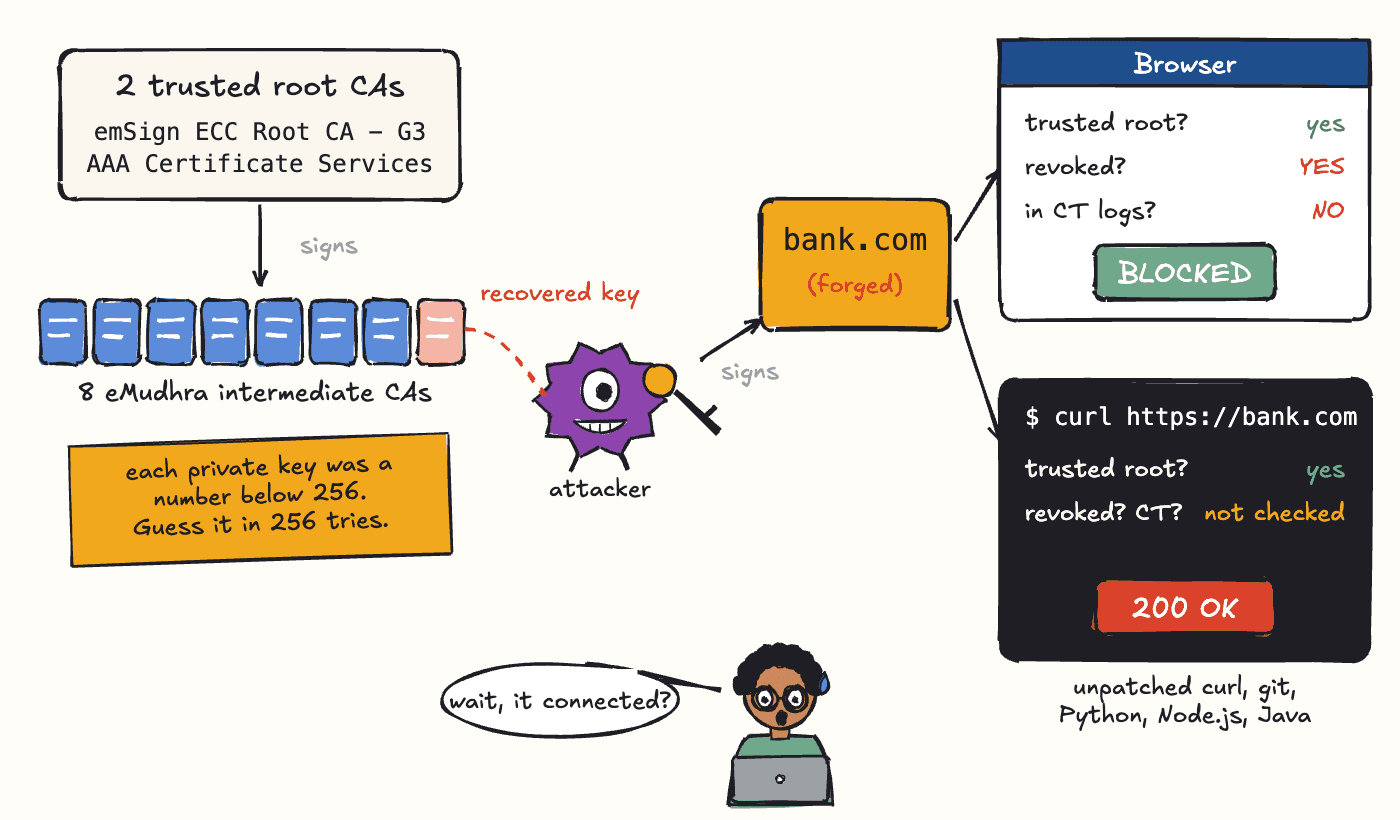
Fig 1: One recovered intermediate key lets an attacker forge a certificate for any site. Browsers check revocation and CT logs and block it. Many CLI tools only check the chain and connect.
On a Mac there is more than one bundle. The Keychain, /etc/ssl/cert.pem, Homebrew's bundle and the stores that Node.js, Go, Java and Python ship with are separate, and fixing one does not fix the others.
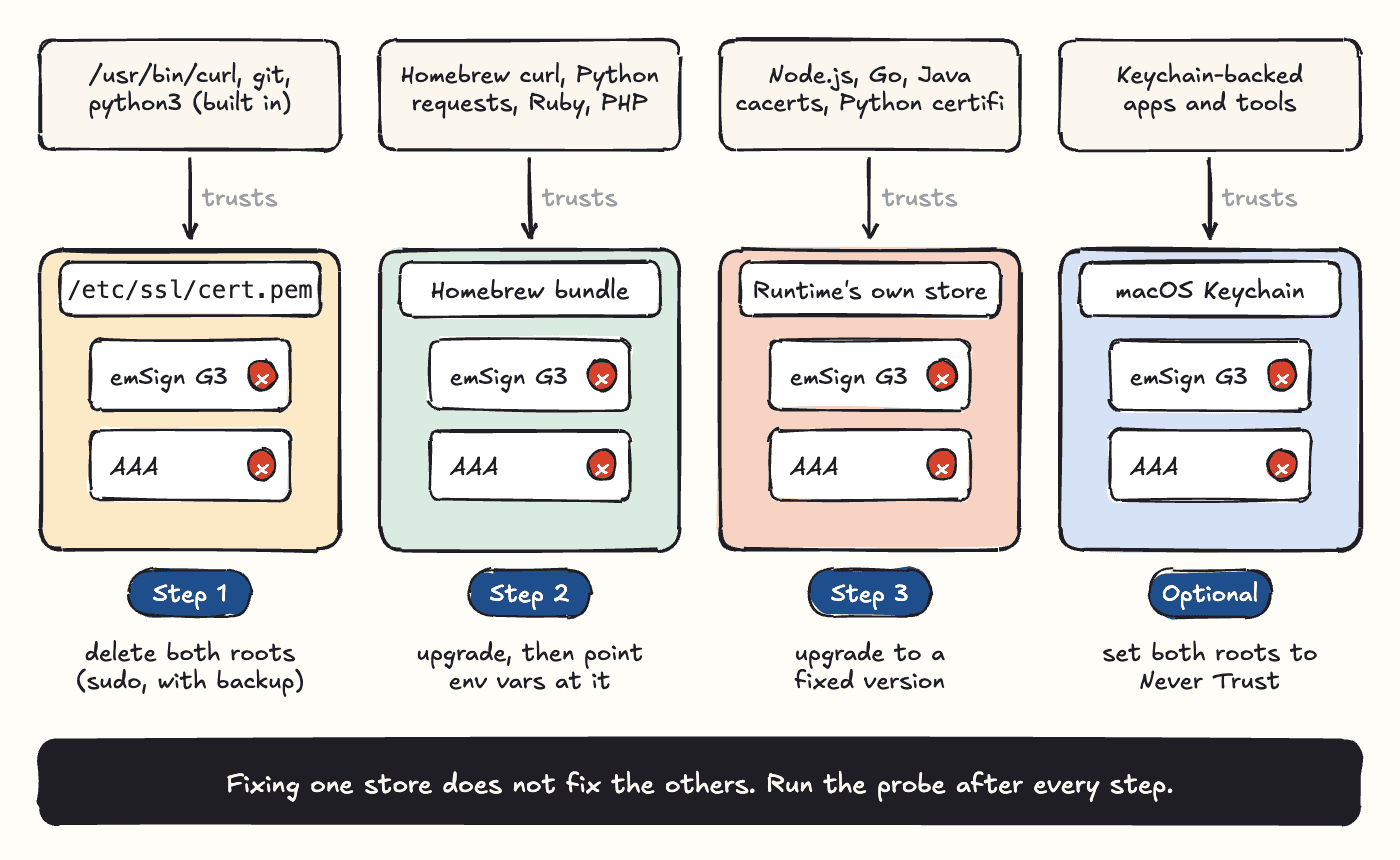
Fig 2: Four trust stores, four fixes. Each tool trusts only its own store, so each step below fixes one of them.
Set up the probe scripts
Every step below ends with a probe, so set the scripts up first. Saurabh wrote them while fixing a One2N Mac, and they live in our public one2nc/security_scripts repo. Clone it, and run every ./check-*.sh command in this post from that directory:
git clone https://github.com/one2nc/security_scripts.git
cd
Each script makes a real HTTPS request to the incident's checker hosts with one runtime's own TLS stack. The checker hosts serve certificates from the compromised chains, so the result tells you whether that runtime still trusts the roots, whatever version it claims to be:
Certificate error = PASS. The runtime rejects the compromised chain. You are safe.
Successful connection = FAIL. The runtime still trusts it.
SKIP: the runtime is not installed, or the check was inconclusive (DNS or timeout).
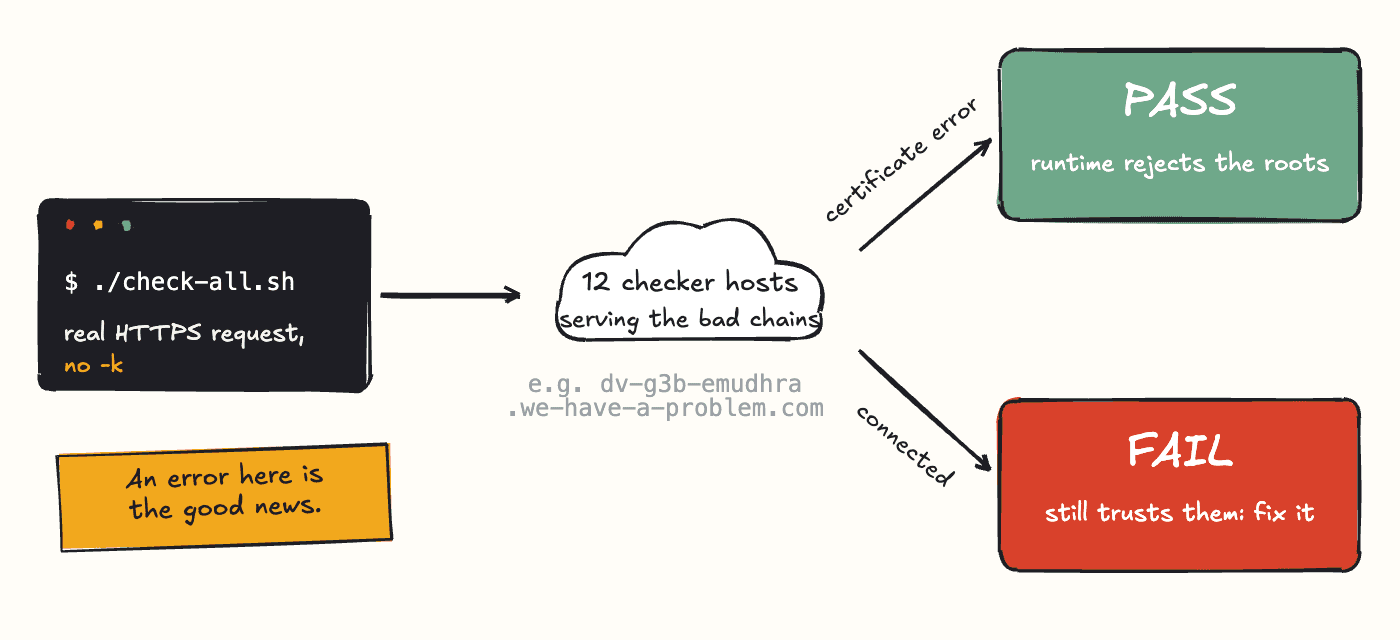
Fig 3: Each probe makes a real HTTPS request to the checker hosts. A certificate error is a PASS.
There is one script per runtime, plus one that runs them all:
check-curl.sh,check-node.sh,check-go.shandcheck-java.sheach check one runtime.check-python.shchecks Pythonurllibandrequestsseparately.check-all.shruns all of them, prints a table, and exits non-zero if any row fails.
By default every script probes all 12 checker hosts: 6 chaining to emSign ECC Root CA - G3 and 6 to AAA Certificate Services, the same set the incident page's browser check uses. Pass --root-only to probe 2 hosts, one per root, for a quick answer. --all is the default, and -h prints help.
./check-curl.sh --root-only
./check-all.sh --root-only
Do not test with curl -k (or --insecure). It skips certificate validation, so curl connects to every host and hides the failure you are looking for. A certificate error is the result you want, so always probe without -k.
The fix at a glance
System bundle: remove both roots from
/etc/ssl/cert.pem, which Apple's built-incurl,gitandpython3read. Probe with./check-curl.sh.Homebrew bundle: upgrade it and point CLI tools at it. Probe with
./check-curl.sh.Language runtimes: probe Node.js, Python, Go and Java with
./check-all.sh, and upgrade whichever fails.Everything else: probe any other runtime the same way, and install browser and macOS updates.
Optional: set both roots to Never Trust in the macOS Keychain. It is covered after Step 4.
What this can break. Removing the two roots also breaks any legitimate site or service whose certificate only chains to them. For emSign ECC Root CA - G3 that is coming anyway: Mozilla plans to remove trust in it, and Google expects to drop it in Chrome Root Store v43, due in Chrome Stable on 27 October. AAA Certificate Services is different. It is a long-standing Sectigo (formerly Comodo) root, so if an internal service or vendor API starts failing with a certificate error after these steps, check whether its chain ends there. Each step below has a rollback.
Step 1: remove the roots from /etc/ssl/cert.pem (sudo)
Apple's update blocks the intermediates in the Keychain, but it does not change /etc/ssl/cert.pem, the PEM bundle that Apple's built-in curl, git and python3 read. This command from the incident page backs the file up to /etc/ssl/cert.pem.bak, then rewrites it without the two roots:
sudo cp -p /etc/ssl/cert.pem /etc/ssl/cert.pem.bak && sudo awk '/^(###|===) /{skip=0} /^=== .*\/CN=(AAA Certificate Services|emSign ECC Root CA - G3)$/{skip=1} !skip' /etc/ssl/cert.pem.bak | sudo tee
Check that the roots are gone (expect 0):
grep -c -e 'AAA Certificate Services' -e 'emSign ECC Root CA - G3'
Then run the curl probe and expect PASS on every host:
To roll back:
sudo cp -p
A macOS update can replace /etc/ssl/cert.pem with Apple's copy. Re-run ./check-curl.sh after each macOS update, and repeat this step if it fails.
Step 2: point CLI tools at Homebrew's clean bundle (no sudo)
Homebrew curl, Python requests and other tools read their own bundle or follow environment variables instead of /etc/ssl/cert.pem. On a Mac, Homebrew builds its ca-certificates bundle from the certificates your Keychain trusts plus Mozilla's list, so versions before 2026-09-25_1 still include both roots. From 2026-09-25_1, the version the incident page lists as fixed, the formula leaves them out by public key. Upgrade first, then point everything at it. Everything under /opt/homebrew belongs to your user, so no sudo is needed. On Intel Macs, Homebrew lives under /usr/local; use /usr/local/etc/ca-certificates/cert.pem in the commands below.
1. Update the bundle and confirm the version is 2026-09-25_1 or later:
brew upgrade ca-certificates
brew list --versions
2. Check that it is clean (expect 0). Homebrew's bundle has no readable names in it, so a plain grep always prints 0. This prints each certificate's subject first, then counts the two roots:
awk '/BEGIN CERT/{c=""} {c=c $0 "\n"} /END CERT/{printf "%s", c | "/usr/bin/openssl x509 -noout -subject"; close("/usr/bin/openssl x509 -noout -subject")}' /opt/homebrew/etc/ca-certificates/cert.pem | grep -c -e 'AAA Certificate Services' -e 'emSign ECC Root CA - G3'
3. Add these lines to ~/.zshrc:
export SSL_CERT_FILE="/opt/homebrew/etc/ca-certificates/cert.pem"
export CURL_CA_BUNDLE="/opt/homebrew/etc/ca-certificates/cert.pem"
export REQUESTS_CA_BUNDLE="/opt/homebrew/etc/ca-certificates/cert.pem"
export NODE_EXTRA_CA_CERTS="/opt/homebrew/etc/ca-certificates/cert.pem"
4. Reload your shell and, in that same shell, re-run the curl probe. If it still fails, check the exports with echo "$CURL_CA_BUNDLE".
source
Environment variables only reach processes started after you set them. Terminals, tmux panes, editor terminals and long-running services that were already open keep the old bundle until you source ~/.zshrc (or your shell's own rc file, such as ~/.bashrc) in each one. Rebooting is the surest way to leave no stale session behind.
What each variable covers:
SSL_CERT_FILE: OpenSSL-linked tools such as Homebrew curl, git, Ruby, Perl, PHP and Pythonssl.CURL_CA_BUNDLE: curl.REQUESTS_CA_BUNDLE: Pythonrequests.NODE_EXTRA_CA_CERTS: Node.js. It adds certificates and cannot remove a root Node already trusts, which is why step 3 still has to upgrade Node.
When to undo this. These variables stay in effect until you delete them, and they pin every tool that reads them to Homebrew's bundle. Once your runtimes are patched and a macOS update ships a clean /etc/ssl/cert.pem, comment the four lines out, open a new shell and run ./check-all.sh. If everything still passes, delete them.
Step 3: probe Node.js, Python, Go and Java, then upgrade
These runtimes can ship their own trust store and ignore the Keychain and both bundles, so steps 1 and 2 may not reach them. Each has its own probe, and check-all.sh runs them together with curl:
check-node.sh: the Node.jshttpsstack.check-python.sh: Python, reported aspython-urllibandpython-requests.check-go.sh: Gocrypto/tls.check-java.sh: JavaHttpsURLConnection, which uses the JDK'scacerts.
An unpatched machine prints one section per runtime, with a row per checker host. Here is the curl section on an unpatched Mac:
## curl
RUNTIME           HOST                                          RESULT  DETAIL
----------------  --------------------------------------------  ------  ------------------------------------
curl              dv-g3b-emudhra.we-have-a-problem.com          FAIL    handshake-succeeded-still-trusted
curl              dv-g3c-emudhra.we-have-a-problem.com          FAIL    handshake-succeeded-still-trusted
curl              ov-g3b-emudhra.we-have-a-problem.com          FAIL    handshake-succeeded-still-trusted
curl              ov-g3c-emudhra.we-have-a-problem.com          FAIL    handshake-succeeded-still-trusted
curl              ev-g3b-emudhra.we-have-a-problem.com          FAIL    handshake-succeeded-still-trusted
curl              ev-g3c-emudhra.we-have-a-problem.com          FAIL    handshake-succeeded-still-trusted
curl              dv-g3b-aaa-emudhra.we-have-a-problem.com      FAIL    handshake-succeeded-still-trusted
curl              dv-g3c-aaa-emudhra.we-have-a-problem.com      FAIL    handshake-succeeded-still-trusted
curl              ov-g3b-aaa-emudhra.we-have-a-problem.com      FAIL    handshake-succeeded-still-trusted
curl              ov-g3c-aaa-emudhra.we-have-a-problem.com      FAIL    handshake-succeeded-still-trusted
curl              ev-g3b-aaa-emudhra.we-have-a-problem.com      FAIL    handshake-succeeded-still-trusted
curl
The same 12 rows follow for node, python-urllib, python-requests, go and java, and the last line totals the PASS, FAIL and SKIP rows. Upgrade every runtime that still shows FAIL and run ./check-all.sh again. A fixed machine exits 0, with every row PASS or SKIP.
Fixed versions from the incident page, with the Homebrew upgrade command:
Node.js 22.23.4, 24.22.1 or 26.12.1:
brew upgrade nodeGo 1.27.3 or 1.26.10:
brew upgrade goJava 27.0.1.0.2, 25.0.5.0.2, 21.0.13.0.2, 17.0.21.0.2, 11.0.33.0.2 or 8u511:
brew upgrade openjdk, or theopenjdk@version you use, such asbrew upgrade openjdk@21Python certifi 2026.10.19:
python3 -m pip install --upgrade certifi
The brew upgrade commands only apply if Homebrew installed the runtime. If you used nvm or fnm, asdf, pyenv, SDKMAN, an official installer or a system package, upgrade with that tool; the version is what matters. The pip3 that ships with macOS, and virtual environments created from the built-in python3, use their own outdated roots. The incident page has a small sitecustomize.py workaround for that in its macOS section.
Step 4: other runtimes, browser and OS
Any other runtime with its own trust store, such as Rust, Deno, Bun, .NET, Ruby, PHP, Erlang or Elixir, can still trust the compromised roots. Probe it the same way: make an HTTPS request to https://dv-g3b-emudhra.we-have-a-problem.com/ from that runtime. A certificate error means it is safe. Then upgrade to the fixed version in the incident page's patched-version list. Install browser and macOS updates when they are offered; they carry each vendor's revocation data. We have no scripts for these.
Optional: untrust both roots in the macOS Keychain
Apple's 19 October update already blocks the eight intermediates on an up-to-date Mac, and the incident page does not ask you to change the Keychain. This step goes further. Both roots still show as trusted in System Roots (Fig 4), and setting them to Never Trust stops anything that validates against the Keychain from trusting any chain that ends at them. The trade-off is the one in "What this can break" above: AAA Certificate Services also anchors legitimate certificates. Saurabh did this on a One2N Mac. If your Mac is managed by your company, check with IT before changing System Roots.
1. Open Keychain Access, select System Roots and search emsign. emSign ECC Root CA - G3 shows as valid and trusted.
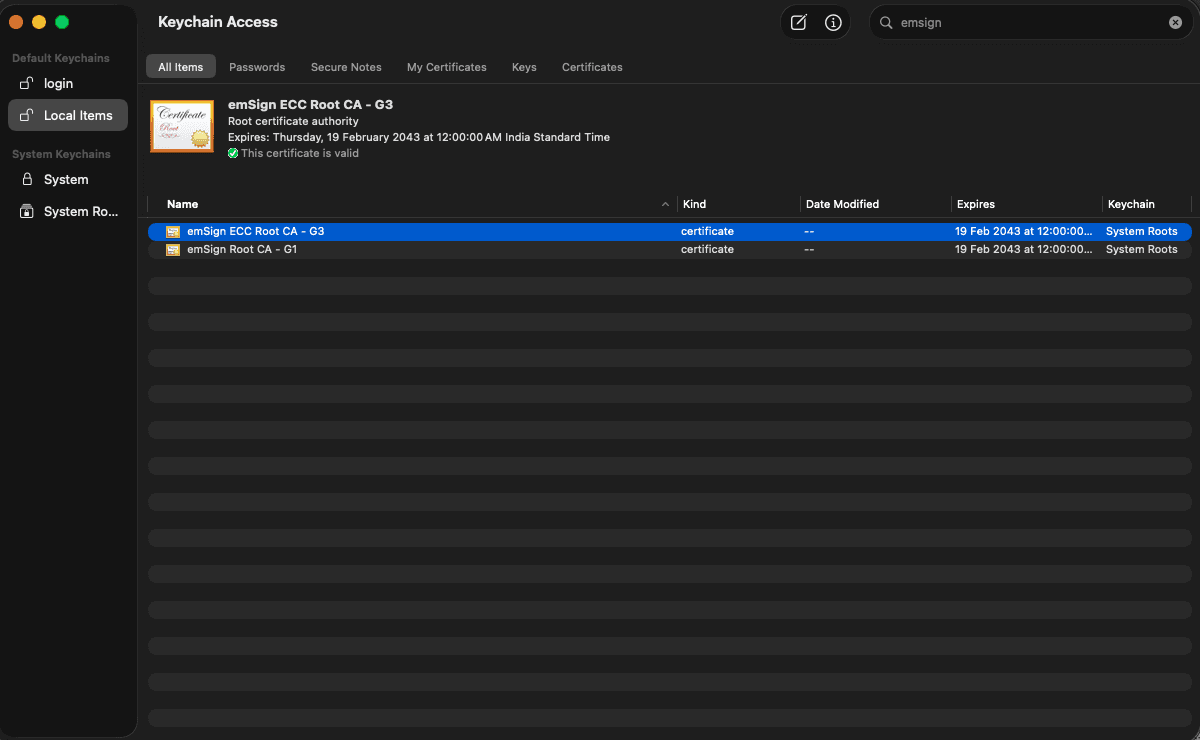
Fig 4: emSign ECC Root CA - G3 in Keychain Access, still trusted under System Roots.
2. Double-click the certificate, expand Trust and set When using this certificate to Never Trust.
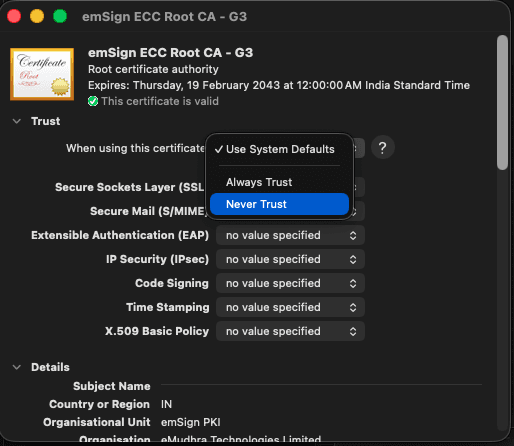
Fig 5: Setting When using this certificate to Never Trust.
3. Close the window and authenticate. The certificate now shows as not trusted for all users.
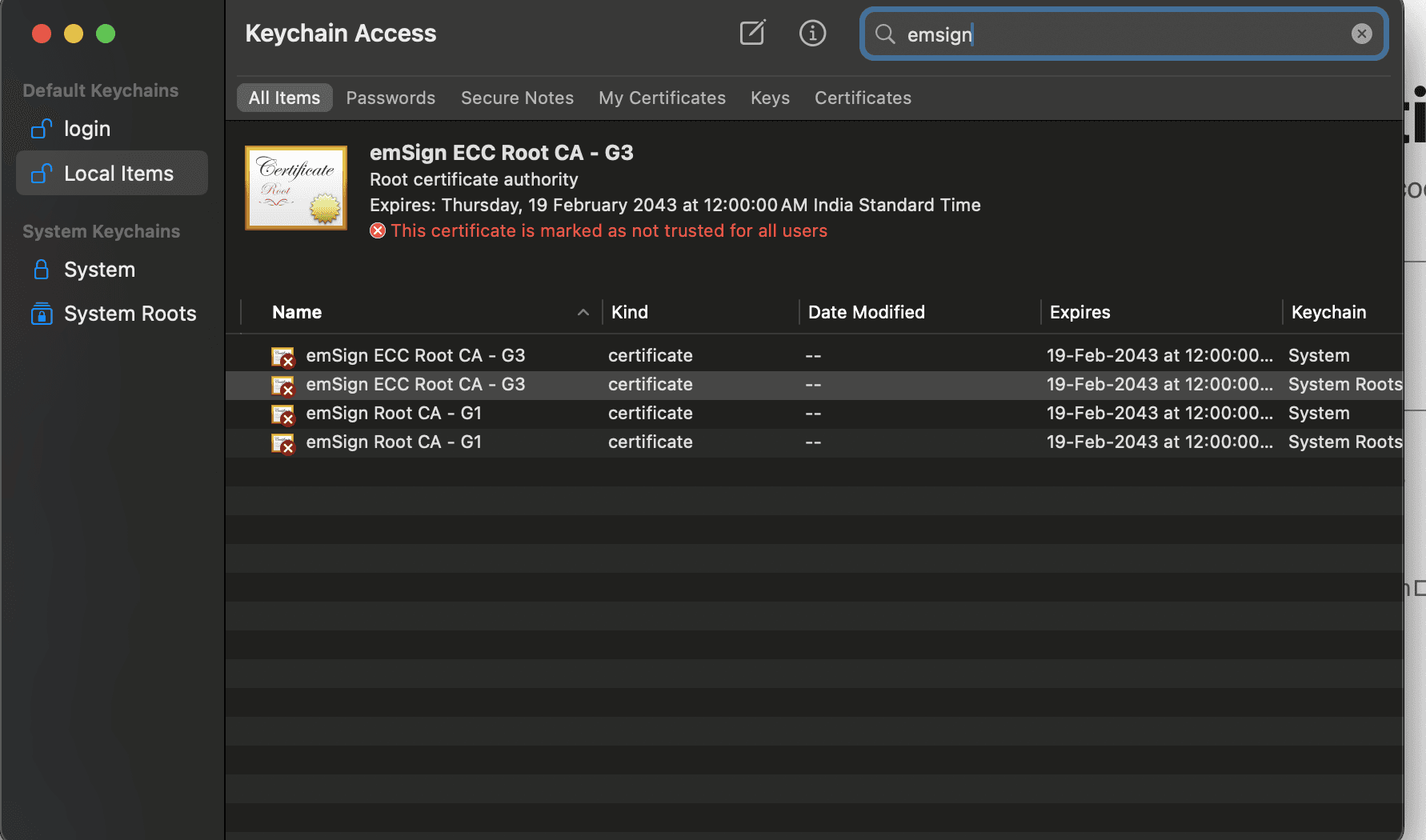
Fig 6: After the change, the root is marked as not trusted for all users.
4. Repeat for AAA Certificate Services: search AAA in System Roots, open it and set it to Never Trust.
If you do this step, do both roots. The intermediates are cross-signed, so 6 of the 12 compromised chains end at emSign ECC Root CA - G3 and the other 6 at AAA Certificate Services. Untrusting one root leaves half the chains trusted. To roll back, set When using this certificate back to Use System Defaults. Afterwards, run ./check-all.sh once more to confirm the earlier steps still pass.
FAQ
Is my browser affected by the eMudhra CA compromise?
No, as long as it is up to date. Every major browser blocked the intermediates by 20 October, and browsers that enforce Certificate Transparency would reject them anyway.
Will untrusting the roots break websites?
It can. Removing emSign ECC Root CA - G3 only breaks sites that Chrome and Firefox are about to stop trusting anyway. AAA Certificate Services is a long-standing Sectigo root, so removing it can break unrelated sites or services whose certificate chains only to it. If something you rely on fails after the change, check its chain and use the rollback.
How do I undo these changes?
Set each root back to Use System Defaults in Keychain Access, restore /etc/ssl/cert.pem from /etc/ssl/cert.pem.bak, and delete the four export lines from ~/.zshrc.
I use Linux or Windows. What should I do?
Microsoft has already shipped the block to Windows through automatic trust list updates. For Linux distributions, the incident page lists the patched ca-certificates version for each one, along with manual workarounds.
What about CI runners and Docker images?
They use the CA bundle of their base image. Update the ca-certificates package to the patched version for that distribution, rebuild the image, and run the same kind of probe from inside it.
Key learnings
A Mac has several separate trust stores: the Keychain,
/etc/ssl/cert.pem, Homebrew's bundle and each runtime's own store. Fix and probe each one.A version number tells you what you installed. A certificate error from the checker hosts tells you the client is safe.
Re-source or reboot after changing CA env vars, or old shells and services keep the stale bundle.
Fixing the common macOS toolchain takes four steps. Fixing every laptop, CI runner and container image in a company starts with knowing where all your trust stores are and how each one gets updated. That is the kind of work our DevSecOps and SRE teams do with clients. If you want help with it, talk to us.
If you liked this post, you might find these interesting too
Last updated: 22 October 2026. This post follows the incident page as it stood on that date.
We ran a routine check on a One2N Mac, and curl connected to a test site built to fail certificate validation. Every major browser had already blocked the certificate. Our terminal had not.
That certificate came from one of eight compromised eMudhra intermediate CAs. This post walks through what happened, how to check your own Mac, and how to fix each place it keeps trusted certificates, including what each fix can break.
TL;DR
What happened: eMudhra issued eight intermediate CA certificates in April 2025 with private keys that were trivially recoverable. Anyone could derive them from the public certificates in under a second.
Why it matters: With those keys, anyone could forge certificates for any HTTPS domain. Up-to-date browsers block them, but many terminal tools may not.
What to do: run the quick check below. If it prints FAIL, set up the probe scripts and work through the four steps, probing after each one.
Why this post exists
This started as Saurabh's notes from fixing a One2N Mac, shared with the team. We cleaned them up for anyone else on a Mac.
The incident page is the source of truth. Read it first. This post follows its macOS guidance, puts the fixes in order and adds one optional Keychain step.
Probe, don't assume. Every step ends with a check against the incident's test hosts, because upgrading without validating is how people stay vulnerable.
macOS only. The fixes use the macOS Keychain,
/etc/ssl/cert.pemand Homebrew paths. For Linux, Windows and BSD, follow the incident page.Don't blindly copy-paste. Every command here was verified on a One2N Mac, but several of them change system trust settings or need
sudo. Understand what you are running first.
Check if your Mac is affected
This check is read-only: it makes two HTTPS requests and changes nothing. Paste it into a terminal. It asks curl to fetch one checker host per compromised root:
for c in /usr/bin/curl $(command -v curl | grep -vx /usr/bin/curl); do
  for h in dv-g3b-emudhra dv-g3b-aaa-emudhra; do
    "$c" -s -o /dev/null --max-time 15 "https://$h.we-have-a-problem.com/" \
      && echo "$c $h: FAIL, still trusts this root" \
      || echo "$c $h: PASS, certificate rejected"
  done
done
It always tests Apple's /usr/bin/curl, which git and many scripts use, and also the curl first on your PATH if that is a different one, such as Homebrew's. FAIL on any line means that curl would accept a forged certificate from these CAs.
Treat this as a quick look. A DNS failure or a timeout also prints PASS, and it only checks curl. The probe scripts you set up later report those cases separately and cover Node.js, Python, Go and Java too.
What happened, and why your terminal is still exposed
A researcher reported the weak keys to the browser root programs on 17 October 2026, and Chrome shipped a CRLSet block less than two hours later. According to eMudhra's account in Mozilla bug 2083449, a key generation script produced a second, weaker set of keys, and those were picked for signing by mistake because their labels looked like the real ones. BleepingComputer has more, including the researcher who found it and the one key that was published on GitHub.
The intermediates chain up to two roots, emSign ECC Root CA - G3 (eMudhra) and AAA Certificate Services (Sectigo, formerly Comodo, through cross-signs). No certificate from them was ever logged to Certificate Transparency, so browsers that enforce CT would have rejected a forged one anyway. eMudhra has since revoked the intermediates, Sectigo has revoked its cross-signs, and Mozilla plans to remove trust in emSign ECC Root CA - G3 altogether.
Browsers check revocation lists and CT logs. Many non-browser clients check neither. curl, git, python3, node, java and go build the chain, see that it ends at a root in their CA bundle, and connect. Until that bundle loses the two roots, a forged certificate from one of the eight intermediates passes.
Fig 1: One recovered intermediate key lets an attacker forge a certificate for any site. Browsers check revocation and CT logs and block it. Many CLI tools only check the chain and connect.
On a Mac there is more than one bundle. The Keychain, /etc/ssl/cert.pem, Homebrew's bundle and the stores that Node.js, Go, Java and Python ship with are separate, and fixing one does not fix the others.
Fig 2: Four trust stores, four fixes. Each tool trusts only its own store, so each step below fixes one of them.
Set up the probe scripts
Every step below ends with a probe, so set the scripts up first. Saurabh wrote them while fixing a One2N Mac, and they live in our public one2nc/security_scripts repo. Clone it, and run every ./check-*.sh command in this post from that directory:
git clone https://github.com/one2nc/security_scripts.git
cd
Each script makes a real HTTPS request to the incident's checker hosts with one runtime's own TLS stack. The checker hosts serve certificates from the compromised chains, so the result tells you whether that runtime still trusts the roots, whatever version it claims to be:
Certificate error = PASS. The runtime rejects the compromised chain. You are safe.
Successful connection = FAIL. The runtime still trusts it.
SKIP: the runtime is not installed, or the check was inconclusive (DNS or timeout).
Fig 3: Each probe makes a real HTTPS request to the checker hosts. A certificate error is a PASS.
There is one script per runtime, plus one that runs them all:
check-curl.sh,check-node.sh,check-go.shandcheck-java.sheach check one runtime.check-python.shchecks Pythonurllibandrequestsseparately.check-all.shruns all of them, prints a table, and exits non-zero if any row fails.
By default every script probes all 12 checker hosts: 6 chaining to emSign ECC Root CA - G3 and 6 to AAA Certificate Services, the same set the incident page's browser check uses. Pass --root-only to probe 2 hosts, one per root, for a quick answer. --all is the default, and -h prints help.
./check-curl.sh --root-only
./check-all.sh --root-only
Do not test with curl -k (or --insecure). It skips certificate validation, so curl connects to every host and hides the failure you are looking for. A certificate error is the result you want, so always probe without -k.
The fix at a glance
System bundle: remove both roots from
/etc/ssl/cert.pem, which Apple's built-incurl,gitandpython3read. Probe with./check-curl.sh.Homebrew bundle: upgrade it and point CLI tools at it. Probe with
./check-curl.sh.Language runtimes: probe Node.js, Python, Go and Java with
./check-all.sh, and upgrade whichever fails.Everything else: probe any other runtime the same way, and install browser and macOS updates.
Optional: set both roots to Never Trust in the macOS Keychain. It is covered after Step 4.
What this can break. Removing the two roots also breaks any legitimate site or service whose certificate only chains to them. For emSign ECC Root CA - G3 that is coming anyway: Mozilla plans to remove trust in it, and Google expects to drop it in Chrome Root Store v43, due in Chrome Stable on 27 October. AAA Certificate Services is different. It is a long-standing Sectigo (formerly Comodo) root, so if an internal service or vendor API starts failing with a certificate error after these steps, check whether its chain ends there. Each step below has a rollback.
Step 1: remove the roots from /etc/ssl/cert.pem (sudo)
Apple's update blocks the intermediates in the Keychain, but it does not change /etc/ssl/cert.pem, the PEM bundle that Apple's built-in curl, git and python3 read. This command from the incident page backs the file up to /etc/ssl/cert.pem.bak, then rewrites it without the two roots:
sudo cp -p /etc/ssl/cert.pem /etc/ssl/cert.pem.bak && sudo awk '/^(###|===) /{skip=0} /^=== .*\/CN=(AAA Certificate Services|emSign ECC Root CA - G3)$/{skip=1} !skip' /etc/ssl/cert.pem.bak | sudo tee
Check that the roots are gone (expect 0):
grep -c -e 'AAA Certificate Services' -e 'emSign ECC Root CA - G3'
Then run the curl probe and expect PASS on every host:
To roll back:
sudo cp -p
A macOS update can replace /etc/ssl/cert.pem with Apple's copy. Re-run ./check-curl.sh after each macOS update, and repeat this step if it fails.
Step 2: point CLI tools at Homebrew's clean bundle (no sudo)
Homebrew curl, Python requests and other tools read their own bundle or follow environment variables instead of /etc/ssl/cert.pem. On a Mac, Homebrew builds its ca-certificates bundle from the certificates your Keychain trusts plus Mozilla's list, so versions before 2026-09-25_1 still include both roots. From 2026-09-25_1, the version the incident page lists as fixed, the formula leaves them out by public key. Upgrade first, then point everything at it. Everything under /opt/homebrew belongs to your user, so no sudo is needed. On Intel Macs, Homebrew lives under /usr/local; use /usr/local/etc/ca-certificates/cert.pem in the commands below.
1. Update the bundle and confirm the version is 2026-09-25_1 or later:
brew upgrade ca-certificates
brew list --versions
2. Check that it is clean (expect 0). Homebrew's bundle has no readable names in it, so a plain grep always prints 0. This prints each certificate's subject first, then counts the two roots:
awk '/BEGIN CERT/{c=""} {c=c $0 "\n"} /END CERT/{printf "%s", c | "/usr/bin/openssl x509 -noout -subject"; close("/usr/bin/openssl x509 -noout -subject")}' /opt/homebrew/etc/ca-certificates/cert.pem | grep -c -e 'AAA Certificate Services' -e 'emSign ECC Root CA - G3'
3. Add these lines to ~/.zshrc:
export SSL_CERT_FILE="/opt/homebrew/etc/ca-certificates/cert.pem"
export CURL_CA_BUNDLE="/opt/homebrew/etc/ca-certificates/cert.pem"
export REQUESTS_CA_BUNDLE="/opt/homebrew/etc/ca-certificates/cert.pem"
export NODE_EXTRA_CA_CERTS="/opt/homebrew/etc/ca-certificates/cert.pem"
4. Reload your shell and, in that same shell, re-run the curl probe. If it still fails, check the exports with echo "$CURL_CA_BUNDLE".
source
Environment variables only reach processes started after you set them. Terminals, tmux panes, editor terminals and long-running services that were already open keep the old bundle until you source ~/.zshrc (or your shell's own rc file, such as ~/.bashrc) in each one. Rebooting is the surest way to leave no stale session behind.
What each variable covers:
SSL_CERT_FILE: OpenSSL-linked tools such as Homebrew curl, git, Ruby, Perl, PHP and Pythonssl.CURL_CA_BUNDLE: curl.REQUESTS_CA_BUNDLE: Pythonrequests.NODE_EXTRA_CA_CERTS: Node.js. It adds certificates and cannot remove a root Node already trusts, which is why step 3 still has to upgrade Node.
When to undo this. These variables stay in effect until you delete them, and they pin every tool that reads them to Homebrew's bundle. Once your runtimes are patched and a macOS update ships a clean /etc/ssl/cert.pem, comment the four lines out, open a new shell and run ./check-all.sh. If everything still passes, delete them.
Step 3: probe Node.js, Python, Go and Java, then upgrade
These runtimes can ship their own trust store and ignore the Keychain and both bundles, so steps 1 and 2 may not reach them. Each has its own probe, and check-all.sh runs them together with curl:
check-node.sh: the Node.jshttpsstack.check-python.sh: Python, reported aspython-urllibandpython-requests.check-go.sh: Gocrypto/tls.check-java.sh: JavaHttpsURLConnection, which uses the JDK'scacerts.
An unpatched machine prints one section per runtime, with a row per checker host. Here is the curl section on an unpatched Mac:
## curl
RUNTIME           HOST                                          RESULT  DETAIL
----------------  --------------------------------------------  ------  ------------------------------------
curl              dv-g3b-emudhra.we-have-a-problem.com          FAIL    handshake-succeeded-still-trusted
curl              dv-g3c-emudhra.we-have-a-problem.com          FAIL    handshake-succeeded-still-trusted
curl              ov-g3b-emudhra.we-have-a-problem.com          FAIL    handshake-succeeded-still-trusted
curl              ov-g3c-emudhra.we-have-a-problem.com          FAIL    handshake-succeeded-still-trusted
curl              ev-g3b-emudhra.we-have-a-problem.com          FAIL    handshake-succeeded-still-trusted
curl              ev-g3c-emudhra.we-have-a-problem.com          FAIL    handshake-succeeded-still-trusted
curl              dv-g3b-aaa-emudhra.we-have-a-problem.com      FAIL    handshake-succeeded-still-trusted
curl              dv-g3c-aaa-emudhra.we-have-a-problem.com      FAIL    handshake-succeeded-still-trusted
curl              ov-g3b-aaa-emudhra.we-have-a-problem.com      FAIL    handshake-succeeded-still-trusted
curl              ov-g3c-aaa-emudhra.we-have-a-problem.com      FAIL    handshake-succeeded-still-trusted
curl              ev-g3b-aaa-emudhra.we-have-a-problem.com      FAIL    handshake-succeeded-still-trusted
curl
The same 12 rows follow for node, python-urllib, python-requests, go and java, and the last line totals the PASS, FAIL and SKIP rows. Upgrade every runtime that still shows FAIL and run ./check-all.sh again. A fixed machine exits 0, with every row PASS or SKIP.
Fixed versions from the incident page, with the Homebrew upgrade command:
Node.js 22.23.4, 24.22.1 or 26.12.1:
brew upgrade nodeGo 1.27.3 or 1.26.10:
brew upgrade goJava 27.0.1.0.2, 25.0.5.0.2, 21.0.13.0.2, 17.0.21.0.2, 11.0.33.0.2 or 8u511:
brew upgrade openjdk, or theopenjdk@version you use, such asbrew upgrade openjdk@21Python certifi 2026.10.19:
python3 -m pip install --upgrade certifi
The brew upgrade commands only apply if Homebrew installed the runtime. If you used nvm or fnm, asdf, pyenv, SDKMAN, an official installer or a system package, upgrade with that tool; the version is what matters. The pip3 that ships with macOS, and virtual environments created from the built-in python3, use their own outdated roots. The incident page has a small sitecustomize.py workaround for that in its macOS section.
Step 4: other runtimes, browser and OS
Any other runtime with its own trust store, such as Rust, Deno, Bun, .NET, Ruby, PHP, Erlang or Elixir, can still trust the compromised roots. Probe it the same way: make an HTTPS request to https://dv-g3b-emudhra.we-have-a-problem.com/ from that runtime. A certificate error means it is safe. Then upgrade to the fixed version in the incident page's patched-version list. Install browser and macOS updates when they are offered; they carry each vendor's revocation data. We have no scripts for these.
Optional: untrust both roots in the macOS Keychain
Apple's 19 October update already blocks the eight intermediates on an up-to-date Mac, and the incident page does not ask you to change the Keychain. This step goes further. Both roots still show as trusted in System Roots (Fig 4), and setting them to Never Trust stops anything that validates against the Keychain from trusting any chain that ends at them. The trade-off is the one in "What this can break" above: AAA Certificate Services also anchors legitimate certificates. Saurabh did this on a One2N Mac. If your Mac is managed by your company, check with IT before changing System Roots.
1. Open Keychain Access, select System Roots and search emsign. emSign ECC Root CA - G3 shows as valid and trusted.
Fig 4: emSign ECC Root CA - G3 in Keychain Access, still trusted under System Roots.
2. Double-click the certificate, expand Trust and set When using this certificate to Never Trust.
Fig 5: Setting When using this certificate to Never Trust.
3. Close the window and authenticate. The certificate now shows as not trusted for all users.
Fig 6: After the change, the root is marked as not trusted for all users.
4. Repeat for AAA Certificate Services: search AAA in System Roots, open it and set it to Never Trust.
If you do this step, do both roots. The intermediates are cross-signed, so 6 of the 12 compromised chains end at emSign ECC Root CA - G3 and the other 6 at AAA Certificate Services. Untrusting one root leaves half the chains trusted. To roll back, set When using this certificate back to Use System Defaults. Afterwards, run ./check-all.sh once more to confirm the earlier steps still pass.
FAQ
Is my browser affected by the eMudhra CA compromise?
No, as long as it is up to date. Every major browser blocked the intermediates by 20 October, and browsers that enforce Certificate Transparency would reject them anyway.
Will untrusting the roots break websites?
It can. Removing emSign ECC Root CA - G3 only breaks sites that Chrome and Firefox are about to stop trusting anyway. AAA Certificate Services is a long-standing Sectigo root, so removing it can break unrelated sites or services whose certificate chains only to it. If something you rely on fails after the change, check its chain and use the rollback.
How do I undo these changes?
Set each root back to Use System Defaults in Keychain Access, restore /etc/ssl/cert.pem from /etc/ssl/cert.pem.bak, and delete the four export lines from ~/.zshrc.
I use Linux or Windows. What should I do?
Microsoft has already shipped the block to Windows through automatic trust list updates. For Linux distributions, the incident page lists the patched ca-certificates version for each one, along with manual workarounds.
What about CI runners and Docker images?
They use the CA bundle of their base image. Update the ca-certificates package to the patched version for that distribution, rebuild the image, and run the same kind of probe from inside it.
Key learnings
A Mac has several separate trust stores: the Keychain,
/etc/ssl/cert.pem, Homebrew's bundle and each runtime's own store. Fix and probe each one.A version number tells you what you installed. A certificate error from the checker hosts tells you the client is safe.
Re-source or reboot after changing CA env vars, or old shells and services keep the stale bundle.
Fixing the common macOS toolchain takes four steps. Fixing every laptop, CI runner and container image in a company starts with knowing where all your trust stores are and how each one gets updated. That is the kind of work our DevSecOps and SRE teams do with clients. If you want help with it, talk to us.
If you liked this post, you might find these interesting too
Last updated: 22 October 2026. This post follows the incident page as it stood on that date.
We ran a routine check on a One2N Mac, and curl connected to a test site built to fail certificate validation. Every major browser had already blocked the certificate. Our terminal had not.
That certificate came from one of eight compromised eMudhra intermediate CAs. This post walks through what happened, how to check your own Mac, and how to fix each place it keeps trusted certificates, including what each fix can break.
TL;DR
What happened: eMudhra issued eight intermediate CA certificates in April 2025 with private keys that were trivially recoverable. Anyone could derive them from the public certificates in under a second.
Why it matters: With those keys, anyone could forge certificates for any HTTPS domain. Up-to-date browsers block them, but many terminal tools may not.
What to do: run the quick check below. If it prints FAIL, set up the probe scripts and work through the four steps, probing after each one.
Why this post exists
This started as Saurabh's notes from fixing a One2N Mac, shared with the team. We cleaned them up for anyone else on a Mac.
The incident page is the source of truth. Read it first. This post follows its macOS guidance, puts the fixes in order and adds one optional Keychain step.
Probe, don't assume. Every step ends with a check against the incident's test hosts, because upgrading without validating is how people stay vulnerable.
macOS only. The fixes use the macOS Keychain,
/etc/ssl/cert.pemand Homebrew paths. For Linux, Windows and BSD, follow the incident page.Don't blindly copy-paste. Every command here was verified on a One2N Mac, but several of them change system trust settings or need
sudo. Understand what you are running first.
Check if your Mac is affected
This check is read-only: it makes two HTTPS requests and changes nothing. Paste it into a terminal. It asks curl to fetch one checker host per compromised root:
for c in /usr/bin/curl $(command -v curl | grep -vx /usr/bin/curl); do
  for h in dv-g3b-emudhra dv-g3b-aaa-emudhra; do
    "$c" -s -o /dev/null --max-time 15 "https://$h.we-have-a-problem.com/" \
      && echo "$c $h: FAIL, still trusts this root" \
      || echo "$c $h: PASS, certificate rejected"
  done
done
It always tests Apple's /usr/bin/curl, which git and many scripts use, and also the curl first on your PATH if that is a different one, such as Homebrew's. FAIL on any line means that curl would accept a forged certificate from these CAs.
Treat this as a quick look. A DNS failure or a timeout also prints PASS, and it only checks curl. The probe scripts you set up later report those cases separately and cover Node.js, Python, Go and Java too.
What happened, and why your terminal is still exposed
A researcher reported the weak keys to the browser root programs on 17 October 2026, and Chrome shipped a CRLSet block less than two hours later. According to eMudhra's account in Mozilla bug 2083449, a key generation script produced a second, weaker set of keys, and those were picked for signing by mistake because their labels looked like the real ones. BleepingComputer has more, including the researcher who found it and the one key that was published on GitHub.
The intermediates chain up to two roots, emSign ECC Root CA - G3 (eMudhra) and AAA Certificate Services (Sectigo, formerly Comodo, through cross-signs). No certificate from them was ever logged to Certificate Transparency, so browsers that enforce CT would have rejected a forged one anyway. eMudhra has since revoked the intermediates, Sectigo has revoked its cross-signs, and Mozilla plans to remove trust in emSign ECC Root CA - G3 altogether.
Browsers check revocation lists and CT logs. Many non-browser clients check neither. curl, git, python3, node, java and go build the chain, see that it ends at a root in their CA bundle, and connect. Until that bundle loses the two roots, a forged certificate from one of the eight intermediates passes.
Fig 1: One recovered intermediate key lets an attacker forge a certificate for any site. Browsers check revocation and CT logs and block it. Many CLI tools only check the chain and connect.
On a Mac there is more than one bundle. The Keychain, /etc/ssl/cert.pem, Homebrew's bundle and the stores that Node.js, Go, Java and Python ship with are separate, and fixing one does not fix the others.
Fig 2: Four trust stores, four fixes. Each tool trusts only its own store, so each step below fixes one of them.
Set up the probe scripts
Every step below ends with a probe, so set the scripts up first. Saurabh wrote them while fixing a One2N Mac, and they live in our public one2nc/security_scripts repo. Clone it, and run every ./check-*.sh command in this post from that directory:
git clone https://github.com/one2nc/security_scripts.git
cd
Each script makes a real HTTPS request to the incident's checker hosts with one runtime's own TLS stack. The checker hosts serve certificates from the compromised chains, so the result tells you whether that runtime still trusts the roots, whatever version it claims to be:
Certificate error = PASS. The runtime rejects the compromised chain. You are safe.
Successful connection = FAIL. The runtime still trusts it.
SKIP: the runtime is not installed, or the check was inconclusive (DNS or timeout).
Fig 3: Each probe makes a real HTTPS request to the checker hosts. A certificate error is a PASS.
There is one script per runtime, plus one that runs them all:
check-curl.sh,check-node.sh,check-go.shandcheck-java.sheach check one runtime.check-python.shchecks Pythonurllibandrequestsseparately.check-all.shruns all of them, prints a table, and exits non-zero if any row fails.
By default every script probes all 12 checker hosts: 6 chaining to emSign ECC Root CA - G3 and 6 to AAA Certificate Services, the same set the incident page's browser check uses. Pass --root-only to probe 2 hosts, one per root, for a quick answer. --all is the default, and -h prints help.
./check-curl.sh --root-only
./check-all.sh --root-only
Do not test with curl -k (or --insecure). It skips certificate validation, so curl connects to every host and hides the failure you are looking for. A certificate error is the result you want, so always probe without -k.
The fix at a glance
System bundle: remove both roots from
/etc/ssl/cert.pem, which Apple's built-incurl,gitandpython3read. Probe with./check-curl.sh.Homebrew bundle: upgrade it and point CLI tools at it. Probe with
./check-curl.sh.Language runtimes: probe Node.js, Python, Go and Java with
./check-all.sh, and upgrade whichever fails.Everything else: probe any other runtime the same way, and install browser and macOS updates.
Optional: set both roots to Never Trust in the macOS Keychain. It is covered after Step 4.
What this can break. Removing the two roots also breaks any legitimate site or service whose certificate only chains to them. For emSign ECC Root CA - G3 that is coming anyway: Mozilla plans to remove trust in it, and Google expects to drop it in Chrome Root Store v43, due in Chrome Stable on 27 October. AAA Certificate Services is different. It is a long-standing Sectigo (formerly Comodo) root, so if an internal service or vendor API starts failing with a certificate error after these steps, check whether its chain ends there. Each step below has a rollback.
Step 1: remove the roots from /etc/ssl/cert.pem (sudo)
Apple's update blocks the intermediates in the Keychain, but it does not change /etc/ssl/cert.pem, the PEM bundle that Apple's built-in curl, git and python3 read. This command from the incident page backs the file up to /etc/ssl/cert.pem.bak, then rewrites it without the two roots:
sudo cp -p /etc/ssl/cert.pem /etc/ssl/cert.pem.bak && sudo awk '/^(###|===) /{skip=0} /^=== .*\/CN=(AAA Certificate Services|emSign ECC Root CA - G3)$/{skip=1} !skip' /etc/ssl/cert.pem.bak | sudo tee
Check that the roots are gone (expect 0):
grep -c -e 'AAA Certificate Services' -e 'emSign ECC Root CA - G3'
Then run the curl probe and expect PASS on every host:
To roll back:
sudo cp -p
A macOS update can replace /etc/ssl/cert.pem with Apple's copy. Re-run ./check-curl.sh after each macOS update, and repeat this step if it fails.
Step 2: point CLI tools at Homebrew's clean bundle (no sudo)
Homebrew curl, Python requests and other tools read their own bundle or follow environment variables instead of /etc/ssl/cert.pem. On a Mac, Homebrew builds its ca-certificates bundle from the certificates your Keychain trusts plus Mozilla's list, so versions before 2026-09-25_1 still include both roots. From 2026-09-25_1, the version the incident page lists as fixed, the formula leaves them out by public key. Upgrade first, then point everything at it. Everything under /opt/homebrew belongs to your user, so no sudo is needed. On Intel Macs, Homebrew lives under /usr/local; use /usr/local/etc/ca-certificates/cert.pem in the commands below.
1. Update the bundle and confirm the version is 2026-09-25_1 or later:
brew upgrade ca-certificates
brew list --versions
2. Check that it is clean (expect 0). Homebrew's bundle has no readable names in it, so a plain grep always prints 0. This prints each certificate's subject first, then counts the two roots:
awk '/BEGIN CERT/{c=""} {c=c $0 "\n"} /END CERT/{printf "%s", c | "/usr/bin/openssl x509 -noout -subject"; close("/usr/bin/openssl x509 -noout -subject")}' /opt/homebrew/etc/ca-certificates/cert.pem | grep -c -e 'AAA Certificate Services' -e 'emSign ECC Root CA - G3'
3. Add these lines to ~/.zshrc:
export SSL_CERT_FILE="/opt/homebrew/etc/ca-certificates/cert.pem"
export CURL_CA_BUNDLE="/opt/homebrew/etc/ca-certificates/cert.pem"
export REQUESTS_CA_BUNDLE="/opt/homebrew/etc/ca-certificates/cert.pem"
export NODE_EXTRA_CA_CERTS="/opt/homebrew/etc/ca-certificates/cert.pem"
4. Reload your shell and, in that same shell, re-run the curl probe. If it still fails, check the exports with echo "$CURL_CA_BUNDLE".
source
Environment variables only reach processes started after you set them. Terminals, tmux panes, editor terminals and long-running services that were already open keep the old bundle until you source ~/.zshrc (or your shell's own rc file, such as ~/.bashrc) in each one. Rebooting is the surest way to leave no stale session behind.
What each variable covers:
SSL_CERT_FILE: OpenSSL-linked tools such as Homebrew curl, git, Ruby, Perl, PHP and Pythonssl.CURL_CA_BUNDLE: curl.REQUESTS_CA_BUNDLE: Pythonrequests.NODE_EXTRA_CA_CERTS: Node.js. It adds certificates and cannot remove a root Node already trusts, which is why step 3 still has to upgrade Node.
When to undo this. These variables stay in effect until you delete them, and they pin every tool that reads them to Homebrew's bundle. Once your runtimes are patched and a macOS update ships a clean /etc/ssl/cert.pem, comment the four lines out, open a new shell and run ./check-all.sh. If everything still passes, delete them.
Step 3: probe Node.js, Python, Go and Java, then upgrade
These runtimes can ship their own trust store and ignore the Keychain and both bundles, so steps 1 and 2 may not reach them. Each has its own probe, and check-all.sh runs them together with curl:
check-node.sh: the Node.jshttpsstack.check-python.sh: Python, reported aspython-urllibandpython-requests.check-go.sh: Gocrypto/tls.check-java.sh: JavaHttpsURLConnection, which uses the JDK'scacerts.
An unpatched machine prints one section per runtime, with a row per checker host. Here is the curl section on an unpatched Mac:
## curl
RUNTIME           HOST                                          RESULT  DETAIL
----------------  --------------------------------------------  ------  ------------------------------------
curl              dv-g3b-emudhra.we-have-a-problem.com          FAIL    handshake-succeeded-still-trusted
curl              dv-g3c-emudhra.we-have-a-problem.com          FAIL    handshake-succeeded-still-trusted
curl              ov-g3b-emudhra.we-have-a-problem.com          FAIL    handshake-succeeded-still-trusted
curl              ov-g3c-emudhra.we-have-a-problem.com          FAIL    handshake-succeeded-still-trusted
curl              ev-g3b-emudhra.we-have-a-problem.com          FAIL    handshake-succeeded-still-trusted
curl              ev-g3c-emudhra.we-have-a-problem.com          FAIL    handshake-succeeded-still-trusted
curl              dv-g3b-aaa-emudhra.we-have-a-problem.com      FAIL    handshake-succeeded-still-trusted
curl              dv-g3c-aaa-emudhra.we-have-a-problem.com      FAIL    handshake-succeeded-still-trusted
curl              ov-g3b-aaa-emudhra.we-have-a-problem.com      FAIL    handshake-succeeded-still-trusted
curl              ov-g3c-aaa-emudhra.we-have-a-problem.com      FAIL    handshake-succeeded-still-trusted
curl              ev-g3b-aaa-emudhra.we-have-a-problem.com      FAIL    handshake-succeeded-still-trusted
curl
The same 12 rows follow for node, python-urllib, python-requests, go and java, and the last line totals the PASS, FAIL and SKIP rows. Upgrade every runtime that still shows FAIL and run ./check-all.sh again. A fixed machine exits 0, with every row PASS or SKIP.
Fixed versions from the incident page, with the Homebrew upgrade command:
Node.js 22.23.4, 24.22.1 or 26.12.1:
brew upgrade nodeGo 1.27.3 or 1.26.10:
brew upgrade goJava 27.0.1.0.2, 25.0.5.0.2, 21.0.13.0.2, 17.0.21.0.2, 11.0.33.0.2 or 8u511:
brew upgrade openjdk, or theopenjdk@version you use, such asbrew upgrade openjdk@21Python certifi 2026.10.19:
python3 -m pip install --upgrade certifi
The brew upgrade commands only apply if Homebrew installed the runtime. If you used nvm or fnm, asdf, pyenv, SDKMAN, an official installer or a system package, upgrade with that tool; the version is what matters. The pip3 that ships with macOS, and virtual environments created from the built-in python3, use their own outdated roots. The incident page has a small sitecustomize.py workaround for that in its macOS section.
Step 4: other runtimes, browser and OS
Any other runtime with its own trust store, such as Rust, Deno, Bun, .NET, Ruby, PHP, Erlang or Elixir, can still trust the compromised roots. Probe it the same way: make an HTTPS request to https://dv-g3b-emudhra.we-have-a-problem.com/ from that runtime. A certificate error means it is safe. Then upgrade to the fixed version in the incident page's patched-version list. Install browser and macOS updates when they are offered; they carry each vendor's revocation data. We have no scripts for these.
Optional: untrust both roots in the macOS Keychain
Apple's 19 October update already blocks the eight intermediates on an up-to-date Mac, and the incident page does not ask you to change the Keychain. This step goes further. Both roots still show as trusted in System Roots (Fig 4), and setting them to Never Trust stops anything that validates against the Keychain from trusting any chain that ends at them. The trade-off is the one in "What this can break" above: AAA Certificate Services also anchors legitimate certificates. Saurabh did this on a One2N Mac. If your Mac is managed by your company, check with IT before changing System Roots.
1. Open Keychain Access, select System Roots and search emsign. emSign ECC Root CA - G3 shows as valid and trusted.
Fig 4: emSign ECC Root CA - G3 in Keychain Access, still trusted under System Roots.
2. Double-click the certificate, expand Trust and set When using this certificate to Never Trust.
Fig 5: Setting When using this certificate to Never Trust.
3. Close the window and authenticate. The certificate now shows as not trusted for all users.
Fig 6: After the change, the root is marked as not trusted for all users.
4. Repeat for AAA Certificate Services: search AAA in System Roots, open it and set it to Never Trust.
If you do this step, do both roots. The intermediates are cross-signed, so 6 of the 12 compromised chains end at emSign ECC Root CA - G3 and the other 6 at AAA Certificate Services. Untrusting one root leaves half the chains trusted. To roll back, set When using this certificate back to Use System Defaults. Afterwards, run ./check-all.sh once more to confirm the earlier steps still pass.
FAQ
Is my browser affected by the eMudhra CA compromise?
No, as long as it is up to date. Every major browser blocked the intermediates by 20 October, and browsers that enforce Certificate Transparency would reject them anyway.
Will untrusting the roots break websites?
It can. Removing emSign ECC Root CA - G3 only breaks sites that Chrome and Firefox are about to stop trusting anyway. AAA Certificate Services is a long-standing Sectigo root, so removing it can break unrelated sites or services whose certificate chains only to it. If something you rely on fails after the change, check its chain and use the rollback.
How do I undo these changes?
Set each root back to Use System Defaults in Keychain Access, restore /etc/ssl/cert.pem from /etc/ssl/cert.pem.bak, and delete the four export lines from ~/.zshrc.
I use Linux or Windows. What should I do?
Microsoft has already shipped the block to Windows through automatic trust list updates. For Linux distributions, the incident page lists the patched ca-certificates version for each one, along with manual workarounds.
What about CI runners and Docker images?
They use the CA bundle of their base image. Update the ca-certificates package to the patched version for that distribution, rebuild the image, and run the same kind of probe from inside it.
Key learnings
A Mac has several separate trust stores: the Keychain,
/etc/ssl/cert.pem, Homebrew's bundle and each runtime's own store. Fix and probe each one.A version number tells you what you installed. A certificate error from the checker hosts tells you the client is safe.
Re-source or reboot after changing CA env vars, or old shells and services keep the stale bundle.
Fixing the common macOS toolchain takes four steps. Fixing every laptop, CI runner and container image in a company starts with knowing where all your trust stores are and how each one gets updated. That is the kind of work our DevSecOps and SRE teams do with clients. If you want help with it, talk to us.
If you liked this post, you might find these interesting too
Last updated: 22 October 2026. This post follows the incident page as it stood on that date.
We ran a routine check on a One2N Mac, and curl connected to a test site built to fail certificate validation. Every major browser had already blocked the certificate. Our terminal had not.
That certificate came from one of eight compromised eMudhra intermediate CAs. This post walks through what happened, how to check your own Mac, and how to fix each place it keeps trusted certificates, including what each fix can break.
TL;DR
What happened: eMudhra issued eight intermediate CA certificates in April 2025 with private keys that were trivially recoverable. Anyone could derive them from the public certificates in under a second.
Why it matters: With those keys, anyone could forge certificates for any HTTPS domain. Up-to-date browsers block them, but many terminal tools may not.
What to do: run the quick check below. If it prints FAIL, set up the probe scripts and work through the four steps, probing after each one.
Why this post exists
This started as Saurabh's notes from fixing a One2N Mac, shared with the team. We cleaned them up for anyone else on a Mac.
The incident page is the source of truth. Read it first. This post follows its macOS guidance, puts the fixes in order and adds one optional Keychain step.
Probe, don't assume. Every step ends with a check against the incident's test hosts, because upgrading without validating is how people stay vulnerable.
macOS only. The fixes use the macOS Keychain,
/etc/ssl/cert.pemand Homebrew paths. For Linux, Windows and BSD, follow the incident page.Don't blindly copy-paste. Every command here was verified on a One2N Mac, but several of them change system trust settings or need
sudo. Understand what you are running first.
Check if your Mac is affected
This check is read-only: it makes two HTTPS requests and changes nothing. Paste it into a terminal. It asks curl to fetch one checker host per compromised root:
for c in /usr/bin/curl $(command -v curl | grep -vx /usr/bin/curl); do
  for h in dv-g3b-emudhra dv-g3b-aaa-emudhra; do
    "$c" -s -o /dev/null --max-time 15 "https://$h.we-have-a-problem.com/" \
      && echo "$c $h: FAIL, still trusts this root" \
      || echo "$c $h: PASS, certificate rejected"
  done
done
It always tests Apple's /usr/bin/curl, which git and many scripts use, and also the curl first on your PATH if that is a different one, such as Homebrew's. FAIL on any line means that curl would accept a forged certificate from these CAs.
Treat this as a quick look. A DNS failure or a timeout also prints PASS, and it only checks curl. The probe scripts you set up later report those cases separately and cover Node.js, Python, Go and Java too.
What happened, and why your terminal is still exposed
A researcher reported the weak keys to the browser root programs on 17 October 2026, and Chrome shipped a CRLSet block less than two hours later. According to eMudhra's account in Mozilla bug 2083449, a key generation script produced a second, weaker set of keys, and those were picked for signing by mistake because their labels looked like the real ones. BleepingComputer has more, including the researcher who found it and the one key that was published on GitHub.
The intermediates chain up to two roots, emSign ECC Root CA - G3 (eMudhra) and AAA Certificate Services (Sectigo, formerly Comodo, through cross-signs). No certificate from them was ever logged to Certificate Transparency, so browsers that enforce CT would have rejected a forged one anyway. eMudhra has since revoked the intermediates, Sectigo has revoked its cross-signs, and Mozilla plans to remove trust in emSign ECC Root CA - G3 altogether.
Browsers check revocation lists and CT logs. Many non-browser clients check neither. curl, git, python3, node, java and go build the chain, see that it ends at a root in their CA bundle, and connect. Until that bundle loses the two roots, a forged certificate from one of the eight intermediates passes.
Fig 1: One recovered intermediate key lets an attacker forge a certificate for any site. Browsers check revocation and CT logs and block it. Many CLI tools only check the chain and connect.
On a Mac there is more than one bundle. The Keychain, /etc/ssl/cert.pem, Homebrew's bundle and the stores that Node.js, Go, Java and Python ship with are separate, and fixing one does not fix the others.
Fig 2: Four trust stores, four fixes. Each tool trusts only its own store, so each step below fixes one of them.
Set up the probe scripts
Every step below ends with a probe, so set the scripts up first. Saurabh wrote them while fixing a One2N Mac, and they live in our public one2nc/security_scripts repo. Clone it, and run every ./check-*.sh command in this post from that directory:
git clone https://github.com/one2nc/security_scripts.git
cd
Each script makes a real HTTPS request to the incident's checker hosts with one runtime's own TLS stack. The checker hosts serve certificates from the compromised chains, so the result tells you whether that runtime still trusts the roots, whatever version it claims to be:
Certificate error = PASS. The runtime rejects the compromised chain. You are safe.
Successful connection = FAIL. The runtime still trusts it.
SKIP: the runtime is not installed, or the check was inconclusive (DNS or timeout).
Fig 3: Each probe makes a real HTTPS request to the checker hosts. A certificate error is a PASS.
There is one script per runtime, plus one that runs them all:
check-curl.sh,check-node.sh,check-go.shandcheck-java.sheach check one runtime.check-python.shchecks Pythonurllibandrequestsseparately.check-all.shruns all of them, prints a table, and exits non-zero if any row fails.
By default every script probes all 12 checker hosts: 6 chaining to emSign ECC Root CA - G3 and 6 to AAA Certificate Services, the same set the incident page's browser check uses. Pass --root-only to probe 2 hosts, one per root, for a quick answer. --all is the default, and -h prints help.
./check-curl.sh --root-only
./check-all.sh --root-only
Do not test with curl -k (or --insecure). It skips certificate validation, so curl connects to every host and hides the failure you are looking for. A certificate error is the result you want, so always probe without -k.
The fix at a glance
System bundle: remove both roots from
/etc/ssl/cert.pem, which Apple's built-incurl,gitandpython3read. Probe with./check-curl.sh.Homebrew bundle: upgrade it and point CLI tools at it. Probe with
./check-curl.sh.Language runtimes: probe Node.js, Python, Go and Java with
./check-all.sh, and upgrade whichever fails.Everything else: probe any other runtime the same way, and install browser and macOS updates.
Optional: set both roots to Never Trust in the macOS Keychain. It is covered after Step 4.
What this can break. Removing the two roots also breaks any legitimate site or service whose certificate only chains to them. For emSign ECC Root CA - G3 that is coming anyway: Mozilla plans to remove trust in it, and Google expects to drop it in Chrome Root Store v43, due in Chrome Stable on 27 October. AAA Certificate Services is different. It is a long-standing Sectigo (formerly Comodo) root, so if an internal service or vendor API starts failing with a certificate error after these steps, check whether its chain ends there. Each step below has a rollback.
Step 1: remove the roots from /etc/ssl/cert.pem (sudo)
Apple's update blocks the intermediates in the Keychain, but it does not change /etc/ssl/cert.pem, the PEM bundle that Apple's built-in curl, git and python3 read. This command from the incident page backs the file up to /etc/ssl/cert.pem.bak, then rewrites it without the two roots:
sudo cp -p /etc/ssl/cert.pem /etc/ssl/cert.pem.bak && sudo awk '/^(###|===) /{skip=0} /^=== .*\/CN=(AAA Certificate Services|emSign ECC Root CA - G3)$/{skip=1} !skip' /etc/ssl/cert.pem.bak | sudo tee
Check that the roots are gone (expect 0):
grep -c -e 'AAA Certificate Services' -e 'emSign ECC Root CA - G3'
Then run the curl probe and expect PASS on every host:
To roll back:
sudo cp -p
A macOS update can replace /etc/ssl/cert.pem with Apple's copy. Re-run ./check-curl.sh after each macOS update, and repeat this step if it fails.
Step 2: point CLI tools at Homebrew's clean bundle (no sudo)
Homebrew curl, Python requests and other tools read their own bundle or follow environment variables instead of /etc/ssl/cert.pem. On a Mac, Homebrew builds its ca-certificates bundle from the certificates your Keychain trusts plus Mozilla's list, so versions before 2026-09-25_1 still include both roots. From 2026-09-25_1, the version the incident page lists as fixed, the formula leaves them out by public key. Upgrade first, then point everything at it. Everything under /opt/homebrew belongs to your user, so no sudo is needed. On Intel Macs, Homebrew lives under /usr/local; use /usr/local/etc/ca-certificates/cert.pem in the commands below.
1. Update the bundle and confirm the version is 2026-09-25_1 or later:
brew upgrade ca-certificates
brew list --versions
2. Check that it is clean (expect 0). Homebrew's bundle has no readable names in it, so a plain grep always prints 0. This prints each certificate's subject first, then counts the two roots:
awk '/BEGIN CERT/{c=""} {c=c $0 "\n"} /END CERT/{printf "%s", c | "/usr/bin/openssl x509 -noout -subject"; close("/usr/bin/openssl x509 -noout -subject")}' /opt/homebrew/etc/ca-certificates/cert.pem | grep -c -e 'AAA Certificate Services' -e 'emSign ECC Root CA - G3'
3. Add these lines to ~/.zshrc:
export SSL_CERT_FILE="/opt/homebrew/etc/ca-certificates/cert.pem"
export CURL_CA_BUNDLE="/opt/homebrew/etc/ca-certificates/cert.pem"
export REQUESTS_CA_BUNDLE="/opt/homebrew/etc/ca-certificates/cert.pem"
export NODE_EXTRA_CA_CERTS="/opt/homebrew/etc/ca-certificates/cert.pem"
4. Reload your shell and, in that same shell, re-run the curl probe. If it still fails, check the exports with echo "$CURL_CA_BUNDLE".
source
Environment variables only reach processes started after you set them. Terminals, tmux panes, editor terminals and long-running services that were already open keep the old bundle until you source ~/.zshrc (or your shell's own rc file, such as ~/.bashrc) in each one. Rebooting is the surest way to leave no stale session behind.
What each variable covers:
SSL_CERT_FILE: OpenSSL-linked tools such as Homebrew curl, git, Ruby, Perl, PHP and Pythonssl.CURL_CA_BUNDLE: curl.REQUESTS_CA_BUNDLE: Pythonrequests.NODE_EXTRA_CA_CERTS: Node.js. It adds certificates and cannot remove a root Node already trusts, which is why step 3 still has to upgrade Node.
When to undo this. These variables stay in effect until you delete them, and they pin every tool that reads them to Homebrew's bundle. Once your runtimes are patched and a macOS update ships a clean /etc/ssl/cert.pem, comment the four lines out, open a new shell and run ./check-all.sh. If everything still passes, delete them.
Step 3: probe Node.js, Python, Go and Java, then upgrade
These runtimes can ship their own trust store and ignore the Keychain and both bundles, so steps 1 and 2 may not reach them. Each has its own probe, and check-all.sh runs them together with curl:
check-node.sh: the Node.jshttpsstack.check-python.sh: Python, reported aspython-urllibandpython-requests.check-go.sh: Gocrypto/tls.check-java.sh: JavaHttpsURLConnection, which uses the JDK'scacerts.
An unpatched machine prints one section per runtime, with a row per checker host. Here is the curl section on an unpatched Mac:
## curl
RUNTIME           HOST                                          RESULT  DETAIL
----------------  --------------------------------------------  ------  ------------------------------------
curl              dv-g3b-emudhra.we-have-a-problem.com          FAIL    handshake-succeeded-still-trusted
curl              dv-g3c-emudhra.we-have-a-problem.com          FAIL    handshake-succeeded-still-trusted
curl              ov-g3b-emudhra.we-have-a-problem.com          FAIL    handshake-succeeded-still-trusted
curl              ov-g3c-emudhra.we-have-a-problem.com          FAIL    handshake-succeeded-still-trusted
curl              ev-g3b-emudhra.we-have-a-problem.com          FAIL    handshake-succeeded-still-trusted
curl              ev-g3c-emudhra.we-have-a-problem.com          FAIL    handshake-succeeded-still-trusted
curl              dv-g3b-aaa-emudhra.we-have-a-problem.com      FAIL    handshake-succeeded-still-trusted
curl              dv-g3c-aaa-emudhra.we-have-a-problem.com      FAIL    handshake-succeeded-still-trusted
curl              ov-g3b-aaa-emudhra.we-have-a-problem.com      FAIL    handshake-succeeded-still-trusted
curl              ov-g3c-aaa-emudhra.we-have-a-problem.com      FAIL    handshake-succeeded-still-trusted
curl              ev-g3b-aaa-emudhra.we-have-a-problem.com      FAIL    handshake-succeeded-still-trusted
curl
The same 12 rows follow for node, python-urllib, python-requests, go and java, and the last line totals the PASS, FAIL and SKIP rows. Upgrade every runtime that still shows FAIL and run ./check-all.sh again. A fixed machine exits 0, with every row PASS or SKIP.
Fixed versions from the incident page, with the Homebrew upgrade command:
Node.js 22.23.4, 24.22.1 or 26.12.1:
brew upgrade nodeGo 1.27.3 or 1.26.10:
brew upgrade goJava 27.0.1.0.2, 25.0.5.0.2, 21.0.13.0.2, 17.0.21.0.2, 11.0.33.0.2 or 8u511:
brew upgrade openjdk, or theopenjdk@version you use, such asbrew upgrade openjdk@21Python certifi 2026.10.19:
python3 -m pip install --upgrade certifi
The brew upgrade commands only apply if Homebrew installed the runtime. If you used nvm or fnm, asdf, pyenv, SDKMAN, an official installer or a system package, upgrade with that tool; the version is what matters. The pip3 that ships with macOS, and virtual environments created from the built-in python3, use their own outdated roots. The incident page has a small sitecustomize.py workaround for that in its macOS section.
Step 4: other runtimes, browser and OS
Any other runtime with its own trust store, such as Rust, Deno, Bun, .NET, Ruby, PHP, Erlang or Elixir, can still trust the compromised roots. Probe it the same way: make an HTTPS request to https://dv-g3b-emudhra.we-have-a-problem.com/ from that runtime. A certificate error means it is safe. Then upgrade to the fixed version in the incident page's patched-version list. Install browser and macOS updates when they are offered; they carry each vendor's revocation data. We have no scripts for these.
Optional: untrust both roots in the macOS Keychain
Apple's 19 October update already blocks the eight intermediates on an up-to-date Mac, and the incident page does not ask you to change the Keychain. This step goes further. Both roots still show as trusted in System Roots (Fig 4), and setting them to Never Trust stops anything that validates against the Keychain from trusting any chain that ends at them. The trade-off is the one in "What this can break" above: AAA Certificate Services also anchors legitimate certificates. Saurabh did this on a One2N Mac. If your Mac is managed by your company, check with IT before changing System Roots.
1. Open Keychain Access, select System Roots and search emsign. emSign ECC Root CA - G3 shows as valid and trusted.
Fig 4: emSign ECC Root CA - G3 in Keychain Access, still trusted under System Roots.
2. Double-click the certificate, expand Trust and set When using this certificate to Never Trust.
Fig 5: Setting When using this certificate to Never Trust.
3. Close the window and authenticate. The certificate now shows as not trusted for all users.
Fig 6: After the change, the root is marked as not trusted for all users.
4. Repeat for AAA Certificate Services: search AAA in System Roots, open it and set it to Never Trust.
If you do this step, do both roots. The intermediates are cross-signed, so 6 of the 12 compromised chains end at emSign ECC Root CA - G3 and the other 6 at AAA Certificate Services. Untrusting one root leaves half the chains trusted. To roll back, set When using this certificate back to Use System Defaults. Afterwards, run ./check-all.sh once more to confirm the earlier steps still pass.
FAQ
Is my browser affected by the eMudhra CA compromise?
No, as long as it is up to date. Every major browser blocked the intermediates by 20 October, and browsers that enforce Certificate Transparency would reject them anyway.
Will untrusting the roots break websites?
It can. Removing emSign ECC Root CA - G3 only breaks sites that Chrome and Firefox are about to stop trusting anyway. AAA Certificate Services is a long-standing Sectigo root, so removing it can break unrelated sites or services whose certificate chains only to it. If something you rely on fails after the change, check its chain and use the rollback.
How do I undo these changes?
Set each root back to Use System Defaults in Keychain Access, restore /etc/ssl/cert.pem from /etc/ssl/cert.pem.bak, and delete the four export lines from ~/.zshrc.
I use Linux or Windows. What should I do?
Microsoft has already shipped the block to Windows through automatic trust list updates. For Linux distributions, the incident page lists the patched ca-certificates version for each one, along with manual workarounds.
What about CI runners and Docker images?
They use the CA bundle of their base image. Update the ca-certificates package to the patched version for that distribution, rebuild the image, and run the same kind of probe from inside it.
Key learnings
A Mac has several separate trust stores: the Keychain,
/etc/ssl/cert.pem, Homebrew's bundle and each runtime's own store. Fix and probe each one.A version number tells you what you installed. A certificate error from the checker hosts tells you the client is safe.
Re-source or reboot after changing CA env vars, or old shells and services keep the stale bundle.
Fixing the common macOS toolchain takes four steps. Fixing every laptop, CI runner and container image in a company starts with knowing where all your trust stores are and how each one gets updated. That is the kind of work our DevSecOps and SRE teams do with clients. If you want help with it, talk to us.
If you liked this post, you might find these interesting too
Last updated: 22 October 2026. This post follows the incident page as it stood on that date.
We ran a routine check on a One2N Mac, and curl connected to a test site built to fail certificate validation. Every major browser had already blocked the certificate. Our terminal had not.
That certificate came from one of eight compromised eMudhra intermediate CAs. This post walks through what happened, how to check your own Mac, and how to fix each place it keeps trusted certificates, including what each fix can break.
TL;DR
What happened: eMudhra issued eight intermediate CA certificates in April 2025 with private keys that were trivially recoverable. Anyone could derive them from the public certificates in under a second.
Why it matters: With those keys, anyone could forge certificates for any HTTPS domain. Up-to-date browsers block them, but many terminal tools may not.
What to do: run the quick check below. If it prints FAIL, set up the probe scripts and work through the four steps, probing after each one.
Why this post exists
This started as Saurabh's notes from fixing a One2N Mac, shared with the team. We cleaned them up for anyone else on a Mac.
The incident page is the source of truth. Read it first. This post follows its macOS guidance, puts the fixes in order and adds one optional Keychain step.
Probe, don't assume. Every step ends with a check against the incident's test hosts, because upgrading without validating is how people stay vulnerable.
macOS only. The fixes use the macOS Keychain,
/etc/ssl/cert.pemand Homebrew paths. For Linux, Windows and BSD, follow the incident page.Don't blindly copy-paste. Every command here was verified on a One2N Mac, but several of them change system trust settings or need
sudo. Understand what you are running first.
Check if your Mac is affected
This check is read-only: it makes two HTTPS requests and changes nothing. Paste it into a terminal. It asks curl to fetch one checker host per compromised root:
for c in /usr/bin/curl $(command -v curl | grep -vx /usr/bin/curl); do
  for h in dv-g3b-emudhra dv-g3b-aaa-emudhra; do
    "$c" -s -o /dev/null --max-time 15 "https://$h.we-have-a-problem.com/" \
      && echo "$c $h: FAIL, still trusts this root" \
      || echo "$c $h: PASS, certificate rejected"
  done
done
It always tests Apple's /usr/bin/curl, which git and many scripts use, and also the curl first on your PATH if that is a different one, such as Homebrew's. FAIL on any line means that curl would accept a forged certificate from these CAs.
Treat this as a quick look. A DNS failure or a timeout also prints PASS, and it only checks curl. The probe scripts you set up later report those cases separately and cover Node.js, Python, Go and Java too.
What happened, and why your terminal is still exposed
A researcher reported the weak keys to the browser root programs on 17 October 2026, and Chrome shipped a CRLSet block less than two hours later. According to eMudhra's account in Mozilla bug 2083449, a key generation script produced a second, weaker set of keys, and those were picked for signing by mistake because their labels looked like the real ones. BleepingComputer has more, including the researcher who found it and the one key that was published on GitHub.
The intermediates chain up to two roots, emSign ECC Root CA - G3 (eMudhra) and AAA Certificate Services (Sectigo, formerly Comodo, through cross-signs). No certificate from them was ever logged to Certificate Transparency, so browsers that enforce CT would have rejected a forged one anyway. eMudhra has since revoked the intermediates, Sectigo has revoked its cross-signs, and Mozilla plans to remove trust in emSign ECC Root CA - G3 altogether.
Browsers check revocation lists and CT logs. Many non-browser clients check neither. curl, git, python3, node, java and go build the chain, see that it ends at a root in their CA bundle, and connect. Until that bundle loses the two roots, a forged certificate from one of the eight intermediates passes.
Fig 1: One recovered intermediate key lets an attacker forge a certificate for any site. Browsers check revocation and CT logs and block it. Many CLI tools only check the chain and connect.
On a Mac there is more than one bundle. The Keychain, /etc/ssl/cert.pem, Homebrew's bundle and the stores that Node.js, Go, Java and Python ship with are separate, and fixing one does not fix the others.
Fig 2: Four trust stores, four fixes. Each tool trusts only its own store, so each step below fixes one of them.
Set up the probe scripts
Every step below ends with a probe, so set the scripts up first. Saurabh wrote them while fixing a One2N Mac, and they live in our public one2nc/security_scripts repo. Clone it, and run every ./check-*.sh command in this post from that directory:
git clone https://github.com/one2nc/security_scripts.git
cd
Each script makes a real HTTPS request to the incident's checker hosts with one runtime's own TLS stack. The checker hosts serve certificates from the compromised chains, so the result tells you whether that runtime still trusts the roots, whatever version it claims to be:
Certificate error = PASS. The runtime rejects the compromised chain. You are safe.
Successful connection = FAIL. The runtime still trusts it.
SKIP: the runtime is not installed, or the check was inconclusive (DNS or timeout).
Fig 3: Each probe makes a real HTTPS request to the checker hosts. A certificate error is a PASS.
There is one script per runtime, plus one that runs them all:
check-curl.sh,check-node.sh,check-go.shandcheck-java.sheach check one runtime.check-python.shchecks Pythonurllibandrequestsseparately.check-all.shruns all of them, prints a table, and exits non-zero if any row fails.
By default every script probes all 12 checker hosts: 6 chaining to emSign ECC Root CA - G3 and 6 to AAA Certificate Services, the same set the incident page's browser check uses. Pass --root-only to probe 2 hosts, one per root, for a quick answer. --all is the default, and -h prints help.
./check-curl.sh --root-only
./check-all.sh --root-only
Do not test with curl -k (or --insecure). It skips certificate validation, so curl connects to every host and hides the failure you are looking for. A certificate error is the result you want, so always probe without -k.
The fix at a glance
System bundle: remove both roots from
/etc/ssl/cert.pem, which Apple's built-incurl,gitandpython3read. Probe with./check-curl.sh.Homebrew bundle: upgrade it and point CLI tools at it. Probe with
./check-curl.sh.Language runtimes: probe Node.js, Python, Go and Java with
./check-all.sh, and upgrade whichever fails.Everything else: probe any other runtime the same way, and install browser and macOS updates.
Optional: set both roots to Never Trust in the macOS Keychain. It is covered after Step 4.
What this can break. Removing the two roots also breaks any legitimate site or service whose certificate only chains to them. For emSign ECC Root CA - G3 that is coming anyway: Mozilla plans to remove trust in it, and Google expects to drop it in Chrome Root Store v43, due in Chrome Stable on 27 October. AAA Certificate Services is different. It is a long-standing Sectigo (formerly Comodo) root, so if an internal service or vendor API starts failing with a certificate error after these steps, check whether its chain ends there. Each step below has a rollback.
Step 1: remove the roots from /etc/ssl/cert.pem (sudo)
Apple's update blocks the intermediates in the Keychain, but it does not change /etc/ssl/cert.pem, the PEM bundle that Apple's built-in curl, git and python3 read. This command from the incident page backs the file up to /etc/ssl/cert.pem.bak, then rewrites it without the two roots:
sudo cp -p /etc/ssl/cert.pem /etc/ssl/cert.pem.bak && sudo awk '/^(###|===) /{skip=0} /^=== .*\/CN=(AAA Certificate Services|emSign ECC Root CA - G3)$/{skip=1} !skip' /etc/ssl/cert.pem.bak | sudo tee
Check that the roots are gone (expect 0):
grep -c -e 'AAA Certificate Services' -e 'emSign ECC Root CA - G3'
Then run the curl probe and expect PASS on every host:
To roll back:
sudo cp -p
A macOS update can replace /etc/ssl/cert.pem with Apple's copy. Re-run ./check-curl.sh after each macOS update, and repeat this step if it fails.
Step 2: point CLI tools at Homebrew's clean bundle (no sudo)
Homebrew curl, Python requests and other tools read their own bundle or follow environment variables instead of /etc/ssl/cert.pem. On a Mac, Homebrew builds its ca-certificates bundle from the certificates your Keychain trusts plus Mozilla's list, so versions before 2026-09-25_1 still include both roots. From 2026-09-25_1, the version the incident page lists as fixed, the formula leaves them out by public key. Upgrade first, then point everything at it. Everything under /opt/homebrew belongs to your user, so no sudo is needed. On Intel Macs, Homebrew lives under /usr/local; use /usr/local/etc/ca-certificates/cert.pem in the commands below.
1. Update the bundle and confirm the version is 2026-09-25_1 or later:
brew upgrade ca-certificates
brew list --versions
2. Check that it is clean (expect 0). Homebrew's bundle has no readable names in it, so a plain grep always prints 0. This prints each certificate's subject first, then counts the two roots:
awk '/BEGIN CERT/{c=""} {c=c $0 "\n"} /END CERT/{printf "%s", c | "/usr/bin/openssl x509 -noout -subject"; close("/usr/bin/openssl x509 -noout -subject")}' /opt/homebrew/etc/ca-certificates/cert.pem | grep -c -e 'AAA Certificate Services' -e 'emSign ECC Root CA - G3'
3. Add these lines to ~/.zshrc:
export SSL_CERT_FILE="/opt/homebrew/etc/ca-certificates/cert.pem"
export CURL_CA_BUNDLE="/opt/homebrew/etc/ca-certificates/cert.pem"
export REQUESTS_CA_BUNDLE="/opt/homebrew/etc/ca-certificates/cert.pem"
export NODE_EXTRA_CA_CERTS="/opt/homebrew/etc/ca-certificates/cert.pem"
4. Reload your shell and, in that same shell, re-run the curl probe. If it still fails, check the exports with echo "$CURL_CA_BUNDLE".
source
Environment variables only reach processes started after you set them. Terminals, tmux panes, editor terminals and long-running services that were already open keep the old bundle until you source ~/.zshrc (or your shell's own rc file, such as ~/.bashrc) in each one. Rebooting is the surest way to leave no stale session behind.
What each variable covers:
SSL_CERT_FILE: OpenSSL-linked tools such as Homebrew curl, git, Ruby, Perl, PHP and Pythonssl.CURL_CA_BUNDLE: curl.REQUESTS_CA_BUNDLE: Pythonrequests.NODE_EXTRA_CA_CERTS: Node.js. It adds certificates and cannot remove a root Node already trusts, which is why step 3 still has to upgrade Node.
When to undo this. These variables stay in effect until you delete them, and they pin every tool that reads them to Homebrew's bundle. Once your runtimes are patched and a macOS update ships a clean /etc/ssl/cert.pem, comment the four lines out, open a new shell and run ./check-all.sh. If everything still passes, delete them.
Step 3: probe Node.js, Python, Go and Java, then upgrade
These runtimes can ship their own trust store and ignore the Keychain and both bundles, so steps 1 and 2 may not reach them. Each has its own probe, and check-all.sh runs them together with curl:
check-node.sh: the Node.jshttpsstack.check-python.sh: Python, reported aspython-urllibandpython-requests.check-go.sh: Gocrypto/tls.check-java.sh: JavaHttpsURLConnection, which uses the JDK'scacerts.
An unpatched machine prints one section per runtime, with a row per checker host. Here is the curl section on an unpatched Mac:
## curl
RUNTIME           HOST                                          RESULT  DETAIL
----------------  --------------------------------------------  ------  ------------------------------------
curl              dv-g3b-emudhra.we-have-a-problem.com          FAIL    handshake-succeeded-still-trusted
curl              dv-g3c-emudhra.we-have-a-problem.com          FAIL    handshake-succeeded-still-trusted
curl              ov-g3b-emudhra.we-have-a-problem.com          FAIL    handshake-succeeded-still-trusted
curl              ov-g3c-emudhra.we-have-a-problem.com          FAIL    handshake-succeeded-still-trusted
curl              ev-g3b-emudhra.we-have-a-problem.com          FAIL    handshake-succeeded-still-trusted
curl              ev-g3c-emudhra.we-have-a-problem.com          FAIL    handshake-succeeded-still-trusted
curl              dv-g3b-aaa-emudhra.we-have-a-problem.com      FAIL    handshake-succeeded-still-trusted
curl              dv-g3c-aaa-emudhra.we-have-a-problem.com      FAIL    handshake-succeeded-still-trusted
curl              ov-g3b-aaa-emudhra.we-have-a-problem.com      FAIL    handshake-succeeded-still-trusted
curl              ov-g3c-aaa-emudhra.we-have-a-problem.com      FAIL    handshake-succeeded-still-trusted
curl              ev-g3b-aaa-emudhra.we-have-a-problem.com      FAIL    handshake-succeeded-still-trusted
curl
The same 12 rows follow for node, python-urllib, python-requests, go and java, and the last line totals the PASS, FAIL and SKIP rows. Upgrade every runtime that still shows FAIL and run ./check-all.sh again. A fixed machine exits 0, with every row PASS or SKIP.
Fixed versions from the incident page, with the Homebrew upgrade command:
Node.js 22.23.4, 24.22.1 or 26.12.1:
brew upgrade nodeGo 1.27.3 or 1.26.10:
brew upgrade goJava 27.0.1.0.2, 25.0.5.0.2, 21.0.13.0.2, 17.0.21.0.2, 11.0.33.0.2 or 8u511:
brew upgrade openjdk, or theopenjdk@version you use, such asbrew upgrade openjdk@21Python certifi 2026.10.19:
python3 -m pip install --upgrade certifi
The brew upgrade commands only apply if Homebrew installed the runtime. If you used nvm or fnm, asdf, pyenv, SDKMAN, an official installer or a system package, upgrade with that tool; the version is what matters. The pip3 that ships with macOS, and virtual environments created from the built-in python3, use their own outdated roots. The incident page has a small sitecustomize.py workaround for that in its macOS section.
Step 4: other runtimes, browser and OS
Any other runtime with its own trust store, such as Rust, Deno, Bun, .NET, Ruby, PHP, Erlang or Elixir, can still trust the compromised roots. Probe it the same way: make an HTTPS request to https://dv-g3b-emudhra.we-have-a-problem.com/ from that runtime. A certificate error means it is safe. Then upgrade to the fixed version in the incident page's patched-version list. Install browser and macOS updates when they are offered; they carry each vendor's revocation data. We have no scripts for these.
Optional: untrust both roots in the macOS Keychain
Apple's 19 October update already blocks the eight intermediates on an up-to-date Mac, and the incident page does not ask you to change the Keychain. This step goes further. Both roots still show as trusted in System Roots (Fig 4), and setting them to Never Trust stops anything that validates against the Keychain from trusting any chain that ends at them. The trade-off is the one in "What this can break" above: AAA Certificate Services also anchors legitimate certificates. Saurabh did this on a One2N Mac. If your Mac is managed by your company, check with IT before changing System Roots.
1. Open Keychain Access, select System Roots and search emsign. emSign ECC Root CA - G3 shows as valid and trusted.
Fig 4: emSign ECC Root CA - G3 in Keychain Access, still trusted under System Roots.
2. Double-click the certificate, expand Trust and set When using this certificate to Never Trust.
Fig 5: Setting When using this certificate to Never Trust.
3. Close the window and authenticate. The certificate now shows as not trusted for all users.
Fig 6: After the change, the root is marked as not trusted for all users.
4. Repeat for AAA Certificate Services: search AAA in System Roots, open it and set it to Never Trust.
If you do this step, do both roots. The intermediates are cross-signed, so 6 of the 12 compromised chains end at emSign ECC Root CA - G3 and the other 6 at AAA Certificate Services. Untrusting one root leaves half the chains trusted. To roll back, set When using this certificate back to Use System Defaults. Afterwards, run ./check-all.sh once more to confirm the earlier steps still pass.
FAQ
Is my browser affected by the eMudhra CA compromise?
No, as long as it is up to date. Every major browser blocked the intermediates by 20 October, and browsers that enforce Certificate Transparency would reject them anyway.
Will untrusting the roots break websites?
It can. Removing emSign ECC Root CA - G3 only breaks sites that Chrome and Firefox are about to stop trusting anyway. AAA Certificate Services is a long-standing Sectigo root, so removing it can break unrelated sites or services whose certificate chains only to it. If something you rely on fails after the change, check its chain and use the rollback.
How do I undo these changes?
Set each root back to Use System Defaults in Keychain Access, restore /etc/ssl/cert.pem from /etc/ssl/cert.pem.bak, and delete the four export lines from ~/.zshrc.
I use Linux or Windows. What should I do?
Microsoft has already shipped the block to Windows through automatic trust list updates. For Linux distributions, the incident page lists the patched ca-certificates version for each one, along with manual workarounds.
What about CI runners and Docker images?
They use the CA bundle of their base image. Update the ca-certificates package to the patched version for that distribution, rebuild the image, and run the same kind of probe from inside it.
Key learnings
A Mac has several separate trust stores: the Keychain,
/etc/ssl/cert.pem, Homebrew's bundle and each runtime's own store. Fix and probe each one.A version number tells you what you installed. A certificate error from the checker hosts tells you the client is safe.
Re-source or reboot after changing CA env vars, or old shells and services keep the stale bundle.
Fixing the common macOS toolchain takes four steps. Fixing every laptop, CI runner and container image in a company starts with knowing where all your trust stores are and how each one gets updated. That is the kind of work our DevSecOps and SRE teams do with clients. If you want help with it, talk to us.
If you liked this post, you might find these interesting too
Share
Share
On this page
Section
On this page
In this post
section